Welcome to our community

Be a part of something great, join today!

  • Hey all, just changed over the backend after 15 years I figured time to give it a bit of an update, its probably gonna be a bit weird for most of you and i am sure there is a few bugs to work out but it should kinda work the same as before... hopefully :)

RCX PRO Build 11 Beta and Epic/ Scarlet Camera build 3.0 (release)

Hmmmm. What are the minimum requirements to run the 32-bit Windows version of RCX Pro 11 ?

On my notebook PC, running Windows XP, it asks if I want it to automatically check for new versions. I click "No". Then nothing else happens.
 
Great shot Lauri.

Builds are now on RED.COM.
 
I have to say that the version 3 looks great. I just have one request for future updates: maybe I'm doing it wrong, but after updating the firmware on my scarlet and my Redmote, I had to redo all settings, all button mapping both on the camera and the Redmote. That took me a while as I had it all custom programmed. Maybe these things will carry in the future when you do a firmware upgrade?

Resetting the user settings during an upgrade will help keep incompatible settings between versions from causing problems. Hopefully as the firmware matures there will be less need for this. But for now it is for your own good.

For now, you can create a key mapping preset, export it to SSD, and then reapply your mappings after upgrading the firmware.
 
Updated my two Epics and Redmotes, installed RCX on Win and Mac machines. All went smoothly. Love the new color and other goodies. Thank you all at Red!
 
Absolutely love the improvements. Thanks guys. Really great work.

One (hopefully minor) issue: How do I get RC3/RG3 to auto-default? Right now still RC2/RG2 are defaulting for every clip. Thanks!

Clips will always default to the settings at time it was recorded so you start out with what you saw on set (ie, the intend). You can batch change clips, but there is no way currently to always override to certain settings (that creates other dangers). This one of those things where we probably can't please everybody :)
 
I'm having the same problems on my iMac and Mac Pro, both with 10.7.3.

Whew! Thanks. I thought I was the only one. Any solution? For the records below is my original post:

On opening old projects in RCX 11 or even creating new projects, I don't see thumbnails of the shots. It says that there are X number of items but no thumbnails. Meanwhile I can view the footage straight from the browser.

MacOX 10.6.8
 
I actually can see the sharpening just fine inside RCX-Pro even at lower resolutions. The problem is when I output a TIFF snapshot there is no sharpening applied to the outputted TIFF file :)

What he's saying is that the strength you apply at a lower resolution may not be enough when rendering out full res to see much of a difference. When applying effects (this goes for filmlook too for example) you really want to preview at the intended output resolution (or as close to it) so you can see how things are going to look.

We ran a quick test here and could not reproduce your issue, so I'm hoping the above is what's going on. If you continue to have issues can you let us know what your settings are in the snapshot preference dialog?
 
Whew! Thanks. I thought I was the only one. Any solution? For the records below is my original post:

On opening old projects in RCX 11 or even creating new projects, I don't see thumbnails of the shots. It says that there are X number of items but no thumbnails. Meanwhile I can view the footage straight from the browser.

MacOX 10.6.8

Can you zip up a project and email that to redcinex@red?
 
Whew! Thanks. I thought I was the only one. Any solution? For the records below is my original post:

On opening old projects in RCX 11 or even creating new projects, I don't see thumbnails of the shots. It says that there are X number of items but no thumbnails. Meanwhile I can view the footage straight from the browser.

MacOX 10.6.8

Did you save the project first? I was having the same issue getting things to transfer to the bin until I saved the project.

Also, is the 5K setting in camera 16:9? I thought it wasn't but I'm not seeing any change in aspect ratio on the monitor when i change from 5K to 4K.
 
Will do. Thanks.

Thanks, would also be great if you could email us a verbose log (enable verbose logging in preferences, restart redcine-x, load project then email the log file to the same address).

Thanks so much!
 
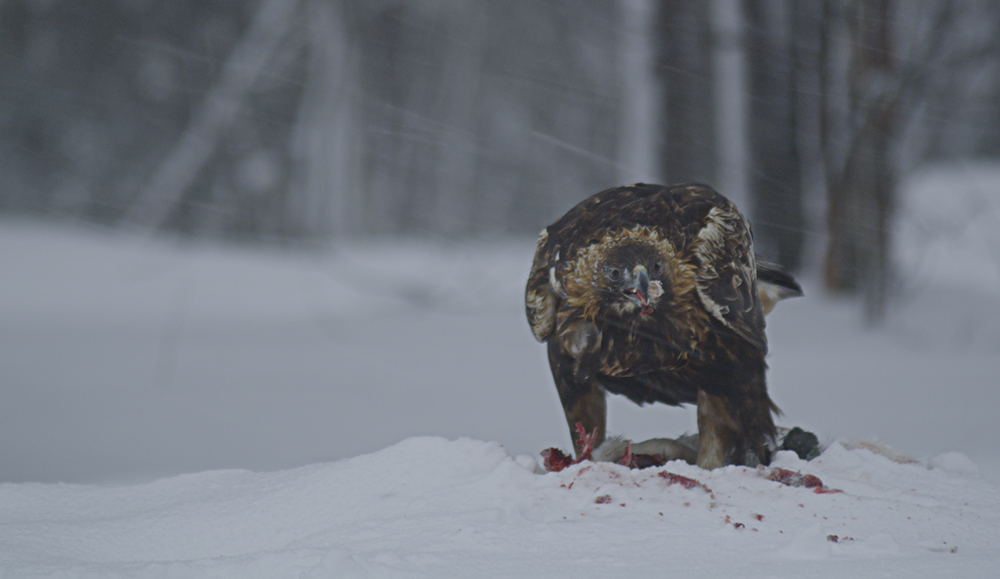
Having fun with old Red One files. This was shot in a heavy snow strom more than three years ago. The colors come out so nicely with RC3 and RG3 with a minimal effort. Especially, the reds look great.

Kotka.jpg


Jarred, thanks for the compliment.
 
The single greatest value of RC3/RG3 to me is the improvement of the look of the live output from the Epic. It really looks fantastic; for the first time since owning an Epic I don't have to justify or explain how it looks... it just looks great.
 
Cant wait to load the looks on camera. and yeah ^ what Brook said ^ switched the look over in RCX for some people, they were really impressed.

Still Ugh. Its always me with the problems and everything. The build seems to be running really slowly on my tower, and it has difficulty doing things like adding clips to bins. anyone else having technical issues? Ill probably post over in workflow and open a ticket. I'm always causing trouble...
 
Thanks Graeme for all this hard work!

It looks so beautiful !

Thanks Jim, Rob and all who worked on this new release.

Really...i love it.


Antoine
 
Back
Top