Mike P.
Well-known member
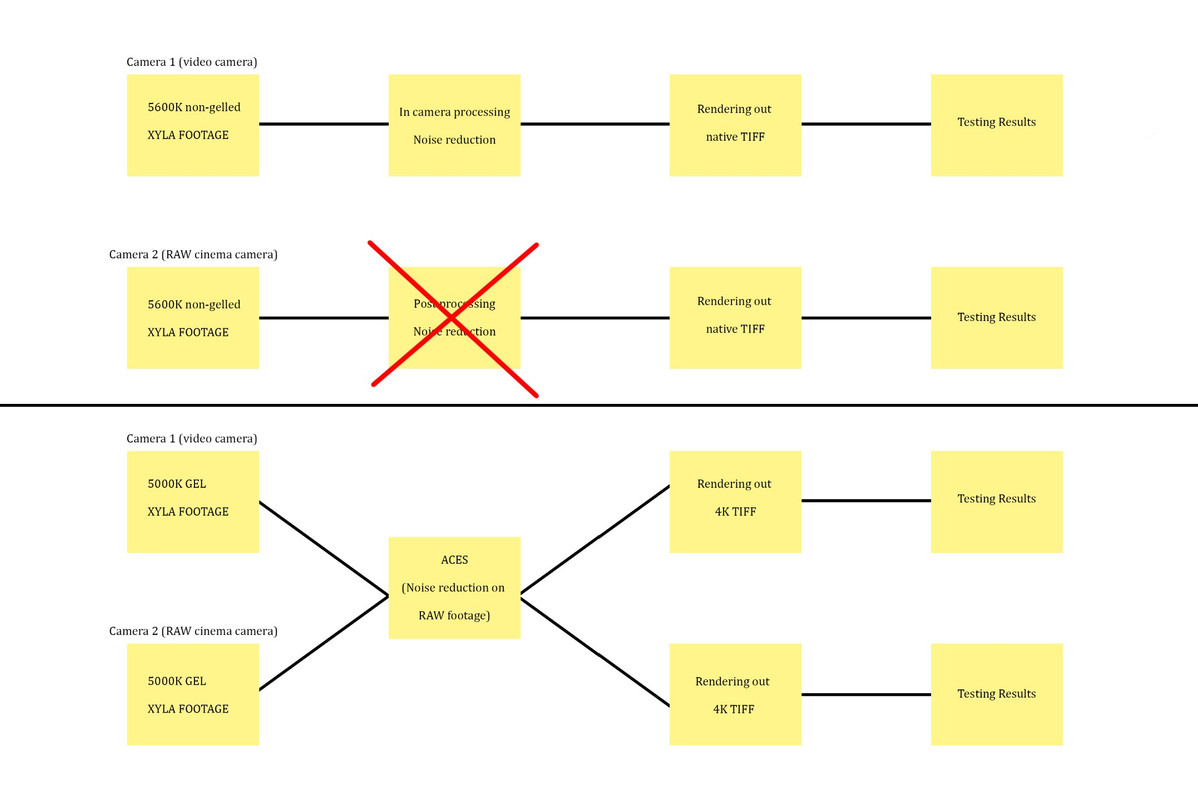
Seems a little odd that the test was done poorly, but only the RED succumbed to the problem of really poor above-mid-grey performance and false-positive recovered highlight stops (the top two stops of the P6k still have clear RGB definition/capture even with the improper testing). Also a little ironic that, after fixing the colour temp issue, the results didn't change with regards to the highlight recovery phenomenon/missing ~2 colour channels in the highest recovered stops (Sidetone: Did they re-do the chart with 3200k balanced incandescent/full spectrum lights or just change the WB to 3200k?)
While it's cool that everyone is focusing on the imatest/xyla chart results and coming to their own DR conclusions (which are moot apparently), isn't the practical/real-world (and saturated) shot, that demonstrates why those those top two stops aren't all there, more important? CineD could not recover accurate skintone highlights after one stop overexposure (for comparison, they mentioned getting 4 stops over from the P6k).
While I'd like to chalk this up to bad testing, even RED's GioScope puts mid-grey at chip11 of 16... which would put the skintone at ~12, which aligns fairly accurately with CineD's results, but whatever, it must be that time of year... And hey, at least the massive green tint discrepancy was solved (which was more of a concern, to be honest).
Admittedly I presumed that's how IPP2 handles highlights on all RED sensors -- takes none clipped channel(s), ramps down saturation the closer it gets to clip, so that there's "detail/texture" there, but it lacks solid colour (hence it's good for improving perceived roll-off, but you can't recover those stops as "usable" image unless it's a b&w project). I noticed as much when testing IPP2 on MX; more discernible detail, but lack of colour. It works well for things that are monochromatic, like clouds, but not so good on, say, skin tones (it shows texture where there was none, but it's greyish when you try to bring it into useable range). Again, that's not a (b&w) chart, but anecdotal observation.
As for others, BRAW has a highlight recovery check box in Resolve (which someone above mentioned wasn't used for CineD's testing), so it'd be neat to see how that looks on the scope. If memory serves (and again, anecdotally, by eye) it's not nearly as aggressive as IPP2. Come to think of it, pretty sure Canon raw has a 'Highlight Recovery' check box too.
OH, and not to muddy the waters further, but back when Weapon came out, someone noticed if you set the raw whitebalance to something right near clip, then used a WB node (not the raw settings) to attempt to rebalance the image to proper wb in post, you could get an additional ~1+ stops of detail in the high-end. It didn't work most of the time because the colours had a tendency to get wonky/thin (the correction node didn't always look good, and you'd have to selectively correct tons of other things in the frame). Pretty sure this is that, but on the scopes.
While it's cool that everyone is focusing on the imatest/xyla chart results and coming to their own DR conclusions (which are moot apparently), isn't the practical/real-world (and saturated) shot, that demonstrates why those those top two stops aren't all there, more important? CineD could not recover accurate skintone highlights after one stop overexposure (for comparison, they mentioned getting 4 stops over from the P6k).
While I'd like to chalk this up to bad testing, even RED's GioScope puts mid-grey at chip11 of 16... which would put the skintone at ~12, which aligns fairly accurately with CineD's results, but whatever, it must be that time of year... And hey, at least the massive green tint discrepancy was solved (which was more of a concern, to be honest).
I do think the issue of whether to include recovered highlights or not is a complicated one. Is Komodo the only camera currently to have highlight recovery built in and visible on the monitor during recording? I would say it is a bit complicated since conceivably such highlight recovery is available to other raw cameras but not visible until processed in post. In your opinion how should the xyla chart be exposed with respect to RGB channel clipping? Should it the top chip be counted as in as long as at least one color channel is not yet clipped?
Admittedly I presumed that's how IPP2 handles highlights on all RED sensors -- takes none clipped channel(s), ramps down saturation the closer it gets to clip, so that there's "detail/texture" there, but it lacks solid colour (hence it's good for improving perceived roll-off, but you can't recover those stops as "usable" image unless it's a b&w project). I noticed as much when testing IPP2 on MX; more discernible detail, but lack of colour. It works well for things that are monochromatic, like clouds, but not so good on, say, skin tones (it shows texture where there was none, but it's greyish when you try to bring it into useable range). Again, that's not a (b&w) chart, but anecdotal observation.
As for others, BRAW has a highlight recovery check box in Resolve (which someone above mentioned wasn't used for CineD's testing), so it'd be neat to see how that looks on the scope. If memory serves (and again, anecdotally, by eye) it's not nearly as aggressive as IPP2. Come to think of it, pretty sure Canon raw has a 'Highlight Recovery' check box too.
OH, and not to muddy the waters further, but back when Weapon came out, someone noticed if you set the raw whitebalance to something right near clip, then used a WB node (not the raw settings) to attempt to rebalance the image to proper wb in post, you could get an additional ~1+ stops of detail in the high-end. It didn't work most of the time because the colours had a tendency to get wonky/thin (the correction node didn't always look good, and you'd have to selectively correct tons of other things in the frame). Pretty sure this is that, but on the scopes.
Last edited: