Welcome to our community

Be a part of something great, join today!

  • Hey all, just changed over the backend after 15 years I figured time to give it a bit of an update, its probably gonna be a bit weird for most of you and i am sure there is a few bugs to work out but it should kinda work the same as before... hopefully :)

REDCINE-X PRO Build 23.2 BETA

Am I right unthinking A.D.D is using temporal information to Debeyer and provide an improved image ?
 
Immediate crash on clicking Monitor Out button to Flanders BM230 through BM Decklink Duo card

5,1 Mac Pro, 10.8.3, 64 GB's RAM, GTX 680, Cuda enabled in Preferences


Edit: Switched back to RCX 22.3 and Monitor Out works fine.
 
Okay - after more testing - I gotta say this is pretty amazing.

It's REALLY needs to be in the SDK so we can render motion clips in various applications. The unsharp mask happens after the sampling/processing - so - it's worth noting that as soon as we can get a REDLINE version that supports batch renders of ADD frames in DPX - one could render RLF DPX frames with ADD without unsharp mask and then add sharping on a shot by shot basis during color finishing. Adobe Speedgrade has great sharpening and it's super easy to apply with a secondary shape or qualifier for selective sharpening.

But yeah - let's skip the DPX intermediate render - especially in 4K - we want SDK support for rendering ADD frames. Having it in the full Adobe CC suite would be awesomeness.
 
Hmm is it just me but I feel that this process is softening the image. Would you need to sharpen again after running this process? Is this primarily to remove noise? In some of the original images I feel have perceived sharpness due to the grain like noise. Maybe I just like grain.
 
Mark L. Pederson said:
then add sharping on a shot by shot basis during color finishing. Adobe Speedgrade has great sharpening and it's super easy to apply with a secondary shape or qualifier for selective sharpening.

Mark, or anyone else, what have you found to be the best sharpening / detail enhancer for post? Have you tried the updated sharpness filter in Sapphire 7? I would like to find something that I can plug into scratch.
 
Mark, or anyone else, what have you found to be the best sharpening / detail enhancer for post? Have you tried the updated sharpness filter in Sapphire 7? I would like to find something that I can plug into scratch.

I love the sharpen tool in Adobe Speedgrade - super easy to use from the RAW files - just "send to Speedgrade" from Premiere timeline. Sapphire would be the solution for Scratch - you can get a free trial and test.
 
Jarred, ADD IS AMAZING!!

I can't see why we wouldn't finish everything with it. Sure it will hurt at first, but give it a while and computers will give us more than decent render times. Once it makes it to the SDK and everything adopts it we'll be using ADD for all we can. Gorgeous beautiful and clean... I am in love all over again.
 
Guys... ADD is insane. I'm going back to my original Dragon bracketing tests and I can't believe how much more resolution and color information I'm seeing. It's a whole new sensor... again.
 
Hmm is it just me but I feel that this process is softening the image. Would you need to sharpen again after running this process? Is this primarily to remove noise? In some of the original images I feel have perceived sharpness due to the grain like noise. Maybe I just like grain.
Not softening, 'decoarsening'.
 
Mind. Blown.

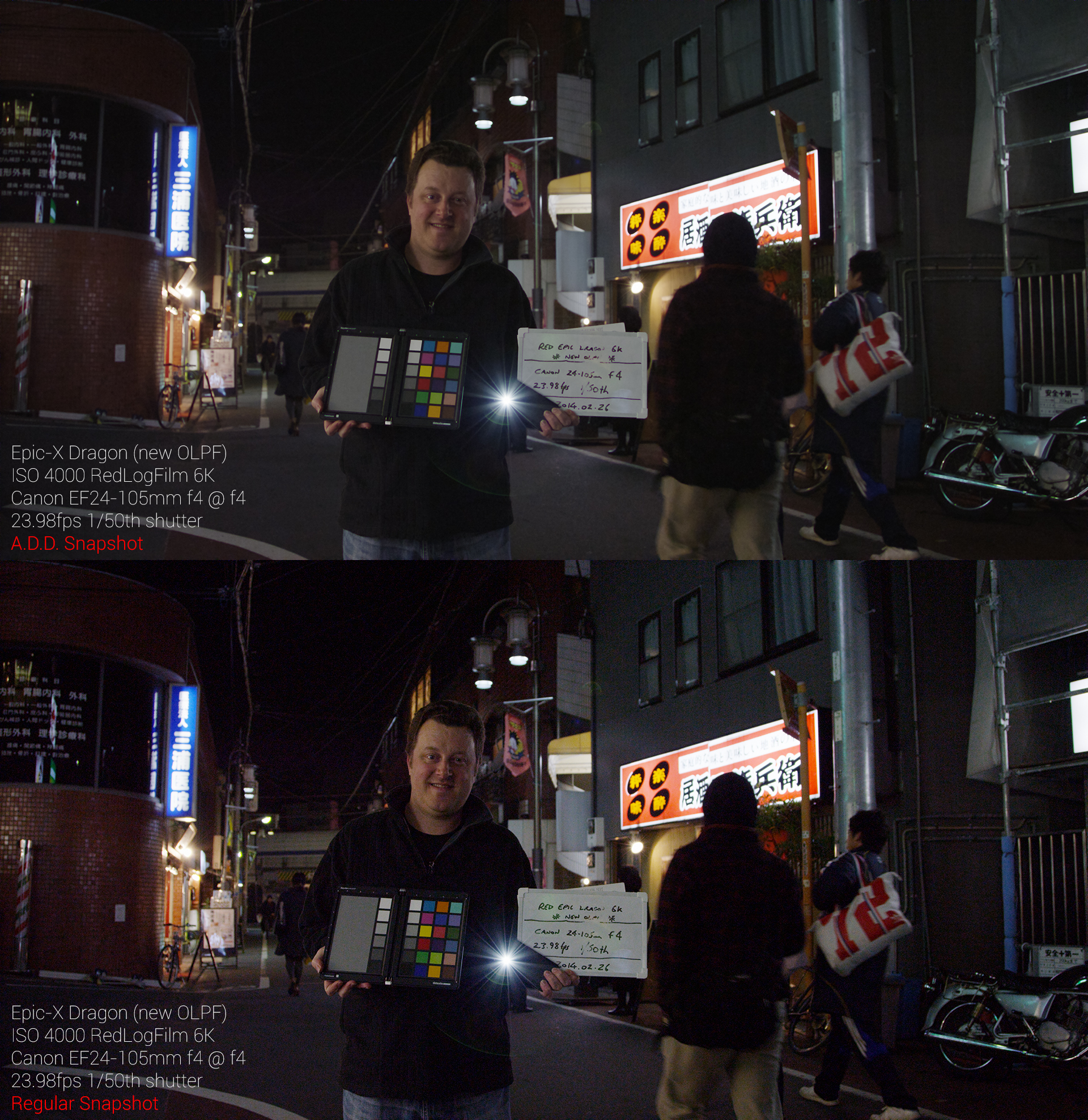
A001_C005_02261I.478.0000478F_ADD_vs_Normal_Snapshot.jpg


That's an astonishing difference. I literally clicked two buttons. Once on the regular snapshot. Once on the ADD snapshot. Default ADD output settings.

This was a torture test, done at ISO4000 at f4 (cheap lens so don't judge sharpness!).

Save the image to see it at 1920 width.

Crazy.... :emote_22_yikes:

Cheers from Tokyo,

Paul :)

WoW...the regular snapshot looks like an average DSLR like a 7D or something, but the A.D.D one actually looks better or at least as good as a 5D Mark III...I have been waiting for the moment that RED actually surpasses the performance of DSLR's, even in low light...and it looks like that moment has finally come!
 
Any chance of posting some 1:1 crops ? I find it difficult to see what's going on in webcam sized images ;)

WoW...the regular snapshot looks like an average DSLR like a 7D or something, but the A.D.D one actually looks better or at least as good as a 5D Mark III...I have been waiting for the moment that RED actually surpasses the performance of DSLR's, even in low light...and it looks like that moment has finally come!
 
Stacey, thanks for the link.
Here is some low light Dragon footage that I tested with. Phil's match light test.
These are 1:1 crops.
I will test with non low light frames next. I expect better results with more normal exposed frames as there is less noise and more real image detail available to tease information from.
I'm glad RED is going in this direction for processing.

Regular snap :
snap.0002.jpg


ADD snap :
ADD.0002.jpg


NEAT video , radius 1 :
neat.0002.jpg
 
Back
Top