Welcome to our community

Be a part of something great, join today!

  • Hey all, just changed over the backend after 15 years I figured time to give it a bit of an update, its probably gonna be a bit weird for most of you and i am sure there is a few bugs to work out but it should kinda work the same as before... hopefully :)

REDCINE-X Build 158...

If I use either the new Clipfinder, or the EDL2RCX, the audio is not carried into the project at RC-X Build 158. :scared:

Any idea or suggestion?

Thanks!

Can't respond for ClipFinder but EDL2RCX just ignores any audio edits.

I don't think REDCINE-X will let you import any audio file yet... except playback 2 camera audio tracks or 2 synced BWF.

Since BWF audio match info are stored in the .RMD file you should get the audio from each clip back in the timeline (not tested but I think it does)...

maybe future version of RCX will let you import an AIFF and add it to the timeline... guess it would be nice to be able to grade (one light) with some music sometimes :-)

btw I'm finishing writing a new script called XML2RCX (free for any EDL2RCX registered user) but again no audio from your FCP edit will be carried over in any way...
 
from a fresh RCX B158 boot :

1. load a clip in player (I used a 24fps 16/9 4K clip)
2. player window was set to 1/8 fit both
(but I got same results with those too settings : full debayer fit both, full debayer 100%, 1/2 debayer 25%)
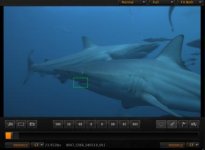
3. open details window, refresh. DETAIL HAS A VERTICAL OFFSET compared to the greenbox.
4. Move greenbox around, go to another frame, refresh details, still off.

to fix it :
1. switch player to 100% view
2. switch back to fit both and the problem is gone for good until next RCX restart...

Seems like any change in Player zoom value will fix it... and it only appears on first usage of the detail window within a session... if you cannot reproduce it, I'll try again and see what could be specific on my setup to make it happen...

Thanks. That helps alot.
 
What format is the source footage?

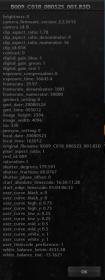
Deanan: was 4k 16:9 at 29.97..... i attached the metadata from the clip---i think was build 15 way back when.

Johnny
 

Attachments

  • Screen shot 2010-03-12 at 6.11.35 PM.jpg
    Screen shot 2010-03-12 at 6.11.35 PM.jpg
    5 KB · Views: 0
If I make metadata changes in the Windows version, is it possible to save those changes into the original R3D, or only into a separate RMD? Does the current Windows version write RMD files (I'm not seeing them, but user error is possible)?

Thanks,
Tim
 
Banding...

Banding...

Hello,

I am experiencing "banding" on shots where before it was not there. This is even using "Denoise" at "6", and "Sharpens" at "0", and "Full Debayer".

I am enclosing a grab (downsized from tiff generated by RC-X) sowing the banding area.

My card is Nvidia GeForce 8800 GT, which I always have used to manage R3Ds without this problem...

Any feedback or comment on this problem, please.

Thanks,
 
Hello,

I am experiencing "banding" on shots where before it was not there. This is even using "Denoise" at "6", and "Sharpens" at "0", and "Full Debayer".

I am enclosing a grab (downsized from tiff generated by RC-X) sowing the banding area.

My card is Nvidia GeForce 8800 GT, which I always have used to manage R3Ds without this problem...

Any feedback or comment on this problem, please.

Thanks,

Email me the tiff please. Thanks.
 
Looks lost when REDCINE-X crashes

Looks lost when REDCINE-X crashes

Hi Deanan,

I'll set aside some time for a more detailed follow up in the next couple of days via email, but I've got a request to prioritize file writes for the look setting after look creation please.

I am seeing REDCINE-X crash several times a day, but I get where we are in the development cycle. On balance the Rocket/REDCine-X combo is powerful enough that the growing pains are worth it.

The suck factor is high however when you've actually got the DP over to collaborate on a look, you can't quit the program to force a save because something is transcoding, and you crash before you can quit to save the look.

This has bit me in the backside a couple of times, and it makes for very grumpy DP's and directors.

It would be great to actually have the look written to disk immediately upon creation.

Cheers, and thanks for all the great work,

Steve
 
Hi Deanan,

I'll set aside some time for a more detailed follow up in the next couple of days via email, but I've got a request to prioritize file writes for the look setting after look creation please.

I am seeing REDCINE-X crash several times a day, but I get where we are in the development cycle. On balance the Rocket/REDCine-X combo is powerful enough that the growing pains are worth it.

The suck factor is high however when you've actually got the DP over to collaborate on a look, you can't quit the program to force a save because something is transcoding, and you crash before you can quit to save the look.

This has bit me in the backside a couple of times, and it makes for very grumpy DP's and directors.

It would be great to actually have the look written to disk immediately upon creation.

Cheers, and thanks for all the great work,

Steve

We're making some changes to the look system in an upcoming build. This should be in it.

If you're seeing crashes, we can only fix them if we get detailed feedback from you (crash reports, log files, plus a detailed description of what you're doing). There are alot of people using RCX without problems so if you're seeing problems it helps to get this info.

Also, the builds that are posted on reduser are test builds meant to get feedback with newly added features so there will tend to be more risky than the ones posted on the support site. Something to keep in mind when choosing which build to use.
 
We're making some changes to the look system in an upcoming build. This should be in it.

Very cool, thank you!

If you're seeing crashes, we can only fix them if we get detailed feedback from you (crash reports, log files, plus a detailed description of what you're doing). There are alot of people using RCX without problems so if you're seeing problems it helps to get this info.

Also, the builds that are posted on reduser are test builds meant to get feedback with newly added features so there will tend to be more risky than the ones posted on the support site. Something to keep in mind when choosing which build to use.

I completely hear you on this. As a practical matter, build 158 has been more useable than build 104 for me, e.g. the option to output with clip file name to clip folder works correctly in 158, fit width is consistently right etc. So good news, I'm seeing real progress.

Schedule constraints haven't allowed me the time to get you useful data until now (machines were literally running 24x7) but I'll follow up with that as soon as I get the cart off the truck and reintroduce myself to my family. :-)

As a former SQA manager, I understand how valuable real data is.

Cheers, and thanks,

Steve
 
Last edited:
Is there any reason I can not seem to use the detail controls? they don't seem to work for me at all. No amount of clicking or dragging seems to produce any response from the controls
 
Is there any reason I can not seem to use the detail controls? they don't seem to work for me at all. No amount of clicking or dragging seems to produce any response from the controls

Clicking the update icon in the upper left didn't work?
 
me too the sharpen does not work even if I move the bars.. or maybe its just such a tiny amount that I don't notice a difference
 
Is it possible to get an RLX out of the current Windows version of Redcine-X (to use with MetaFuze)?

Thanks,
Tim
 
Is there any reason I can not seem to use the detail controls? they don't seem to work for me at all. No amount of clicking or dragging seems to produce any response from the controls

me too the sharpen does not work even if I move the bars.. or maybe its just such a tiny amount that I don't notice a difference

Answer:

You mean the sliders under the detail view?

If you have a rocket installed, then those are fixed as rocket hardware does not have a controllable debayer.
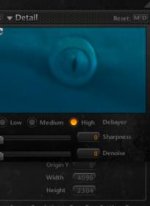
So no detail adjustment yet with a rocket installed. I think the options should be grayed out if they are not available.
 
Back
Top