Welcome to our community

Be a part of something great, join today!

  • Hey all, just changed over the backend after 15 years I figured time to give it a bit of an update, its probably gonna be a bit weird for most of you and i am sure there is a few bugs to work out but it should kinda work the same as before... hopefully :)

REDCINE-X Build 158...

Ive been using RC-X b158 all day, and have no issues, except for one. The detail window doesnt seem to do anything. Ive tried to change the detail settings, to no avail. The sliders do not move, the text fields are not able to be adjusted. When I press on the down arrow to expand the detail window, the window does expand and shows a portion of the frame. I am able to move the green box around. The refresh button does properly refresh the window to the new green box area.

In summary, the detail is there, I just cant adjust any settings. Ive enabled verbose logging, and I dont see anything relevant.

Ideas?
 
Ive been using RC-X b158 all day, and have no issues, except for one. The detail window doesnt seem to do anything. Ive tried to change the detail settings, to no avail. The sliders do not move, the text fields are not able to be adjusted. When I press on the down arrow to expand the detail window, the window does expand and shows a portion of the frame. I am able to move the green box around. The refresh button does properly refresh the window to the new green box area.

In summary, the detail is there, I just cant adjust any settings. Ive enabled verbose logging, and I dont see anything relevant.

Ideas?

It's a manual refresh now because it can get really slow on every update since it has to render a full 4k frame to get the detail view.
 
It's a manual refresh now because it can get really slow on every update since it has to render a full 4k frame to get the detail view.

I understand. However, Im not able to move the sliders, adjust the text fields or make any detail changes. The sliders stay at 0, and the detail is set to high. Nothing budges.

Id like to add some detail, but Im not able to, unless Im missing something.
 
Id like to add some detail, but Im not able to, unless Im missing something.

Do you have the control expanded, so you can see a zoom in of the image? If so, that usually slows things down about 100x. :) Collapse it so you only see the controls and then adjust.
 
Do you have the control expanded, so you can see a zoom in of the image? If so, that usually slows things down about 100x. :) Collapse it so you only see the controls and then adjust.

Regardless of if the zoom in the detail window is expanded or collapsed, the sliders wont move and the settings remain at 0. I should be able to at least type into the window to set some sort of setting, and I cant even click into it. No cursor for me.
 
To be more clear, the metadata and reset buttons in the window seem to work (they light up like they are working) and the window expands and refreshes. But those are the onlyy elements that work. The other GUI elements do not operate at all.
 
Regardless of if the zoom in the detail window is expanded or collapsed, the sliders wont move and the settings remain at 0. I should be able to at least type into the window to set some sort of setting, and I cant even click into it. No cursor for me.

You mean the sliders under the detail view?

If you have a rocket installed, then those are fixed as rocket hardware does not have a controllable debayer.
 
As mentioned previously.....in my detail window....the green box doe not align with the image. So when viewing within the green box, I'm actually viewing not at the center of the box but more towards the edges or possibly outside the green box. just an FYI.
 
As mentioned previously.....in my detail window....the green box doe not align with the image. So when viewing within the green box, I'm actually viewing not at the center of the box but more towards the edges or possibly outside the green box. just an FYI.

If you turn off rocket do you also see the same thing?
 
If you turn off rocket do you also see the same thing?

I also got the details window not aligned with the greenbox here on a non rocket enabled machine (MBP 2.8)... like if there was an offset or something was not working in getting the coordinates. Will see if I can find sure steps on how to reproduce it (I was using 4K 16.9)
 
I also got the details window not aligned with the greenbox here on a non rocket enabled machine (MBP 2.8)... like if there was an offset or something was not working in getting the coordinates. Will see if I can find sure steps on how to reproduce it (I was using 4K 16.9)

Yeah, please try to reproduce it.
 
Deanan,
could you please tell me where I can find the download link RCX 158 for windows 7. I can´t find it. Or is it not out yet?
Thank you,
Marc
 
Deanan,
could you please tell me where I can find the download link RCX 158 for windows 7. I can´t find it. Or is it not out yet?
Thank you,
Marc

Not out yet. We're fixing a few things that we found in the mac build first.

In general, we'll send out a build to test like 158 on mac first, fix bugs, repeat, then release a windows version.
 
Yeah, please try to reproduce it.

from a fresh RCX B158 boot :

1. load a clip in player (I used a 24fps 16/9 4K clip)
2. player window was set to 1/8 fit both
(but I got same results with those too settings : full debayer fit both, full debayer 100%, 1/2 debayer 25%)
3. open details window, refresh. DETAIL HAS A VERTICAL OFFSET compared to the greenbox.
4. Move greenbox around, go to another frame, refresh details, still off.

to fix it :
1. switch player to 100% view
2. switch back to fit both and the problem is gone for good until next RCX restart...

Seems like any change in Player zoom value will fix it... and it only appears on first usage of the detail window within a session... if you cannot reproduce it, I'll try again and see what could be specific on my setup to make it happen...
 
If you turn off rocket do you also see the same thing?

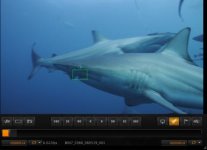
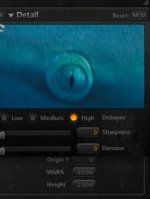
So, here's what i get...see pics attached
(with RR card on)

You'll see the green detail area has the eye of the shark just outside and to the top, but in the detail box, it's centered.....this is consistent throughout
 

Attachments

  • Screen shot 2010-03-12 at 7.38.18 AM.jpg
    Screen shot 2010-03-12 at 7.38.18 AM.jpg
    11.3 KB · Views: 0
  • Screen shot 2010-03-12 at 7.38.31 AM.jpg
    Screen shot 2010-03-12 at 7.38.31 AM.jpg
    7.7 KB · Views: 0
Here's same thing without RR card turned on.
I can get it to repeat every time.

As was suggested by the previous user. If i scale to 50% (from 100%)...i have not tried other %'s, but just 50%. Anyway, then refresh the detail screen, everything lines up properly, then i can go back to 100% and it's still lined up properly. So that seems to work, but detail won't work out of the gate. Also, i presume detail controls are not working at the moment--sharpness, low, medium, high etc.....
 
Back
Top