
Navigation
Install the app
How to install the app on iOS
Follow along with the video below to see how to install our site as a web app on your home screen.

Note: this_feature_currently_requires_accessing_site_using_safari
More options
Welcome to our community
Be a part of something great, join today!
You are using an out of date browser. It may not display this or other websites correctly.
You should upgrade or use an alternative browser.
You should upgrade or use an alternative browser.
Official Post Your DSLR Still Photography Thread
- Thread starter Tom Lowe
- Start date

- Moderator
- #1,062

- Joined
- Apr 19, 2007
- Messages
- 13,392
- Reaction score
- 796
- Points
- 113
- Location
- Los Angeles
- Website
- www.phfx.com
Phil,
The Spherical panorama hdr from El Matador Beach is amazing. Good thinking to spherize it, and make it look unique.
Cheers to that and thank you. If you ever find yourself at El Matador it's the main cave to the right. They've shot a few scenes there for features and television. You can do a heck of a lot with high resolution spherical imagery. More than the common "little planet" look that became popular years ago.
Here's another one with a strange view of some train tracks in which you can see what is in front and behind you.
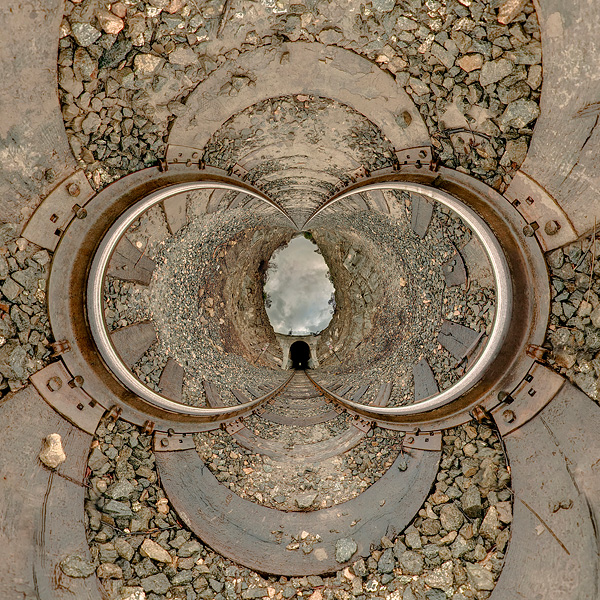
- bigger
Bill Anderson
Well-known member
Train Tracks:
Einstein would love that one.
Einstein would love that one.
- Thread starter
- #1,064

Tom Lowe
Well-known member
- Joined
- Jan 5, 2007
- Messages
- 8,520
- Reaction score
- 1
- Points
- 0
Those are very cool, Phil.
- Thread starter
- #1,065
Tom Lowe
Well-known member
- Joined
- Jan 5, 2007
- Messages
- 8,520
- Reaction score
- 1
- Points
- 0

I shot this on a PL-converted Canon 1D4 with a 16mm Master Prime at ISO 5000. 12 second exposure.
http://500px.com/photo/2759030
Bryant Swanstrom
Well-known member
- Joined
- Feb 8, 2011
- Messages
- 139
- Reaction score
- 0
- Points
- 0
- Location
- Topanga, CA
- Website
- www.steadiswan.com


Hah... need to update my watermark.

Sabyasachi Patra
Well-known member
- Joined
- Jun 14, 2011
- Messages
- 561
- Reaction score
- 0
- Points
- 16
- Location
- New Delhi, Bangalore, India
- Website
- www.indiawilds.com
Sharing a few images of Wild Tigers.
Predator and Prey ::
Canon EOS 1D Mark II, Canon EF 400mm f2.8 L IS USM, EF 2xII TC, Full frame image.

Angry Snarl
Canon EOS 1D Mark IV, Canon EF 400mm f2.8 L IS USM, EF 2xII TC, Full frame image.

A Study in B&W
Canon EOS 1D Mark IV, Canon EF 70-200 F2.8 L IS II USM, EF 2xII TC, Full Frame image.

Cheers,
Sabyasachi
Predator and Prey ::
Canon EOS 1D Mark II, Canon EF 400mm f2.8 L IS USM, EF 2xII TC, Full frame image.
Angry Snarl
Canon EOS 1D Mark IV, Canon EF 400mm f2.8 L IS USM, EF 2xII TC, Full frame image.
A Study in B&W
Canon EOS 1D Mark IV, Canon EF 70-200 F2.8 L IS II USM, EF 2xII TC, Full Frame image.
Cheers,
Sabyasachi

Brad Webb
Well-known member
A little halloween fun. Some behind the scenes photos I took for Funny or Die.
You can watch the video (with very NSFW audio) here:
http://www.funnyordie.com/videos/1103277a2d/monster-mash?playlist=featured_videos


You can watch the video (with very NSFW audio) here:
http://www.funnyordie.com/videos/1103277a2d/monster-mash?playlist=featured_videos

Zeb B
Well-known member
NOOB Question: how do you paste photos and videos into the Forum? Mine show up as thumbnails with links
Austin Glass
Well-known member
NOOB Question: how do you paste photos and videos into the Forum? Mine show up as thumbnails with links
You host it somewhere else (flickr, imageshack, picasa, etc), and paste the URL between the IMG brackets.
Zeb B
Well-known member
Thanks bro!

TonySegreto
Well-known member
- Joined
- Aug 14, 2009
- Messages
- 338
- Reaction score
- 0
- Points
- 0
- Location
- New York
- Website
- www.vigilantehd.com
Montclaire, NJ looking at NYC.

Zeb B
Well-known member
I cannot for the life of me figure out how to post photos directly. When I click on the "Insert Image" icon it gives me a dialog box that has a paste line with "http://" already in it. Paste the Flickr link in there = nothing. No brackets appear link they do for video. Help please - cannot find a FAQ link on this

Last edited:
- Moderator
- #1,075
- Joined
- Apr 19, 2007
- Messages
- 13,392
- Reaction score
- 796
- Points
- 113
- Location
- Los Angeles
- Website
- www.phfx.com
I cannot for the life of me figure out how to post photos directly. When I click on the "Insert Image" icon it gives me a dialog box that has a paste line with "http://" already in it. Paste the Flickr link in there = nothing. No brackets appear link they do for video. Help please - cannot find a FAQ link on this
Right click on the image you'd like to post from flickr and select "copy image location" or "copy image url". Then paste it into the dialog box.
Zeb B
Well-known member
Thanks Phil, On a Mac. Flickr has a "Grab a Link" dialog box - I do that. I come back to REDuser and click the "Insert Image" icon and paste = nothing happens. Nothing appears in the post - not brackets, no image, nothing
Last edited:
Austin Glass
Well-known member
Thanks Phil, On a Mac. Flickr has a "Grab a Link" dialog box - I do that. I come back to REDuser and click the "Insert Image" icon and paste = nothing happens. Nothing appears in the post - not brackets, no image, nothing
On Flickr, go to "Actions" just to the top-left of the photo, and select "View all Sizes." Right-click on the image, and you'll see (if using Firefox) "Copy Image Location." That will copy the correct link to the clipboard.
Now, in your new RedUser post, click the "Insert Image" icon, and simply paste what's in your clipboard (it will end up replacing the "http://"). Hit okay, and that should work.
If you're not using Firefox, then the steps are the same, only the verbiage used when right-clicking will be slightly different.
Zeb B
Well-known member
On Flickr, go to "Actions" just to the top-left of the photo, and select "View all Sizes." Right-click on the image, and you'll see (if using Firefox) "Copy Image Location." That will copy the correct link to the clipboard.
Now, in your new RedUser post, click the "Insert Image" icon, and simply paste what's in your clipboard (it will end up replacing the "http://"). Hit okay, and that should work.
If you're not using Firefox, then the steps are the same, only the verbiage used when right-clicking will be slightly different.
THANK YOU AUSTIN and PHIL. Working now

Timur Civan
Well-known member
- Joined
- Jan 5, 2007
- Messages
- 1,683
- Reaction score
- 0
- Points
- 36
- Location
- LA - NYC
- Website
- www.timurcivan.com
Montclaire, NJ looking at NYC.
love it.

Paul Russell
Well-known member
- Joined
- Sep 27, 2011
- Messages
- 1,693
- Reaction score
- 0
- Points
- 0
- Location
- Malaysia and Singapore
- Website
- www.paulrussellphoto.com
Some of my recent favourites:

Shopping in the vegetable market at Port Louis, Mauritius

Abandoned car in West Australia

Sunset Footballer, Mauritius

Old guy carries the Kavadia for Shiva. Thaipusam Festival, Singapore

The view from my balcony last week.
Shopping in the vegetable market at Port Louis, Mauritius
Abandoned car in West Australia
Sunset Footballer, Mauritius
Old guy carries the Kavadia for Shiva. Thaipusam Festival, Singapore
The view from my balcony last week.