Welcome to our community

Be a part of something great, join today!

  • Hey all, just changed over the backend after 15 years I figured time to give it a bit of an update, its probably gonna be a bit weird for most of you and i am sure there is a few bugs to work out but it should kinda work the same as before... hopefully :)

NAB 2014 - DRAGONcolor and REDgamma 4

how good is the new redcine at encoding dpx files via rocket and mx? i'm running an older version and just curious...
 
I read in one of the pieces of the marketing material that the new version of RCX was better for photographers. I don't really see what they are talking about other than the flattened interface I don't see anything different. What I am missing? Am I missing something?
 
I read in one of the pieces of the marketing material that the new version of RCX was better for photographers. I don't really see what they are talking about other than the flattened interface I don't see anything different. What I am missing? Am I missing something?

The new version supports the frame marking feature added to the camera firmware in 5.2.x. In camera you can now mark frames while you are recording, or use the new burst capture mode to capture bursts of images at the lowest compression possible.
 
The new version supports the frame marking feature added to the camera firmware in 5.2.x. In camera you can now mark frames while you are recording, or use the new burst capture mode to capture bursts of images at the lowest compression possible.

That explains it. Off to upgrade Scarlet's firmware. Thank you.
 
Not sure how many apps already support REDgamma4 and DRAGONcolor but FWIW foolcat can now process files with such metadata or RMD settings.
http://foolcolor.net/foolcat
 
mine says there's no openCL device available... on latest 2013 mbp retina w/ intel iris graphics

plays back alright at 1/4 res anyhow, and i'm getting better than realtime at 1/8, but i'd like to use my gpu - anybody know what i need to do?

When the OpenCL-Compatable-RCX-Beta came out, and I tested it, it failed with the Intel graphics chip. On my system, at least, and I believe a few others. When I switched the Intel chip off, and the NVidia chip on, RCX worked functionally the way that it should, and debayered/decompressed faster than before. I can't speculate as to why, but I'm guessing that RCX needs a dedicated GPU chip, not an integrated Intel chip, in order to get acceleration to work.
 
Here is an image I posted previously. Re-processed with RC2, RC3, and DC so show how saturated red has changed along the way. REDGamma4 was used on all three images.

REDColor2
01_rc2.jpg


REDColor3
02_rc3.jpg


DRAGONcolor
03_dc.jpg
 
Last edited:
I've been testing the new color science today. I especially appreciate the fact that the magenta cast is finally gone, as well as the fixed up reds that everybody has also been testing. Thank you Graeme.

Augusto
 
Ii've been preparing to do some testing today using HDRx for a 48 timebase at 1/48th shutter. When I turn on HDRx, my time base changes to 42.25 and shutter reads out at 1/84.56 and an RC of 17:1

What can I expect with my footage when incorporated into otherwise 48 timebase footage?
 
Ii've been preparing to do some testing today using HDRx for a 48 timebase at 1/48th shutter. When I turn on HDRx, my time base changes to 42.25 and shutter reads out at 1/84.56 and an RC of 17:1

What can I expect with my footage when incorporated into otherwise 48 timebase footage?

If your time time base is 48 and your sensor fps is 42, the footage will appear sped up on playback. You'll need to drop your resolution to achieve a 48 fps sensor frame rate with hdrx. (I'm assuming you are shooting Dragon @ 6k)
 
If your time time base is 48 and your sensor fps is 42, the footage will appear sped up on playback. You'll need to drop your resolution to achieve a 48 fps sensor frame rate with hdrx. (I'm assuming you are shooting Dragon @ 6k)
Yes, 6k 2.1

Thanks Mathew, will allow for that.
 
Just got an error message... IIRC 0x0000001d, when I re-attached my Redmote after using it wirelessly. I saved the log but cannot remember where I'm supposed to send it. Anyone remember the email address?

forgot to mention... I rebooted and everything seems to be working flawlessly.

Same thing happened again under the same circumstance.
 
RCX pro my Rocket is grayed out now.

RCX pro my Rocket is grayed out now.

Might have done something wrong, maybe someone could lend a solution.

I downloaded the latest RCX Pro with RG4, my Dragon hasn't come for my EPIC as of yet.

I installed the updated driver for my RED Rocket also and then updated the firmware for my OLDER Rocket card which was working perfectly all these years.

I can't get the Rocket enabled now, have rebooted, it shows up in the system driver installed as yes installed but no joy. Running OS Mac 10.8.5.

Suggestions appreciated. Thank you. What am I doing wrong?


Best,
Frazier Nivens, Ocean Imaging
 
AMD 16 GB W9100 and Redcine-X Pro with new DRAGON color science

AMD 16 GB W9100 and Redcine-X Pro with new DRAGON color science

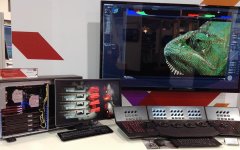
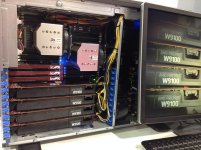
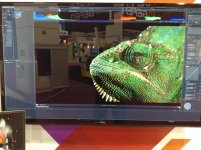
Agree with everything that's been said about how great the new DRAGON color science is ... Graeme really pulled the rabbit out of the hat on this one ... just spent the week at NAB demoing the new AMD FirePro GPUs running Resolve with 6K DRAGON files (big thanks to Clark Dunbar at Mammoth HD for the excellent stock footage) but also installed the latest version of RCX-P (thanks Rob) onto the demo machine ... and now that RCX-P is optimized for OpenCL these AMD W9100s run it like 'greased lightning' ... amazing to be able to do a 'Full Res Premium' debayer on 6K .r3ds and playback at 'Full Res Premium' 24 fps per second on a 65 inch UHDTV on GPU power alone without missing a heart beat ... and all from a bog standard Supermciro PC running Win 7 - utterly amazing.

All the RedHeads who came to the AMD booth were blown away by the power of the AMD W9100s and the quality of the DRAGON imagery and the speed of the playback on the 65 inch SEIKI.

Here's some pixs of RCX-P in action with the DRAGON footage and a short video interview we did on the AMD GPUs in action ... though I'm talking about Resolve in the interview, all the speed benefits apply equally as well to RedcineX-Pro:

LumaForge at NAB with 6K DRAGON footage running on AMD W9100s

Kudos to Rob and Graeme .. we now have a color science to match the quality of the DRAGON sensor!

Cheers,
Neil
 

Attachments

  • IMG_0348.jpg
    IMG_0348.jpg
    97.8 KB · Views: 0
  • IMG_0349.jpg
    IMG_0349.jpg
    96.8 KB · Views: 0
  • IMG_0358.jpg
    IMG_0358.jpg
    98.4 KB · Views: 0
  • IMG_0359.jpg
    IMG_0359.jpg
    96.5 KB · Views: 0
  • IMG_0367.jpg
    IMG_0367.jpg
    97.6 KB · Views: 0
anyone else notice how the RAW is no longer tinted green on this build?

To help clarify what 'RAW' view is in camera, it's been clearly defined as the following.

  • Updated RAW mode for MX and Dragon: RLF, RC2, 5600K, 800 ISO, 0 TINT
 
To help clarify what 'RAW' view is in camera, it's been clearly defined as the following.
  • Updated RAW mode for MX and Dragon: RLF, RC2, 5600K, 800 ISO, 0 TINT

Ah… interesting… Maybe this is opening a can of worms, but it'd be nice to be able to have user-assigned parameters for Raw view. It's also curious for the choice of 5600K… I've always come up with consistently around 5000K on MX, has that "native" white point slightly changing on Dragon?
 
To help clarify what 'RAW' view is in camera, it's been clearly defined as the following.

  • Updated RAW mode for MX and Dragon: RLF, RC2, 5600K, 800 ISO, 0 TINT

Thanks Matt. I was going to ask about this next week.
 
Ah… interesting… Maybe this is opening a can of worms, but it'd be nice to be able to have user-assigned parameters for Raw view. It's also curious for the choice of 5600K… I've always come up with consistently around 5000K on MX, has that "native" white point slightly changing on Dragon?

RAW probably isn't the best name for it. We'll probably be moving to calling it LOG.

The settings provide a known, and reproducible, baseline to toggle back to for reference while shooting under different conditions.
 
I like that idea actually! LOG VIEW makes a lot of sense. And with that, I'd love to be able to assign a target ISO/COLOR of my choosing to compare and evaluate to...
 
Back
Top