Welcome to our community

Be a part of something great, join today!

  • Hey all, just changed over the backend after 15 years I figured time to give it a bit of an update, its probably gonna be a bit weird for most of you and i am sure there is a few bugs to work out but it should kinda work the same as before... hopefully :)

More Monstro Thoughts & Dragon vs Monstro Test

David J. Buchanan

Well-known member
Joined
Oct 4, 2016
Messages
371
Reaction score
0
Points
16
Location
Minnesota
Website
davidjbuchanan.com
More test of the Monstro and a little Monstro vs Dragon

Honestly out in the field the camera is too new, it just came out of the basement for its first official paid shoot. Nobody knows about the camera is what I’m guess… We need to market this things. Anyway –
Monstro on the shoot: quirks are what I think everyone knows about and what they already are fixing with third party aks. The sidekick for ACs is pretty bad, and they complain all the time, even did when I had Helium, it is what it is.

So lightweight that the Steadicam op had to add weight, a good problem to have.

Now for the image quality stuff.

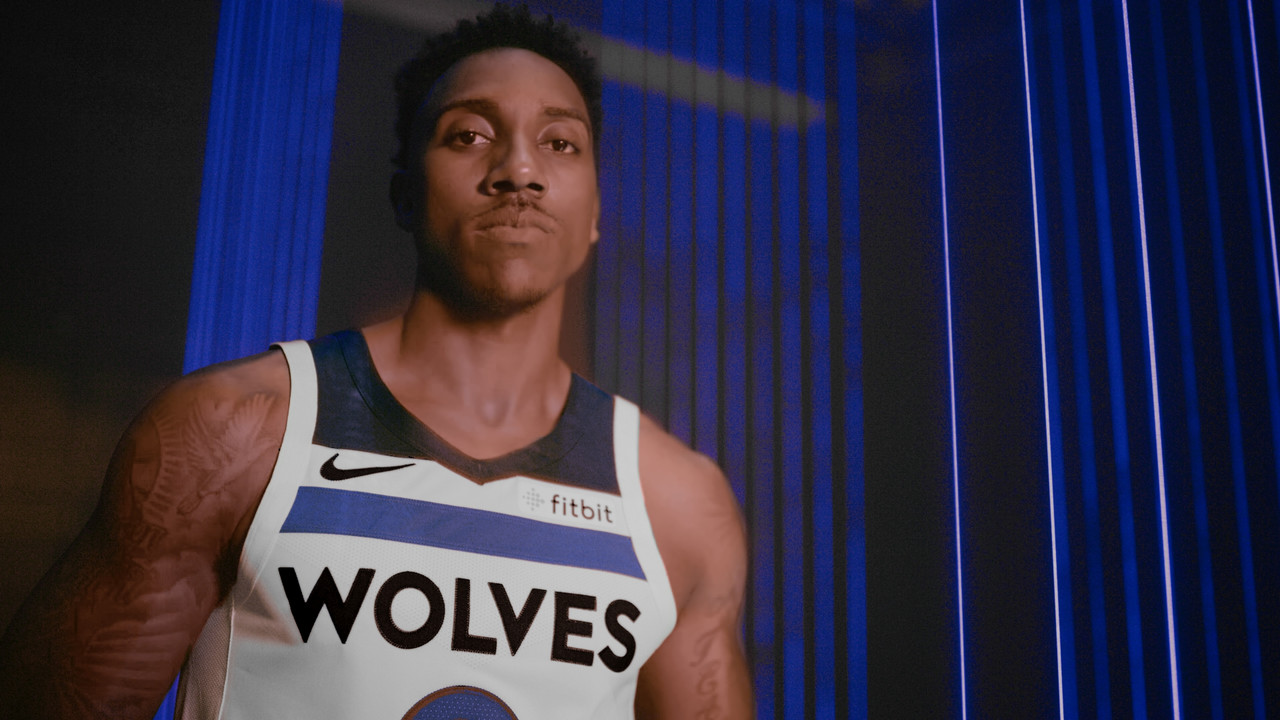
We were filming lasers/RGB lights (real RGB stage lights, not movie lights) and basketball players. The color was muted and strange (not accurate at all) and while I was at another booth I get a phone call telling me to come over and fix this. In my mind I’m thinking “Oh, god not a problem with the RED.” Well it turns out the “fix” in IPP2 for color clipping also causes the camera not to pick up RGB lighting, well or at all it seems. Switch to legacy and holy crap do these images look amazing, better than it looked before I thought. Anyway the shoot ended and I brought the camera home to check for laser and all that.

https://drive.google.com/file/d/1XYwv7Fx_zatHfucDh8GPuM499LNH2r-l/view?usp=sharing

Whilst checking for damage, I think why not test out Monstro vs Dragon (we had my Dragon on the shoot as well). So I rigged up both cams with Otus Lenses tried to match exposure best I could and shoot a little bit.

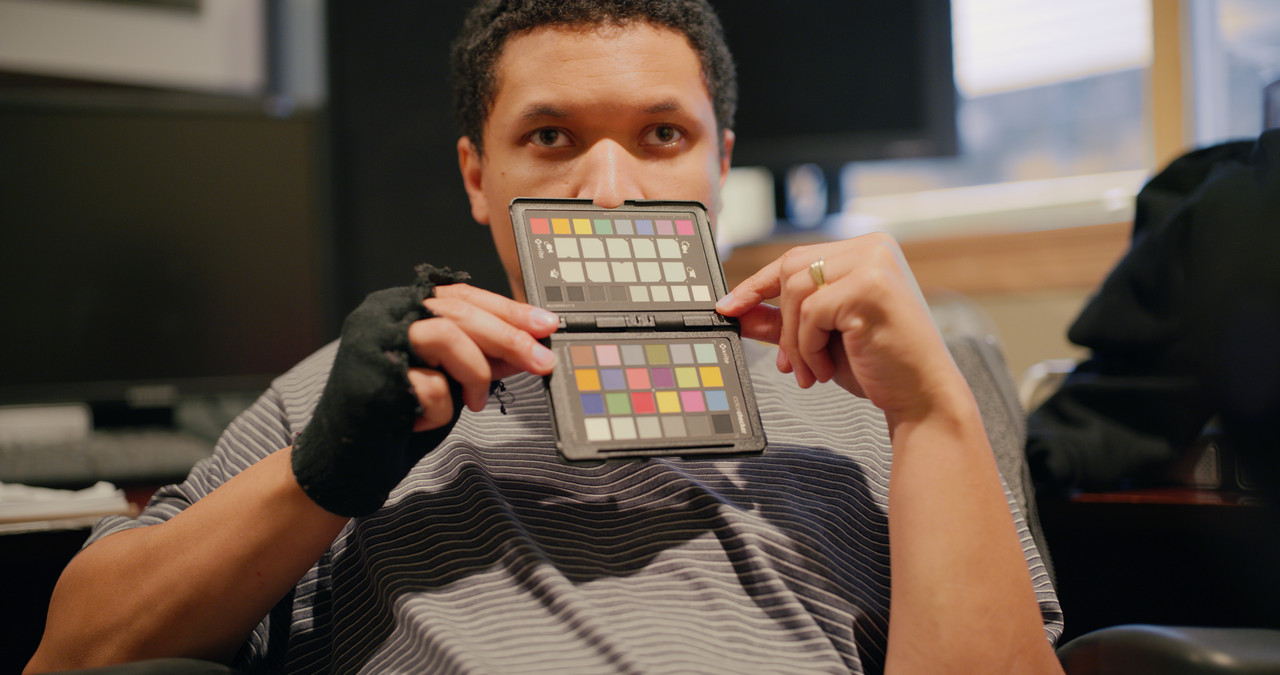
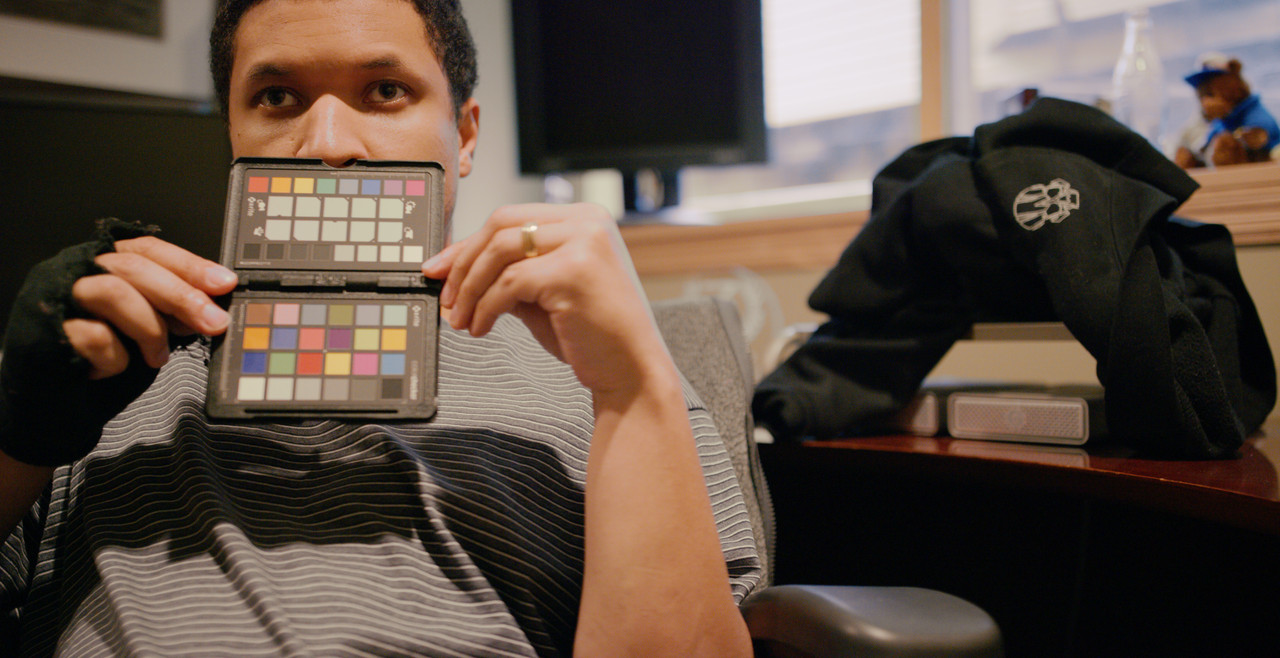
What this conclusion led me to was that Monstro really is on another level, dynamic range, cleanness, sharpness, all outstanding. The one area that still slightly bothers me is the color. But looking further into it with a color checker, it seems to be more accurate than the Dragon, I guess that means I don’t like actual real world colors lol. To get it to match a little better I desaturated slightly and changed hue a touch, this got the colors to fit more closely.

Now I must say, all this was done with Legacy. As soon as I tested with IPP2 I found the result to be quite to my disliking. I don’t know what the deal is, if I’m doing something wrong or whatever, but I haven’t point the camera at any street lights, I don’t know if the color clips with legacy or anything, I just know that when looking at skins, normal exposed colors, and darks it looks really amazing in Legacy.
And boy, oh boy did RED make a beast. I didn’t go any higher than 1600 ISO in my testing.

https://drive.google.com/file/d/1KNX2ybYhuO0YSn5zWw5gncxNBhjC19fi/view?usp=sharing
https://drive.google.com/file/d/1RV2z_N_P8DLZveSIQXE97IHjroJbFAAF/view?usp=sharing
 
Kf the color clips or not... only one way to know and that is looking at the RGB stoplights. expose so they go on and then stop down down and decide how many stops you want to use for highlight protection. Usually thats decided depending on whats goes on in your lowlights.

To look at the image trough a lut, ipp2 or any orher colorpipline and from there decide how to expose is quite deciving I think.
 
David,

I realized that I don't like "accurate" colors either, I have a "SpyderCheckR" from Datacolor just collecting dust in some drawer somewhere.here are the two pictures of you with the colorchart corrected, I ignored the colorchart when making the corrections. Still trying to figure out the blue basketball player guy grade.

A004_C026_09259_B.0000577_F.0000000_redo.jpg


D002_C001_0101_PB.0000502_F.0000000_redo.jpg
 
As one of the few and fortunate Dragon 8K VV owners I truly can't stress the time spent testing between Monstro and Dragon. I took my sweet time with it and uncovered lots of things that led me going "all Monstro", and I'm sure Jarred or Brent could tell you the mental battles I was having with myself initially regarding all that.

The trouble I was facing was I love Dragon and shot tremendous imagery all over the world with it and it was/is the same pixel pitch as Monstro. But it's always good to look deeply into it.

Upon testing, the quick things I can say are regarding Monstro:
- More accurate color
- More color (can be seen on a pixel and finishing level)
- Better color linearity
- Slightly better sensitivity
- Slightly more Total Captured Dynamic Range
- Better results in real deep shadows or artifact inducing stress tests

Of course in camera support for IPP2 should be on there for Monstro.

Like every camera and sensor it has its limits, but in the face of current camera lineups from everybody I feel Monstro is the best overall image maker out there when you take everything into account.
 
David,


The best I could do with the Basketball player

basketball_player_blue_6_1.5.2.jpg
 
Last edited:
Down-rezzed the frames in a 4K ANA timeline I had open.

Monstro -


Dragon -


Can still see the difference in resolution, latitude and a slightly different colour response between the sensors.


Just playing around with it -


Thanks for the frames David, was interesting to see the Monstro/Dragon comparison & the unusual lighting on the other one.
 
Can't say I agree with you on the Legacy vs IPP2 thing, for either camera:

IPP2 Monstro - High Con/Soft - WB set to the average of the chip chart's entire greyscale
44921725211_aca4690740_k.jpg


Legacy Monstro - Same raw settings where applicable
29985285637_fa575dc48a_k.jpg


IPP2 Dragon - High Con/Soft - WB set to the average of the chip chart's entire greyscale - Exposure matched to Monstro
29985285127_4c0d520cc7_k.jpg


Legacy Dragon - Same raw settings where applicable
44921724181_68fee5bd75_k.jpg


IMO, when you set the white balance to a white card, the IPP2 Monstro image comes out far more pleasing to me out of the gate, with IPP2 Dragon, then Legacy Monstro, then Legacy Dragon in last place, in that order. IPP2 Dragon is just a little too monochromatic in the skin, I prefer the way Monstro handles that better.

IPP2 Monstro - High Con/Soft
29985284337_048eb50eaa_k.jpg


Legacy Monstro - Same raw settings where applicable
44921723801_5c19f83a1e_k.jpg


These both are pretty punchy, colorful images. I must not be seeing the same thing you are with IPP2 muting colors. I also like IPP2 better because of the way the blue highlight on the nose is blended/rolled off via increased saturation just before that point. Overall it feels more dynamic, too, where the Legacy version appears flatter.
 
Color is the only aspect of digital capture that is still "not there yet". As long as a Bayer pattern sensor has to extrapolate color with only half the green photo sites and a quarter of the blue and red photo sites, this is as good as it will get. We have the resolution, we have the dynamic range, and we now have a good base sensitivity... color still lacks behind. I honestly think that IPP2 was a huge step forward for Red, I can't recall a single time when I switched back to legacy color and preferred the look over IPP2.
 
Looking forward to photo sites that read the wavelength individually. The tech to do it is already being developed. Timeline to a production ready camera is another issue.

ATM, Bayer CFAs provide the best combination of DR, rez, speed and color. FWIW, all RGB based acquisition topologies have to do a fair amount of interpolation. A three sensor camera, each with dedicated color duties, can potentially capture more discrete values - color and luminance - than a Bayer CFA (FFI, I suggest John Galt's essay on the subject, flawed though it may be). That said, just like RED; Canon, ARRI, Panny, BMD, etc are choosing Bayer CFA tech for their top digital cinema cameras in 2018...

Cheers - #19
 
Color is the only aspect of digital capture that is still "not there yet". As long as a Bayer pattern sensor has to extrapolate color with only half the green photo sites and a quarter of the blue and red photo sites, this is as good as it will get.

But doesn't that mean that theoretically, an 8K bayer sensor is capable of a true 4K RGB image with no interpolation, since 1/2 (4096 x 4320) pixels are green, 1/4 (4096 x 2160) are blue and 1/4 (4096 x 2160) are red? You could throw half those green pixels away and still have 4K worth of information for each channel.

So if color is "not there yet," then it's gotta be something else other than just the bayer array.
 
Photo sites do not equal pixels. The math gets a little complicated and this is something that was discussed many times on this forum but what you are saying is correct in theory except for the fact that at any given resolution you still really only have one third of the overall color information... the algorithm needs to come up with the other two thirds.
 
4k is 1/4 the photosites of 8k. That's exactly what he's saying, "You could throw half those green pixels away and still have 4K worth of information for each channel."

An 8k bayer sensor is a 4k RGB sensor + another 4k green sensor on top

If you mean that not every single photon is counted, well, that's true for any sensor you might design.

All you need to arrive at is the correct ratio of RGB to send to a screen, it doesn't matter much if any red or teal or yellow photons don't find their way in to be counted as long as that doesn't effect the ratios.
 
Color is the only aspect of digital capture that is still "not there yet". As long as a Bayer pattern sensor has to extrapolate color with only half the green photo sites and a quarter of the blue and red photo sites, this is as good as it will get. We have the resolution, we have the dynamic range, and we now have a good base sensitivity... color still lacks behind. I honestly think that IPP2 was a huge step forward for Red, I can't recall a single time when I switched back to legacy color and preferred the look over IPP2.

Bare in mind on a with modern digital sensors that have anything close to the resolving power of film (or exceeding it) you are capturing more color and tonal information at this point on a per format size basis. Certainly something I agree with certain other DPs who made headlines recently.

Remember, film is made up of crystals and gaps, the crystals themselves contain color and not all of them have color due to how the substrate works. Film itself, according to Kodak, contains 13 stops of Total Captured Dynamic Range. I've measured up to 15 stops in rather idea conditions, but recent generation and last generation of digital cinema cameras have surpassed captured DR.

You can still have a conversation about bit depth perhaps, but even that is getting a bit oversimplified if you are looking deeply into it.

And before any of this goes a certain way, I'm not saying digital is better than film or vice versa. I'm saying they are different mediums that have their own unique properties. Film has color properties digital doesn't and certain rolls off differently to clip due to colorization and the anti-halation layer, but beyond that in terms of captured color and detail, it's not really an argument these days.

Film remains beautiful for a variety of reasons as it's an interesting medium confined to a bit of chemical chaos. In the RED world, sensor-wise from Dragon on it's been alarmingly good. And this is coming from a guy who even worked with 70mm last year.
 
Looking forward to photo sites that read the wavelength individually. The tech to do it is already being developed. Timeline to a production ready camera is another issue.

ATM, Bayer CFAs provide the best combination of DR, rez, speed and color. FWIW, all RGB based acquisition topologies have to do a fair amount of interpolation. A three sensor camera, each with dedicated color duties, can potentially capture more discrete values - color and luminance - than a Bayer CFA (FFI, I suggest John Galt's essay on the subject, flawed though it may be). That said, just like RED; Canon, ARRI, Panny, BMD, etc are choosing Bayer CFA tech for their top digital cinema cameras in 2018...

Cheers - #19

Yes, you could make a camera that reads individual wavelengths - that's a spectra-radiometer!

A three sensor camera (i.e. traditional 3 chip camera with dichroic prisms to split the light) has much sharper spectral response curves and thus more likely to "fail" with monochromatic colour sources than a camera where the sensors have a wider spectral response. When your colour response curves are too sharp, it's easy for a monochromatic colour to "fall" between the peaks and look diminished or not get picked up at all. Broad responses work better (overlap means no gaps) but you've got to put more into the matrix to pull pure colour out.

There's a reason the Bayer CFA rules - it's the most efficient. Galt's article is terrible and recommended an "RGB (Trinitron?) Stripe" CFA, which certainly doesn't address spectral response issues (it being a dye based CFA) and it is the least efficient CFA pattern, and as we saw when we shot zone plates with it, produced rainbow banding just as I predicted.... Sony soon dropped this tech, then went with their 45 degree rotated bayer which also failed in the market place (being less efficient than a traditional bayer for a rectangular grid image production) and finally they did what they knew they should have been doing from the beginning - a traditional high resolution Bayer CFA.

Graeme
 
4k is 1/4 the photosites of 8k. That's exactly what he's saying, "You could throw half those green pixels away and still have 4K worth of information for each channel."

An 8k bayer sensor is a 4k RGB sensor + another 4k green sensor on top

u have 4K RGB spread across the area of 8K. it is never true 4K RGB capture, and u can never get that in the downsample.
 
As one of the few and fortunate Dragon 8K VV owners I truly can't stress the time spent testing between Monstro and Dragon. I took my sweet time with it and uncovered lots of things that led me going "all Monstro", and I'm sure Jarred or Brent could tell you the mental battles I was having with myself initially regarding all that.

The trouble I was facing was I love Dragon and shot tremendous imagery all over the world with it and it was/is the same pixel pitch as Monstro. But it's always good to look deeply into it.

Upon testing, the quick things I can say are regarding Monstro:
- More accurate color
- More color (can be seen on a pixel and finishing level)
- Better color linearity

- Slightly better sensitivity
- Slightly more Total Captured Dynamic Range
- Better results in real deep shadows or artifact inducing stress tests

Of course in camera support for IPP2 should be on there for Monstro.

Like every camera and sensor it has its limits, but in the face of current camera lineups from everybody I feel Monstro is the best overall image maker out there when you take everything into account.

Phil,

what do u mean by "more color" ? are u referring to gamut ? Has RED released coordinates ?

re "Better color linearity": that would be one of the more important improvements... how did u determine this ?
 
u have 4K RGB spread across the area of 8K. it is never true 4K RGB capture, and u can never get that in the downsample.

That's not true, for colors or for resolution. The CFA pattern works with the OLPF to make sure that nothing is so localized that it will miss a photosite. The green-ish light shouldn't fall into the gaps between two green photosites, it will be spread to the frequency of the photosites.

There's a quantum efficiency to sensor technology which I don't think can even theoretically be 100% due to heat, material physics, quantum physics etc. So you have to accept that not all photons get counted and there's some noise.

If you mean the fill factor for all 3 color channels should be 100% so that all light that reaches the sensor has an equal chance to get counted... I think that would be nice it doesn't have an impact on large scale detail. In some sense less fill factor gets you sharper detail, much like not having an OLPF. You can check this amazing site to see its effects: http://jtra.cz/stuff/camera-sensors/index.html

Color isn't real.. in our own biology we experience 3 channels mixing and not a spectrum. The goal of the camera is to figure out what ratio of mixing those 3 stimuli is the same as the full spectrum of light on set.. if it's working orange is orange and our biology cannot tell the difference.
 
That's not true, for colors or for resolution. The CFA pattern works with the OLPF to make sure that nothing is so localized that it will miss a photosite. The green-ish light shouldn't fall into the gaps between two green photosites, it will be spread to the frequency of the photosites.

There's a quantum efficiency to sensor technology which I don't think can even theoretically be 100% due to heat, material physics, quantum physics etc. So you have to accept that not all photons get counted and there's some noise.

If you mean the fill factor for all 3 color channels should be 100% so that all light that reaches the sensor has an equal chance to get counted... I think that would be nice it doesn't have an impact on large scale detail. In some sense less fill factor gets you sharper detail, much like not having an OLPF. You can check this amazing site to see its effects: http://jtra.cz/stuff/camera-sensors/index.html

Color isn't real.. in our own biology we experience 3 channels mixing and not a spectrum. The goal of the camera is to figure out what ratio of mixing those 3 stimuli is the same as the full spectrum of light on set.. if it's working orange is orange and our biology cannot tell the difference.

lots of words, all mean nothing. Bayer capture is not the same as true 3 chip capture. downsampling will obviously get closer... yada.... yada... yada.... it won't match

talking now about human perception etc is pointless as no camera and for sure not RED's color science takes JNDs into account.... even if, based on what model or encoding space would that be ?

my statement was about the capture and u claiming that 8K bayer equals 4K RGB capture. it cannot. same as when u color sub sample to 422 or 420 u can never get the original data back.

does not mean u cannot shoot pretty pictures with a Bayer cam... ;-)
 
two of the bigger problems with RED cams in the past was obviously linearity (general problems with cams), and then that the color (no matter how good or bad the color is) does not hold up in over/under exposure... very dramatic, severe color shifts...

wonder if Monstro sensor tech improved upon that and if anybody has run stress tests ?
 
Back
Top