Welcome to our community

Be a part of something great, join today!

  • Hey all, just changed over the backend after 15 years I figured time to give it a bit of an update, its probably gonna be a bit weird for most of you and i am sure there is a few bugs to work out but it should kinda work the same as before... hopefully :)

External GPU for MBP

If you working in 4K, the 980Ti should work well.
You'll also need an external power supply rated at ideally at least 300watts, or 400watts if going Maxwell based Titan-X for 6K+ work, which will end up making a mess on your desk.

Its just plan easier to get a bizonbox2


Pretty much I am currently working with 5k MX and will soon be working with 8k Helium so I imagine a Titan-X is the way to go. Honestly though, after that new MbP announcement I'm thinking of going a Windows route for my next machine. If you could get the Razor Core working with a Dell XPS15 that would be an amazing setup. The Core, with all its extra ports looks like the ultimate mobile to desktop solution.

In the case I buy a temp solution for now, does anyone have any idea when OSX will support Pascal? Could buy a Bison with Pascal Titan and then upgrade enclosure when changing systems.
 
The major limitation of the new MacBook Pro is the 16 GB RAM limitation, which isn't enough for processing more than 4K, it could be a bottleneck when transcoding 6k or 8k R3D files.
i see Ressolve using 70+ gig on a feature timeline when manageing media, and 26-30 gig when loading the timeline, 22+ gig when working.... 16 gig? 4.3kUSD? really? what year is it anyway? 2002?
{quick callander check}

no it's 2016....
 
i see Ressolve using 70+ gig on a feature timeline when manageing media, and 26-30 gig when loading the timeline, 22+ gig when working.... 16 gig? 4.3kUSD? really? what year is it anyway? 2002?
{quick callander check}

no it's 2016....

Seriously, who grades and renders a feature on a laptop? You should really be using a desktop for that. Yes, it's $4,300 for that particular configuration. You're getting a portable computer with a P3 wide gamut retina display, 2TB of the fastest solid state storage, 4 TB3 ports on a laptop, the best force touch touchpad on the market, the new Touch Bar. And let's not forget you get to run MacOS, the real reason anyone buys a Mac in the first place. You can go down to 1TB of storage and get it for $3,500. Not a bad deal.
 
Prior to TB3 on Alpine Ridge, it could be argued that putting engineering resources into eGPU support at the OS level was a low priority. Now that the hardware is (mostly) up to the task, does it just become a financial equation? Would the implementation of robust eGPU support increase sales enough to justify the cost of coding for it? Knowing that a high percentage of those who would use such a capability would choose nVidia cards, how would Apple's partner AMD feel about that?

Cheers - #19
 
No, afaik you can have a TB3 computer and use an adapter for TB1/2 accessories
but a TB2 computer will never be able to connect to any TB3 device even with an adapter...
 
No, afaik you can have a TB3 computer and use an adapter for TB1/2 accessories
but a TB2 computer will never be able to connect to any TB3 device even with an adapter...

http://www.apple.com/shop/product/MMEL2AM/A/thunderbolt-3-usb-c-to-thunderbolt-2-adapter

"As a bidirectional adapter, it can also connect new Thunderbolt 3 devices to a Mac with a Thunderbolt or Thunderbolt 2 port.*
* Requires macOS Sierra."

Of course you should only expect the theoretical speeds of the slowest part of that combination.

https://support.apple.com/en-us/HT207266

"You can use the Thunderbolt 3 (USB-C) to Thunderbolt 2 Adapter to connect your Mac with Thunderbolt or Thunderbolt 2 ports to these devices:
-Thunderbolt 3 (USB-C) self-powered devices, such as Thunderbolt 3 displays and Thunderbolt 3 self-powered hard drives
-Mac computers that have Thunderbolt 3

The Thunderbolt 3 (USB-C) to Thunderbolt 2 Adapter doesn't support connections to these devices:
-Thunderbolt 3 (USB-C) bus-powered devices
-USB-C devices, displays, and adapters that don't have Thunderbolt"
 
Last edited:
Daniel Reed said:
To keep myself up and running for now, I'm going BisonBox2 as well, with Titan X 12GB (Maxwell)
Read, heard, and have seen "magic" with that combo on Macs over TB1/2, especially in Resolve.
(Just waiting for delivery now, ordered the Maxwell based Titan X directly from EVGA)

Daniel, can you post a link to where you're getting this Titan X from EVGA? TIA.

Thinking of doing same with Thunderbolt3 and use a bizonbox3.

EDIT: I see Bison has an option to include the Titan X. https://bizon-tech.com/us/bizonbox3-egpu.html/
 
Last edited:
http://www.apple.com/shop/product/MMEL2AM/A/thunderbolt-3-usb-c-to-thunderbolt-2-adapter

"As a bidirectional adapter, it can also connect new Thunderbolt 3 devices to a Mac with a Thunderbolt or Thunderbolt 2 port.*
* Requires macOS Sierra."

Of course you should only expect the theoretical speeds of the slowest part of that combination.

https://support.apple.com/en-us/HT207266

"You can use the Thunderbolt 3 (USB-C) to Thunderbolt 2 Adapter to connect your Mac with Thunderbolt or Thunderbolt 2 ports to these devices:
-Thunderbolt 3 (USB-C) self-powered devices, such as Thunderbolt 3 displays and Thunderbolt 3 self-powered hard drives
-Mac computers that have Thunderbolt 3

The Thunderbolt 3 (USB-C) to Thunderbolt 2 Adapter doesn't support connections to these devices:
-Thunderbolt 3 (USB-C) bus-powered devices
-USB-C devices, displays, and adapters that don't have Thunderbolt"

Yes thanks Andre I just read that TB3 LaCie drives will work with an adapter on older TB2 computers too...

I was mislead by this akitio interface that seems to be unidirectional :
https://www.akitio.com/adapters/t3t
 
"As a bidirectional adapter, it can also connect new Thunderbolt 3 devices to a Mac with a Thunderbolt or Thunderbolt 2 port.*
* Requires macOS Sierra."

Of course you should only expect the theoretical speeds of the slowest part of that combination.

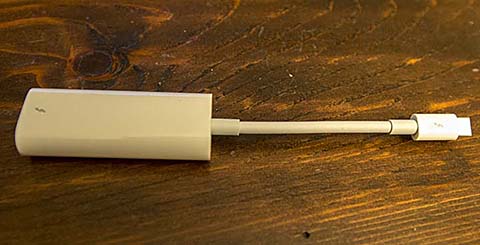
Got my Thunderbolt3 to TB2 adapter yesterday. It's a pleasant surprise to discover it's bi-directional.

TB3adapter.jpg
 
Last edited:
Keep in mind:

The 4 Core 6000 Series Skylake Processors only have 16 PCIe Lanes to work with. Not all 16 are spent on the TB3 ports AND TB3 is only operating at 40Gb/s.

Sticking a Pascal Titan-X into an eGPU would likely render zero gains over a GTX 1080. Also, Vanilla GTX 1080's are now down to $600-650, in stock at many big retailers. I think we're going to see a lot of unhappy Titan-P customers in a few months when a 1080Ti releases OR a 12-16GB version. Unless the drivers and high-end GPU driven apps mature in the coming months, the gains are rather small for 2X the price.

If you really feel the need, here is NVidia's order page:
http://www.geforce.com/hardware/10series/titan-x-pascal

Edit: I'll add in MOST use cases. The margin of difference further lessens if you have less than an 8 Core machine to handle a Titan-X.
 
The Apple TB3 to TB2 adapter is bi-directional and at $49 (USA) is the cheapest of any such adapter on the market. It's also the most compact one out there and will allow connecting TB3 devices to older systems with TB2 ports. So confusing that Apple can hit a home run with an adapter like this one and then still charge $30 for a standard USB-C cable that Monoprice or Anker charge $8 for...
 
Just don't buy your GPU from them. Jeebus.

And any Thunderbolt 3 PCIe expander will work for eGPUs, provided it has the right power connectors and enough room for your card. We're still waiting on nVidia to work out all the kinks with their drivers and hopefully they'll have Pascal support soon too.
 
I'd do the exact opposite and avoid buying ANY new Apple Mac system.
Apple has no interest in making Macs with high core count workstation class CPUs.
Even with TB3 for ext CUDA, you won't be able to get the needed CPU core count on a Mac.

What ****ing point is there to another 4 core MBP?


What laptop do you plan on getting? All laptops are 4 core. Just curious as I am looking for a laptop right now of the windows variety
 
Yeah, there's only a couple mobile workstations out there that offer desktop class CPUs with 6 or 8 cores. Technically, they could offer 10 cores or even more with a Xeon CPU -- don't know of any doing desktop/server class Xeon chip. And of those using a desktop class i7 CPU, they are some seriously beastly things. Don't even qualify as laptops, IMO. Totally different class of machine. We will see 6-core mobile CPUs for notebooks in about 18 ~ 24 months. Then we'll all be pining for 64GB RAM and Apple will finally give us 32GB. ;)

If the MBP isn't powerful enough for you, then you're best off with a Dell or Boxx system that offers a little bit more in terms of GPU, and in some cases memory as well. The Dell XPS 15 can be had with a 4K touch screen, if that's your thing, and 32GB RAM, GTX960M GPU -- not really a whole better than the 460 Pro GPU in the MacBook, but supports CUDA. And we get a lesser CPU in the XPS 15, same generation, just one model short of the top spec, which Apple offers.

The Dell Precision 5000 notebook is an XPS 15 with a couple more options like that top end i7 CPU and a 4GB Quadro M2000 GPU. Then there's the 7000 and that gets a lot more unweildy. The screen isn't as nice on the 7000, but we can get a mobile Xeon CPU (identical spec as the top i7, but supports ECC memory) and we can have up to 64GB in there. Unfortunately, there's no Thunderbolt ports on the 7000 series Precision notebooks.

I like my XPS 15. Needs another TB3 port.
 
Back
Top