Welcome to our community

Be a part of something great, join today!

  • Hey all, just changed over the backend after 15 years I figured time to give it a bit of an update, its probably gonna be a bit weird for most of you and i am sure there is a few bugs to work out but it should kinda work the same as before... hopefully :)

EPIC/Scarlet Build 3.3.14

Thats because it's the exact same build as 3.3.14... which was beta until today. They didn't make a change between beta and release, hence no new news.


In this case no news is great news! It means it works!
 
Making it a stable release build is huge news to me...

Thats because it's the exact same build as 3.3.14... which was beta until today. They didn't make a change between beta and release, hence no new news.
 
Just install it and test it few minutes :

- Strange frame rates in the FPS menu
- my epic crashed 3 times.

Back to the last firmware.


I just installed 3.3.14 and noticed the strange frame rates in the FPS menu. Every single frame rate has a decimal point after it. And some strange defaults, like 119.88. Although after two hours of testing no crashes, but this frame rate thing is a problem. Any ideas out there?
 
I just installed 3.3.14 and noticed the strange frame rates in the FPS menu. Every single frame rate has a decimal point after it. And some strange defaults, like 119.88. Although after two hours of testing no crashes, but this frame rate thing is a problem. Any ideas out there?

It is not a problem, we are just no longer rounding the real framerate to an integer value.
 
Trent,
I understood that to be in 23.98, but all of the frame rate listed when you touch FPS have decimals, is that normal as well?

Yes. When you are in a project rate of 23.98 (which is actually 24/1.001) all the available framerates have the same 1.001 divider, so 48 fps would really be 48/1.001 or 47.95
 
Yes. When you are in a project rate of 23.98 (which is actually 24/1.001) all the available framerates have the same 1.001 divider, so 48 fps would really be 48/1.001 or 47.95


Thanks for the clarification on that, so if I need 40 FPS for HMI's, I dial in 39.96? I don't want this to sound sarcastic (because it's not) but, I was under the impression we were trying to make things easier and less complicated with the 24 and 23.98 display. Now every frame rate needs to be "explained" on set as well.
 
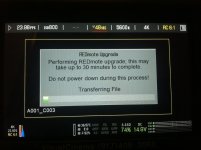
Where can i find firmware for REDmote for this build?
 
is 4.0.6 compatible?
 
Yes. When you are in a project rate of 23.98 (which is actually 24/1.001) all the available framerates have the same 1.001 divider, so 48 fps would really be 48/1.001 or 47.95

Does this have anything to do with audio sync to prevent the possibility of drift?
 
Thanks for the clarification on that, so if I need 40 FPS for HMI's, I dial in 39.96? I don't want this to sound sarcastic (because it's not) but, I was under the impression we were trying to make things easier and less complicated with the 24 and 23.98 display. Now every frame rate needs to be "explained" on set as well.

Correct, and thought the number is technically correct (and a good confirmation), it would be nice to be able choose to display the rounded again, as i get 'questioned' every time as well.....
 
Anyone else having crashing issues? Trying to decide whether or not to instal for an upcoming commercial shoot.
 
I found it on the download page as a separate firmware. Not as part of the camera firmware upgrade.

You can simply just dock the REDmote to camera and upgrade the firmware through camera. It's a great time to own a RED!
photo.jpg
 
Back
Top