Welcome to our community

Be a part of something great, join today!

  • Hey all, just changed over the backend after 15 years I figured time to give it a bit of an update, its probably gonna be a bit weird for most of you and i am sure there is a few bugs to work out but it should kinda work the same as before... hopefully :)

DSMC v5.2.29 Release Build and 5.3.9 Beta

On-camera REDmote update failed the first time. Tried again, worked; probably due to camera re-start (?). All's well... :smiley:
 
REDLink Bridge updated automatically as soon as I snapped it on to the back of the camera. Impressive! :thumbsup:
 
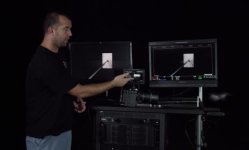
Pardon the crappy video, but the switchblade is SOOOOOO much better with the new firmware.

Awesome work!

Well I'm never taking my switchblade off after seeing that. Can't wait to upgrade the firmware.
 
Does this fix the corrupted right half of the LCD on startup?


Don't know about that but I've noticed there's no longer a scrambled screen when you switch to and from 1:1.
 
BOOM!

Excellent work, as always ladies and gents. That Gio Scope tho...absolutely brilliant way to interpret the scene's contrast.

Thank you for your diligence. Killing it.

Eryc
 
A Redmote question. I'll load 5.2.29 Release build on one camera and 5.3.9 Beta on camera 2. I can upgrade my Redmote software on the Release Build. But then, can I use it on the Beta Build which has special Redmote features, and switch it back and forth from camera 1 and camera 2?
 
A Redmote question. I'll load 5.2.29 Release build on one camera and 5.3.9 Beta on camera 2. I can upgrade my Redmote software on the Release Build. But then, can I use it on the Beta Build which has special Redmote features, and switch it back and forth from camera 1 and camera 2?

REDMOTE version 9.1.x should work with both camera versions 5.2.x and 5.3.x (with some functionality disabled when using 5.2.x).
 
What is the latest version of the manual? Does it cover this stuff yet? (Specifically the beta build.)


EDIT: Found it. Looks like it covers 5.3.
 
Hey Jarred, would it e possible to indicate which of these features (if any) are gonna work on MX (now or in the future)? Might be worthwhile to avoid a deluge of questions...

Mike P, in the release notes, we indicate if the feature or bug fix is sensor specific. Like for DRAGON only.

I understand you are asking us to be more like "DRAGON only now, but will (or won't be) in M-X (or M) in the future". It really is case-by-case and dependent on a lot of factors. So, yeah, ask the question - if we know, we will say. If we don't, we will say that, too. :thumbsup:
 
today was a good day :)
 

Attachments

  • FullSizeRender (4).jpg
    FullSizeRender (4).jpg
    89.9 KB · Views: 0
Couple bug reports on 5.3 Epic Dragon.

If I have ACES proxy and Independent LUTS enabled and have the LCD set to graded... I get a monochrome black and white redgamma4-ish image not the graded DragonColor/REDGamma4 image. The Histogram however is labeled "ACES".

If I have ACES proxy but not Independent LUTs checked my image changes to ACES log but the histogram is still labeled "DC/RG4".

Is it expected behavior for the LCD histogram to display whatever the "neutral" output gamma is? Little confusing to be looking at RG4 but see the label "RLF". Is the histogram for the "neutral" output or for the "Graded" output?

Awesome update! The noise even seems like it's been subtly improved. But maybe that's just my imagintion.

EDIT: just brought in a clip... and the image is very green. Needs a -10 tint off of just daylight to neutralize. Has the debayer been weighted green to minimize red noise or is that just because I haven't blackshaded yet?
 
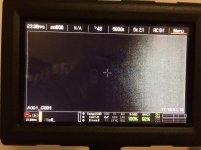
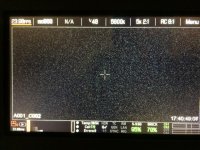
One of the new tools I am really loving is the GIO SCOPE! One really awesome use for this other than exposing, is that you can really visualise when the sensor is not blackshaded properly or when it needs BS. Here are two pics of before and after black shade. Thanks RED TEAM for including this in the EPIC MX.

attachment.php


attachment.php
 

Attachments

  • IMG_4107.jpg
    IMG_4107.jpg
    94.9 KB · Views: 0
  • IMG_4111.jpg
    IMG_4111.jpg
    98.5 KB · Views: 0
I'm out of town until tomorrow, but just wanted to say thank you for this rather jam packed update.
 
Back
Top