Welcome to our community

Be a part of something great, join today!

  • Hey all, just changed over the backend after 15 years I figured time to give it a bit of an update, its probably gonna be a bit weird for most of you and i am sure there is a few bugs to work out but it should kinda work the same as before... hopefully :)

$16 Wifi side plate for DSMC2

Based on Nathan's mod I assume any 2.4 rp-sma antenna would work.
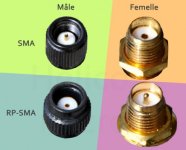
However, it is still good to know if the ufl-rp sma cable has a male or female end. I think it is female. Then you need the right correspondant pole on the antenna side, which is male.
 
Last edited:
Okay guys, I just did a quick test.

In ad-hoc mode with the internal antenna, I was getting maybe 5-10ft before the signal would drop. There's only my home wifi signal to cause interference, and even changing channels didn't help much. Either way it was absolutely unusable for pulling focus with FoolControl, and very unreliable even for changing camera settings.

Now with my wifi side plate and a small 2db antenna, I'm getting around 300-350ft before the ad-hoc starts to get spotty. I have a 5db antenna as well, but didn't bother to test that as 350ft seemed plenty.

I haven't had a chance to test infrastructure mode, but I think that really would be dependent on the strength of the router. Either way I'm certain the signal would go much further, even if using a budget router.

awesome... cant wait to hear more. I have gotten some great results in infrastructure mode ( all routers are not made the same, i learned the hard way)
 
As for the gender of the cable/antenna, it's a bit confusing. Apparently a decade or two ago, they switched the "polarity" of these SMA connectors in attempt to limit consumer devices from being able to use stronger antennas. PR-SMA (reverse-polarity SMA) was thus born, which conforms with "regulation 15". That plan quickly failed, as people just started manufacturing the antennas in both "polarities".

I quote "polarity" because from my understanding, "RP" stands for "reverse polarity", however it's actually not polarity at all, but rather simply "reverse gender". Meaning they reversed which end is male and female, and kept the polarity the same. The antenna should work regardless of so called "polarity", as long as the two ends mate properly.

--

From WIKI:

https://en.wikipedia.org/wiki/SMA_connector#Reverse_polarity_SMA

"Reverse polarity SMA (RP-SMA or RSMA) is a variation of the SMA connector specification which reverses the gender of the interface, as shown in Figures 1 and 2. The term "reverse polarity" here refers only to the gender of the connector's contact pin, not in any way to the signal polarity."

--

WC uses the SMA on their wifi plate, and I used RP-SMA on my own design. Point being, it doesn't seem to matter if you use SMA or RP-SMA. I'm getting a solid 300-350ft in adhoc mode with RP-SMA, which indicates that it's clearly working.
 
Last edited:
RP-SMA and SMA are basically the same, just with reverse gender. It really doesn't matter.
In the drone world it is quite common, I even mix RP-SMA with SMA for my 5.8 video downlink. No problem at all. I know it is confusing. So, even if you have the wrong end on both side, you can buy an adapter to fit.

Here is a link.

http://www.getfpv.com/rf-rp-sma-male-to-sma-female-adapter.html
 
Last edited:
I think you should sell these Nathan. Resource the parts...then uncharge a little bit for those who don't want to source everything themselves. You'd probably sell these things like hot-cakes.

Chris, I considered that, but I'd much rather just do my best to contribute by giving it away free. Hopefully one day it comes full circle. :)
 
Chris, I considered that, but I'd much rather just do my best to contribute by giving it away free. Hopefully one day it comes full circle. :)


Great post and awesome contribution...love REDUSER :)
 
FYI Wooden camera published some range testing they did last week with their new wifi antenna side plate :

http://woodencamera.com/WiFi-Side-Plate-Weapon-Scarlet-W-Raven.html

Signal Range Testing:
Accessories on the Camera: Easy Top (Weapon), Trigger Handle (Weapon), RED Touch 4.7, WiFi Side Plate (Weapon), Right Side Plate (Weapon), Easy Riser (Weapon), Unified Bridgeplate (19mm)
Antenna Used: Large
Phone Used: iPhone 6s running FoolControl

Ad-Hoc Mode (Camera generates the WiFi network)
Built in Antenna: 150 feet
WiFi Side Plate: 250 feet

Infrastructure Mode (Camera and phone connected to Netgear Nighthawk AC1900 router, phone was located next to router and camera was moved)
Built in Antenna: 300 feet (some dropouts occured at this range)
WiFi Side Plate: 650 feet (zero dropouts, this range was limited by the distance of testing zone, could be farther)
 
Ad-Hoc Mode (Camera generates the WiFi network)
Built in Antenna: 150 feet

150ft with the built in antenna? I'm lucky to get 10ft, sometimes even with drop outs at 3ft. I wonder is something is wrong with my internal antenna?

Either way the external antenna does the trick, as I also hit 300ft or so with my little wifi side plate. :)

Thanks Mikael!
 
Nathan we have similar issues with internal WiFi, sometimes things are great 100' away other times it loses signal 5' away
Not always but it happens quite a bit during shoot day
 
Well, so I just installed my new DuMoulin Wifi side plate. I ordered the Wifi parts through eBay from Nathan's shopping list, and the plates themselves from Shapeways. I made one red and one blue, for A and B cameras.
The installation is not without its challenges. The Wifi cable connector on the body is extremely small and hard to deal with. One of the cables I ordered did not fit. The other one did, but I had to refit it as first time it didn't make an appropriate connection.
The installation of the plate itself is a breeze. I got 2 types of antennas for 2.4Ghz. A long and a short one, and installed the short one. I had a good internal antenna wifi connection before, but I can say that with the new plate it's 10-20% better with the short antenna. You can see the numbers when you are inside the camera's Wifi menu.
But I have to say that what really improves the Wifi signal quality and robustness is to use a router. By Mikael's advice I got a TP Link WR802N that is tiny and powered through USB, so you can power it from any USB battery. That really makes the Wifi connection much, much better.

2B3CFCAA-19D2-419E-ABBF-85B0F366EF71_zpscc4idkfu.jpg


4D350A8D-9FBF-4B4E-BE98-C0E50DDF8A09_zpsymsokrdn.jpg
 
I had a good internal antenna wifi connection before, but I can say that with the new plate it's 10-20% better with the short antenna.

Daniel, glad to hear that the installation went well. It seems that you were already getting good range with your internal antenna, so the boost isn't as noticeable for you. Us less fortunate ones are getting as poor as 5-10ft with the internal antenna, so having a boost to 250-300ft with this add on is a blessing. Hard to beat the performance bump for $16-20. :p

Red is actually looking into my internal antenna problem as we speak. It's nice to have such good customer support.
 
My Scarlet-W is presently at RED in Irvine. They are checking out some WiFi problems I has having. My signal wasn't stay connected for more then a minute... even when my phone with Foolcontrol was sitting directly on top of the camera (the location of the internal antenna)
RED support has been super great about getting the camera in quick and investigating. Hope to have it back late next week.
 
Little update for everyone.

Red returned my camera, and have improved my Wifi issue (thanks!). My range used to be about 3-5ft, and it now an acceptable 25ft or so. Although usable, the Wifi side plate pushes that range up to 250-350ft (depending on interference and AKS), so I'm opting to continue using it. If you're not using a sidekick, then for the sake of $16 in parts, it's really a no-brainer.

Also a note from Jarred about removing the sticker over the Wifi connector (was posted in a thread about the WC Wifi plate):

This does not void your camera warranty if you need to remove this sticker.. Of course if you break the antenna connector during the install or use it will not be covered under warranty but I think that is a pretty obvious.
 
This solution does not work if you are mounting Sidekick. You must use without the plate.
I can confirm that range is much better than internal.
 

Attachments

  • image.jpg
    image.jpg
    12.1 KB · Views: 3
This solution does not work if you are mounting Sidekick. You must use without the plate.
I can confirm that range is much better than internal.

That is why the wooden camera replaces the whole side plate to allow use of sidekick and upcoming side handle...

Also be careful not removing / reinstalling that antenna cable too often as those are fragile 'internal' connectors absolutely not ready for daily matting...
 
Of course not. Once installed, it stays there.

Yes Wooden camera is certainly the elegant solution. But it costs US 500.
I paid US 3.90 for the UFL cable. Wifi antenna I already have from an old router.
And it does the trick too.
 
Back
Top