Welcome to our community

Be a part of something great, join today!

  • Hey all, just changed over the backend after 15 years I figured time to give it a bit of an update, its probably gonna be a bit weird for most of you and i am sure there is a few bugs to work out but it should kinda work the same as before... hopefully :)

$1299 Seiki UHDTV 50" SE50UY04 - Bought it today

Not sure what happened, if it has anything to do with the firmware update I did last night or what... I now have no sound coming out of the SEIKI. Just noticed that when trying to run something with audio through it. It worked 2 days ago, just not now. Hmmm.... Tried a couple sources and a couple inputs. On the bright side, the sync issues seem to be gone. Anyone else having issues, particularly audio issues, after the firmware update?
 
... I now have no sound coming out of the SEIKI. Just noticed that when trying to run something with audio through it. It worked 2 days ago, just not now. ... Anyone else having issues, particularly audio issues, after the firmware update?

My audio is fine coming out of the Sony 790. What are you using to feed the panel?


_____________________________
Scarlet X # 1859 “Bettie Page”
“… preparing to ‘whip’ the competition …”

Zeiss Lenses:

CY 21/2.8
ZF 28/2.0
CY 35-70/3.4
CY 50/1.4
ZF100/2.0

Nikon Lenses:
G 14-24/2.8
G 24-70/2.8
D 80-200/2.8

Tokina Lenses:

11-16/2.8
 
I just did the firmware update on mine, didn't go when I plugged it in so I did it through the service menu. No more sound for me either.

under Software Version/Baseline Version in the service menu

Video Ver: went from 496203 to 502040
Audio Ver: not updated, still 494203
AP Ver: went from 496698 to 513407

Bill, since your audio is working, did your Audio Ver change?
 
Last edited:
I take back what I said about the audio. There was audio last night when I did the update ... now there isn't. Go figure? Not even analog audio. Audio version is the same: 494203.

_____________________________
Scarlet X # 1859 “Bettie Page”
“… preparing to ‘whip’ the competition …”

Zeiss Lenses:

CY 21/2.8
ZF 28/2.0
CY 35-70/3.4
CY 50/1.4
ZF100/2.0

Nikon Lenses:
G 14-24/2.8
G 24-70/2.8
D 80-200/2.8

Tokina Lenses:

11-16/2.8
 

Not a deal-breaker ... but a pisser nonethless. One step forward ... half-a-step back.

Here is the e-mail that I just sent to customerservice@seikidigital.com:

" Gentlemen: I downloaded and installed the most recent firmware update for my 50" SE 50UY04 LED television last night (Changes in supported EDID timings). After the firmware update ALL audio is now non-functional ... both HDMI audio and analog audio.

Please investigate and promptly issue a patch or revised firmware to address the non-functional audio issue.

This is happening to other owners of your 50" SE 50UY04 LED television who installed your recent firmware as well, so it is not an isolated incident.

Thank you for your prompt attention to this matter.

Bill Sepaniak"

It wouldn't hurt if Seiki got a few more e-mails along the same line and maybe we will see a fix next week.

_____________________________
Scarlet X # 1859 “Bettie Page”
“… preparing to ‘whip’ the competition …”

Zeiss Lenses:

CY 21/2.8
ZF 28/2.0
CY 35-70/3.4
CY 50/1.4
ZF100/2.0

Nikon Lenses:
G 14-24/2.8
G 24-70/2.8
D 80-200/2.8

Tokina Lenses:

11-16/2.8
 
I've also lost audio after firmware update. The panel still drops video for few seconds from time to time (this has not changed).
 
Yep, no audio, not on any input, not from any source. Ooops. I have sent an email to SEIKI's customer service/ support... Hopefully they fix this one relatively soon. Normally I don't need the audio out of the TV, but where it's sitting temporarily, I don't have any other sound system hooked up for all my testing and whatnot. Kinda need sound to work. :/


And I can confirm that the sync issue is still there. It seems better, but still not gone.
 
I received a response -- they are aware of the audio issue and are working on it.
 
I received a response -- they are aware of the audio issue and are working on it.


Same here. Good to know they are working on it. (Actually a pretty quick response ... when you consider it is probably coming from China!)

_____________________________
Scarlet X # 1859 “Bettie Page”
“… preparing to ‘whip’ the competition …”

Zeiss Lenses:

CY 21/2.8
ZF 28/2.0
CY 35-70/3.4
CY 50/1.4
ZF100/2.0

Nikon Lenses:
G 14-24/2.8
G 24-70/2.8
D 80-200/2.8

Tokina Lenses:

11-16/2.8
 
Last edited:
OK, sports fans... News Flash!!!

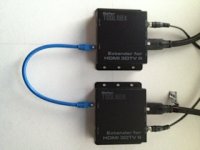
The FW update did a good job to make the OPPO BDP-103 rock solid and significantly improved one particularly bothersome source, but did not completely cure it. So, then - I tried this hookup, after discussing with the chief tech at Gefen, he suggested I try their GTB-HDMI-3DTV extender. Plugged it all together and BAM! NO sync issues or dropouts from my "bothersome" source...

http://www.gefen.com/kvm/gtb-hdmi-3dtv-blk.jsp?prod_id=9420

You may also be able to use this one which is $100 less... probably has the same chipset.

http://www.gefen.com/kvm/gtv-hdbt-cat5.jsp?prod_id=10870

BTW - cables used are 6' long Monoprice "High Speed" HDMI (the ones with the nylon mesh "Net Jacket") from the receiver to the TV and a 4' cable (same type) from the device to the sender unit. I'm using an off the shelf CAT6 patch cable in the photo and tried a home-built one about 6' long which also worked. I will try progressively longer cables and report back.

The issue, as it was explained to me is that the SEIKI has trouble with "weak" HDMI signals and it appears that the Gefen solution drives the signal at a level that the display is happy with. And, now, I'm very happy!!!
 

Attachments

  • IMG_1605.jpg
    IMG_1605.jpg
    29.2 KB · Views: 0
OK, so now that I've delivered my news, can one of you (Jeff?) please advise which video card I should use for the GUI in my Mac Pro 2009? I think that Jarred mentioned the GTX580 over the 590 but I can't find the post within this thread...

I'm using a Quadro4000 for the GPU and will reinstall the Rocket card (currently in the M-Logic box for my Thunderbolt rig...) Any thoughts?
 
I'll add myself to those questioning about ways to get this TV @ Europe. Somehow googling didn't return not even one EU shop selling and almost each and every state side online shop that sell it won't ship it internationally, Amazon included. Of course there is option of using some shipping/freight forwarder firms, but still it looks very costly, eg. via DHL (as it seems too big to be shipped by USPS) ~ +$460 at least ($720 if with pallet for extra protection). And then added local custom payment & VAT. Almost doubled enduser price in addition of need to risk not having warranty and possible damage during shipment seems a bit handicapped. Can anyone suggest cheaper shipping ways to get this over pond?
 
I'll add myself to those questioning about ways to get this TV @ Europe. Somehow googling didn't return not even one EU shop selling and almost each and every state side online shop that sell it won't ship it internationally, Amazon included. Of course there is option of using some shipping/freight forwarder firms, but still it looks very costly, eg. via DHL (as it seems too big to be shipped by USPS) ~ +$460 at least ($720 if with pallet for extra protection). And then added local custom payment & VAT. Almost doubled enduser price in addition of need to risk not having warranty and possible damage during shipment seems a bit handicapped. Can anyone suggest cheaper shipping ways to get this over pond?

you should email them and ask if there are any dealers anywhere remotely close to you. if not you should get together with a few people and make a order of a dozen or so panels. if you buy them directly from China the shipping will be much lower if you split the pallet cost across a bunch of them.

of note in case it matters.. the monitors over here have hard wired power cables so you are going to need an adapter or put on a new plug for across the pond.

Still pretty pleased with these monitors.. We have been buying them by the truckload and Jim and I both are using them at work and now even at home as computer monitors. There seams to be variation in the level of " signal strength " the monitors require. On the same REDRAY or PCs one set doesn't flicker at all and another one does, and then another one splits the difference.
 
By the truckload??? What are you guys doing with them? Seeing those 84" ones at NAB has me holding out a little. Maybe the 65" that Seiki will be releasing a little later.

you should email them and ask if there are any dealers anywhere remotely close to you. if not you should get together with a few people and make a order of a dozen or so panels. if you buy them directly from China the shipping will be much lower if you split the pallet cost across a bunch of them.

of note in case it matters.. the monitors over here have hard wired power cables so you are going to need an adapter or put on a new plug for across the pond.

Still pretty pleased with these monitors.. We have been buying them by the truckload and Jim and I both are using them at work and now even at home as computer monitors. There seams to be variation in the level of " signal strength " the monitors require. On the same REDRAY or PCs one set doesn't flicker at all and another one does, and then another one splits the difference.
 
OK, so now that I've delivered my news, can one of you (Jeff?) please advise which video card I should use for the GUI in my Mac Pro 2009? I think that Jarred mentioned the GTX580 over the 590 but I can't find the post within this thread...

I'm using a Quadro4000 for the GPU and will reinstall the Rocket card (currently in the M-Logic box for my Thunderbolt rig...) Any thoughts?

I have the OPPO rocking 100% on the SEIKI (other than the new audio issue). It doesn't seem to output a very strong signal and that's a problem for 4K or FHD3D. It's working perfectly if I use an HDMI 1.3a or better rated HDMI cable with ferrites on the ends. Seems to work perfect with the blue SEIKI cable after the firmware update too. Before the firmware update, input #3 was the most problematic for me, but I think it is more exposed to the PSU within the TV and gets more interference.

Still pretty pleased with these monitors.. We have been buying them by the truckload and Jim and I both are using them at work and now even at home as computer monitors. There seams to be variation in the level of " signal strength " the monitors require. On the same REDRAY or PCs one set doesn't flicker at all and another one does, and then another one splits the difference.

Completely agree here. And now that I have mine plus two others near me to compare, I agree on the signal issue. I've found that my signal requirements shifted when I relocated my display. I think most of the issues come down to EMI shielding, or lack thereof. Combine that with sources that are a bit weak on their output and you have sync issues.

Anyway, if you need to unload one of those 84" Sony monitors after buying all these 50" ones, I might have a home for it. :) If the price is right.


Ron, The extender that you point out, it's excellent, BTW, I've had nothing but great results from all of GEFEN's stuff. Anyway going with an HDBASE-T extender or even an HDMI signal booster that can deal with the proper bit rates should clear up any drop-outs from a proper 4K source I'm thinking. Seems like even though it killed the audio, this firmware update fixed the timing issues.


As for the GPU, I know it's a bit more expensive, but get the GTX-680 Mac Edition. The GTX580 is a very tiny bit faster for some things, but not worth the trade-offs it comes with. The GTX590 is a bad idea, even if you have a PC capable of hosting it. Don't expect the GPU to work miracles. For GPU-accelerated tasks, it will be a good 60% or so faster than the Quadro 4000 card. For R3D tasks, all the heavy lifting, which is the wavelet decoding, is still done via the CPUs and/ or Rocket. What happens after the decode may or may not benefit from the GPU, depending on which app you're talking about. Should give you about a 10-15% boost in playback speed within Resolve just with the card swap. For actual grading, the 680 will handle about double the number of node ops, give or take, depending on which ones.
 
By the truckload??? What are you guys doing with them? Seeing those 84" ones at NAB has me holding out a little. Maybe the 65" that Seiki will be releasing a little later.

Agree Bob, 65" for the wall is good; 42" for the desktop would also be good.

David Webb is offering to calibrate a 50" for me and ship it out to NZ; his partner in crime says they have a 42" 4K due 'end of summer'. Don't know date for 65".

Should a GTX 570 drive this thing OK? It has patched firmware which gives working boot screen on OSX...

Mike
 
OK, so now that I've delivered my news, can one of you (Jeff?) please advise which video card I should use for the GUI in my Mac Pro 2009? I think that Jarred mentioned the GTX580 over the 590 but I can't find the post within this thread...

I'm using a Quadro4000 for the GPU and will reinstall the Rocket card (currently in the M-Logic box for my Thunderbolt rig...) Any thoughts?

Just joined the forum as it seems to be the most active discussion group on the Seiki which I bought last week (and I've always wanted a RED).

Are you planning to connect your Mac Pro directly to the Seiki? If so, you'll want a GTX6xx series kepler based card, or AMD 78xx or 8xxx series to get 4k resolution. I discovered this after learning that my GTX570 is limited to 2560x1600 to a single monitor, and after some research, purchased the AMD 7870 2GB which has worked great (especially with the Seiki FW update). No more signal drops on the Seiki. If I were going with Nvidia, I'd go with the GTX660 for about $200.
 
Last edited:
65" SEIKI is due end of summer here as well. I think the 42" is going to be my new desktop monitor. My desk is big enough to hold the 50 -- it has replaced dual 30" displays, maybe I'm just still getting used to it. It's freaking beautiful though. I think the issue is that it's a bit too tall in relation to everything else. Maybe I should put it on an arm so I can push it back a bit more and lower it another inch or so

I really want a 75" 4K display for home. That would be perfect, but I'd take a 70 or a 72... Vizio's 70" 4K is supposed to come out in July or August. One of my sources tells me that Apple has been testing three sizes for their "iTV" -- a 42", 54" and 72", all of them UHD/4K. I want to believe it and this source has been very reliable in the past, but they totally missed the mark with a Mac Pro prediction. Actually I don't think they were wrong, I think Apple just opted to not bring it to market at that time... Anyway, The proliferation of 65" displays is kinda aggravating. Two manufacturers understand this -- Samsung and Sharp. As the physical size of TV's has shrunk considerably over the past couple years, screen sizes have remained the same. The Samsung 75" has a then bezel all the way around, it's tiny. That TV is actually 1/4 inch narrower than the 65" Sony 4K with it's fugly dumb-ear speakers. Wish the Samsung was 4K...
 
Back
Top