Welcome to our community

Be a part of something great, join today!

  • Hey all, just changed over the backend after 15 years I figured time to give it a bit of an update, its probably gonna be a bit weird for most of you and i am sure there is a few bugs to work out but it should kinda work the same as before... hopefully :)

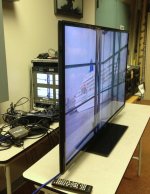
$1299 Seiki UHDTV 50" SE50UY04 - Bought it today

Thanks for the link...that patch sounds very interesting. I prefer using HiDPI mode because I already have two high quality 27" desktop monitors so there's no shortage of screen real-estate...the attraction for me is to mount this on the wall just behind my desk and use it for photo and video editing. The controls/menus are at a size that are easily viewable but I still get full-rez photos and video. It also works fine at it's native resolution...but I just can't mount it close enough to where I'm sitting to read small text clearly...even finding the mouse pointer can be a challenge sometimes!
 
Jimmy Grewal: out of curiosity, what shipping option have you used to get it over to Dubai and how much did it cost?
 
For those using a PC with a 4K display to view H264 encoded material, are you using the stock Windows decoder? Anyone tried CoreAVC ? Cyberlink ? They might be more efficient.
 
After being excited by the low price of the Seiki monitor I was really tempted to buy one at the $1100 price point. While I'm sort of sad I missed the window, I'm also glad, because I knew I didn't know enough to make an informed decision. What I discovered is that finding video cards with resolutions beyond 2560x1600 is not quick or simple. As examples, NVidia's website shows that the GTX680 only supports up to 2560x1600 while Zotac lists a GTX680 with a resolution of 3840x2160. The other thing I still can't figure out is how the Oppo BDP-103 can do so much for only $500. Just when I thought I was getting a handle on things, I saw this great interview with Joe Kane: http://youtu.be/0ZqhA3iIHm4 where he and Scott Wilkinson talk about what 4K really means, i.e. 4096x2160 versus 3840x2160. There is also a very interesting discussion on the importance of bit rate and there are specific examples of challenges with 8 and 10 bit versus 12 bit and above displays.

Thanks to everyone who has been posting! I've learned a lot and realize I have a lot more to learn.
 
Many Nvidia cards support UHD. You just have to type a custom setting in by hand.
Nvidia spec sheets were written before UHD came out.
My old gtx 480 works. A cheap-ish GTX 650 works as well. The 650 seems to work as well as the Titan I have in there now.

After being excited by the low price of the Seiki monitor I was really tempted to buy one at the $1100 price point. While I'm sort of sad I missed the window, I'm also glad, because I knew I didn't know enough to make an informed decision. What I discovered is that finding video cards with resolutions beyond 2560x1600 is not quick or simple. As examples, NVidia's website shows that the GTX680 only supports up to 2560x1600 while Zotac lists a GTX680 with a resolution of 3840x2160. The other thing I still can't figure out is how the Oppo BDP-103 can do so much for only $500. Just when I thought I was getting a handle on things, I saw this great interview with Joe Kane: http://youtu.be/0ZqhA3iIHm4 where he and Scott Wilkinson talk about what 4K really means, i.e. 4096x2160 versus 3840x2160. There is also a very interesting discussion on the importance of bit rate and there are specific examples of challenges with 8 and 10 bit versus 12 bit and above displays.

Thanks to everyone who has been posting! I've learned a lot and realize I have a lot more to learn.
 
Many Nvidia cards support UHD. You just have to type a custom setting in by hand.
Nvidia spec sheets were written before UHD came out.
My old gtx 480 works. A cheap-ish GTX 650 works as well. The 650 seems to work as well as the Titan I have in there now.

How would you go about adding these custom settings manually? I have a Titan and was thinking about using the seiki as a monitor. thinking...
 
Using Blackmagic SDI to HDMI 4k

Using Blackmagic SDI to HDMI 4k

Very early success to connect 4x HDSDI to the Seiki TV using the Blackmagic converter to HDMI.
It works once in a while and looses sync fairly often (even after the firmware upgrade), I tried a lot of format and framerate from our 4K decoder. But when it works, it's pretty!

However, Blackmagic said they're looking into it (they didn't test that monitor yet).

Luc
 

Attachments

  • 2013-05-14 12.59.22small.jpg
    2013-05-14 12.59.22small.jpg
    87.7 KB · Views: 0
  • 2013-05-14 12.58.41small.jpg
    2013-05-14 12.58.41small.jpg
    90.3 KB · Views: 0
Last edited:
How would you go about adding these custom settings manually? I have a Titan and was thinking about using the seiki as a monitor. thinking...

Nvidia control panel , set resolution, click customize , set custom resolution.
Use 3840 x 2160 at 24FPS ( or 30 ) and the reduced blanking option.
 
A lot of people seem to be bricking their units by sending custom signals and it doesn't seem to be a case of Signal A vs B but rather random occurrence when custom signals are sent and the unit just boinks. That's definitely not a good thing. :cursing:
 
A lot of people seem to be bricking their units by sending custom signals and it doesn't seem to be a case of Signal A vs B but rather random occurrence when custom signals are sent and the unit just boinks. That's definitely not a good thing. :cursing:
Where did you read that?
 
Gtx titan and seiki 4K

Gtx titan and seiki 4K

How would you go about adding these custom settings manually? I have a Titan and was thinking about using the seiki as a monitor. thinking...

With the more recent nvidia drivers, you may not need to make a custom rez - one is available at 29Hz. I have the Seiki on sli titans at 30Hz (custom) with reduced blanking and only once every few days (at most, so far) is there a handshake dropout. As the experts here have said, cable quality is critical. The included blue cable, and one i have from "bluejeans cables" work fine. Several others lying around here either would not work at all, or caused frequent, momentary, dropouts. Overall this monitor is a steal. My hp zr30w, once a sight to behold, is now a satellite monitor O_o.

and.... I have certainly learned a lot reading this thread.
 
I didn't have to do any custom anything to run the SEIKI on my GTX Titan. It sync'd right up at 3840x2160 @ 30Hz.

As for bricking their units, I haven't heard of any such reports. Not sure where that's coming from. Everyone I know of who installed the firmware update last week lost audio and it only partially fixed some of the signal drop-out issues. SEIKI has removed the firmware from their site and has sent some of us emails saying they are working on it.

FWIW, Amazon has the SEIKI right now for $1199 w/ free shipping. I'm planning on buying another one or two. But they'll have to get the dropouts and audio issues resolved.
 
... Everyone I know of who installed the firmware update last week lost audio and it only partially fixed some of the signal drop-out issues. SEIKI has removed the firmware from their site and has sent some of us emails saying they are working on it. ...

I wonder if "The Restore Factory Default" setting in the service menu will roll back the firmware to give us audio ... at least until they come up with a proper fix?

_____________________________
Scarlet X # 1859 “Bettie Page”
“… preparing to ‘whip’ the competition …”

Zeiss Lenses:

CY 21/2.8
ZF 28/2.0
CY 35-70/3.4
CY 50/1.4
ZF100/2.0

Nikon Lenses:
G 14-24/2.8
G 24-70/2.8
D 80-200/2.8

Tokina Lenses:

11-16/2.8
 
I didn't have to do any custom anything to run the SEIKI on my GTX Titan. It sync'd right up at 3840x2160 @ 30Hz.

As for bricking their units, I haven't heard of any such reports. Not sure where that's coming from. Everyone I know of who installed the firmware update last week lost audio and it only partially fixed some of the signal drop-out issues. SEIKI has removed the firmware from their site and has sent some of us emails saying they are working on it.

FWIW, Amazon has the SEIKI right now for $1199 w/ free shipping. I'm planning on buying another one or two. But they'll have to get the dropouts and audio issues resolved.

yes, no need to make a custom rez profile at all. In fact, the Seiki was recognized as 38x21 just running off the iGPU. (Tried that For first connect. Would rather delid another 3770k than foul 2 titans... Just OCD caution on my part).

I basically use the Seiki for simple desktop stuff and for visualization of 3D biomolecule modeling/ calculation display. Absolutely spectacular!
 
Decklink 9.7.2 update seems to offer better hdmi timings, doesnt drop sync, can play UHD out of resolve.

Still waiting on the Hi5-4k.
 
I bought mine from buydig.com for $1099 with free shipping by asking nicely. They're closed until Friday tho.
 
Are there any current solutions for running this at full-res as a 2nd monitor for my retina MBP? I think the HDMI port is crippled from the computer to only handle up to 2560x1440 or something (not sure about thunderbolt)
 
Back
Top