Welcome to our community

Be a part of something great, join today!

  • Hey all, just changed over the backend after 15 years I figured time to give it a bit of an update, its probably gonna be a bit weird for most of you and i am sure there is a few bugs to work out but it should kinda work the same as before... hopefully :)

Red Link Received ... WOW

The REDmote can be used wirelessly at the same time as the REDlink bridge.

I'm here to report THAT YOU CAN USE THE REDMOTE (BETA FIRMWARE) WITH THE REDLINK BRIDGE AT THE SAME DANG TIME.

Thanks for confirming this valuable functionality.

Using both RED Link and RED Mote opens up new possibilities how to work efficiently on set.
If the RED Link SDK will be enhanced to support more metadata this will be a great addition.
Especially information like pitch and bank for VFX people would be nice to add.
Notes for editors and customized slates.

Maybe a developer can provide an editable database of presets for lenses and other things for quick filling in some fields via drag and drop.
So if a beta tester for a win pc app is needed send me a PM . . . ;-)

Thanks for sharing your experiences !!!


Regards,

Marcus
 
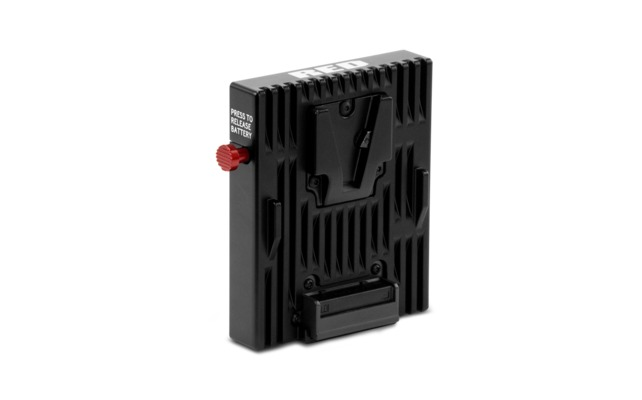
how im gonna connect redlink if i have only this powering option?
products_primary_QuickplateModuleHero.png

I wonder this aswell, if its only going to connect at the back of the camera? Killing alot of oter modules or power options.
 
The REDmote can be used wirelessly at the same time as the REDlink bridge.


How many devices can be connected to one RED LINK at once?

For example if I was using an iPad to control just the basic settings as a DoP, could then an AC have another app in which they where controlling focus on the a third party app.Then could you then have say a DIT using another app on a Mac to input meta data into clips ... if RED put this feature in ;) ?

Or is it just simply one device at a time, I havent had the chance to test it out yet.
 
One thing that I love in playback mode is you can directly go to any clip, you dont have to jump through every clip to get to the one that you want, also being able to control the playback is awesome so I can quickly jump to the part of the clip I want.

Hi Jonathan,

This sounds great. Any chance you could show us a quick video glimpse of what the playback features and functionality look like? Am looking for just such a solution.

Thanks!
 
How many devices can be connected to one RED LINK at once?

For example if I was using an iPad to control just the basic settings as a DoP, could then an AC have another app in which they where controlling focus on the a third party app.Then could you then have say a DIT using another app on a Mac to input meta data into clips ... if RED put this feature in ;) ?

Or is it just simply one device at a time, I havent had the chance to test it out yet.

With the REDLINK BRIDGE you are limited to one connection at a time. If you connect to the camera through the GigE port and a separate wifi router you can connect up to 8 devices to your camera.
 
Lookiing to maybe use this with a Gimbal device and Camera powered, from a belt pack, for example.
 
GigE Wifi and multiple users . . .

GigE Wifi and multiple users . . .

With the REDLINK BRIDGE you are limited to one connection at a time. If you connect to the camera through the GigE port and a separate wifi router you can connect up to 8 devices to your camera.

WOW - that sounds great to me.
The existing GigE Cable can easily connect with a wifi router.
So a notebook app (Win PC) for AC / DIT and smartphones for DPs plus REDMote makes lots of people changing camera settings ...
Is there a feature to limit rights on one "Master" App to prevent some settings from being changed ?
I think somebody must be in charge of this to prevent chaos or unintended changes.

Lots of potential.
We will se what the developers come up with.

Thanks for the information !

Regards,

Marcus
 
WOW - that sounds great to me.
The existing GigE Cable can easily connect with a wifi router.
So a notebook app (Win PC) for AC / DIT and smartphones for DPs plus REDMote makes lots of people changing camera settings ...
Is there a feature to limit rights on one "Master" App to prevent some settings from being changed ?
I think somebody must be in charge of this to prevent chaos or unintended changes.

Lots of potential.
We will se what the developers come up with.

Thanks for the information !

Regards,

Marcus

At the moment, we are not handling any user rights management in the camera - we are leaving this up to the application developers. It may make more sense for the user settings/rights to be managed in an outside database (and not limited by what we would implement in camera). As this feature is still in its infancy we are taking all feedback under consideration.
 
You all should remember that the REDlink is a DEV Kit (developer kit) and not really meant for everyday shooting situations. There will surely be other versions in the future which will be useable with any power solution. Just not at the moment.
 
Trent, although I'm swaying a bit off topic : I recently wondered why it isn't possible to capture the focal length changes over time from a canon zoom in metadata. Could this be possible in the future ? I really missed it ... :) thanks!
 
At the moment, we are not handling any user rights management in the camera - we are leaving this up to the application developers. It may make more sense for the user settings/rights to be managed in an outside database (and not limited by what we would implement in camera). As this feature is still in its infancy we are taking all feedback under consideration.

Agreed.
Thanks for chiming in.
Since it is not limited to REDLink access and also GigE connection with some apps already in the wild we will see what is needed and makes sense.
Thanks for opening up the connectivity with the SDK and the hardware.
It is all about options.
Fits to the RED philosophy.
Thanks for listening to the users and monitoring contrasting opinions and suggestions.

You all should remember that the REDlink is a DEV Kit (developer kit) and not really meant for everyday shooting situations. There will surely be other versions in the future which will be useable with any power solution. Just not at the moment.

The SDK is free to download without the REDLink hardware if I understood correctly.
You can develop with the GigE cable as Mikael Lubtchansky
did . . .

And we also have the free apps to download - so on set everybody can come up with an app to toy with the cameras ... in theory ...

Anyway.
Great possibillities with lots of potential in my opinion.

Regards,

Marcus
 

The SDK is free to download without the REDLink hardware if I understood correctly.
You can develop with the GigE cable as Mikael Lubtchansky
did . . .

And we also have the free apps to download - so on set everybody can come up with an app to toy with the cameras ... in theory ...

Anyway.
Great possibillities with lots of potential in my opinion.

Regards,

Marcus

This is an important distinction that I think a lot of people miss.

REDLINK (also know as REDLINK Command Protocol or RCP) - the protocol used to control a camera remotely (over gigE, WiFi, Serial, etc)
REDLINK BRIDGE - a module that adds WiFi support to the camera (to be used with a REDLINK compatible application)
 
Marcus, you are totally right. You don't need the DEV kit to do it. You only need it if you want to control the camera wirelessly. What I said is that the DEV kit is just that: a developer kit. And that there will be other solutions for people using a brick or a single red volt at the back of the camera.
 
Marcus, you are totally right. You don't need the DEV kit to do it. You only need it if you want to control the camera wirelessly. What I said is that the DEV kit is just that: a developer kit. And that there will be other solutions for people using a brick or a single red volt at the back of the camera.

Hi Patrick !

Right.
It is a developer kit. But not too much going on in the dev forum section. :-(
Nice to see people exploring the possibilities from different perspectives here :-)

So for all the folks with a V-Mount on the back of the camera it is easy to use the GigE cable and a wifi router alternatively.
No REDLink Bridge is required necessarily.

Regards,

Marcus
 
I can see many possibilities with this kit. I wonder if there's enough interest for hardware development that works alongside this unit. For instance, controlling focus/iris via thumbwheel as opposed to an iOS device. I'd buy that in a second!
 
I can see many possibilities with this kit. I wonder if there's enough interest for hardware development that works alongside this unit. For instance, controlling focus/iris via thumbwheel as opposed to an iOS device. I'd buy that in a second!

The RED solution is to use the Tactical Hand Controller along with the REDLINK BRIDGE

I also believe that Jacek is working on a third party solution (the Optitron2). See this thread for more details: The Internal Focus Motor Thread
 
The RED solution is to use the Tactical Hand Controller along with the REDLINK BRIDGE

Very cool! I've always thought the THC unit was exclusive to RED's WMD system. Not a bad alternative for canon users with an AC. Now here's a proposal... What if RED developed a TTC unit (Tactical Thumbwheel Controller) that works in conjunction with the REDLINK? Credit card surrendered. Oftentimes I'm running n gunning on my own and something like this would be extremely handy.
 
Back
Top