Welcome to our community

Be a part of something great, join today!

  • Hey all, just changed over the backend after 15 years I figured time to give it a bit of an update, its probably gonna be a bit weird for most of you and i am sure there is a few bugs to work out but it should kinda work the same as before... hopefully :)

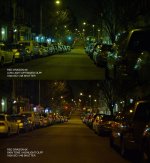
OLPFS NIGHT TEST

Patrick Kendall

Well-known member
Joined
May 12, 2012
Messages
245
Reaction score
0
Points
16
Location
New York City
Website
www.jellyjam.com
I got my Low Light Optimized OLPF today, so I decided to do some quick nighttime comparisons with the Skin Tone/Highlight OLPF. Shot with only street light with the iris wide open. Here are some ungraded jpgs.
 

Attachments

  • OLPFS_1.jpg
    OLPFS_1.jpg
    87.5 KB · Views: 0
  • OLPFS_2.jpg
    OLPFS_2.jpg
    82 KB · Views: 0
  • OLPFS_3.jpg
    OLPFS_3.jpg
    81.6 KB · Views: 0
That's quite a pronounced difference. Curious to know if there is that much difference between the two in daylight.
 
Thanks Patrick
It would be interesting if you could post a few .R3D single frames to look at grading options and grain structure
As it is now with jpeg only we cannot really draw any information on various OLPFs low light performance...
 
I didn't change anything between tests other than the OLPF setting in the menu.
Yeah, that's all I meant. Surprising - I didn't expect there to be this much color variation based on past comparisons. Perhaps some R3D's would illuminate what's going on ;)
 
I didn't change anything between tests other than the OLPF setting in the menu.

Patrick, i am almost sure when you switch OLPF , in the red menu you also have to change what OLPF is in the camera beacause they have different calibrations. Make sure you did this in camera.
 
Agreed. It actually just looks like the White Balance is off between the two clips or the OLPF Profile is wrong. I've done "a lot" of this sort of testing and didn't see anything like in terms of color variance.
 
Patrick, thanks for doing this. It would really be helpful though to get an idea of the noise by looking at a 4K RAW file or image.
 
Patrick, thanks for doing this. It would really be helpful though to get an idea of the noise by looking at a 4K RAW file or image.

I think he was shooting 6K. Yes an .R3D frame would be great!

PS - awesome job Patrick! Was that one of your Contax primes?
 
What lens was used "wide open" and at what shutter angle? 360/180?
What was the process? Take a shot, switch OLPFs? Take the next shot?

did you do a shot in between with no OLPF as well?

what version of RCX? Dragon color 2?

Really need r3ds to understand

a. Exposure/settings
b. Where/ how this noticeable shift is happening?


Battistella
 
Also, they both appear the same in brightness…shouldn't there be a difference? Only difference I see is in tone.

Are we sure changing OLPF's affects the brightness in a scene - ie one OLPF would be brighter than the other at same ISO? (as in what would happen when using a Motion Mount that blocks 1.5 stops of light)

I though the change in OLPF was simply a remapping of the gain floor - so exposure is THE SAME, except one is clean at 320 with expanded highlights, and other is clean at 800 with expanded blacks. The exposure is the same...just the noise floor is different?

Maybe I'm misunderstanding? Love some clarification!
 
Last edited:
What lens was used "wide open" and at what shutter angle? 360/180?
What was the process? Take a shot, switch OLPFs? Take the next shot?

did you do a shot in between with no OLPF as well?

what version of RCX? Dragon color 2?

Really need r3ds to understand

a. Exposure/settings
b. Where/ how this noticeable shift is happening?


Battistella

But does any of that matter if each shot was the same? My understanding was he changed OLPFs, changed the OLPF setting in the menu, then shot the same exact shot again with the new OLPF using the same settings.

This seems to verify that exchanging the OLPFs is a pretty easy thing.
 
Back
Top