Welcome to our community

Be a part of something great, join today!

  • Hey all, just changed over the backend after 15 years I figured time to give it a bit of an update, its probably gonna be a bit weird for most of you and i am sure there is a few bugs to work out but it should kinda work the same as before... hopefully :)

MacBook Pro 2018 for a RED workflow?

Radeon Pro SSG is pretty useless for real world r3d workflows.
 
Radeon Pro SSG is pretty useless for real world r3d workflows.
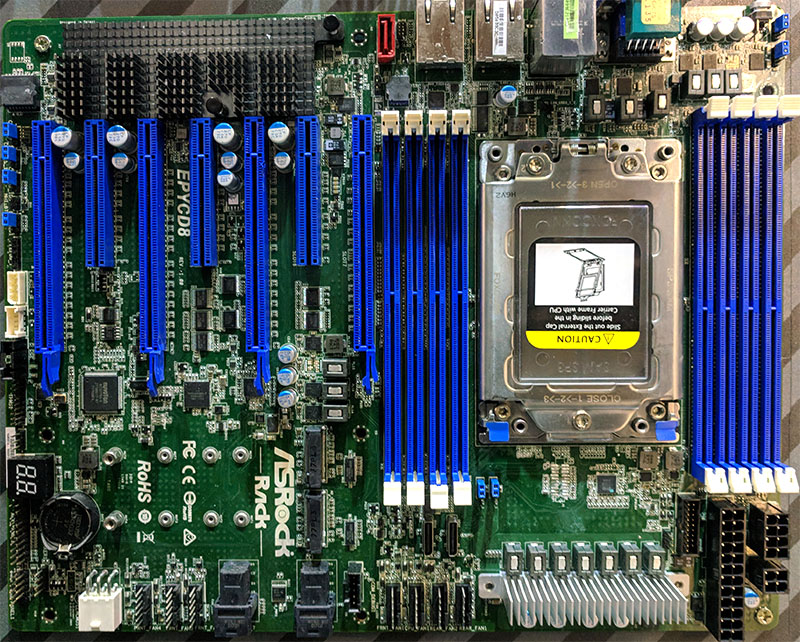
There a better options

ASRock-Rack-EPYCD8-Motherboard.jpg


With 4 GPU's (GTX, Vega, whatever) of your choice over 4 real PCIe-16 lanes and 3 PCIe 8 slots left for other equipment for more or less the same price as an 1 SSG or 1 Quadro p6000.

But these options won't work on a Apple laptop.
 
sole purpose for the decision being the display, which based on measurements I've seen does indeed produce the full DCI-P3 gamut with phenomenal accuracy.

Aris,

Indeed the Apple display technology is very impressive especially in regards to colour and quite reasonable in regards to the contrast. But be wary of the toe or black level. While I have no experience of the 2018 MacBook Pro I do have the 2018 iMac and it is not the ideal grading tool. If your work is for online consumption all should be well but not for broadcast. Apple screens have just a small crush in the blacks that I assume keeps pictures crunchy and vibrant but it will lead you astray in grading. I have seen people grading on their iMacs screens and the result can create milky blacks when played on TV screens. I know its expensive but if your serious about grading accuracy you need to add a broadcast monitor.
 
To get this back on topic...OP didn’t say anything about needing the mobility of a laptop. The MBP is a solid machine but unless you must work on the go I wouldn’t suffer from the limitations of a laptop. Also if you’re heavily using Premiere, OSX is not a good choice.
 
Aris,

Indeed the Apple display technology is very impressive especially in regards to colour and quite reasonable in regards to the contrast. But be wary of the toe or black level. While I have no experience of the 2018 MacBook Pro I do have the 2018 iMac and it is not the ideal grading tool. If your work is for online consumption all should be well but not for broadcast. Apple screens have just a small crush in the blacks that I assume keeps pictures crunchy and vibrant but it will lead you astray in grading. I have seen people grading on their iMacs screens and the result can create milky blacks when played on TV screens. I know its expensive but if your serious about grading accuracy you need to add a broadcast monitor.

Oh, I didn't know that. Is there any way to prevent milky blacks from occurring?

While I will be doing a decent amount of work intended for online distribution, my main target -or rather desired target - will be cinema screens, for the short I'll be DP'ing shortly, when it (hopefully) gets accepted into festivals, albeit probably the smaller ones like the last two I shot a few years back, it'll have to be sent to a post house to be made into a DCP for projection, so this is why it's important for me to be able to work properly in P3, so the MacBook was a very attractive choice. For the previous shorts I did I basically had zero grading ability since I was lacking a good editing machine and they were projected off a BluRay disc, so I'm hoping to step it up this time around. Main driving factor behind a laptop purchase is mobility, I travel all the time so a desktop with a proper broadcast monitor is sadly not an option.

This upcoming short will be my most important project for this year, so being able to color it as precisely as possible and knowing it'll look that way (more or less, I'm aware projectors behave differently than screens) on a big screen, is why I felt the MacBook was appealing. That black level discrepancy does concern me though now that I hear about it.
 
Figure out how to get an external NVIDIA gou running... that will be more important than anything.

I absolutely love the NVIDIA platform and plugging something like a 1070 or 1080 would be a dream come true, but probably ain't gonna be happening on the Apple platform, without some sort of programming magic tricks at least and that does indeed disappoint me. If the Dell XPS's display was as spicy as the MacBook's, I'd definitely be going that route + a muscular eGPU to go with it to chew through r3d's!
 
I use Premiere for everything except color, it's my go-to platform. Could you elaborate on the OSX-related issues with it?

Color correcting with Adobe software and FCPX works on MacBooks with a DCI-P3 screen, Davinci doesn't work for color on a build in DCI-P3 screen (Declink is not an option, you NEED it, together with an external monitor/TV/Beamer/etc...).

With a MacBook, FCPX is the way to go, when your on the go (color wise).
 
I absolutely love the NVIDIA platform and plugging something like a 1070 or 1080 would be a dream come true, but probably ain't gonna be happening on the Apple platform, without some sort of programming magic tricks at least and that does indeed disappoint me. If the Dell XPS's display was as spicy as the MacBook's, I'd definitely be going that route + a muscular eGPU to go with it to chew through r3d's!

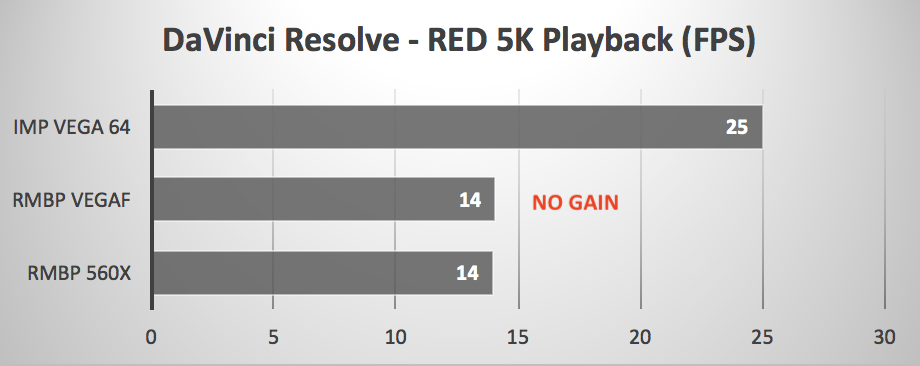
macbook_pro_egpu_davinci_red.png


Full res is not an option 1/2 or 1/4 res might work, 1536x790 (1/4 res) works great for edit on a 2880x1800 MacPro screen.

pic_disp.php


pic_disp.php


AMD cards are not far behind NVidia and it works flawless with Apple (and they deliver equal or more performance/$).

The CPU will be the bottleneck during rendering.
 
Davinci doesn't work for color on a build in DCI-P3 screen (Declink is not an option, you NEED it, together with an external monitor/TV/Beamer/etc...).

It doesn't work? Are you absolutely sure? So if I set my timeline in Davinci to P3 etc. etc. nothing would happen? That is a surprise. Why exactly is that? If that's the case, it's a deal-breaker but I find it very, very hard to believe.
 
Ugh... the benchmarks are triggering my OCD. They’re labeled as 29.97 playback, but it’s obviously 24/23.9....
 
It doesn't work? Are you absolutely sure? So if I set my timeline in Davinci to P3 etc. etc. nothing would happen? That is a surprise. Why exactly is that? If that's the case, it's a deal-breaker but I find it very, very hard to believe.

That fancy shmancy P3 calibrated display on your laptop is still driven at 8bits through the standard RGB GUI interface. If you want to properly monitor for grading, you need a Decklink card outputting to a properly calibrated display.

OTOH, if you know how to use the grading tools, scopes, histogram, etc.. you can get a good way there as it is. And now I’m going to be that guy and say that the current round of Apple displays are good enough that I would trust them for primary color work, even given the interface/GUI compromise, over professional broadcast monitors / grading monitors I’ve spent big money on in the past. Don’t sweat it... If you’re trying to be a pro colorist, you’ll want a pro grading setup, but until then don’t worry until you have the budget and truly the need for it.
 
I absolutely love the NVIDIA platform and plugging something like a 1070 or 1080 would be a dream come true, but probably ain't gonna be happening on the Apple platform, without some sort of programming magic tricks at least and that does indeed disappoint me. If the Dell XPS's display was as spicy as the MacBook's, I'd definitely be going that route + a muscular eGPU to go with it to chew through r3d's!

This- loaded, I9, 64gb ram , 4k, nvidia p2000, 2x mv slots, under 4lbs, with the great thinkpad keyboard-

https://www.anandtech.com/show/13208/lenovo-launches-ultra-thin-thinkpad-p1

and this-

https://www.gigabyte.com/Graphics-Card/GV-N1080IXEB-8GD#kf

Might be a good transportable option. If Misha approves.

I have the Gaming box, it is very light, and am going to wait on the MBP till I see how Resolve works on the P1. I might have to forgo FCPX.
 
That fancy shmancy P3 calibrated display on your laptop is still driven at 8bits through the standard RGB GUI interface. If you want to properly monitor for grading, you need a Decklink card outputting to a properly calibrated display.

OTOH, if you know how to use the grading tools, scopes, histogram, etc.. you can get a good way there as it is. And now I’m going to be that guy and say that the current round of Apple displays are good enough that I would trust them for primary color work, even given the interface/GUI compromise, over professional broadcast monitors / grading monitors I’ve spent big money on in the past. Don’t sweat it... If you’re trying to be a pro colorist, you’ll want a pro grading setup, but until then don’t worry until you have the budget and truly the need for it.

I see. Yes, when I grade I keep my eyes peeled on those scopes!

So apart from the inferior bit depth, the shades of color I'll be seeing through Resolve will be accurate yes? Not trying to be a pro colorist by any means, just want to add some spicy color to my work that'll be reasonably consistent across different viewing platforms.
 
I believe there are real advatages to checking on a 8bit didplay... the last few times I have regretted a grade was when we didn't check it on a 8bit computer display before letting it go..

That fancy shmancy P3 calibrated display on your laptop is still driven at 8bits through the standard RGB GUI interface. If you want to properly monitor for grading, you need a Decklink card outputting to a properly calibrated display.

OTOH, if you know how to use the grading tools, scopes, histogram, etc.. you can get a good way there as it is. And now I’m going to be that guy and say that the current round of Apple displays are good enough that I would trust them for primary color work, even given the interface/GUI compromise, over professional broadcast monitors / grading monitors I’ve spent big money on in the past. Don’t sweat it... If you’re trying to be a pro colorist, you’ll want a pro grading setup, but until then don’t worry until you have the budget and truly the need for it.
 
I see. Yes, when I grade I keep my eyes peeled on those scopes!

So apart from the inferior bit depth, the shades of color I'll be seeing through Resolve will be accurate yes? Not trying to be a pro colorist by any means, just want to add some spicy color to my work that'll be reasonably consistent across different viewing platforms.

You’ll be just fine. :)
 
I believe there are real advatages to checking on a 8bit didplay... the last few times I have regretted a grade was when we didn't check it on a 8bit computer display before letting it go..

For sure. And we have to remember than 99% of all the displays out there in the world are 8bit, uncalibrated and many LED/LCD panels as well as most plasmas and older HDTVs were manipulating pixel color closer to the 6bit range by the time they were activating the elements on the screen itself.
 
This- loaded, I9, 64gb ram , 4k, nvidia p2000, 2x mv slots, under 4lbs, with the great thinkpad keyboard-

https://www.anandtech.com/show/13208/lenovo-launches-ultra-thin-thinkpad-p1

and this-

https://www.gigabyte.com/Graphics-Card/GV-N1080IXEB-8GD#kf

Might be a good transportable option. If Misha approves.

I have the Gaming box, it is very light, and am going to wait on the MBP till I see how Resolve works on the P1. I might have to forgo FCPX.

Misha doesn't approve or disapprove anything, I just give my opinion when it suits me and sometimes I'm totally wrong and get corrected soon enough.

But those gigabyte and MSI laptops are tempting if only R3D wasn't so hard on those tiny laptop CPU's (Cineform uses about 5..7 times less compute power with a 10..30% increase in filesize with the same quality output).
It all comes down how you want to work, a bit heavy and get the job done or in style with a fancy under powered laptop.
 
Back
Top