Welcome to our community

Be a part of something great, join today!

  • Hey all, just changed over the backend after 15 years I figured time to give it a bit of an update, its probably gonna be a bit weird for most of you and i am sure there is a few bugs to work out but it should kinda work the same as before... hopefully :)

MacBook Pro 2018 for a RED workflow?

Aris_Gavriilidis

Well-known member
Joined
Feb 18, 2015
Messages
117
Reaction score
0
Points
16
Location
Athens, Greece
Hello everyone,

I'm seriously considering getting the brand new 2018 MacBook Pro 15" for editing and coloring an upcoming short I'm shooting on Dragon, sole purpose for the decision being the display, which based on measurements I've seen does indeed produce the full DCI-P3 gamut with phenomenal accuracy. I know the top of the line Core i9 model isn't worth it due to thermal throttling so I'm going for the base one (plus the maxed out one is out of my budget at the moment)

2.2Ghz i7
16GB RAM*
Radeon Pro 555X
256GB SSD

*Would it be worth the extra cash to take it to 32GB of RAM?

I work with Adobe Premiere and Davinci Resolve, I've seen various tests but I thought it was worth asking here too if this machine can work fast with this particular software. I'm going to be mainly working in 2K timelines for both color and cutting, but I'll definitely finish some projects in 4K down the line too.

Is it worth the investment? I'm aware that for the same money I can get the new Dell XPS 15 9570 which is faster in almost every aspect, but its panel just isn't on the same level in terms of color accuracy and for me that was a deal breaker.
 
The iMacPro's display might help you in Premiere it won't in Davinci Resolve(you need a Declink card for this).

Since the i9 and the i7 have about the same speed (as you mentioned), the i7 is the better choice.
Yes, the 32GB is worth the upgrade because you can't upgrade it afterwards and both programs you mentioned work better with 32GB than with 16 GB.
When you work a lot wit R3D don't expect to much from a laptop(any laptop).

Have a look at http://barefeats.com/, they test Mac's for a living.
 
Just to add here, the thermal throttling on these isn’t as bad as some of the initial reports make it out ot be. And Apple has partially addressed it via an SMC update that curbs the throttling a bit, but the system does run a hotter still and that really impacts the battery. FWIW, this new i9 MBP absolutely smokes my Dell with the same CPU and larger fans. The throttling really only kicks in when all 6 cores are pumping and sustaining a load — rendering, for example.

Beyond that, this is a +1 to what Misha said above. Definitely get the 32GB RAM. If you still have room in the budget after the RAM upgrade, then consider the 512GB SSD. 256 will be large enough for OS and apps, but the 512 will can also be useful for some additional cache or scratch space and this storage is FAST! Of course, even larger is better, but the prices climb very fast as you go to 1TB and beyond. For most general usage the 2.2GHz isn’t going to be much different or slower than the 2.6GHz. I appreciate the effort to go to 6-core here, but I think Apple should have offered the 3GHz 4-core option as well and it fits in the same power/TDP window as the 2.2GHz 6-core. For most that would have been the better CPU option, once again does not throttle back as much as that 2.6GHz i9 and would have provided superior performance in many apps like Photoshop and the like that can’t use more than 2 cores most of the time anyway.

Battery life on these 2016~2018 MBP’s is crap too, just so you’re warned. In some ways it’s very impressive due to how thin and efficient they have become. But I wish they had kept the 2012~2015 MBP design. It would have doubled their battery and also offered greater cooling capacity. And everyone was happy with that unit. IMO my 2012 rMBP was the best laptop I’ve ever owned.
 
I would upgrade the GPU as well, before you upgrade the SSD.
 
I faced the same decision recently and at the last minute I decided to jump on this deal for a 2016 from B&H which to me made a whole lot more sense for me. I have an iMac that's my edit base, so it might be different if this is your main machine, but the big deciding factor for me was that I would rather edit on proxies on a slower machine than have a super fast machine that's limited to external HDs. I make a lot of shorts, so most projects are <2tb of data, and I just couldn't spend $3k on a machine with less storage than a minimag, regardless of all the other features. But they are enticing! And at the end of the day, as long as the thing runs, don't let the specs and clock speeds and all the other bullshit run you into the ground. Buy something and make the most of it.
 
Figure out how to get an external NVIDIA gou running... that will be more important than anything.
 
I don’t think the nVidia thing is going to happen anytime soon. So far the hacks/ tweaks that make it work are only partially functional and break with every new OSX or nVidia driver release. Lots of finger pointing back and forth between nVidia and Apple on this one. It seems there’s a PCIe addressing extension practice they’re using that OSX doesn’t like or allow. AMD updated their driver base to accommodate, nVidia refuses to. Perhaps they might feel more willing to do so if Apple had not cut them out of the loop, going exclusively with AMD GPUs.

Although, I’m expecting Apple to ditch AMD soon and shift over to their own GPUs. Their GPU in the A11 Bionic chip is freakin’ amazing and it’s their first attempt. If they were to pump that up a bit more for their notebooks and bigger multi-core variants for desktops, they would be killing it. The rumors keep circulating about Apple shifting to ARM... Who knows, I don’t see that happening specifically, I think the industry as a whole is going to see an evolution into x86/ARM convergence. I do see Apple moving to their own GPUs. Probably very soon.
 
Figure out how to get an external NVIDIA gou running... that will be more important than anything.

Are you sure?

pic_disp.php


Cheapest GTX1080ti $ 650 https://www.newegg.com/Product/Product.aspx?Item=N82E16814500427&cm_re=gtx1080ti-_-14-500-427-_-Product

Used RX VEGA 64 $ 550 https://www.newegg.com/Product/Product.aspx?Item=N82E16814932031R&cm_re=rx_vega_64-_-14-932-031R-_-Product

Or when you need some GPU with enough memory to not run out of mem all the time the VEGA FE with 16 GB $ 1.000 and it always works with Apple, windows, Linux, etc....
 
One thing I have found with Resolve and nVidia vs. AMD is that multi-GPU CUDA definitely outperforms multi-GPU AMD/OpenCL. ...And Yes, the nVidia GPUs are more expensive, even when not comparing with an open-box AMD, especially the better OC models.

AMD has done very well recently with getting their drivers up to snuff with their hardware. That was a huge problem for the past several years. The one thing that keeps many going back to nVidia though, regardless of performance/price potential is there’s still a lot of software that is CUDA only.
 
Are you sure?

pic_disp.php


Or when you need some GPU with enough memory to not run out of mem all the time the VEGA FE with 16 GB $ 1.000 and it always works with Apple, windows, Linux, etc....

Let’s wait to pick up this discussion tomorrow night :)
 
Let’s wait to pick up this discussion tomorrow night :)

Looking forward to a NVidia GPU with atleast 12 GByte that supports OpenGL overlay at 10-bit color depth from NVidia for around $ 1.000.

Or is 8 bits color good enough for Premiere Pro, AVID, etc users (A7's are pretty good in low light with only 8 bits).
For Resolve users it's less of an issue, when they have a platform that has enough PCIe lanes to support multiple GPU's (for 10 bits you need a declink card anyway).

8K.R3D is more in need of a good CPU for less than $2 k to decode/decompress the R3D's, oh wait, their is an other announcment tomorrow during the day time.
 
Are you sure?

pic_disp.php


Cheapest GTX1080ti $ 650 https://www.newegg.com/Product/Product.aspx?Item=N82E16814500427&cm_re=gtx1080ti-_-14-500-427-_-Product

Used RX VEGA 64 $ 550 https://www.newegg.com/Product/Product.aspx?Item=N82E16814932031R&cm_re=rx_vega_64-_-14-932-031R-_-Product

Or when you need some GPU with enough memory to not run out of mem all the time the VEGA FE with 16 GB $ 1.000 and it always works with Apple, windows, Linux, etc....
Under $1000 works with Apple
https://www.anandtech.com/show/13210/amd-announces-radeon-pro-wx-8200
https://www.youtube.com/watch?v=oYSwvKoKqtA
 
Last edited:
Figure out how to get an external NVIDIA gou running... that will be more important than anything.

Forgot this one

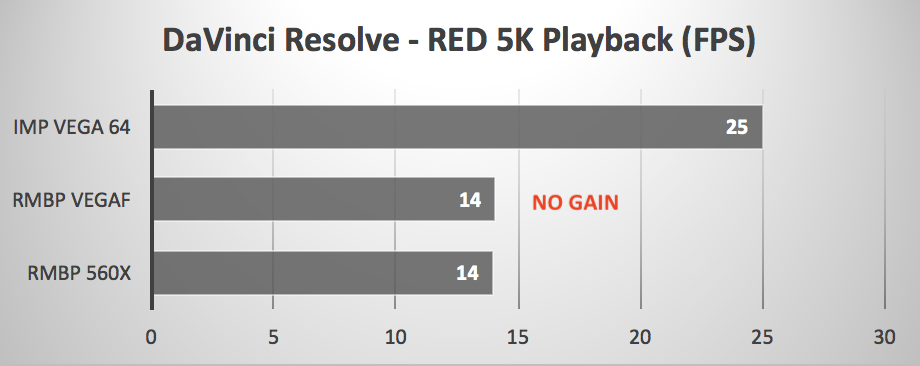
macbook_pro_egpu_davinci_red.png


Even the lowest resolution DSMC2 (Gemini 5k) won't give you more than 14 fps with all the gpu's in the world connected to a MacBook Pro, the cpu is the bottleneck.
Well that is not entirely true, with some tricks the Radeon Pro SSG could help some, but you have more experience with it than I have, at least you got one from Raja last year.
 
Back
Top