
DJ Meyer
Well-known member
- Joined
- Dec 22, 2008
- Messages
- 1,070
- Reaction score
- 47
- Points
- 48
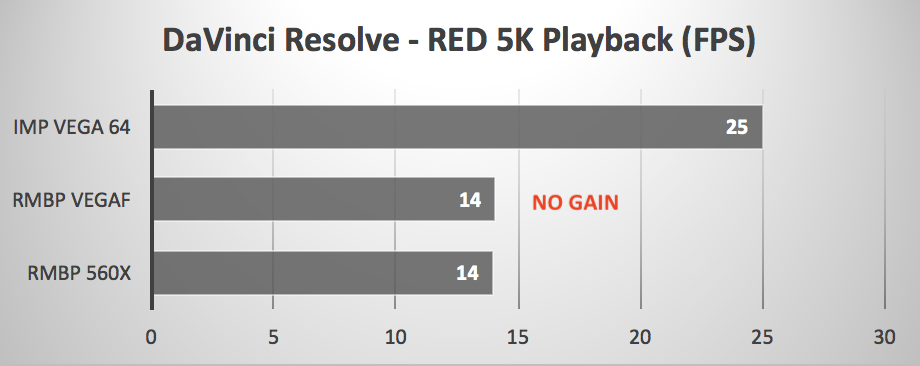
Radeon Pro SSG is pretty useless for real world r3d workflows.

Follow along with the video below to see how to install our site as a web app on your home screen.

Note: this_feature_currently_requires_accessing_site_using_safari
Radeon Pro SSG is pretty useless for real world r3d workflows.


sole purpose for the decision being the display, which based on measurements I've seen does indeed produce the full DCI-P3 gamut with phenomenal accuracy.

Aris,
Indeed the Apple display technology is very impressive especially in regards to colour and quite reasonable in regards to the contrast. But be wary of the toe or black level. While I have no experience of the 2018 MacBook Pro I do have the 2018 iMac and it is not the ideal grading tool. If your work is for online consumption all should be well but not for broadcast. Apple screens have just a small crush in the blacks that I assume keeps pictures crunchy and vibrant but it will lead you astray in grading. I have seen people grading on their iMacs screens and the result can create milky blacks when played on TV screens. I know its expensive but if your serious about grading accuracy you need to add a broadcast monitor.
Figure out how to get an external NVIDIA gou running... that will be more important than anything.
Also if you’re heavily using Premiere, OSX is not a good choice.
I use Premiere for everything except color, it's my go-to platform. Could you elaborate on the OSX-related issues with it?
I absolutely love the NVIDIA platform and plugging something like a 1070 or 1080 would be a dream come true, but probably ain't gonna be happening on the Apple platform, without some sort of programming magic tricks at least and that does indeed disappoint me. If the Dell XPS's display was as spicy as the MacBook's, I'd definitely be going that route + a muscular eGPU to go with it to chew through r3d's!
Davinci doesn't work for color on a build in DCI-P3 screen (Declink is not an option, you NEED it, together with an external monitor/TV/Beamer/etc...).

It doesn't work? Are you absolutely sure? So if I set my timeline in Davinci to P3 etc. etc. nothing would happen? That is a surprise. Why exactly is that? If that's the case, it's a deal-breaker but I find it very, very hard to believe.
I absolutely love the NVIDIA platform and plugging something like a 1070 or 1080 would be a dream come true, but probably ain't gonna be happening on the Apple platform, without some sort of programming magic tricks at least and that does indeed disappoint me. If the Dell XPS's display was as spicy as the MacBook's, I'd definitely be going that route + a muscular eGPU to go with it to chew through r3d's!
That fancy shmancy P3 calibrated display on your laptop is still driven at 8bits through the standard RGB GUI interface. If you want to properly monitor for grading, you need a Decklink card outputting to a properly calibrated display.
OTOH, if you know how to use the grading tools, scopes, histogram, etc.. you can get a good way there as it is. And now I’m going to be that guy and say that the current round of Apple displays are good enough that I would trust them for primary color work, even given the interface/GUI compromise, over professional broadcast monitors / grading monitors I’ve spent big money on in the past. Don’t sweat it... If you’re trying to be a pro colorist, you’ll want a pro grading setup, but until then don’t worry until you have the budget and truly the need for it.

That fancy shmancy P3 calibrated display on your laptop is still driven at 8bits through the standard RGB GUI interface. If you want to properly monitor for grading, you need a Decklink card outputting to a properly calibrated display.
OTOH, if you know how to use the grading tools, scopes, histogram, etc.. you can get a good way there as it is. And now I’m going to be that guy and say that the current round of Apple displays are good enough that I would trust them for primary color work, even given the interface/GUI compromise, over professional broadcast monitors / grading monitors I’ve spent big money on in the past. Don’t sweat it... If you’re trying to be a pro colorist, you’ll want a pro grading setup, but until then don’t worry until you have the budget and truly the need for it.
I see. Yes, when I grade I keep my eyes peeled on those scopes!
So apart from the inferior bit depth, the shades of color I'll be seeing through Resolve will be accurate yes? Not trying to be a pro colorist by any means, just want to add some spicy color to my work that'll be reasonably consistent across different viewing platforms.

I believe there are real advatages to checking on a 8bit didplay... the last few times I have regretted a grade was when we didn't check it on a 8bit computer display before letting it go..
This- loaded, I9, 64gb ram , 4k, nvidia p2000, 2x mv slots, under 4lbs, with the great thinkpad keyboard-
https://www.anandtech.com/show/13208/lenovo-launches-ultra-thin-thinkpad-p1
and this-
https://www.gigabyte.com/Graphics-Card/GV-N1080IXEB-8GD#kf
Might be a good transportable option. If Misha approves.
I have the Gaming box, it is very light, and am going to wait on the MBP till I see how Resolve works on the P1. I might have to forgo FCPX.