Welcome to our community

Be a part of something great, join today!

  • Hey all, just changed over the backend after 15 years I figured time to give it a bit of an update, its probably gonna be a bit weird for most of you and i am sure there is a few bugs to work out but it should kinda work the same as before... hopefully :)

KOMODO....

Alexandre I loooooove what you did !!! J'adore !
I like so many things about this, the fonts, the use of colors to make everything clear, the addition of 'Assist' button, marker, loupe, how it makes it easier to know when you're in standby or recording, etc.

Looking at this full screen on an iPhone 8 and nothing feels too small, looks perfectly unusable and intuitive.
Loved what Stanly brought to the table but this is my favorite foundation for the UI & UX. Hope Jarred feels inspired by this as well.
 
Alexandre, this is my favorite UI yet and by far. i think this is all very sleek, and does everything you'd want it to do in a very forward thinking and easy to navigate way.
 
Love the work you guys are doing, Stanly and Alexandre! Rand's concerns about the "tape measure" might be very valid, but I'm a fan of the "tape measure" approach in general, and my hope would be that its use in smartphone interfaces would make it familiar enough to be acceptable on all manner of sets.

Alexandre :
+) Round record button : A useful shape to distinguish it with peripheral vision. Round would also take away concerns that pressing near the edge might trigger a record. Colour of Record Button could indicate state (In-Playback-Mode / Not-Recording / Pre-record / Recording / Finalising).

Antony raises a good point-- possible a different shape for the record button would be valuable?
 
One big question: what are the implications of having the main control interface ON TOP of the camera? Haven't seen much discussion of this, but there are good reasons that it's a relatively uncommon arrangement, right?

I'm trying to think of comparisons. The Sony FS100 and FS700 cameras had built-in monitors that meant you needed to keep the top of the camera somewhat clear of rigging-- but at least controls were on the side, and you could tilt the screen so that you could be behind the camera. And DSLRs often have controls located on a top panel-- but with a viewfinder and LCD facing back. The most similar layouts I can think of are medium format still cameras: the Hasselblad 500 series and various TLR designs (e.g. Rollei, Yashica...)
 
Any color blind people around? We would prefer RED/CYAN or RED/BLUE patterns as color contrast for the REC button... RED/GREEN is pretty much the same for us.

Let's make the standby status blue then ; ) on the new UI thread here : http://www.reduser.net/forum/showthread.php?181378-UI-amp-UX-ideas&p=1895969&viewfull=1#post1895969

You and Stanly are well beyond what I am capable of! I could never get my menus to be interactive. Maybe between you and Stanly, Red will get some new Ideas on how they can change how consumers interact with the Komodo's interface.

Rand, you also have great concepts, let's hope it helps RED! : )

Love the work you guys are doing, Stanly and Alexandre! Rand's concerns about the "tape measure" might be very valid, but I'm a fan of the "tape measure" approach in general, and my hope would be that its use in smartphone interfaces would make it familiar enough to be acceptable on all manner of sets.

Thanks! I think that including also preset makes for the best of both world. If you like, one tap on a preset and you're done. And if you need to fine-tune an in-between value the slider is more useful than entering a value or pressing dozens of times on a +/- button.

Lots of great ideas here. Thanks for all the effort Alexandre, Stanly and Rand.

My one concern is usability of the more complicated menus with the limited buttons on the Komodo. We basically have MENU, UP, DOWN, SELECT, PLAYBACK (and of course RECORD).

Hi Robert, I assume the touch screen will be used for more advanced manipulations like the sliders. I get your point though and I tried also to make it more usable on the small touchscreen.

Personally, I would be sad to see the histogram go, and think it should be given as much screen real estate as possible.

My thinking is similar to yours but to be able to have a detailed RGB histogram and goal posts, I think it needs it's own space. Personally I prefer fast access to most used tools on the main view like magnify, assist tools and marker, and when needed, it's only one tap away to have a bigger RGB histogram and it uses the full width of the screen. Tap again anywhere on the histogram and you're back to the main view.

Colour of Record Button could indicate state (In-Playback-Mode / Not-Recording / Pre-record / Recording / Finalising).
6 sec into the following video is an example of using colour of a Record button with White (not active), Red (Record), Yellow (Finalising Recording) : https://vimeo.com/268841859#t=0m6s

Red RED button is such a convention and in a good way, it's instantly recognizable, you don't need to look for it. But I agree with you that it may happen in the heat on set that it's not always obvious. Older tape cameras used to have the STBY green pause/stop button when not recording, so the recording indicator not just disappear but is replaced by something else that explicitly says it's not recording.

Alexandre I loooooove what you did !!! J'adore !
I like so many things about this, the fonts, the use of colors to make everything clear, the addition of 'Assist' button, marker, loupe, how it makes it easier to know when you're in standby or recording, etc.

Looking at this full screen on an iPhone 8 and nothing feels too small, looks perfectly unusable and intuitive.
Loved what Stanly brought to the table but this is my favorite foundation for the UI & UX. Hope Jarred feels inspired by this as well.

Thanks Gabriel!
 
If I'm not mistaken Jarred has talked about a Mamiya 6/7 6.45 like a billion times.

I could be mistaken tho.

I'm really thinking specifically about the challenges of top panel interface. Thanks for pointing this out Jarred's words, though, Andrew; I see the Komodo link conceptually-- those medium format cameras offer an incredible amount of image quality in a compact, easy to use package.

With each of those Mamiyas, though, the viewfinder is positioned at the back, just as with a standard SLR or rangefinder. The Hasselblad 500 series and TLRs are generally operated from above, looking down at a ground glass. (Though prism viewfinder attachments were available.) The further difference is that the control interface of the Komodo is on top-- not the case with the Hasselblad or TLR.
 
I'm really thinking specifically about the challenges of top panel interface. Thanks for pointing this out Jarred's words, though, Andrew; I see the Komodo link conceptually-- those medium format cameras offer an incredible amount of image quality in a compact, easy to use package.

With each of those Mamiyas, though, the viewfinder is positioned at the back, just as with a standard SLR or rangefinder. The Hasselblad 500 series and TLRs are generally operated from above, looking down at a ground glass. (Though prism viewfinder attachments were available.) The further difference is that the control interface of the Komodo is on top-- not the case with the Hasselblad or TLR.

Remember the original intension of the Komodo? An auxiliary camera to mount anywhere including aerials and gimbals. Hence why it’s ergonomics are different to traditional video cameras. That said, many will adapt it to other purposes.
 
Some of these layouts are shown at more than twice the actual display size. They may not scale down well for easy accurate touch functionality. I have designed AV system control UI's for touch screens ranging from about the size of Komodo's up to video wall way finding maps. The smallest practical touch button for ease of operation is about the size of your index finger tip, 3/8" to 1/2" square. Below that they can get a bit fiddly.
 
Some of these layouts are shown at more than twice the actual display size. They may not scale down well for easy accurate touch functionality. I have designed AV system control UI's for touch screens ranging from about the size of Komodo's up to video wall way finding maps. The smallest practical touch button for ease of operation is about the size of your index finger tip, 3/8" to 1/2" square. Below that they can get a bit fiddly.

You are right, since KOMODO's screen is about the width of iPhone 6 – iOS guidelines become really useful to define what's "tappable" or visible in use.
 
Can anyone tell me what technology the canon variable ND mount adaptor uses? Is it an electronic adaptor like sony or the Mavo LF adaptor uses inside, or is it just two polarisers like a standard vari ND?
This is a big deal to me, as those two polariser options are no good when you want to control reflections with another polariser (like filming a car). I like having easy variable ND's, but not with restrictions.

cheers Paul
 
Alexandre -- this looks OUTSTANDING
 
Here's my updated display at 100% based on iPhone 6. I used a 17.3 inch laptop. open it up to either "full screen" or "fit screen" or "view actual size"on your computer.

This means nothing unless you know the PPI of the Komodo's screen and the PPI of the screen you're viewing on.
 
Speaking of PPI, as much as I love to see everyone chiming in on the UI design, not many of y'all are actual UI designers. You need to remember to take into account tap target size, so the buttons are actually something you have enough room to hit, and not accidentally hit a neighboring button.
 
Tim,

if you are a UI designer would you like to show us your UI? well yeah, the preset buttons are a little tight and may not be doable, but these are suggestions. And you're also right that I am not a UI designer. I started using the program about 5 days ago. But Jarred did ask for suggestions. Could I see yours?
 
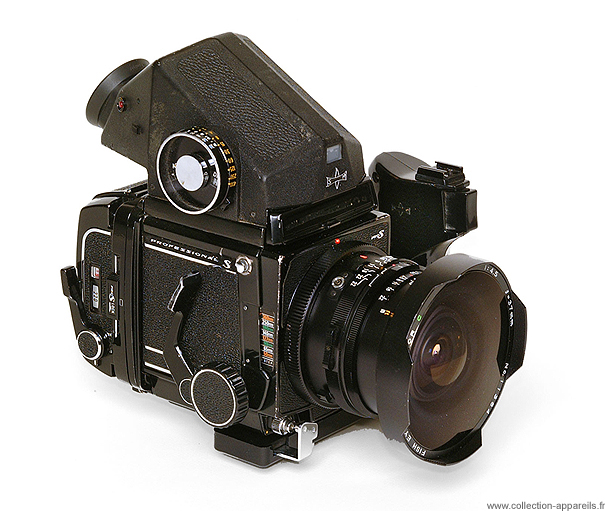
I saw some here talking about the possibility of a Mamiya Style vewfinder accessory piece and saying that it would have to be viewed from the top and wouldn't be that practical.
I agree, UNLESS you have something like this :
ensemble.jpg

Mamiya_RB67.jpg


We can imagine something that doesn't cover the entire top of the camera so the physical buttons stay usable.
 
Luis,

No problem. Someone wanted to see how the UIs that had been posted would scale so I brought a few examples of the ones I made from that other thread. All future UIs will be posted to that thread.
 
I saw some here talking about the possibility of a Mamiya Style vewfinder accessory piece and saying that it would have to be viewed from the top and wouldn't be that practical.
I agree, UNLESS you have something like this :
ensemble.jpg

Mamiya_RB67.jpg


We can imagine something that doesn't cover the entire top of the camera so the physical buttons stay usable.

If it easily flips open it does not matter if it covers the whole top. Someone made a loupe for the 5" red touch before that was on a hinch which worked great just flip it to the side if using the touchscreen and flip back when using it as a view finder.
 
Back
Top