Welcome to our community

Be a part of something great, join today!

  • Hey all, just changed over the backend after 15 years I figured time to give it a bit of an update, its probably gonna be a bit weird for most of you and i am sure there is a few bugs to work out but it should kinda work the same as before... hopefully :)

Holiday Update + IPP2 Preview Build

Hi Guys,

My weapon was stolen last year, insurance is going to get me a New one.

How long will an allocation take for a Weapon helium right now ?

I still have a vistavision deposit in fron a couple NABs ago.

Thanks !

Dan
 
Hey All,

We have been shooting all week on our Epic-W with the holiday firmware update. Things have been looking great, but we've seen a number of potential bugs. In no particular order:

- Side mag reader not recognizing 512gig mags. This occurred when using the user keys at the front of the side mini mag module. Afterwards, the top user key would not function (fixed after full power cycle)
- IO expander not outputting HD-SDI (fixed w/ 2 power cycles)
- Histogram's horizontal size has not been previewing consistently. It seems to shuffle between the standard horizontal width, and a slightly compressed width. Can't figure out what we could be doing on our end to cause this. It's been very random sometimes occuring after watching clip playback.
- Clip playback is defaulting to a super flat, log look. Honestly, I would not be surprised if there is a setting that's been overlooked on this issue. But it seems odd to default to such a flat playback. Anyone have a tip on this point?


Camera setup:
-Epic-w + base io expander, dsmc2 7" touch, Wooden Camera top handle, side pogo lemo adapter
- 8k 2:1, 24fps, 1280-1600 iso, 10:1 compression ratio
- RwgRGB + LOG3G10
- Expander dtap in use for teradeck bolt transmitter + focus motor
- HDSDI output in use
- 512 and 240 mini mags
- Mixed battery and AC power source

Thanks all. Footage is looking great tho!
 
Kevin,

Presently none of the Red cameras support a LUT on playback and assuming you are using the IPP2 preset on your Heluim then you will only see the base log image. This solution is temporary and in future builds Grahame has said they won't be relying on LUTS to "normalize" the image. BUT Red please allow LUTS to be applied to playback as its a real limitation.
 
In camera, easiest way to try the IPP2 preview is to go to "presets" and select the "IPP2 Preview" preset which sets the raw development to RWG/Log3G10 and loads up the IPP2 preview math as a LUT. When we move to the full (rather than preview) implementation in camera of IPP2, we'll put the flexibility in to do more options than the default REC709/BT1886.

Graeme


When implementing the IPP2 Preview Preset my saturation slider in the Looks menu on the camera goes to 1.97. Is this to be expected???
 
Here is a shot with my Epic Dragon. Picture 1 is WIDEGAMUT & REDGAMMA4, The second shot is REDGAMMA4, Dragoncolor2. It fixes the nasty blue that has plagued dragon. The one color that always bothered me at weddings ( a popular color amongst brides) and I always had to worry about over clipped blues. However it takes away some reds, browns, yellows it seems. Look at the wood of the guitar.
 

Attachments

  • guitar_DC.0000000.jpg
    guitar_DC.0000000.jpg
    70.8 KB · Views: 0
  • guitar_wide.0000000.jpg
    guitar_wide.0000000.jpg
    65.8 KB · Views: 0
Here is a shot with my Epic Dragon. Picture 1 is WIDEGAMUT & REDGAMMA4, The second shot is REDGAMMA4, Dragoncolor2. It fixes the nasty blue that has plagued dragon. The one color that always bothered me at weddings ( a popular color amongst brides) and I always had to worry about over clipped blues. However it takes away some reds, browns, yellows it seems. Look at the wood of the guitar.

RWG is not meant to be viewed direct. You should be applying the IPP2 Preview cube to view the result correctly.

Graeme
 
RWG is not meant to be viewed direct. You should be applying the IPP2 Preview cube to view the result correctly.

Graeme

IPP2 isn't in my REDCine X. I don't have an option for that. This was already filmed on Epic Dragon a few moths back how would I do this?
 
IPP2 isn't in my REDCine X. I don't have an option for that. This was already filmed on Epic Dragon a few moths back how would I do this?

If you download the IPP2 preview from the start of this thread (just leave the default settings of REC709/BT1886 as that's the HD monitor standard) that will work without you doing anything else. If you want to try the cube method you use the "normal" REDCine-X, set it to RWG/Log3G10 and apply the 3D Cube http://www.phfx.com/temp/reduser/phfx_RED_RWGRGBwithLG310_IPP2PreviewLUT.zip

Graeme
 
IPP2 isn't in my REDCine X. I don't have an option for that. This was already filmed on Epic Dragon a few moths back how would I do this?

Ahoy:

I'm getting asked a bunch either how or for the IPP2 Preview LUT. Here's a short explanation to get people started.

Download this IPP2 Preview LUT (this is RED's official preview LUT):

http://www.phfx.com/temp/reduser/phfx_RED_RWGRGBwithLG310_IPP2PreviewLUT.zip

Instructions for REDCINE-X PRO:


For 3rd Party Applications, do the same as above and apply the 3D LUT via whatever program you are using.
 
Thanks Phil for your timely and helpful response!

Graeme
 
Thanks guys! Is this the only way going forward? I have my helium coming in a few weeks or so (hopefully, I wish I honestly had an idea LOL) with helium will it ever be easy again like just using the settings for red without having to apply a LUT? With my Epic Dragon I always just used dragoncolor2, and redgamma3 or redgamma4. If I wanted to cinema custom grade I would use redlogfilm and then load a LUT
 
Yes, it will get that easy again with the full IPP2 release. Things will be a bit different as you'll be setting what your monitor is rather than a specific red gamma and red colour, but you'll get a better image, more flexibility and better grading should you decide to go that route. And I'll be here to help you.

Graeme
 
WOW. Much better than Dragoncolor2! This is looking pretty damn good guys! Just amazing.
 

Attachments

  • guitar_DC.0000000.jpg
    guitar_DC.0000000.jpg
    70.8 KB · Views: 0
  • guitar_ipp2.0000000.jpg
    guitar_ipp2.0000000.jpg
    58.2 KB · Views: 0
Why is the reds blotchy? Look at the skin tone and EXIT sign. With LOG310. When I take LOG312 or anything else its fine. So the LUT and wide gamut are fine too. The LOG310 is causing it.

LOG310 with IPP2 is left (first picture), the Dragoncolor2 is right (picture 2)
 

Attachments

  • wide_man.0004081.jpg
    wide_man.0004081.jpg
    64.2 KB · Views: 0
  • dragon_color2.0004081.jpg
    dragon_color2.0004081.jpg
    70 KB · Views: 0
WOW. Much better than Dragoncolor2! This is looking pretty damn good guys! Just amazing.

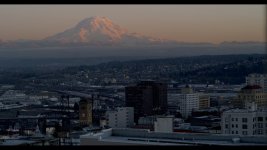
Yeah, I just filmed a short timelapse of sunset over Mt. Rainier this evening, and it's surprising how natural it looks with very little effort using just the RWG + Log310 and applying a Rec709 look in the final node in Resolve.
 

Attachments

  • Mtrainier_1.1.1.jpg
    Mtrainier_1.1.1.jpg
    92.8 KB · Views: 0
Yeah, I just filmed a short timelapse of sunset over Mt. Rainier this evening, and it's surprising how natural it looks with very little effort using just the RWG + Log310 and applying a Rec709 look in the final node in Resolve.
Looks great! You shoot anything the day after NY? The sky and sunsets were amazing that week. That day, in particular, had blues and yellows I have not seen in a long time. We have had some wonderful golden sunsets the past two weeks. I went out last night and it was the one bad night. Figures!

I see Starbucks HQ in the bottom.
 
Looks great! You shoot anything the day after NY? The sky and sunsets were amazing that week. That day, in particular, had blues and yellows I have not seen in a long time. We have had some wonderful golden sunsets the past two weeks. I went out last night and it was the one bad night. Figures!

I see Starbucks HQ in the bottom.

You guys have such great light out there...we just don't get that back east
 
Back
Top