Welcome to our community

Be a part of something great, join today!

  • Hey all, just changed over the backend after 15 years I figured time to give it a bit of an update, its probably gonna be a bit weird for most of you and i am sure there is a few bugs to work out but it should kinda work the same as before... hopefully :)

Exposure Tool

Owen Rennie

Well-known member
Joined
May 5, 2010
Messages
761
Reaction score
0
Points
0
Age
45
Location
Sydney
Website
www.driftwoodcinema.com
I'm sure I must of missed this bit in the user manual but....

When viewing the Exposure tool, Red is clipping, purple is crushed blacks, and then I have green everywhere. What is the green??

Thanks to Reduser I never shoot without checking exposure tool first now and my images are looking better for it.

Thanks in advance


Owen
 
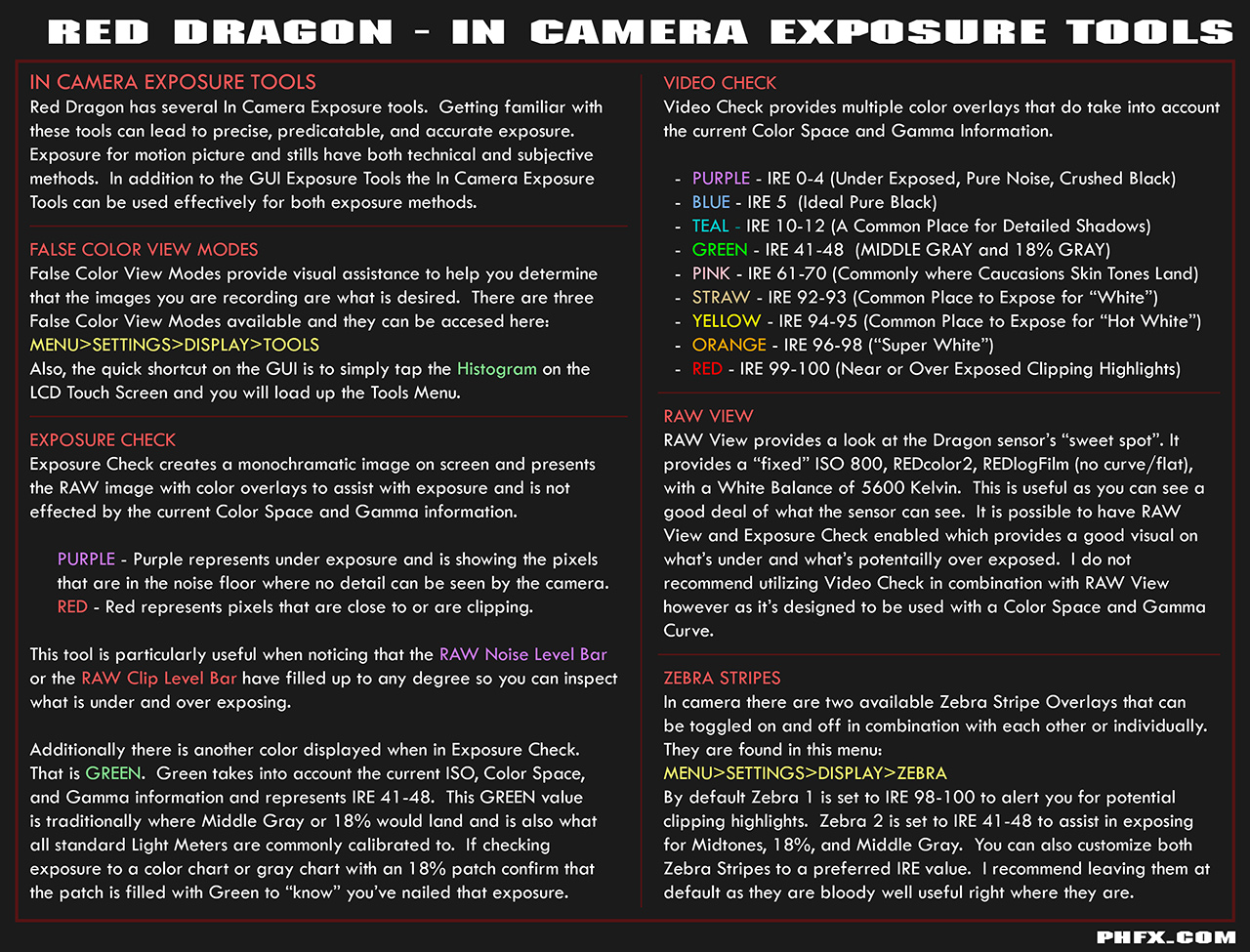
Green represents 18% Grey or Middle Grey for the given gamma curve and color space. With Video Check that lands in the IRE range of 41-48.

Red Dragon - In Camera Exposure Tools
 
Ok thanks Phil, I haven't done too much reading on IRE values but I will now... So I guess if my exposure tool shows nothing but lots of green I'm doing good yeh?

Owen
 
Don't forget that all the dialogs offer in-camera help. It is the same text found in the user manual. Just tap the "Help" button on the top of the screen when a dialog is open.

The "Display > Tools" dialog help will explain what the colors mean.
 
Hey why is that 18% grey is a good exposure for skin tone ?

http://www.ryanewalters.com/Blog/blog.php?id=3551583675371023276

"Furthermore the published standards for correct reflectance values of middle grey (ANSI PH3.49-1971) actually put it at 12%-13%, which is about 1/2 stop under 18%. And it seems that most meter and camera manufacturers agree with this standard, as many of the reflected meters will determine middle tone as a 12%-13% middle grey value. Yep, companies like Sekonic and Canon, among others put middle tone at 12%-13%, not 18%."
 
Usually you want some of that green on the skin tones for proper exposure...

Hey why is that 18% grey is a good exposure for skin tone ?

Lot's of different methods I've seen over the years in relationship to where 18% Grey lands and where a desired skin tone is exposed.

Typically for Caucasian land you'll illuminate pink. However, when lighting to light meter and grabbing a desired look you may want the skintones entirely in 18% Grey. Some prefer to have the illuminated surface of the face from the key light fill up entirely Pink. Or a slight variation of transition from say the highlight of the given skin surface in Pink that transitions to 18% Grey. For High Key work you may not want any Green on a lighter skin surface. For Low Key work you may not want anything above Green for a skin surface. Just depends.

It's a matter of preference and style. I've seen pretty much everything when it comes to IRE and where skin lands. There are certainly standard methods of exposing via meter and this provides a very expected result that you can make creative and technical decisions based on 18% Grey as your reference point. Which has been standard working procedure for a long, long time.
 
Hey why is that 18% grey is a good exposure for skin tone ?

Phil + Mark are right and more accurate than me....green / 18% should be on *some* of the skin tone highlights like cheekbones but yes pink (in the false color system) is what you should be looking for on caucasian skin in daylight.

Not sure anything was announced officially outside of Jarred's Facebook regarding the upcoming ZONE tool... but it was working on a 'beta' camera in the IBC booth and it looks like it will be a super useful addition to the toolbox.
 
i know the manual says that the 'Exposure Tool" is based on RAW data and Look settings do not affect the Exposure indicators, and as Phil says, Color Space and Gamma information do not affect the exposure indicators, but if I do not see this on my Scarlet. With the Exposure tool on, I can toggle RAW view on and off and the amount of purple will change. Likewise, with the exposure tool on I can switch between Redlogfilm, RedGamma4, RedGamma3, RedGamma2......and the amount of purple will change. Redlogfilm of course is the saw as RAW view. I'm just wondering what I'm missing here. As a practice I am in the habit of switching to RAW view to use the exposure tool, I am just wondering what I'm missing here.
 
i know the manual says that the 'Exposure Tool" is based on RAW data and Look settings do not affect the Exposure indicators, and as Phil says, Color Space and Gamma information do not affect the exposure indicators, but if I do not see this on my Scarlet. With the Exposure tool on, I can toggle RAW view on and off and the amount of purple will change. Likewise, with the exposure tool on I can switch between Redlogfilm, RedGamma4, RedGamma3, RedGamma2......and the amount of purple will change. Redlogfilm of course is the saw as RAW view. I'm just wondering what I'm missing here. As a practice I am in the habit of switching to RAW view to use the exposure tool, I am just wondering what I'm missing here.

You're doing the right thing. RAW view and the Exposure Check will reveal exactly where potential problem areas are. Where Red and Purple are should be areas that you intend to clip or crush, if not, a different lighting scheme or exposure should likely be explored.

For general exposure when in one of the Video Gammas (more or less are there to produce a normal looking image/rec.709) Video Check "tells" you where more values land so you can carve it out the way you want. The same could be said if you are using a custom Look with a different curve or whatever.

The Exposure Tool is based on the RAW data, but can also be effected by the "look". Heh. I may to look at the manual again, but that's certainly what it's doing.
 
The manual clearly states that "Look" settings have no affect on exposure indicators in the Exposure tool. I have always thought I was just crazy.....so maybe I not completely crazy... Ha
 
Phill where can we get all of this "pdfs" youve made from exposure to framerates, sensor size,...?

Soon my friend. Making a few very important pages for it this week.
 
Ansel Adamas places Caucasian skin tone in Zone 6 which is one stop lighter than Zone 5 or Middle Grey (18%)
 
Ansel Adamas places Caucasian skin tone in Zone 6 which is one stop lighter than Zone 5 or Middle Grey (18%)

Which is why there is a pink zone in Video Check for exactly that.
 
Back
Top