Welcome to our community

Be a part of something great, join today!

  • Hey all, just changed over the backend after 15 years I figured time to give it a bit of an update, its probably gonna be a bit weird for most of you and i am sure there is a few bugs to work out but it should kinda work the same as before... hopefully :)

DRAGON vs EPIC MX Noise - NOT GOOD

Status
Not open for further replies.
Is this a problem effecting everyone with the new OLPF and/or the latest firmware or is it just the latest batch of Dragons that are having this problem? I know I've seen some Dragon footage with the new OLPF that doesn't look like the footage I'm getting from my Dragon but I'm not sure what firmware they were using. It could just be an isolated manufacturing defect.
 
My Dragon has unnaceptable levels of spattered red dot-like noise across the entire frame, starting at 400 ISO in various exposures. There's no debate. This is a fact. I'm glad Red is on it because I love Dragon in every other way.
 
Would love to keep this thread on track with examples of noise and possible solutions from RED as they discover and recalibrate the color science, etc. This is quickly going to turn into a subjective discussion about noise and film grain. This is really about comparing the 2 cameras and not what level is acceptable or pleasing. I think we can all agree we would expect Dragon to be at least as good as the MX, if not somewhat better in terms of noise at any given ISO. I can suggest starting a new thread to entertain everyone's notions about how much noise or film grain they like or dislike in their shots.

I fully expected Dragon to have double the sensitivity of MX. So that means no visible noise at at least 1600 ISO. Thats how its advertised, and what can be expected from a sensor upgrade 3 years later. Not roughly the same sensitivity...so i agree it's not really a subjective something, the difference should be so clear and big in noise between MX and Dragon that this thread shouldn't even be possible. That there is even this discussion already indicates it's a lot less sensitive than hoped. We can only hope its pure a software thing.

maybe some sort of noise cancelling in firmware could up the specs of the dragon. the F5 has for example some outstanding build in noise cancelling. When shooting Cine EI on that camera at iso 2000 blacks can be a bit noisey, but when using the build in noise cancelling even ISO 5000 looks pretty clean. So maybe red can somehow tweak the firmware to have a form
of noise cancelling already applied over the raw image. I know the whole raw capture thing and denoise options in rcx, but somehow the camera also does something with the image hence dragon noe had different results than earlier buils.
 
maybe some sort of noise cancelling in firmware could up the specs of the dragon. the F5 has for example some outstanding build in noise cancelling.

I would be surprised if the camera was capable of NR if that wasn't built into the hardware and this would also strike at the heart of the RAW philosophy. Surely a better approach would be to build into RedcineX an effective NR capability even if it was a paid plugin from Neat Video? Use it if you feel you need it only on the shots that need it. Particularly like the way Resolve can apply NR based on the luminance so it can be applied only in the shadows not globally affecting the image and saving on computer render time.
 
I'm happy to hear that it's a calibration issue and not our sensors. Thanks for the update jarred even though you support team has been good a keeping in the loop from the get go.
 
Last edited:
I haven't got the new OLPF in David... So my images are fine.

I'm as curious as you are. I'm sitting on the fence until the boys at RED come back with a solution... Which I'm sure they will.

cheers mate, I, was just ribbing you anyway. :) hope you are well.

Battistella
 
I would be surprised if the camera was capable of NR if that wasn't built into the hardware and this would also strike at the heart of the RAW philosophy. Surely a better approach would be to build into RedcineX an effective NR capability even if it was a paid plugin from Neat Video? Use it if you feel you need it only on the shots that need it. Particularly like the way Resolve can apply NR based on the luminance so it can be applied only in the shadows not globally affecting the image and saving on computer render time.

What would be nice is a feature similar to Adobe camera raw where it automatically sets noise reduction level and sharpening based on what camera you are using. Would make things a lot simpler and quicker to get good results. Basically like a faster working ADD automatically selected when working with Dragon clips.
 
So, good news i suppose. Unless your camera will need to go in to RED again for re-calibration (again).

Not that big a deal for US customers, for others it can be a major ordeal and quite expensive.
 
@jarred - thanks for jumping in with an update.

@phil -

i understand your deep knowledge of film and experience in that area. I also hear you on the points about density, grain, DR, color balance and proper processing of images. There are a couple of points to be made here.

Compared to film, I think people expect much less noise and grain from a digital sensor. I'd say they also expect to rate it at higher Ido values than traditional film with much less noise. We know that when properly lit the dragon has a wide DR and a lot of room to push and pull the image, dragon seems to be the same. We know that under exposed film can get quite grainy and unforgiving, and that also seems to be the case with the new OLPF cal combo. So in that sense it's completely on part with motion picture film and various film stocks.

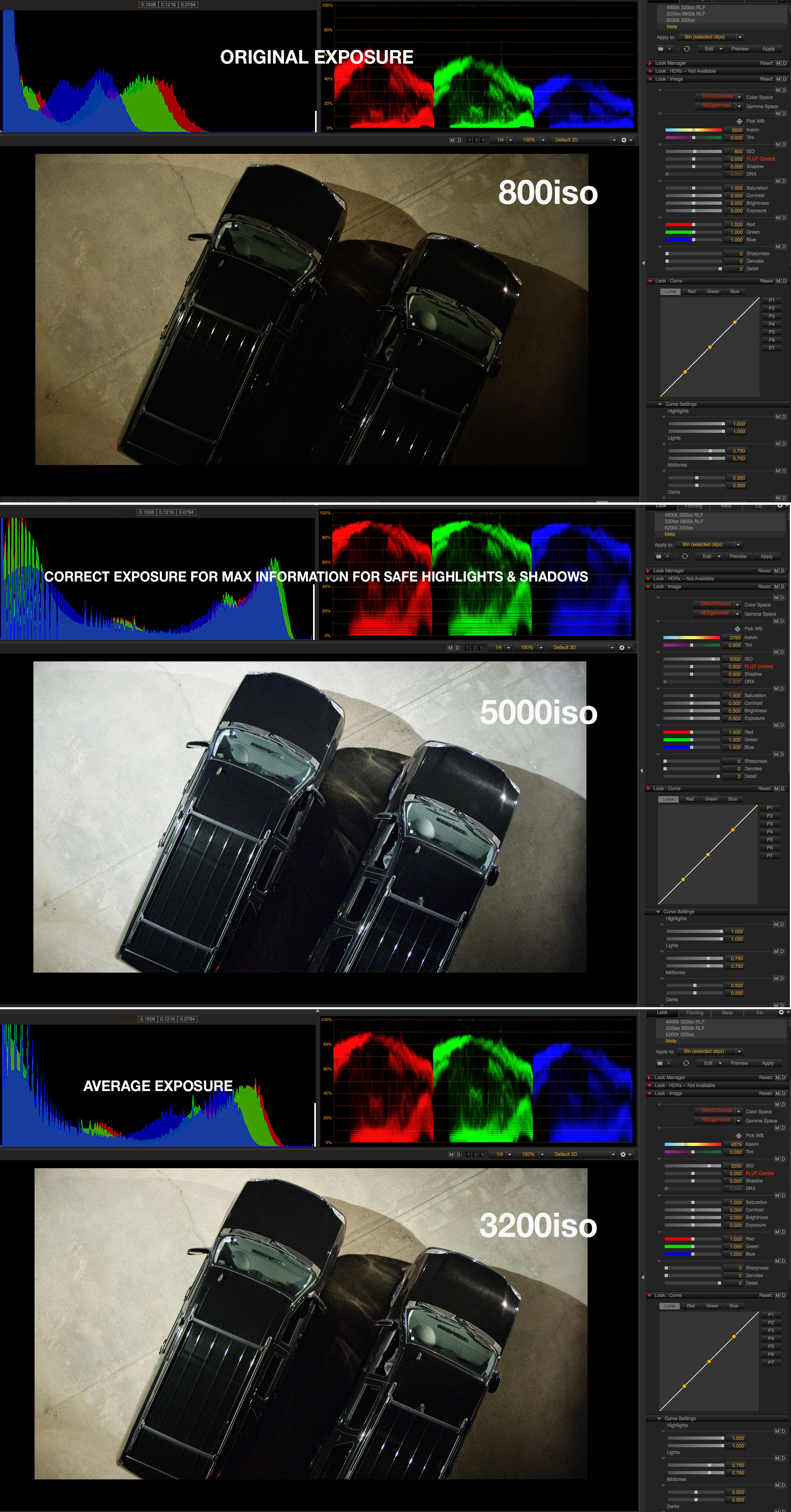
What surprised me was that the noise is literally like an on off switch at the difference of one stop, which I expected to be a more gradual rolloff. My cheesy little example kinda shows how one stop of light in the low end could have a really big effect on images where the blacks could be deep and rich with less noise. (The London test r3ds show pretty amazing blacks).

I've only had the new OLPF, so I can't make any arguments about comparisons I have seen, I just think most of the imagery that people have been going on and has been widely posted to date has not displayed the 0-12 noise profile people are seeing. It seems very consistent in the images people are posting. So it seems like a sensor cal thing.

As jarred posted, there are many improvements (no red dot noise, virtually no sensor flare, skin tones and a host of other things) just this affects images captured in non ideal situations.

Cheers,
battistella
 
Not to divert the conversation here, but I have an odd question that stems mostly from my film background.


What ISO do you want or would expect "crystal clean" ISO performance?


Red's official word on ISO 2000 is "cinema ready" which is relative to common film stocks and grain.


Much like film, Red Dragon's ISO sensitivity effects the general texture of the image.


Which ISO pleases you the most?


I'm happy.
 
Last edited:
As a matter of interest, this will mean 3 versions of Dragon in the wild, old OLPF and old calibration, new OLPF and new calibration, and new OLPF and 'newer' calibration.

Anyone else think this makes using an unknown Dragon a bit of a drag.? It means as a DOP or assistant you have to ask is it old/new/newer.

Also, as there will now be 3 sensor calibrations in the wild what kind of effect will this have on the coding of future firmware updates?

Just askin.
 
@phil -

i understand your deep knowledge of film and experience in that area. I also hear you on the points about density, grain, DR, color balance and proper processing of images. There are a couple of points to be made here.

Compared to film, I think people expect much less noise and grain from a digital sensor. I'd say they also expect to rate it at higher Ido values than traditional film with much less noise. We know that when properly lit the dragon has a wide DR and a lot of room to push and pull the image, dragon seems to be the same. We know that under exposed film can get quite grainy and unforgiving, and that also seems to be the case with the new OLPF cal combo. So in that sense it's completely on part with motion picture film and various film stocks.


Understood. I know myself and Les have posted film scan samples here in the past and Dragon is certainly cleaner than modern film stock at comparable sensitivities.

And yes I do see the differences here between Mysterium-X and Dragon. Which is interesting. Though there are other things not being picked up on, like how much further into darkness/density you see in that upper cabinet. Red will certainly update us if there's any improvement on this front.


There is an interesting battle going on in the world of digital cinema camera these days. Some want less noise. Some want pleasing texture. Texture is character and it is of course one of the reasons film fans love film. Tricky battle there to satisfy both of those crowds. Red's clearly done a lot of work to make Dragon feel far less digital than Mysterium-X and that's super important to "film dudes". The Dynamic Range is obviously important as is it's effect on the color performance as well.

Mysterium-X and Dragon are different in a lot of ways, texture/noise/grain is going to be one of them due to pixel size and a few other factors. Glass clean ISO 800 is an interesting desire, one that neither camera truly does. Though that is indeed the middle point that both sensors are tuned for.


Through the prototypes and up until now with the newest tech we do have the "best Dragon" so far. I'm sure there's always more room to improve. I understand the criticism here as I think people were expecting a "night and day" difference perhaps.


Red isn't into on board noise reduction for a variety of reasons. I personally don't think that's something that is necessarily needed as it does always tamper with detail and color at the end of the day.


Curious to see where this goes from here.
 
I'm happy.

I seem to be the only guy that does not have a real issue with noise... But then again. I don't have the new OPLF.

I do however see the MX / DRAGON (with new OLPF) back to back noise tests people have been posting. I'm sure the RED team will address it.

I'm personally not worried as I don't shoot over 800 iso much at all. And a lot of these posts people are posting are underexposed anyways. It's no wonder they are seeing noise.

over%20head%20black%20trucks.jpg

Mark, no one has a problem with noise on the old OLPF, which I too have tested, so your images don't really speak to the issue. It's the new one that seems to be an issue (and only the new one). I'm glad I'm late in line, because honestly I'd rather keep my MX than have noise like what the new OLPF seems to be producing, and shipping to/from Canada is $$$. Hopefully by the time I get my e-mail, this will be sorted out.

Meanwhile our Epic MX continues to serve us very, very well.
 
Yeah,

its a a curious discussion for sure.

I see see marks stuff and I say, clean blacks, nice highlight rolloff, low noise and I'm quite happy. The thing about shadow noise is that it's crawly and requires cleanup, not so much a problem in mids and highs. The hard clip at the top of MX is gone and that is a huge improvement right there.

all of the dragon stuff has a certain aesthetic that is RED, my preference leans more toward a cleaner image out of the box, where grain can be added if desired. I'd rather have that than trying to remove excess grain.

It is also the creative dividing line between film and video, that is also for sure so I can see how film guys (and I love film) want more texture.

Battistella
 
I think this issue warrants us to stay on topic. This is about a side by side test where the Dragon displays more noise than the MX. I was sent another Dragon vs MX side by side test today which displays very similar results. I really don't understand the subjective debates here, as I'm pretty sure the expectation all around was that the Dragon is cleaner than the MX, toe to toe. Otherwise this thread wouldn't be news.

What I'd like to have answered is:

1. Are the displayed results an isolated event with certain Dragons? (The consensus seems to be no. Thanks to everyone who's confirmed.)
2. If no to #1, is this how the Dragon is supposed to be operating?
3. If no to #2, what is the targeted ISO/Noise ratio for the Dragon fix? I, and many others, was of the impression that the Dragon noise level @ 2000 ISO was to be close to the MX noise level @ 800. What should be be expecting?

@Phil - Is your opinion that you see no issues with Eric's test, and the Dragon is performing as expected?

I really appreciate Red chiming in here and good on them for tackling the issue. God speed, Graeme.

In the meantime, this severely affects the shoot I'm doing next week, which involves nighttime, dusk and twilight aerials. Shooting at 250ISO isn't an option, as it would still be underexposed in the majority of the image. The previous aerials I've done with the Dragon, used in Red's NAB reel, with the older OLPF don't seem to have the same issues that I'm seeing now. Those images are much cleaner than what I'm seeing in this test and others, which makes me about 99% ready to replace the Dragon with an MX or an F55 for my shoot next week.

Really hope this gets figured out quickly. Thanks.
 
Interesting indeed, but that camera has many other issues including 8 bit, skew, and somewhat limited dynamic range. But it's a fun low light specialty cam, for sure, and I can see a lot of uses for it, just not on every gig. It's using a ton of in-camera noise reduction, which is never as good as what you can do in post, but still.

Back to topic, I for one will certainly hold off on upgrading until this issue is resolved. Anyone else agree? Hopefully it will not take too long (maybe it's a simple defect… Let's hope for the sakes of all concerned.)
 
What I'd like to have answered is:

1. Are the displayed results an isolated event with certain Dragons? (The consensus seems to be no. Thanks to everyone who's confirmed.)
2. If no to #1, is this how the Dragon is supposed to be operating?
3. If no to #2, what is the targeted ISO/Noise ratio for the Dragon fix? I, and many others, was of the impression that the Dragon noise level @ 2000 ISO was to be close to the MX noise level @ 800. What should be be expecting?

@Phil - Is your opinion that you see no issues with Eric's test, and the Dragon is performing as expected?


My point of view is going to be different as I'm shooting 4K-6K and testing on a 4K projector elsewhere and 70" 4K screen here at the hut. I've projected ISO 250-6400 on the new OLPF at those resolutions and various REDCODE compression ratios. I'll attempt o answer your points though.

1. I think this is what people are generally experiencing, though I wouldn't describe it as "far worse" than Mysterium-X. I think it's different and needs to be observed accordingly.
2. Mine is operating nicely, though I wasn't there at the test. Next test if there is one, please make sure to put the cameras on the exact same tripod though. There are brightness variations due to angle of incidence that make critical observations and measurements difficult.
3. Most around town are shooting ISO 250-800 at 5K-6K for a 4K finish and getting nice results. I am as well.

I do have general issues with the test, but that's outside of my control and I'm basing what I can off of the samples provided. There's areas of under exposure through decent exposure and Mysterium-X and Dragon will look different due to a variety of factors. The more visible quality of some of the shadow noise could be due to Dragon producing more density at that level and the luminance contrast is more extreme due to that. I'm not expecting the noise or general image characteristics to be the same though due to different sensor/pixel designs and wildly different camera response curves.


More or less I see the difference though I'm not totally astounded by it. I'm also expecting the camera to produce different textures at different ISOs and REDCODE compression ratios.


I would say for the time being tinker around with the "denoise" function in REDCINE-X Pro and see if that provides any help to what you are seeing. I'm exporting and using ISO 2000 material with the New OLPF and Calibration and like how the material looks, though I'm not beefing up underexposed areas outside of reason.
 
I am like Matt

I liked what the old OLPF/sensor cal did for the image.

Going forward (aghhh hate that phrase) I seem to remember RED talking about the possibility of users doing OLPF swaps on their own. If every time you swap an OLPF a sensor cal is needed how likely is this now?
 
Status
Not open for further replies.
Back
Top