Welcome to our community

Be a part of something great, join today!

  • Hey all, just changed over the backend after 15 years I figured time to give it a bit of an update, its probably gonna be a bit weird for most of you and i am sure there is a few bugs to work out but it should kinda work the same as before... hopefully :)

Dragon Non-Linear Color Response?

If you or anyone who looks at it cannot see it then it is not present.

When it is present it is obvious, if you had seen it you would know.

Generally under tungsten lighting. Milk girls was daylight afaik.

As I recall, the first posts on this began to crop up some time after the MX release, but I could be wrong.

One of the first posts I remember seeing was in 2011, by a user named Axel Ebermann. I haven't seen him here in quite a while.

It is interesting to note that Mr. Ebermann was able to replicate his findings on his 5D.

Then this is good news because it appears to be a firmware thing rather than a Dragon sensor thing. If it's firmware and is deemed a real problem, Graeme can fix it.. or Mark L. Pederson or Phil can offer a work-a-round. .
 
Then this is good news because it appears to be a firmware thing rather than a Dragon sensor thing. If it's firmware and is deemed a real problem, Graeme can fix it.. or Mark L. Pederson or Phil can offer a work-a-round. .


It could also be that there was some sort of change in makeup formulation, or an entirely new product that went into circulation at that time. I don't know.
 
It could also be that there was some sort of change in makeup formulation, or an entirely new product that went into circulation at that time. I don't know.

Agreed. Until the puzzle is solved, everything possible is ruled in.
 
RED Log Film out with Tiff, than in PS6 applied Film Look Fuji Film Sensia 200 using Nik Software plug in Color Effects Pro 4, no additional adjustments except grain set to 500 (or grainless), both images can be seen at the attachments.
 

Attachments

  • A004_C001_0223GG.0000607F.0000000.jpg
    A004_C001_0223GG.0000607F.0000000.jpg
    33.4 KB · Views: 0
  • A004_C001_0223GG.0000469F.0000000.jpg
    A004_C001_0223GG.0000469F.0000000.jpg
    34.5 KB · Views: 0
Ok, ok, I'm done now.

I'll be back if I need to talk something around in circles and have all the important points ignored or dismissed.
 
To bring this to a full circle it is quite simple.
The face goes blotchy and out of color before the rest of the girl as the face got more color to it, more red color in other words less green and hardly any blue... So for that reason the face is more starved out of colors then the rest as the face is lacking more blue... if anybody here want to blame the camera or makeup for that thats fine. I would blame lack of color info... So "balanced makup is good... red paint, blue pant or green paint is not good makup, it steals color resolution and even a red tinted face will make huge difference when you expose on the border of under exposure... so do not do that. Do nto under expose if you want clean skin tones. have proper amount of fill. These pictures discussed here had non of that. They are worst case scenario references for lightning.

Simple test, push the iso down to 200 and then tell me if her skin tones looks bad, I think not.
 
Because I think people generally ignore what I have to say, I'll reiterate that I know exactly the problem you're talking about with the MX sensor and I've seen it many times. One of the two examples that immediately come to mind are in Jack The Giant Slayer, on Isabelle's cheek (briefly) when they're in the giant's kitchen. The other one is from John Dies at the End, where they seem to be trying to cover up a wrist tattoo on actor Chase Williamson, seen below.

john-wrist.jpg


Dragon may suffer from the same makeup issue as MX, hopefully to a much lesser degree. However, I guess one of the points I've been trying to make is just because other cameras may not exhibit this exact same issue doesn't mean they don't suffer from makeup issues of their own.

It may be unfair and inaccurate to characterize the problem in terms of "choose the camera that doesn't have makeup issues" because none of them seem to be 100% immune. To me, a makeup issue is a makeup issue.

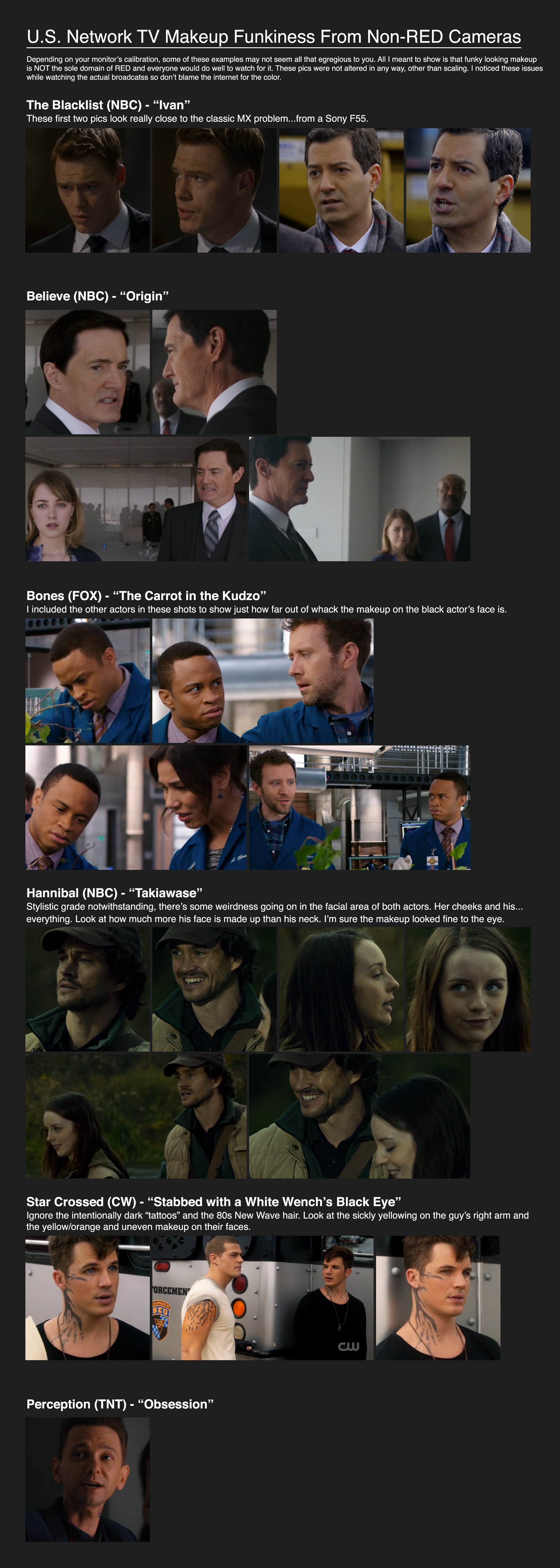
Funky makeup seems to be happening quite a lot lately on network TV. I don't know if I'm just now noticing it (which is entirely possible) or if it's actually getting worse. If it is getting worse, the most likely cause I can think of is people erroneously assuming makeup issues are the sole domain of RED cameras and taking too much for granted, only to find out in post that other cams have makeup issues as well. I think what happens is they simply keep their mouths shut and hope no one notices. And you know what? It's working. So much so that some here on Reduser swear up and down other cameras don't have these kinds of problems, mainly because they've never encountered them. That's kind of like not believing car transmissions go bad because you've never had one go bad.

To see it on other cameras, it's a simple matter of turning on primetime TV and paying attention. To that end, let's play a little game called Guess the Camera. I'll give you a hint: none of them are made by RED.

Click image for larger version.

 
Because I think people generally ignore what I have to say, I'll reiterate that I know exactly the problem you're talking about with the MX sensor and I've seen it many times. One of the two examples that immediately come to mind are in Jack The Giant Slayer, on Isabelle's cheek (briefly) when they're in the giant's kitchen. The other one is from John Dies at the End, where they seem to be trying to cover up a wrist tattoo on actor Chase Williamson, seen below.


Dragon may suffer from the same makeup issue as MX, hopefully to a much lesser degree. However, I guess one of the points I've been trying to make is just because other cameras may not exhibit this exact same issue doesn't mean they don't suffer from makeup issues of their own.

It may be unfair and inaccurate to characterize the problem in terms of "choose the camera that doesn't have makeup issues" because none of them seem to be 100% immune. To me, a makeup issue is a makeup issue.

Funky makeup seems to be happening quite a lot lately. I don't know if I'm just now noticing it (which is entirely possible) or if it's actually getting worse. If it is getting worse, the most likely cause I can think of is people erroneously assuming makeup issues are the sole domain of RED cameras and taking too much for granted, only to find out in post that other cams have makeup issues as well. I think what happens is they simply keep their mouths shut and hope no one notices. And you know what? It's working. So much so that some here on Reduser swear up and down other cameras don't have these kinds of problems, mainly because they've never encountered them. That's kind of like not believing car transmissions go bad because you've never had one go bad.

To see it on other cameras, it's a simple matter of turning on primetime TV and paying attention. To that end, let's play a little game called Guess the Camera. I'll give you a hint: none of them are made by RED.

Click image for larger version.

http://www.harbonder.com/media/TV-makeup-big.jpg

All good points. I've got some notes on problem makeup brands and tones from past shoots. I'm getting together a side by side test. It will be interesting to see the results. Certainly, each camera has it's own response to makeup tones and therefore can have it's own issues. Bad makeup is bad makeup no doubt.

I do know for sure what I've seen with MX and the only way to tell if THIS particular problem that I've encountered with MX is unique to RED is to test against other cameras in the same situation. Sure, the other cameras may have their own issues but what I see in the OPs original image is THE problem I've encountered with MX and with no other camera. As you've said, it doesn't mean it doesn't exist with other cameras. I'd love to know if it TRULY is unique to this sensor and then I'd also love to know if there is a solution on the sensor/color science side. Currently coordinating with Graeme outside of this thread and will keep updates in this thread.
 
To bring this to a full circle it is quite simple.
The face goes blotchy and out of color before the rest of the girl as the face got more color to it, more red color in other words less green and hardly any blue... So for that reason the face is more starved out of colors then the rest as the face is lacking more blue... if anybody here want to blame the camera or makeup for that thats fine. I would blame lack of color info... So "balanced makup is good... red paint, blue pant or green paint is not good makup, it steals color resolution and even a red tinted face will make huge difference when you expose on the border of under exposure... so do not do that. Do nto under expose if you want clean skin tones. have proper amount of fill. These pictures discussed here had non of that. They are worst case scenario references for lightning.

Simple test, push the iso down to 200 and then tell me if her skin tones looks bad, I think not.

Did this test for my reference and to learn the limitations of the gear. I understand now that a 60w incandescent bulb positioned 12" away from a model's face is not providing adequate light for Dragon to render colors correctly - in fact it's a "worst case scenario" :-/

I don't know brother . . . perhaps it's not just the archer . . . maybe the arrow needs a color science tweek
 
To bring this to a full circle it is quite simple.
The face goes blotchy and out of color before the rest of the girl as the face got more color to it, more red color in other words less green and hardly any blue... So for that reason the face is more starved out of colors then the rest as the face is lacking more blue... if anybody here want to blame the camera or makeup for that thats fine. I would blame lack of color info... So "balanced makup is good... red paint, blue pant or green paint is not good makup, it steals color resolution and even a red tinted face will make huge difference when you expose on the border of under exposure... so do not do that. Do nto under expose if you want clean skin tones. have proper amount of fill. These pictures discussed here had non of that. They are worst case scenario references for lightning.

Simple test, push the iso down to 200 and then tell me if her skin tones looks bad, I think not.

Bjorn, I get what you;re saying- there is not enough color info (specifically blue channel info) so there is a problem rendering the color accurately. I get it- we all know that the MX sensor (and Dragon I presume) is noisiest and lacking the most in the blue channel under tungsten light since the sensor is natively daylight balanced. Yellowish makeup exacerbates the problem by robbing the sensor of more blue color info. HOWEVER, to say that this is a problem with underexposure is what doesn't sit right with me. Like I've written earlier in this thread, I have seen terrible green faced actors that I have lit with a 3200K source at 1.5 stops over key (incident reading) while rating the camera at ISO 400. This should not be considered underexposure. So while I am sure you are right that the sensor doesn't have enough info in the blue channel because of yellowish makeup under a 3200K source, it is not only because the sensor has been underexposed. I would hope to be able to shoot without issue on the MX or Dragon, a scene under 3200K light with a face at key exposure with a warm tone makeup that on every other camera regularly makes that particular actor look great.

I spoke to a makeup artist with whom I have been collaborating the past 3 years specifically on this issue. She confirmed that she has seen this issue time and again with the RED camera and that she has to cut most yellow based products with pinker tones, even though it is very often totally counterintuitive to do so with some actors' skin tones. We have worked together on dozens of shoots over the years and she has been instrumental in helping find the workaround to the problem. It's taken many times of having an actor look green faced and experimenting with how to cut the yellow/orange base with pinker tones before getting the hang of it. She also confirmed that she has not seen this issue with the Alexa, for what it's worth. I think it's important to note this, because although purely anecdotal evidence, hopefully the comparison can lead to a discovery of why one sensor might exhibit this particular issue and the other might not. Or maybe they both will- a side by side test will tell.

In the meantime, I have found my notes regarding makeup brands and added some based on my discussion with this makeup artist who is familiar with the issue.

HAVE EXHIBITED THE PROBLEM: - -These are brands that typically lean towards yellow or golden.
Visiora (PL 006)
"HD makeup"
Bobby Brown
Makeup forever hd foundation


TESTED AND DO NOT EXHIBIT PROBLEM
Gerda Spillman (CH-8134)
La Mer Tan
Armani
Loreal Tru Match Cool

I'm hoping to be able to pick up some of the problem and non problem makeup and do some comparative tests in the coming weeks. I'll be sure to bracket exposure.
 
...

To see it on other cameras, it's a simple matter of turning on primetime TV and paying attention. To that end, let's play a little game called Guess the Camera. I'll give you a hint: none of them are made by RED.

...

Oh Great... I recently watched a couple of these shows and didn't notice a thing. Since reading your post I look for bad makeup on everything I watch.

Thanks a LOT! mumble grrrr dagnabit
 
Because I think people generally ignore what I have to say, I'll reiterate that I know exactly the problem you're talking about with the MX sensor and I've seen it many times. One of the two examples that ......

Agree 100% Brian.

Thanks for all these.
 
HAVE EXHIBITED THE PROBLEM: - -These are brands that typically lean towards yellow or golden.
Visiora (PL 006)
"HD makeup"
Bobby Brown
Makeup forever hd foundation

TESTED AND DO NOT EXHIBIT PROBLEM
Gerda Spillman (CH-8134)
La Mer Tan
Armani
Loreal Tru Match Cool

Now we're moving ahead. Thank you

Anyone else care to share their valuable professional experience so we can all avoid the avoidable?
 
To try and mediate a little - there are some strands of overlapping information going on in this thread.

1. Underexposure / tungsten light, which inherently produces less accurate colour information, tending towards yellowing in skin tone. The OP's example is firmly in this category IMHO. Improvements in both colour science and personal approach take big bites out of this one.

2. Makeup with good exposure reading poorly for colour rendition. This is not camera specific, and has difficult to discern interactions with lighting. It is also a subject conceptually and logistically removed from the skillset and control of your typical DP.

3. A combination of the above, which happens more often than you'd hope. Many very respectable shooters would be surprised how underexposed their blue channel is in conditions which yield generally acceptable results, putting their footage on a knife edge of susceptibility to either 1 or 2.
 
To try and mediate a little - there are some strands of overlapping information going on in this thread.

1. Underexposure / tungsten light, which inherently produces less accurate colour information, tending towards yellowing in skin tone. The OP's example is firmly in this category IMHO. Improvements in both colour science and personal approach take big bites out of this one.

Sorry John have to disagree with you here.

If this was the case how come the problem is more pronounced in Josh's example where the skin is brightest?
 
Back
Top