Welcome to our community

Be a part of something great, join today!

  • Hey all, just changed over the backend after 15 years I figured time to give it a bit of an update, its probably gonna be a bit weird for most of you and i am sure there is a few bugs to work out but it should kinda work the same as before... hopefully :)

Dragon and low light noise

I "upgraded" to the new SkinToneHighlight OLPF and decided to go back to the old OLPF which I got some great shots and remember it picking up more light in camera than what I was seeing on set.

I'm also shooting on T1.3 Super speeds which help to give the sensor more light.

I'll use the SkinToneHighlight OLPF on those bright sunny days out in the field or when flares are a major issue. I've shot with both now and am much more comfortable with the low light version. This is in part due to my lack of experience in heavily lit conditions. I'm mostly making due with what I have and use this "limitation" as a creative challenge. That's the best I can do for now.
 
Last edited:
The low light OLPF is the answer. It should be the standard in my opinion. I absolutely love it. The rolll off is fantastic, as is the dynamic range and color. I'm completely enamored with it.

I got my skintone OLPF swapped out for the interchangeable system with the lowlight OLPF, but the issue with the red orbs when shooting into light still exists. I guess it does, in general, but was surprised by how easily its encountered. I don't think we can consider the low light OLPF the standard... it'd have to be the next one that becomes the standard and addresses or mitigates many of the issues found.
 
I dunno....

ISO 2000, 3000K, no ADD, no DEB, no NR, RG4/Dragoncolor
Skintone OLPF

10608318_10152819930855126_8306024844258878015_o.jpg

Thanks for the response. It looks like your whites are underexposed by maybe a stop, which I think is safe territory. I did some tests that disproved whites as the problem, my current thinking is that you have to assess the underexposure of your whites, mids, and darks, separately and make sure there is no 3-4 stop underexposure of where the tone should naturally be normal conditions. I had some great results at 2000 as long as the darks were provided a little fill light.
 
Thanks for the response. It looks like your whites are underexposed by maybe a stop, which I think is safe territory. I did some tests that disproved whites as the problem, my current thinking is that you have to assess the underexposure of your whites, mids, and darks, separately and make sure there is no 3-4 stop underexposure of where the tone should naturally be normal conditions. I had some great results at 2000 as long as the darks were provided a little fill light.

I kinda simplify that thinking into:
When shooting at 800-2000, it gets very important that the image I see in the monitor doesn't look underexposed compared to the result I want after final grade.
 
This still scares me about the dragon. I sure dont want more noise if i upgrade from mx to dragon with skintones higlight olpf.
Perhaps the v2 of the lowlight olpf could be the answer but then theres the orb issue. Is there an comparison on orbs on mx and dragon with olpf v2? I know theres fixes in post like deb but it still feels kind of early to know. Also im happy with my epic. Just feel i should upgrade "now or never". The thing i like about the dragon is the highlight rolloff. Its sure better, and better dynamic range. But its hard to tell how much better.
 
IMO, Epic MX and Epic Dragon OLPFv2 (STH) need to be treated as completely different cameras in terms of choosing exposure. Expecting similar results on Dragon OLPFv2 with the same strategies that were effective on MX is a good way to get in trouble. Does that mean you have to rate the DragonSTH at 400ISO for everything? Not at all. That said, if you are rating at 2,000ISO or shooting in low light you need to think through where you want various values to land in the final rendering and adjust if that would result in too much noise where it matters.

Cheers - #19
 
This still scares me about the dragon. I sure dont want more noise if i upgrade from mx to dragon with skintones higlight olpf.
Perhaps the v2 of the lowlight olpf could be the answer but then theres the orb issue. Is there an comparison on orbs on mx and dragon with olpf v2? I know theres fixes in post like deb but it still feels kind of early to know. Also im happy with my epic. Just feel i should upgrade "now or never". The thing i like about the dragon is the highlight rolloff. Its sure better, and better dynamic range. But its hard to tell how much better.

Hey Joel, Phil did some tests that suggests the NEW low light OLPF controls the orbs MUCH better, and may even have better colors etc, too.
 
This still scares me about the dragon. I sure dont want more noise if i upgrade from mx to dragon with skintones higlight olpf.
Perhaps the v2 of the lowlight olpf could be the answer but then theres the orb issue. Is there an comparison on orbs on mx and dragon with olpf v2? I know theres fixes in post like deb but it still feels kind of early to know. Also im happy with my epic. Just feel i should upgrade "now or never". The thing i like about the dragon is the highlight rolloff. Its sure better, and better dynamic range. But its hard to tell how much better.

Hey Joel, Phil did some tests that suggests the NEW low light OLPF controls the orbs MUCH better, and may even have better colors etc, too.


This post here has everything I tested out in a nice summary:

I've been asked to make a big summary post by a user with all the useful test images in there as the Interchangeable OLPF System is now making it's way out into cameras.


Color Consistency

The color difference between the Low Light Optimized OLPF and the Skin Tone - Highlight OLPF is fairly minimal:


OLPF Texture Comparison

Below is a sample video showing the texture comparison between both the STH and LLO OLPFs:


There are a few 100% crops from that video here:
http://www.reduser.net/forum/showthread.php?122074-First-Look-Interchangeable-OLPF-on-Dragon&p=1420118&viewfull=1#post1420118

And here:

http://www.reduser.net/forum/showthread.php?122074-First-Look-Interchangeable-OLPF-on-Dragon&p=1423024&viewfull=1#post1423024

As well as some of the "pretty shots" here:

http://www.reduser.net/forum/showthread.php?122074-First-Look-Interchangeable-OLPF-on-Dragon&p=1420342&viewfull=1#post1420342


Notes on Improvements and Artifacts

The general concept is that the texture/noise/grain is 1 to 1.3 stops cleaner on the Low Light Optimized OLPF versus the Skin Tone - Highlight OLPF. Meaning the general "energy" and characteristics of the noise is about 1 to 1.3 stops better. So essentially if you like the Skin Tone - Highlight OLPF at ISO 400, you'd likely feel the same way about the Low Light Optimized OLPF at ISO 800-1000.

Red's recommended "cinema ready" ISO range is ISO 250-2000. However, I've found under some circumstances that ISO 4000-5000 is rather usable in certain situations with the Low Light Optimized OLPF:


A note on potential artifacts.

The LLO OLPF produces this Red Dot Grid at smaller apertures like T16, which is similar to what Mysterium-X does:


Where as the STH OLPF eliminates the undesirable qualities of the Red Dot Grid with it's own unique look:


Additionally and occasionally on super hot sources pointed into the lens you may get Highlight Orbs around the source, which is almost like an extreme lens flare when it happens:


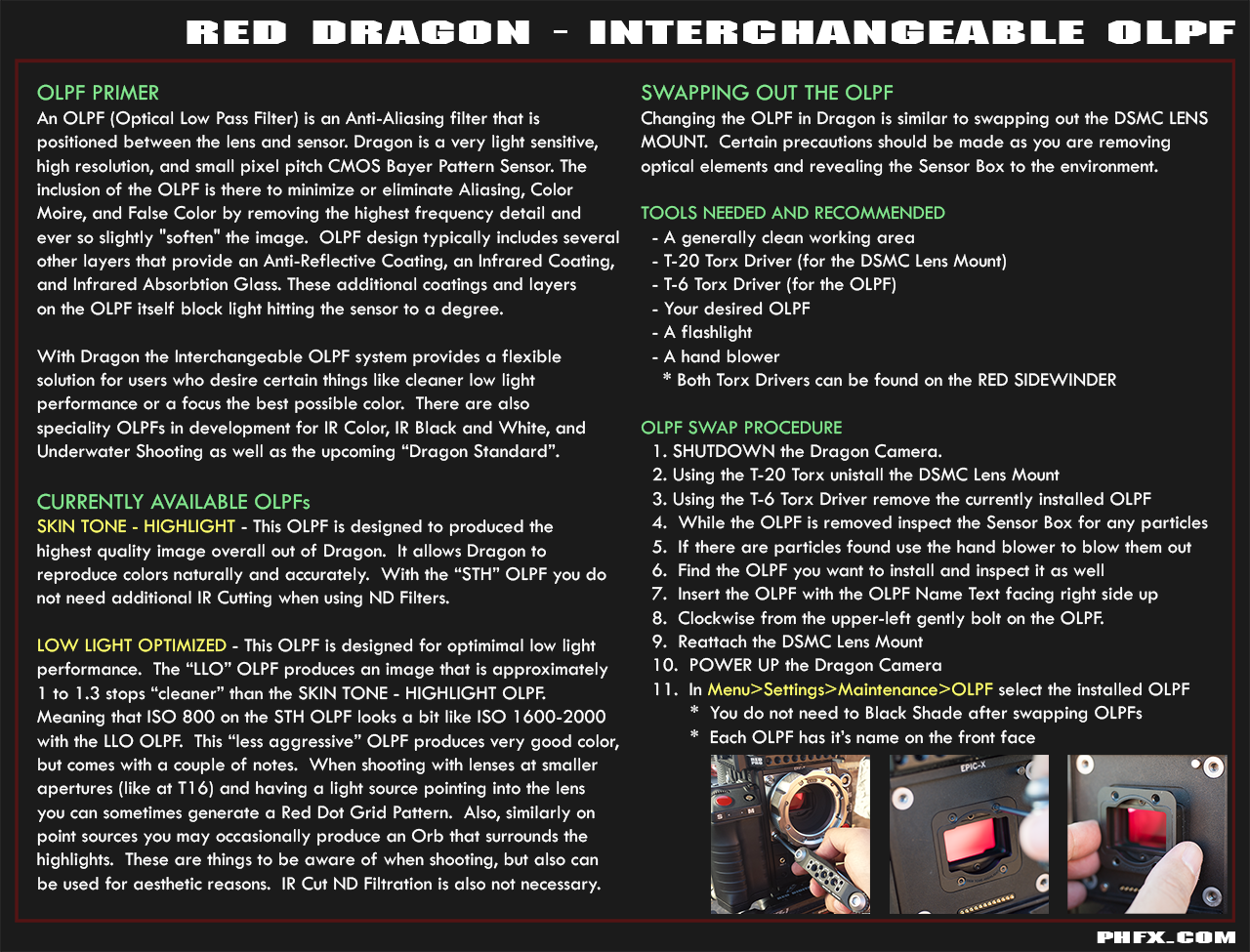
OLPF Swap Process

A quick overview of the OLPF Swap Process, which are now apart of my Dragon Data Sheets:


So my overall assessment here. If you are interested in the "highest quality image" out of Dragon and understand the texture that comes along with the ISO ratings of the Skin Tone - Highlight OLPF it produces the best image. The Low Light Optimized OLPF has pretty damn good color and still fairly nice highlight roll-off, but with the potential to produce certain artifacts under specific conditions. If you are familiar shooting with Mysterium-X you'll be familiar when those artifacts arise and also get the benefits of having a cleaner image across your ISO range.


There we go. Mischief managed.
 
My personal experience, the orbs haven't been an issue, and I shoot with hot sources in the frame all the time.
 
I remember a post saying the dragon will be clean between 400-2000ISO. Is this now not the case?
 
I remember a post saying the dragon will be clean between 400-2000ISO. Is this now not the case?

It's USABLE between 250 and 2000, not always clean.
 
I have noticed my dragon is quite noisy. Even when exposing to a centered histogram at 800+ ISO and no lit up goal posts. Sometimes it so bad it makes me think the camera is f*ed. I shot something recently with the dragon and C300 and the stupid C300 had no grain, while the Dragon had an unreasonable amount. I am having a hard time wrapping my head around this. Is the dragon really this bad in low light? Shouldn't grain just be black. Why is it boosting the low light areas?

And yes I have made sure the camera is black shaded and at the right operating temp and exposure and blaaa blaaa blaaaa.

would love to get this sorted out asap.

Its hard to keep having to tell clients "No no we can remove that grain in post!"
My red one was usually good at 800ISO in any type of lighting.

Could it be something wrong with the camera or is there something I am not doing right?

i will post some examples tomorrow.

if your histogram is centered your a stop under.. meaning your sort of shooting at 1600iso bottom end of histogram is about 2 to 3stops , down as if shooting at 3200iso.
Open you aperture and push the histo levels to the right just before they peak the traffic lights. Don't worry about small spikes from the sun or light bulbs. That's normal. Make sure you don't push past into not retrievable highlights. Traffic lights are a good safety stop.
Best yet shoot at 250 ISO and still favor the right. That's if you want mega clean results.

Enjoy.

ps 2000iso with a favoured right histogram will give you more than useable results.
Post us a r3d still frame. And I can tell you straight away what ISO you shot at.
 
I remember a post saying the dragon will be clean between 400-2000ISO. Is this now not the case?

Here's how to get a clean image at ISO 2000: fill the histogram from the right.

Here's how to get a noisy image at ISO 2000: fill the histogram from the middle.

Here's how to get an unusable image at ISO 2000: fill the histogram from the left.

I'm thinking about adding this to my signature block:

The magic of RAW is not that it allows you to ignore lighting and exposure and then recover a great image in post.
The magic of RAW is that it lets you do practically anything you want with a well-exposed image.

Mark Toia and others have certainly shown what amazing imagery is possible with an image that start out well-exposed.
 
Thank you all for the help. I'll put this to good use.

question. If I put the lens cap on and set it to 2000. How much noise should I see in the black image?
 
Thank you all for the help. I'll put this to good use.

question. If I put the lens cap on and set it to 2000. How much noise should I see in the black image?

Not sure, but post a r3d of the inside of your lens cap shot with a good blackshade at lowest compression full sensor... then others can do the same and that would sort the thought around some cameras having more noise than others and so on. OLPF setting would matter I guess, what olpf was actually in the camera would not matter is my second guess. :)
 
The magic of RAW is not that it allows you to ignore lighting and exposure and then recover a great image in post.
The magic of RAW is that it lets you do practically anything you want with a well-exposed image.
Hey, you could replace the word "RAW" with "FILM" and say the same thing.
 
Haha, I mean, realistically you could say the same thing about any decently deep (10-bit 422) baked-in codecs too (like prores or dnx)...

Think about how much you can push or pull exposure on a properly exposed source image? I'd argue you could go all the way in either direction without the image breaking down. Even the colour could be pushed to well beyond what would be considered watchable when applied in a 32-bit float colour correction layer...
 
until you do not send Raws its difficult to judge about your "noise" Steve ...
 
Post an R3D.

Mark is right, if you expose to the left at 2000 ISO then your exposure is actually more like 3200 or 6400 ISO.

The photosite need light to create an image. How/when are you seeing noise? When you are viewing redlog film in the shadows? Try red gamma 4 (a ballpark gamma curve) and see where the "noise" is.

I have not read one thing about your exposure details other than it was set to 800 ISO.
What was your meter reading?
What was the shutter set at?
What lens aperture?

If you were set to 800 ISO and have the highlight OLPF in with dragon, then you really have to treat it like a whole new camera compared to MX sensor. If you had the LLO OLPF in there then it would be more what you are used to compared to Epic MX.

Just because the physical camera body is the same and the menus and everything are familiar it does not really mean the sensor will respond the same way.
With the dragon sensor installed and STHolpf you really are dealing with a a brand new, completely different camera. And you should treat it like something you have never used and test the shit out of it for your shooting style.

Dragon is really a whole whole new experience not some random upgrade.

I think one trend we've seen here is that people get their upgrade back and just start shooting without really testing to see what the sensor can do and how to maximize the images out of it.

I've shot two films with it now and many more situational imagery situations on both OLPFs. If you ever shot film STH is very much like shooting a 500asa stock with similar texture in low light. If you are used to Epic X then the LLO is more like epic MX but more detail, latitude , highlight protection and smoother blacks.

Each olpf makes ales the dragon a different camera producing different images styles. I can start to spot the STH sometimes now because the colors are so filmic.

But seriously. Post an r3d it saves a ton of time.

Battistella
 
Last edited:
Back
Top