Welcome to our community

Be a part of something great, join today!

  • Hey all, just changed over the backend after 15 years I figured time to give it a bit of an update, its probably gonna be a bit weird for most of you and i am sure there is a few bugs to work out but it should kinda work the same as before... hopefully :)

DJI RONIN PRO SUPPORT

Anyone else having trouble getting a tight fit with the Ronin plate on a 5D?

I have to twist the plate 360° To try and get a super tight fit but then it's too tight ( on the verge of over tightening) and scraping the bottom of the camera.
If my camera gets nudged a little bit off of the lens support the motors react, and the gimbal will be slightly unbalanced.

Today I tried mounting a 5D with the 24-105 and it balanced out easier than the 2 smaller cameras I have tried, and no problem mounting it either.... are you using the supplied 1/4-20 screw? if you tighten the mounting screw all the way and the camera is still loose, it sounds like the screw is bottoming out in the camera... odd.

I like to use a wide/soft rubber washer between the plate and the camera... it really prevents any camera movement on the plate once it is snug (no need for SUPER tight).

If you got it working, how did your footage come out?

I am still having issues with the PC based Assistant (I don't have the iphone 5 and I have the PC drivers installed)... settings randomly don't register, there are no indications in the UI when a calibration is started or stopped (you just have to guess that it is complete) and Auto-Tune is not very helpful, even with the 5D, I have to re-tune after auto-tune because it selects too high of settings and wigs the motors out, especially the Tilt. I am not sure if the iPhone app would do any better... anyone get good numbers from their Auto-Tune?

Also, achieving good settings for walking/running have proved elusive. If you always shoot 4K+ and put it through a stabilizer in post, you would probably be fine, but so far our walking/running footage is not impressive out of the camera, but we are still working with it trying to dial it in... trying a myriad of Smooth Track settings to see if that will help.

Anyone have any tips on settings that have achieved footage they are happy with straight from the camera?

Thanks, Gimbal ON!
 
Thanks for the reply Biff.
My footage is coming out fine so far, but I haven't put it through a full day of shooting yet, but I'm still tinkering with settings.
I may try the washer method just to protect my camera from unnecessary wear and tear from different plates, and switch the screw out.

Re: Autotune --
It seems to always want to put me in the 62-63 stiffness range, but in upright mode it seems to struggle somewhat. I'm in the same boat trying to have a list of settings for a given situation or shot movement.
 
Hey guys,
We received our Ronin last week and everything is great!
But i have two questions: Does anyone know when the XL arms will be available? And is there any progression on the Ronin App for android?

Thanks!

Jasper.
 
Reduser's, I sent this to support but I know they are very busy. Figured these were simple answers that weren't really addressed in the manual, but I know some experienced users may have an answer. Below is what I sent DJI tech support...I'm open to anyone who has so good advice! Thanks!!

RE: Quick DJI Ronin ?'s

Good evening Support!


I am emailing because I am trying to do some fine tuning with the Ronin before I go live on a couple small productions. I have searched the manual, and I'm still concerned about a couple settings that aren't explained in full detail in the manual. Do you have an advanced manual or can you help explain these settings? For now, my questions are:


1) What exactly does "Trim" affect with the motors? The manual simply says "The Trim adjustment controls the preset amount of trim applied to each axis off center"...do you a better breakdown of how this interacts with with Stiffness of the motors?
2) When using SmoothTrack Mode, can you help explain the "Accel" setting. Agian, I wanted to try and find this out on my own, but it is not covered in the manual. I assume that this setting controls how fast the camera picks up speed when turning during Pan and Tilt movements (if so, how is this different from the Speed setting for SmoothTrack Mode?)


Thank you for you help. I've had the Ronin for a couple weeks now and I love it. Trying to get it balanced all the way, but for now, it's working out great.
 
Ok, got an answer back from DJI...hope this helps others..

RE: Ronin ?'s

Hello Rome -
This is Marc at DJI Pro support.
Trim will pan/tilt/roll the camera off center. The more trim you apply, the more degrees off center. Trim does not effect stiffness.


2) Like you said, Acceleration effects how fast the Ronin will pick up speed. If the Ronin senses that the operators movement is ahead of the Ronin, it will accelerate to catch up to the operator
If acceleration is higher than speed, it will temporiarly override the speed settings, to catch up to the operator. The best way to get a sense of the different smooth track settings is to test them at their extremes.
 
I guess my follow-on question would be, why would you ever want your gimbal to be off axis? Why would you ever want to use the gimbal and have the Trim above "0"...

Anyone know?
 
Hello,

I have a Ronin and putting C300 on right now, but I am having a bit of issue with Bluetooth. Basically, suddenly, we cannot find the Ronin on the app.
Anyone had this issue? Any solution? Let me know. Thanks.
 
Hello,

I have a Ronin and putting C300 on right now, but I am having a bit of issue with Bluetooth. Basically, suddenly, we cannot find the Ronin on the app.
Anyone had this issue? Any solution? Let me know. Thanks.

Please make sure you have not accidentally turned off your BlueTooth. With the iOS lock interface options it is very easy to do so...

:sifone: Peter
 
I guess my follow-on question would be, why would you ever want your gimbal to be off axis? Why would you ever want to use the gimbal and have the Trim above "0"...

Anyone know?

There might be special situations when it is easier for you to move with the gimbal in certain direction while it is facing another. For example you need to move through a very tight space which will not give you the room to "orient" the gimbal in the direction you want - but you can do it through the trim...

:sifone: Peter
 
Hello,

I have a Ronin and putting C300 on right now, but I am having a bit of issue with Bluetooth. Basically, suddenly, we cannot find the Ronin on the app.
Anyone had this issue? Any solution? Let me know. Thanks.

I double click and swipe the app closed and open it again.
Whenever I power off the Ronin and exit the app to text or browse a site, and go back in to the app, many times it doesn't recognize the Ronin, so I have just chalked it up to a minor inconvenience and do a full restart of the app. Not much of a solution, but everytime I do this, I get reconnected just fine.
 
New Tutorial video for the DJI Ronin Cinemilled "Mitchell mount" adaptor. I demonstrate how it goes together and how well it works on a Dolly and a crane.......or any Mitchell plate on set!

Now I just wanted to point out that you CAN use our "universal" Ronin quick plate to also go on a mitchell......Just use a long 3/8 bolt into the center hole and a big washer and bam! you mounted onto a mitchell. We decided to make a SPECIFIC mitchell adaptor for people that own cranes or grip equipment that just want to use it on mitchell mounts. So I just wanted to point out that our other plate the Ronin Quick Plate also works on a mitchell. That one mounts just about anywhere!

people requested a mitchell specific so we made one.

 
There might be special situations when it is easier for you to move with the gimbal in certain direction while it is facing another. For example you need to move through a very tight space which will not give you the room to "orient" the gimbal in the direction you want - but you can do it through the trim...

:sifone: Peter

Peter,

Thank you for the clarification. Very helpful.
 
I double click and swipe the app closed and open it again.
Whenever I power off the Ronin and exit the app to text or browse a site, and go back in to the app, many times it doesn't recognize the Ronin, so I have just chalked it up to a minor inconvenience and do a full restart of the app. Not much of a solution, but everytime I do this, I get reconnected just fine.

You don't need to reboot the app. When you close and reopen your phone and the app does not automatically re-connect (or asks to be re-connected) to the Ronin - just go to MORE / DEVICE LIST and there you will see your Ronin listed. Simply tap on the Ronin and the app will re-connect (the blue dot in top left corner will start flashing).

:sifone: Peter
 
Pedro,

I just placed my order for the plate! I decided to grab the black anodized version...I hope to put this puppy to use asap! Thanks for the hard work!
 
You don't need to reboot the app. When you close and reopen your phone and the app does not automatically re-connect (or asks to be re-connected) to the Ronin - just go to MORE / DEVICE LIST and there you will see your Ronin listed. Simply tap on the Ronin and the app will re-connect (the blue dot in top left corner will start flashing).

:sifone: Peter

9/10 it works that way, Peter -- but for that one time, when it turns out being the most crucial time, its minor
_________________________________________________
New Issue:

I had a shoot today, and wanted to use the Ronin for one shot, but scrapped the shot because of time constraints.

Something weird happened though, and I'm not sure what caused it, but when power on -- The PAN axis ANGLED itself and it wasn't centered with the top handle.
I tried correcting with remote, and did everything except RESET the DJI settings, which I probably should have done to get the shot right (a simple follow).

Not sure why this happened, as I did a test the day before and it behaved just fine. Anyone?
 
9/10 it works that way, Peter -- but for that one time, when it turns out being the most crucial time, its minor
_________________________________________________
New Issue:

I had a shoot today, and wanted to use the Ronin for one shot, but scrapped the shot because of time constraints.

Something weird happened though, and I'm not sure what caused it, but when power on -- The PAN axis ANGLED itself and it wasn't centered with the top handle.
I tried correcting with remote, and did everything except RESET the DJI settings, which I probably should have done to get the shot right (a simple follow).

Not sure why this happened, as I did a test the day before and it behaved just fine. Anyone?
Not sure what would cause that, but you can RESET the center PAN using the app:

- select the function in the MORE tab
- pan with the remote to center the axis
- confirm on the app
- make sure you cycle power off and on the Ronin for this to take effect

:sifone: Peter
 
Hey Peter,
Did I miss the battery solution ?
Aloha
A
 
New Cinemilled/Ronin Product announcement!!!

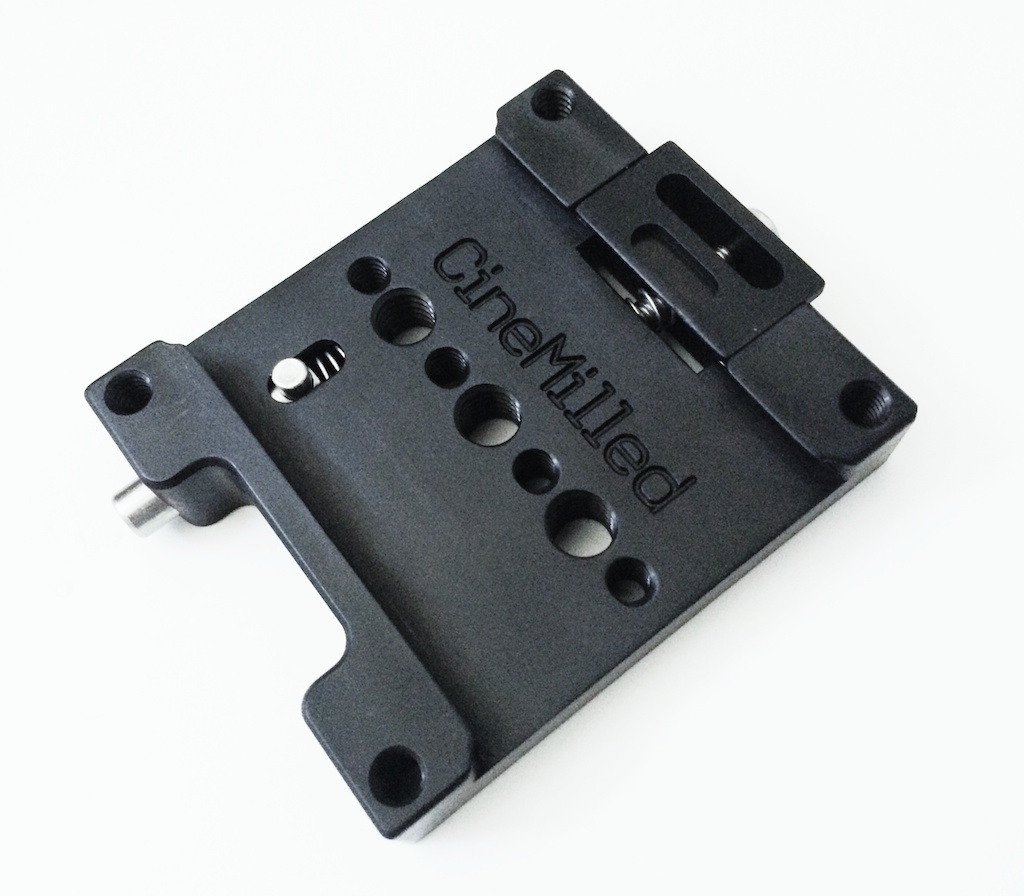
We are happy to introduce the Ronin "Quick Switch" mount plate !!

Quickly and easily swap your camera OFF of your Ronin and onto any other type of camera support on set.

The quick switch plate allows you to leave your camera fully built on the ronin factory dovetail. Then if you need the camera for something else and later need to go BACK onto the ronin……you can do it with ease and speed.

No need to disassemble the camera or remove the ronin dovetail……just slide it off……and slide it on!!!
A must have for any Ronin user’s package!

QSP01.jpg


QSP2.jpg


Order one today!
http://cinemilled.com/product/dji-ronin-quick-switch-mount-plate/

Here is the tutorial video so you can clearly see how it works.
 
Back
Top