Greg, I think we. May be talking about two different defects. DJI didn't even provide a tool to tighten the grip to the handle mount. It sounds like you had the actual handle fail where it attaches to the bar. Is this correct? If so, this is the first I've heard of this problem.

Navigation
Install the app
How to install the app on iOS
Follow along with the video below to see how to install our site as a web app on your home screen.

Note: this_feature_currently_requires_accessing_site_using_safari
More options
Welcome to our community
Be a part of something great, join today!
You are using an out of date browser. It may not display this or other websites correctly.
You should upgrade or use an alternative browser.
You should upgrade or use an alternative browser.
DJI RONIN PRO SUPPORT
- Thread starter Peter Majtan
- Start date

Greg M
Digital FX
- Joined
- Dec 30, 2006
- Messages
- 5,133
- Reaction score
- 1
- Points
- 38
- Location
- Louisiana
- Website
- www.digitalfx.tv
Greg, I think we. May be talking about two different defects. DJI didn't even provide a tool to tighten the grip to the handle mount. It sounds like you had the actual handle fail where it attaches to the bar. Is this correct? If so, this is the first I've heard of this problem.
yes two different issues, sorry for confusion.
Stas Tagios
New member
- Joined
- Apr 20, 2007
- Messages
- 4
- Reaction score
- 0
- Points
- 1
Bought my Ronin about a week ago, but haven't had time to start working with it yet. Just wondering if DJI is planning a Mac OS-based solution for updating firmware, and if so, how soon? I have no access to a PC.
Norbert Niederacher
Well-known member
Smooth Track does not work! For me...
1. Yes. The Gimbal is almost perfect balanced.
2. Yes. I use the DJI Assistant via iPhone.
3. Yes. I am using Smooth Track.
But the Gimbal is not doing, what it should do with Smooth Track on... During testing I pushed to 100.
Any help? Any idea, what I am doing wrong=
1. Yes. The Gimbal is almost perfect balanced.
2. Yes. I use the DJI Assistant via iPhone.
3. Yes. I am using Smooth Track.
But the Gimbal is not doing, what it should do with Smooth Track on... During testing I pushed to 100.
Any help? Any idea, what I am doing wrong=
Ian Tetzner
Active member
- Joined
- Jun 3, 2012
- Messages
- 44
- Reaction score
- 0
- Points
- 0
Norbert, It sounds like your Deadband is too high. Try setting the Deadband in the 1-8 range.

Phil Moreton
Well-known member
Smooth Track does not work! For me...
1. Yes. The Gimbal is almost perfect balanced.
2. Yes. I use the DJI Assistant via iPhone.
3. Yes. I am using Smooth Track.
But the Gimbal is not doing, what it should do with Smooth Track on... During testing I pushed to 100.
Any help? Any idea, what I am doing wrong=
i thought the same when I first tested. You just need to continuously play with the settings until you find that sweet-spot. Once you figure out what does what it gets pretty easy. The main problem still is the auto calibrate doesn't work.
If you have a lighter camera I would recommend practisicing and testing with that until comfortable and then move up to the Epic.
Norbert Niederacher
Well-known member
Thanks, Ian. I will try!

Pedro Guimaraes
Well-known member
- Joined
- May 1, 2009
- Messages
- 611
- Reaction score
- 0
- Points
- 0
- Location
- Burbank, CA
- Website
- www.cinemilled.com
new video I made about the Cinemilled Ronin quick plate......I also talk about balance a bit and it many have found it helpful.
https://vimeo.com/104787611
https://vimeo.com/104787611
Ed Windham
New member
- Joined
- Aug 14, 2014
- Messages
- 1
- Reaction score
- 0
- Points
- 0
Ronin Extended Arms
Ronin Extended Arms
I thought that I would post the DJI Ronin assembly and tuning video.
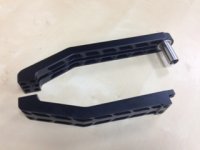
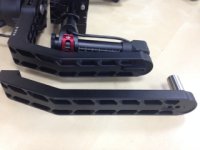
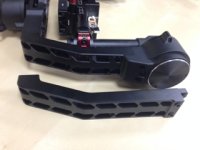
Also several users have requested the option for longer arms. DJI will shortly make available the "B" arms which are 50mm longer and the "C" arms that will be 80mm longer. I have attached pictures of the "B" arms.
Ronin Extended Arms
I thought that I would post the DJI Ronin assembly and tuning video.
Also several users have requested the option for longer arms. DJI will shortly make available the "B" arms which are 50mm longer and the "C" arms that will be 80mm longer. I have attached pictures of the "B" arms.
Attachments

Donald MJ Anderson
Well-known member
What rigs/setups are the xl arms needed for?
Does large heavy glass like RPP'S need it?
Does large heavy glass like RPP'S need it?
Brian Young
Active member
- Joined
- Nov 5, 2008
- Messages
- 38
- Reaction score
- 0
- Points
- 0
I'm hoping the B or C arms will allow for an F5?? Watching from the wings with a checkbook in hand....
Pedro Guimaraes
Well-known member
- Joined
- May 1, 2009
- Messages
- 611
- Reaction score
- 0
- Points
- 0
- Location
- Burbank, CA
- Website
- www.cinemilled.com
yes, RPP it's a must. they are super heavy ..... and yes we have bench tested the ROnin motors.....they are stronger than MOVI
Here is a ARRI 235 with a 400' mag !!


Here is a ARRI 235 with a 400' mag !!

Kaspar Hornikel
Member
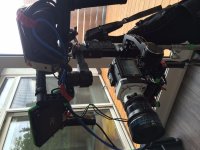
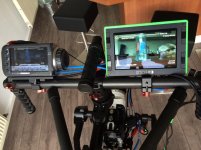
the ronin is definitely stronger than i thought. shot with a phantom miro, schneider ff primes and the remote unit on the bars, all connected with sdi/powercables and powered of one v-mount battery in a backpack. worked brilliant thought it was a bit heavy but i was able do move really fast.
Attachments
Donald MJ Anderson
Well-known member
yes, RPP it's a must. they are super heavy .....
Thanks Pedro. Will it work at all with RPP`s or am I wasting my time just now? I`m wondering if I should wait till the longer arms are shipping before ordering the ronin?

Mark van Coller
Well-known member
Wow glad to see some progress on the longer arms. Is there any news on the JoyStick
Pedro Guimaraes
Well-known member
- Joined
- May 1, 2009
- Messages
- 611
- Reaction score
- 0
- Points
- 0
- Location
- Burbank, CA
- Website
- www.cinemilled.com
Thanks Pedro. Will it work at all with RPP`s or am I wasting my time just now? I`m wondering if I should wait till the longer arms are shipping before ordering the ronin?
The standard Ronin will NOT work with RPP.....maybe if you add a ton of back weight....but then your just trying to fit a square peg in a a round hole.
longer arms would help ALOT.
Manfred Baulig
Well-known member
Where can I get those arms?
Epic with V-Mount Quickplate Module would fit and I could power also the remote ff.
Epic with V-Mount Quickplate Module would fit and I could power also the remote ff.
Pedro Guimaraes
Well-known member
- Joined
- May 1, 2009
- Messages
- 611
- Reaction score
- 0
- Points
- 0
- Location
- Burbank, CA
- Website
- www.cinemilled.com
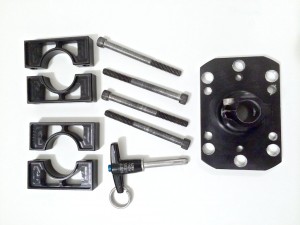
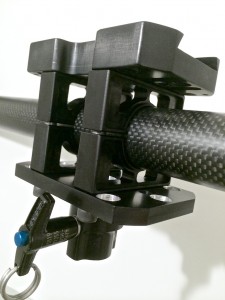
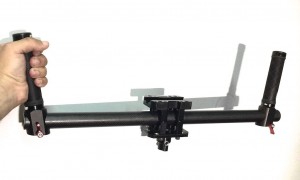
New product ! steadicam armpost adaptor!
New product ! steadicam armpost adaptor!
New product announcement!
The steadicam armpost adaptor is ready!
http://cinemilled.com/ronin-steadicam-armpost-adaptor/
here is the detailed product tutorial and demo video.
on segway
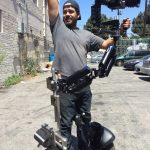
New product ! steadicam armpost adaptor!
New product announcement!
The steadicam armpost adaptor is ready!
http://cinemilled.com/ronin-steadicam-armpost-adaptor/
here is the detailed product tutorial and demo video.
on segway
Pedro Guimaraes
Well-known member
- Joined
- May 1, 2009
- Messages
- 611
- Reaction score
- 0
- Points
- 0
- Location
- Burbank, CA
- Website
- www.cinemilled.com
Just finished uploading the first test clip in real world use. Standard "steadicam" shot....tracking actor and "walk and talk", used my Nikon D4, 35mm lens, (Ronin in follow mode). Vest and arm by GPI PRO™ Footage straight from camera, no color, no post stabilization (DUH) watch and make your own conclusions and decisions.
All I can say no "easyrig" for me.....this is so much better.
Please ignore crappy framing/operating....I was in a rush in follow mode with nohelp and no monitor! Just wanted to give everyone a taste of how it looks and performs. I'll do some sexier testing when I get a chance to breath!! I do belive perfect situation there would be a remote operator and I just worry about holding headroom etc...
All I can say no "easyrig" for me.....this is so much better.
Please ignore crappy framing/operating....I was in a rush in follow mode with nohelp and no monitor! Just wanted to give everyone a taste of how it looks and performs. I'll do some sexier testing when I get a chance to breath!! I do belive perfect situation there would be a remote operator and I just worry about holding headroom etc...
Hugh Hartford
New member
- Joined
- Aug 18, 2014
- Messages
- 3
- Reaction score
- 0
- Points
- 0
We've just assembled DJI Ronin and balanced it with camera. No movement when put at any angle. No cables attached.
When powering on the ronin it spins once and then goes limp - i.e the motors are not giving any power. youtube clips show it should lock into position.
On the iphone DJI Assistant app I can connect with the ronin and see the ANGLE readings for pan, tilt and roll change but ALL power readings never move from 0.
When I 'auto tune stability' it shows the calibrating bar, gets to the end but the ronin has not physically moved and the power readings dont change. This is the same when I try calibrate system.
Any suggestions/pointers/ideas?
Thanks
When powering on the ronin it spins once and then goes limp - i.e the motors are not giving any power. youtube clips show it should lock into position.
On the iphone DJI Assistant app I can connect with the ronin and see the ANGLE readings for pan, tilt and roll change but ALL power readings never move from 0.
When I 'auto tune stability' it shows the calibrating bar, gets to the end but the ronin has not physically moved and the power readings dont change. This is the same when I try calibrate system.
Any suggestions/pointers/ideas?
Thanks