Welcome to our community

Be a part of something great, join today!

  • Hey all, just changed over the backend after 15 years I figured time to give it a bit of an update, its probably gonna be a bit weird for most of you and i am sure there is a few bugs to work out but it should kinda work the same as before... hopefully :)

DaVinci Resolve 16.2. -- With R3D Metal GPU acceleration ( Mac )

I don't get Decompression, only Debayer on a 2016 MPB with 4Gb Video RAM. Why is this?

http://www.beachroadfilms.com/Debayer_Only.jpg

I had this problem too. Turned out that while I had downloaded 16.2.1, I (re-)installed 16.1.2 which I had lying around in my downloads folder. My sometimes dyslexia could not see the problem. When somebody asked me to check version numbers, I saw the problem, installed the correct version, and that was that.
 
I had this problem too. Turned out that while I had downloaded 16.2.1, I (re-)installed 16.1.2 which I had lying around in my downloads folder. My sometimes dyslexia could not see the problem. When somebody asked me to check version numbers, I saw the problem, installed the correct version, and that was that.

That's a good clue, but wrong. Un-installing, let's see what happens.
 
Did anybody tried one GPU vs two GPUs for playback with R3D Metal acceleration?
On one 580 with UHD timeline for 4K clips it's the same 24fps or up to twice as fast, depending from clip duration and node tree. And it's 1/3 faster for 8K for the same timeline. ( full debayer )
 
I have a new Mac Pro with the AMD Pro Vega II 32GB and I have to say, it still not perfect the playback, and I have a pretty substantial machine. :(
 
Apparently it’s not managing multiple frames... which to me suggests any parallelism they (BMD) get going in future Metal SDK enabled versions will potentially have a 2x, 4x, etc, speed increase (though that could be wrong.)
 
Last edited:
Can anyone point me to video card requirements. Looked everywhere, and cannot find the Mac video card requiredments for Resolve 16.2.1 with Metal + "R3D decompression and debayer on Mac".
 
Alex,

I understand the SDK is not currently leveraging multiple GPUs for Metal.

AJ

This is incorrect. But the software itself in how it's implemented might be expressing some limitations or haven't enabled multiple GPU processing. The SDK has support in there for sure.
 
Can anyone point me to video card requirements. Looked everywhere, and cannot find the Mac video card requiredments for Resolve 16.2.1 with Metal + "R3D decompression and debayer on Mac".

Radeon VII should do the trick.
 
This is incorrect. But the software itself in how it's implemented might be expressing some limitations or haven't enabled multiple GPU processing. The SDK has support in there for sure.
That's how I understand it also. But it will be incredebly helpful if somebody can give a first hand experience with two vs one GPU. Since it's so easy in Davinci to change configuration for GPUs.
Difficult to believe there is no one with several GPUs in hand. So many are now tech savvy even while in "home arrest" situation.:emote_couch:
 
Thanks for the input Phil.

<Jarred> “This first Metal implementation is processing single frames at a time so still a ton of improvement to look forward to once that goes parallel and it should be able to get closer to CUDA gains if that happens.”

It sounds like I misinterpreted the above statement to mean one GPU was working on one frame, and working in parallel would still mean one GPU per frame, but multiple frames decoding in parallel.

Apple present various strategies here include Tile decoding (multiple GPUs on one frame): https://developer.apple.com/videos/play/wwdc2019/608/
As tile decoding usually necessitates bandwidth to copy data back to one GPUs memory I was not expecting two GPUs to work on one frame.
I’ve amended my earlier comment.

AJ

This is incorrect. But the software itself in how it's implemented might be expressing some limitations or haven't enabled multiple GPU processing. The SDK has support in there for sure.
 
Difficult to believe there is no one with several GPUs in hand. So many are now tech savvy even while in "home arrest" situation.:emote_couch:

I've been running a number of benchmarks, comparing 16.2.1 with Metal vs. 15.2.x with CUDA. Currently have data on NVIDIA GTX 1080 (non- Ti) and ATI Vega64. Waiting for the Radeon VII to be delivered -- fingers crossed, on Tuesday -- before sharing results.

So far, the Vega64 can't handle both decompression AND debayer. If set to just debayer, there is a significant speed bump over the GTX 1080 when working with Red raw... but there is a very large (approx 60%) drop in ProRes performance.

Should have more later this week, and can hopefully cram both the Vega & Radeon in there for a quick multi-GPU test.
 
Was excited about this, but having some major issues on a loaded 2017 iMac Pro. With 'Memory and GPU' set to Metal, and 'Decompression and Debayer' turned on in decode options, I get stuttery playback on 8k footage... at any playback resolution, even at quarter proxy mode. It says its playing back at 23.98 but in actuality it stutters every half second... visually it appears almost as if the hard drive were the bottleneck, like it can't pull frames quickly enough from it. But when I switch back to OpenCL and set decode to just Decompression, I get smooth realtime playback at half resolution, and even full resolution on more compressed 8k shots. Same shots play back great in Premiere at half resolution as well. Are there any settings I might be missing?

I'm having the same issue on my 2017 iMac Pro, 10-core, Vega 64. "Decompression and Debayer" turned on, my RED Gemini 5K footage is stuttering like crazy. Seemed way smoother in 16.2. Please let me know if you've found any new tricks. For now, I've switched back to Debayer only, seems to be slightly better playback.
 
I'm having the same issue on my 2017 iMac Pro, 10-core, Vega 64. "Decompression and Debayer" turned on, my RED Gemini 5K footage is stuttering like crazy. Seemed way smoother in 16.2. Please let me know if you've found any new tricks. For now, I've switched back to Debayer only, seems to be slightly better playback.

Same. Fortunately I still have my RR-X, and with RR-X doing decode and Vega doing Debayer, it's almost enough to do 8K full res in realtime. Like this >< close.
 
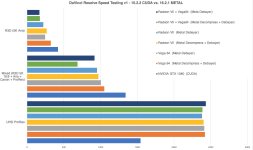
Alright, here's what I've come up with so far, all results are in seconds:

attachment.php

Chart Comparing All GPUs and software options

attachment.php

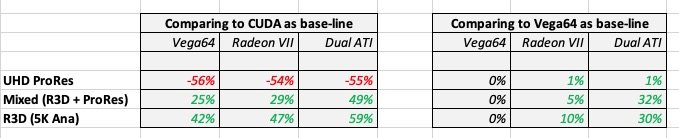
Data table

attachment.php

Close-up view looking at relative speed gains (updated with Vega vs. Radeon)

Info on the test material:

TEST MACHINE
• MacPro 5,1 (2010)
• 12-core 2.96 GHz
• 48 GB RAM
• 4x 7200 RPM RAID0 media drive
• Resolve 15 was tested in MacOS 10.12.6 due to dropped CUDA support in modern MacOS (I'm still bitter about this)
• Resolve 16 was tested in MacOS 10.14.6 because I don't want the Catalina headaches

RED TEST PROJECT
• 5K 6:5 Anamorphic mode shot on Scarlet-W
• 8:1 compression
• IPP2 with 2-3 nodes
• 2min 33sec runtime
• Exporting UHD ProRes 444 Master with PCM audio, best debayer & scaling enabled

MIXED TEST PROJECT
• 11min 42sec runtime
• About 70% Red material - and all red footage was 8:1 compression shot on Scarlet-W, IPP2 in post
• Red material was a mix of 5K 16:9 and 5K 6:5 Anamorphic
• Remaining 30% was UHD ProRes 444 material
• Some compositing of Red + ProRes, some denoising nodes, some film grain nodes, most have 2-3 nodes
• Exporting to UHD ProRes 444XQ Master with PCM audio, best debayer & scaling enabled

PRORES TEST PROJECT
• 51min 38sec runtime
• All source footage is UHD ProRes 444
• Generally 2-3 grading nodes, occasional denoising nodes, occasional film grain nodes
• Exporting to UHD ProRes 444 Master with NO audio, best debayer & scaling enabled

GENERAL OBSERVATIONS
• Very, very disappointing ProRes performance. So much of my broadcast work is onlined using ProRes. Metal is just brutally slow, even comparing the current top-end ATI card (or DUAL cards) with the single previous-ten NON-TI card from NVIDIA.
• On the other hand, big congrats to the R3D team. Even the Vega64 (which I believe is the fair straight-comparison to the GTX1080) is 42% faster in Metal now! I remember when CUDA optimization first came out and it seemed magical... so this is seriously impressive.
• Running both ATI GPUs would mean physically covering all other PCI slots, so I can't run USB3.2 & Decklink cards... that's really not an option, so this was just a theoretical test
• While rendering, I kept my eye on the FPS in Resolve and CPU use in Activity Monitor. Some highlights from that:
- With just the Radeon VII set to Decompress AND Debayer, the 16:9 5K Red material got approx. 16-19 fps, anamorphic was 13-14 fps. CPU load was about 43% for Red, and 82% when it hit ProRes footage
- With both ATI cards set to Decompress AND Debayer, the 16:9 5K Red material got about 30 fps, anamorphic was 22-24 fps. CPU load was about 50% for red (funny that it increased!) and 80% for ProRes​
• I have 3.46 GHz processors and an SSD RAID on the way, to see if I can squeak out a little more performance. The CPU was maxed out when the GPU was handling just the debayer... but it sounds like there's a lot more software optimization to be done.
• There are shockingly few gains going from Vega64 with 8GB to Radeon VII with 16GB... there's got to be something wrong here. For the $825 CAD this card cost, I'd rather just wait 30 more seconds for my master file.

Based on this initial testing, the best bang-for-buck might be 2x Vega64 cards, but there's no room in the case. I'm considering returning the Radeon VII and selling my existing GTX1080 + Vega64 cards to fund a 1080ti... but then I'm stuck at MacOS 10.13.x which I'm not very happy about... ugh... I liked that the Radeon VII could easily roll into 10.15 or beyond (once headaches are sorted) and even transfer into a 2019 MacPro next year, but the price/performance really disappoints. Rock and a hard place here in Mac-Land :(
 

Attachments

  • SpeedTest-v1-Chart.jpg
    SpeedTest-v1-Chart.jpg
    92.4 KB · Views: 0
  • SpeedTest-v1-Data.jpg
    SpeedTest-v1-Data.jpg
    35.3 KB · Views: 0
  • SpeedTest-v1-ATI.jpg
    SpeedTest-v1-ATI.jpg
    42.3 KB · Views: 0
Last edited:
I'm moving back to Resolve 16.2 after seeing no real-world improvement on my 2017 10-core Vega64 iMac Pro (RR-X offers much better performance) AND many, many more hangs. With 16.2.1 I could often not complete a review of 30 minutes of R3D footage with no grades applied.

n.b. I am running Catalina 10.15.3, which I know is probably stupid. But not as stupid as running 10.15.4, which I understand has major issues with large files.
 
In my oldish X99 Hackintosh running 10.15.4 w/ 6800k, 64gb ram and a moderately overclocked Vega II, I'm getting 25fps at 6k/full debayer, also 24-25 with 8k, before I was getting 13 tops, very impressed!

That's on 1080p timeline, on UHD it drops to 22fps. I see that Vega utilisation is at around 80%, I'm sure there will be improvements in next builds.
 
Back
Top