Welcome to our community

Be a part of something great, join today!

  • Hey all, just changed over the backend after 15 years I figured time to give it a bit of an update, its probably gonna be a bit weird for most of you and i am sure there is a few bugs to work out but it should kinda work the same as before... hopefully :)

DaVinci Resolve 16.2. -- With R3D Metal GPU acceleration ( Mac )

So while I think this is probably badass and much needed on lower core count systems, it kinda has the opposite effect for High core count systems.

Example

I have a Mac Pro 7,1, 16 core with Dual Radeon VII (aftermarket, not MPX).

For 6K and under, it makes more sense for me to do CPU decode, and leave more GPU overhead for color transforms, blurs and NR. In 7K and 8K projects, it is pretty sweet to hit 24-40 FPS full debayer decode to 4K Prores. But it uses such a large amount of GPU resources, that with just a tetrahedral LUT transform and some basic corrections, I am already maxed out on GPU resources. Not enough overhead for full grades.

Hopefully some further improvements and BIG Navi will make this a moot point. I Think Puget system already came to this conclusion with CUDA decode.

I wish the switch from CPU to GPU decode did not require a restart of Resolve.
 
will this work on Mojave or does it require Catalina?

It runs on Mojave 14.6.

Would being able to choose just decompression make sense for older systems? (On a 2gb NVIDIA 750m unfortunately Decompression & Debayer is slower than just Debayer, but maybe just decompression would run faster than just debayer?)
 
Last edited:
Fantastic!
Did a performance test on Apple 16" to specked laptop and got almost identical results to running on CPU. Can run Quarter Debay but not half debayer. If I optimize media I get nearly on the second the same results as with CPU. However it seems to use slightly less power. I can also see that the CPU is almost not used at all so it is clearly putting most of the job on the GPU.

Cheers,
Andreas
 
I'm not seeing anything exciting on my iMac Pro for DaVinci Resolve. I tested converting minute-long 8K video into ProRes H.264 and with just GPU Debayer (didn't get the Decode option in the DaVinci Resolve preferences), it took 3:14. With RR-X (either set to Decode or Decode and Debayer) it took just over a minute.

Could it be that there are many places where preferences have to be set to get the correct behavior, not only in the main preference (which requires a Resolve restart)?

I'd really like to be impressed enough to retire my 5 year old RR-X.
 
Michael

All about work sharing, you are forcing the GPU to do both Debayer and H264 encode. With the RR-x, they are split up the task.
 
I'm not seeing anything exciting on my iMac Pro for DaVinci Resolve. I tested converting minute-long 8K video into ProRes H.264 and with just GPU Debayer (didn't get the Decode option in the DaVinci Resolve preferences), it took 3:14. With RR-X (either set to Decode or Decode and Debayer) it took just over a minute.

Could it be that there are many places where preferences have to be set to get the correct behavior, not only in the main preference (which requires a Resolve restart)?

I'd really like to be impressed enough to retire my 5 year old RR-X.

Make sure you have Metal selected in "Memory and GPU" of preferences. Then in Decode Options, have the "Use GPU for R3D" drop down menu on "Decompression and Debayer" (I think using the GPU just the debayer has been around since like ~2013.)
 
Make sure you have Metal selected in "Memory and GPU" of preferences. Then in Decode Options, have the "Use GPU for R3D" drop down menu on "Decompression and Debayer" (I think using the GPU just the debayer has been around since like ~2013.)

I do have Metal for Memory and GPU preferences. In Decode Options, if I have Rocket enabled, the Use GPU for R3D gives no options. If I don't have RR-X enabled, the two options are "None" and "Debayer". I ran the test again, this time with ProRes LT as the target.

GPU-only: 3:20
RR-X decode only: 1:12

RR-X is still better than anything Apple has to offer iMac Pro.
 
I do have Metal for Memory and GPU preferences. In Decode Options, if I have Rocket enabled, the Use GPU for R3D gives no options. If I don't have RR-X enabled, the two options are "None" and "Debayer". I ran the test again, this time with ProRes LT as the target.

GPU-only: 3:20
RR-X decode only: 1:12

RR-X is still better than anything Apple has to offer iMac Pro.

OH, make sure you have Mojave 14.6 or newer and it's actually 16.2.1 (not 16.2 as the thread title suggests).

If that's not it, I don't know what else... Maybe the RRX is overriding the options?
 
Was excited about this, but having some major issues on a loaded 2017 iMac Pro. With 'Memory and GPU' set to Metal, and 'Decompression and Debayer' turned on in decode options, I get stuttery playback on 8k footage... at any playback resolution, even at quarter proxy mode. It says its playing back at 23.98 but in actuality it stutters every half second... visually it appears almost as if the hard drive were the bottleneck, like it can't pull frames quickly enough from it. But when I switch back to OpenCL and set decode to just Decompression, I get smooth realtime playback at half resolution, and even full resolution on more compressed 8k shots. Same shots play back great in Premiere at half resolution as well. Are there any settings I might be missing?
 
I am experiencing the same as Ben, 5K Scarlet footage 10:1

Same exact symptoms with Resolve telling me in the viewer that it was playing at constant 23.98, but stuttering every half second. Same problem with clips utilizing optimized media, which has in the past played back smoothly

I, too, thought it might be my RAID array being wonky, but RED Player was able to play back the same clips, without stutter, and at higher resolution. Furthermore, clips copied to the internal SSD performed no better in Resolve

Much better performance on my MacBook Pro (Mojave 10.14.6) once I switched back to OpenCL
 
For the guy that maybe experiencing problems, try disabling the " Chroma Noise Reduction " in the "Camera Raw" area and see if that helps any.
 
Chroma Noise Reduction has been turned off, problems persist either way! Echoing Kyle, optimized media experiences the same problem (never did before), which is pretty strange. I also copied the footage to a a fast SSD, with same stuttery results.
 
Chroma Noise Reduction has been turned off, problems persist either way! Echoing Kyle, optimized media experiences the same problem (never did before), which is pretty strange. I also copied the footage to a a fast SSD, with same stuttery results.

And the problem persists when using OpenCL instead of Metal? (trying to button down if it might be a 16.2.1 issue, not just a decode thing.)
 
And the problem persists when using OpenCL instead of Metal? (trying to button down if it might be a 16.2.1 issue, not just a decode thing.)

Problem goes away once switched to OpenCL. Much smoother performance on OpenCL

I should try Metal again, but with with ‘Decompression Only’ instead of ‘Decompression and Debayer’. Maybe that will single out where the problem is
 
On my (admittedly old) MBP, Metal performance is ever so slightly better than OpenCL in Debayer-Only mode render times (playback seems the same.).

But I’d be lying if I said I wasn’t hoping for more solid playback in Decompression & Debayer mode... nothing super fancy or miraculous (like 8k full premium), just a bump for real-time playback at 6k 9:1 1/2 Good or 6k 4:1 at 1/4, y’know? Alas, it’s much worse than Debayer-only, so the GPU is clearly being overwhelmed.
 
Mike,


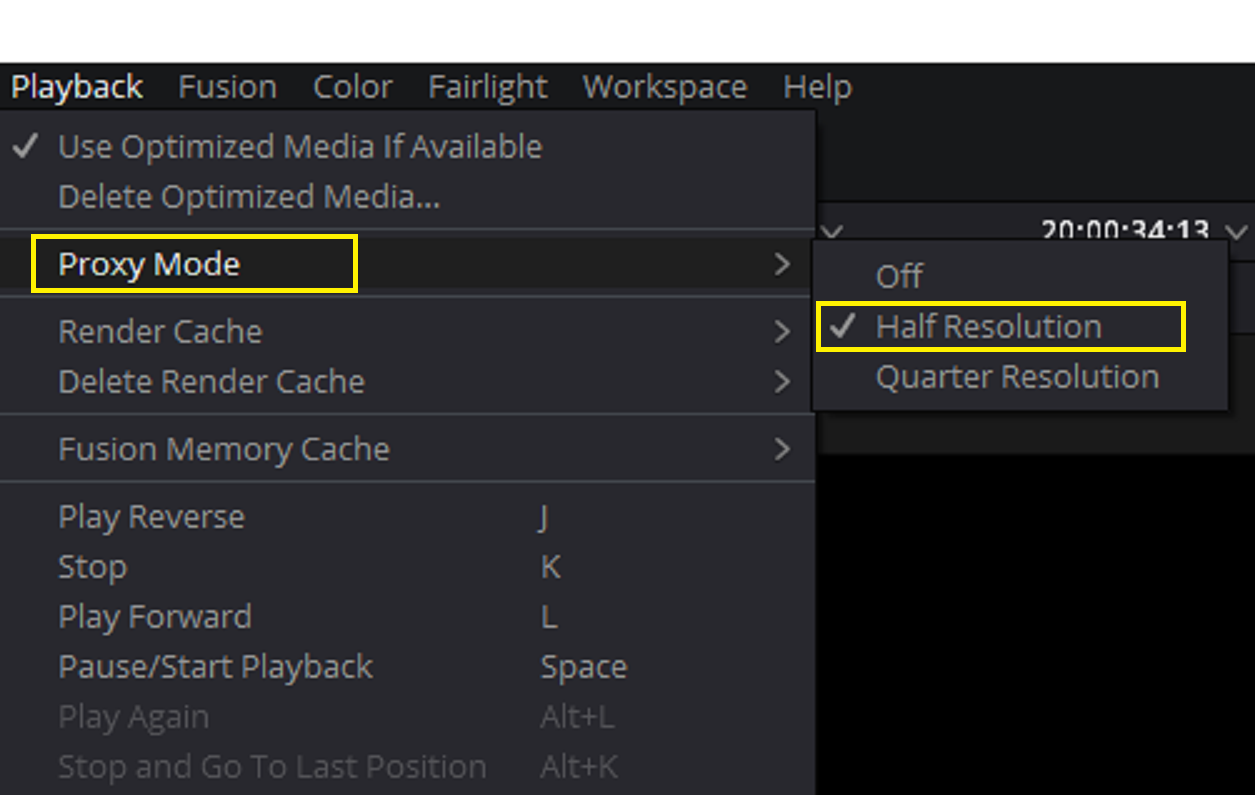
I think you may have already mentioned it, but have you tried using a "Half Resolution" "Proxy Playback". Then try going through the "Debayer Quality settings" to see the highest debayer quality plus Half Resolution Proxy playback combo gives you the best of both quality and smooth playback.

Screenshot-1663.png


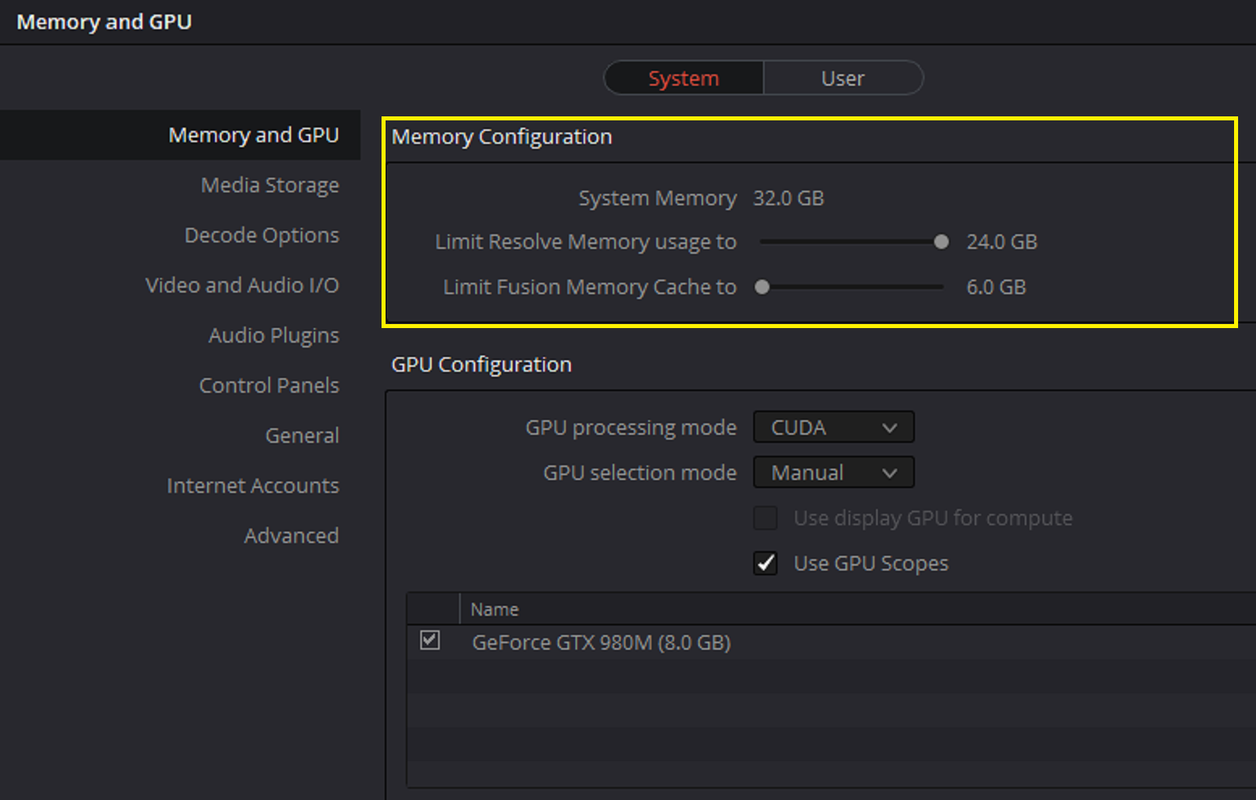
Also, if you don't use Fusion as little as I do, try re-allocating some memory away from Fusion to Resolve.

Screenshot-1662.png
 
Stuttery Playback Fix in RESOLVE 16.2.1

Stuttery Playback Fix in RESOLVE 16.2.1

Was excited about this, but having some major issues on a loaded 2017 iMac Pro. With 'Memory and GPU' set to Metal, and 'Decompression and Debayer' turned on in decode options, I get stuttery playback on 8k footage... at any playback resolution, even at quarter proxy mode. It says its playing back at 23.98 but in actuality it stutters every half second... visually it appears almost as if the hard drive were the bottleneck, like it can't pull frames quickly enough from it. But when I switch back to OpenCL and set decode to just Decompression, I get smooth realtime playback at half resolution, and even full resolution on more compressed 8k shots. Same shots play back great in Premiere at half resolution as well. Are there any settings I might be missing?

Hi, please try enabling show all frames in resolve as shown in attached image. This should improve your playback
 

Attachments

  • Screenshot 2020-04-27 at 08.17.24.jpg
    Screenshot 2020-04-27 at 08.17.24.jpg
    13.5 KB · Views: 0
Good news: Solomon's suggestion of enabling 'show all frames' helped with the stutter on my end, that behavior went away. Thanks!

Bad news: Metal Decompression and Debayer seems slower than Metal Debayer or OpenCL Debayer, in both playback and export. Did a quick test on a 13:1 compression slo-mo clip (I know this is very compressed so is more of a compression workload, but didn't have a less compressed clip on hand) playing off SSD.

-OpenCL: Smooth playback at 24fps with full-res premium, half res good export to Quicktime in 23 seconds.
-Metal Debayer: Smooth playback at 24fps with full-res premium, half res good export to Quicktime in 23 seconds.
-Metal Decompression and Debayer: ~18fps playback at half res good, 1/8 res barely makes 24fps (~23). Half res good export to Quicktime in 30 seconds.

Decompression and Debayer seems decidedly slower, at least with this more highly compressed shot.
 
Back
Top