Welcome to our community

Be a part of something great, join today!

  • Hey all, just changed over the backend after 15 years I figured time to give it a bit of an update, its probably gonna be a bit weird for most of you and i am sure there is a few bugs to work out but it should kinda work the same as before... hopefully :)

RED V-Raptor [X] 8K VV

Phil Holland

Administrator
Staff member
Joined
Apr 19, 2007
Messages
13,390
Reaction score
793
Points
113
Location
Los Angeles
Website
www.phfx.com
I have one as of earlier today. Shot about 5 hours worth of technical tests thus far, but breaking now for food, and will startup again after.

I'll be posting stuff as I discover/uncover things. But quickly I can say this is pretty incredible.
 
Is there any reason not to ditch a regular Raptor for the Raptor X?
i was under the impression a global shutter usually comes at the cost of a slight amount of image quality, but it seems they are promising the same performance (if not more!)
 
  • Thread starter
  • Moderator
  • #5
Phil, Wondering if the extended range writes to Prores? Thanks.
It apparently will, but not as good as the REDCODE RAW implementation, which is shockingly good. The cool thing with how it is now is you can toggle it on and off in REDCINE-X PRO and eventually the SDK.
 
  • Thread starter
  • Moderator
  • #6
Is there any reason not to ditch a regular Raptor for the Raptor X?
i was under the impression a global shutter usually comes at the cost of a slight amount of image quality, but it seems they are promising the same performance (if not more!)
Big, big reason I'm testing hardcore right now and late into the night. Raptor's are my A and B cams for all my work essentially. If there's no penalty, you get global shutter, better audio, and the other goodies; probably a good idea to upgrade. I'll underline though, Raptor 8K VV is not slouch in DR or it's very fast readout speed though. It's 8ms at full readout and that's extremely good. Global Shutter certainly solves problems and opens up new opportunities though.

I'm measuring noise/texture/grain and Dynamic Range in like 2 hours. Will be testing for around 2 hours or so tonight on that front. Already though I'm not seeing any noticeable hit. The only thing I can determine tonight is how it directly compares to the original V-Raptor 8K VV.
 
  • Thread starter
  • Moderator
  • #8
Awesome, thanks.
I should say the "moment" when it hits you is when you turn it on and off in camera. You are seeing it rendered live in monitor and when your clipped highlights become exposed highlights, it's rather nice.
 
Any Timelapse or frame averaging function for animation and other applications?
And what are the slowest frame rates available in the time laps mode. You know what I’m asking and we’re we’re going with these type of questions.
Also wondering if the audio upgrades are to make the camera finally have consistent sync sound.
It would also be nice if there is some better protection for the SDI out. To keep them from burning up. With out having to fallow some on off “monitor first wait no no camera first, what was it again??” Just to save you from having Red replace your video SDI out ports again.
 
Last edited:
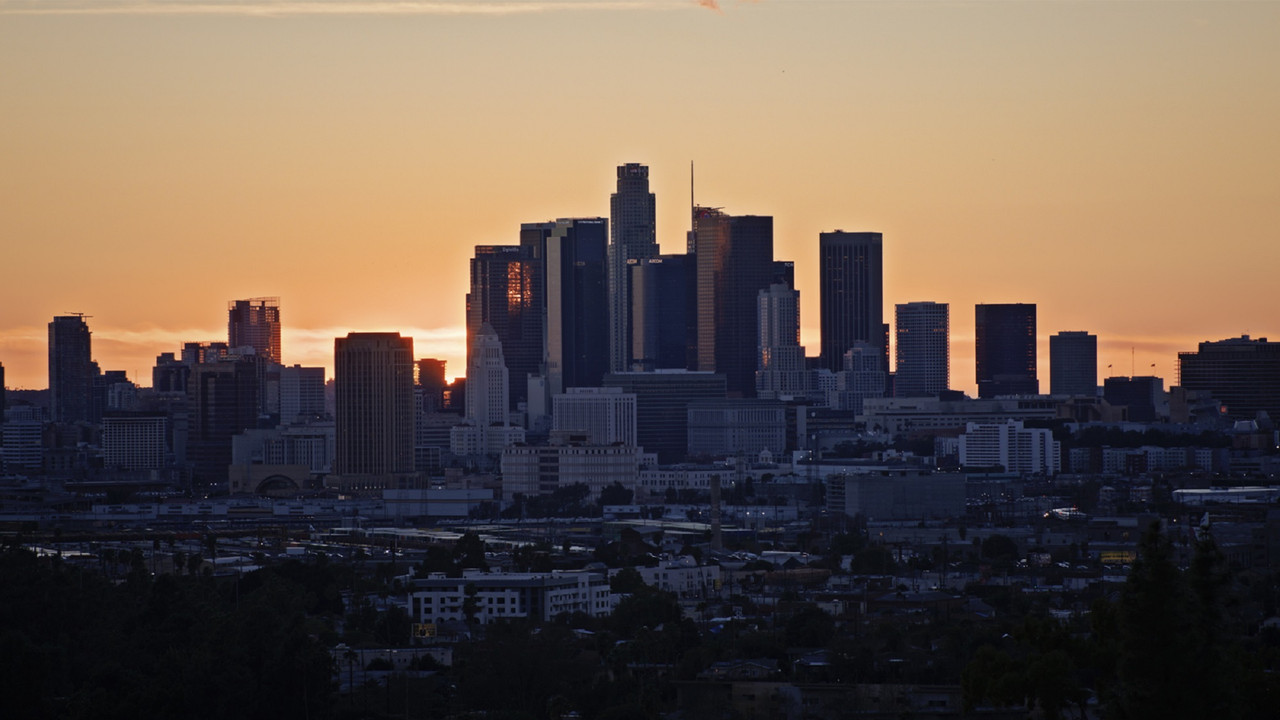
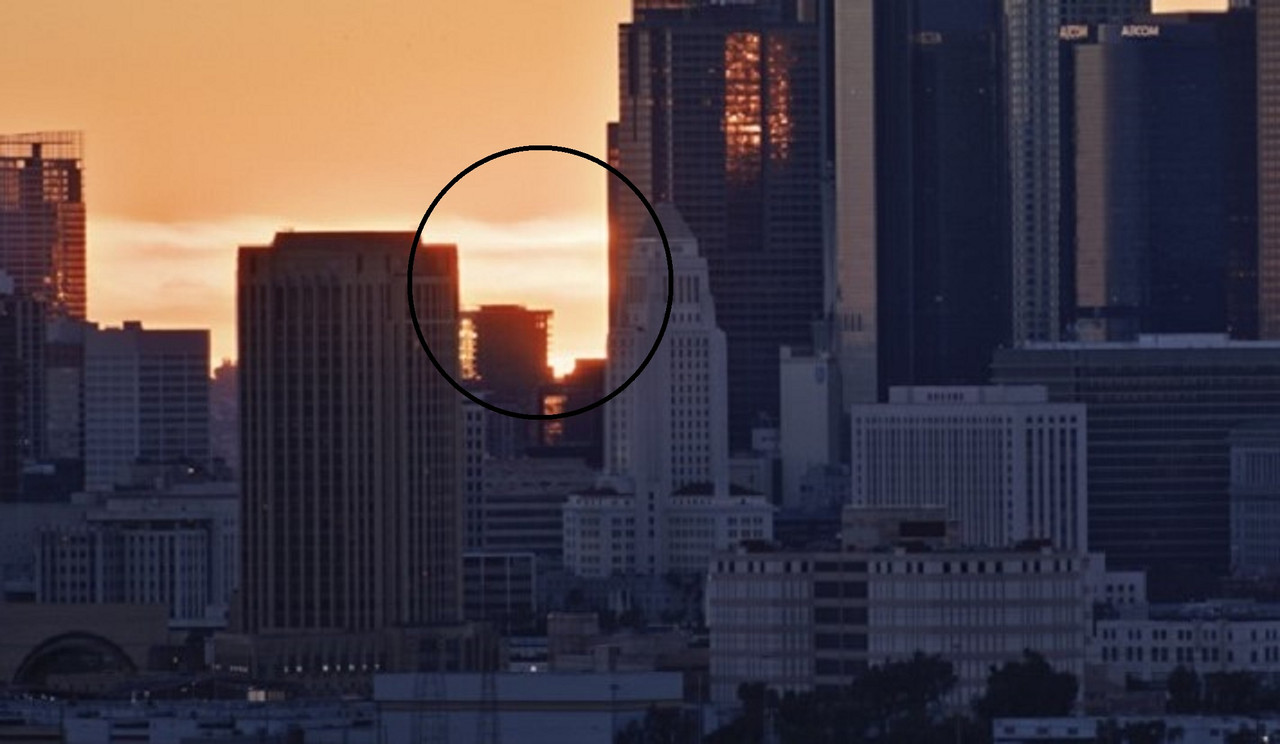
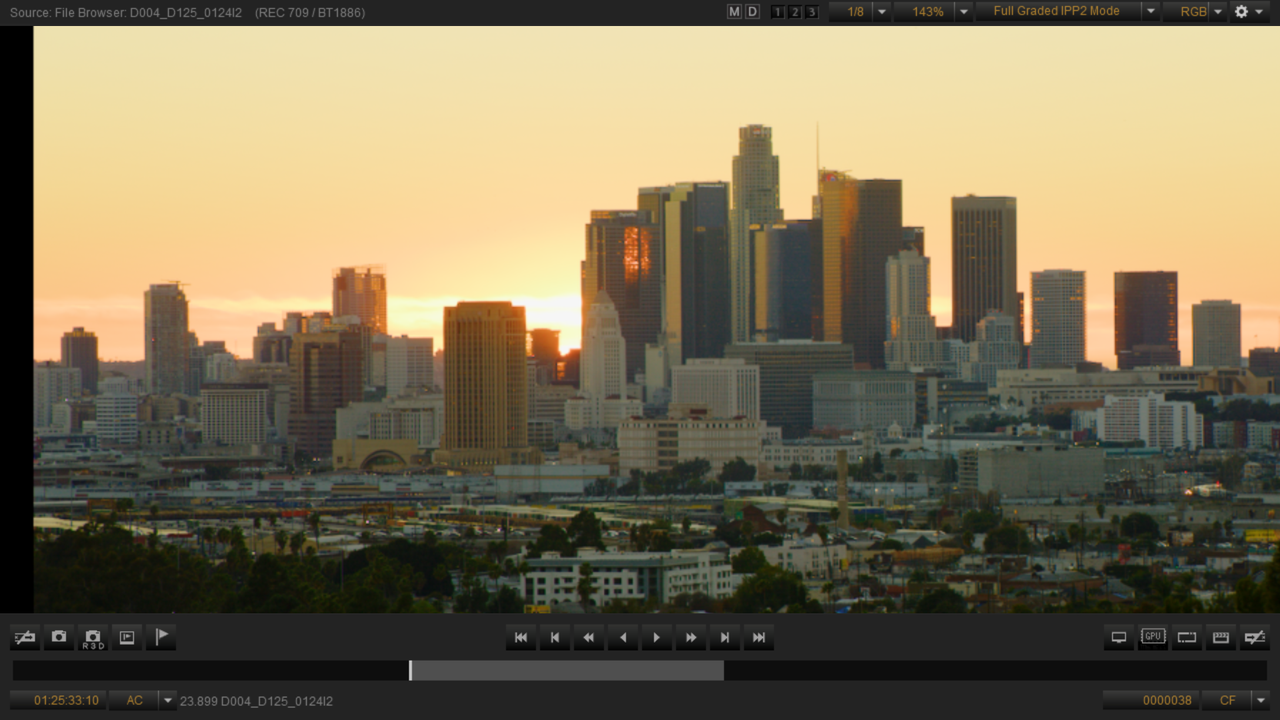
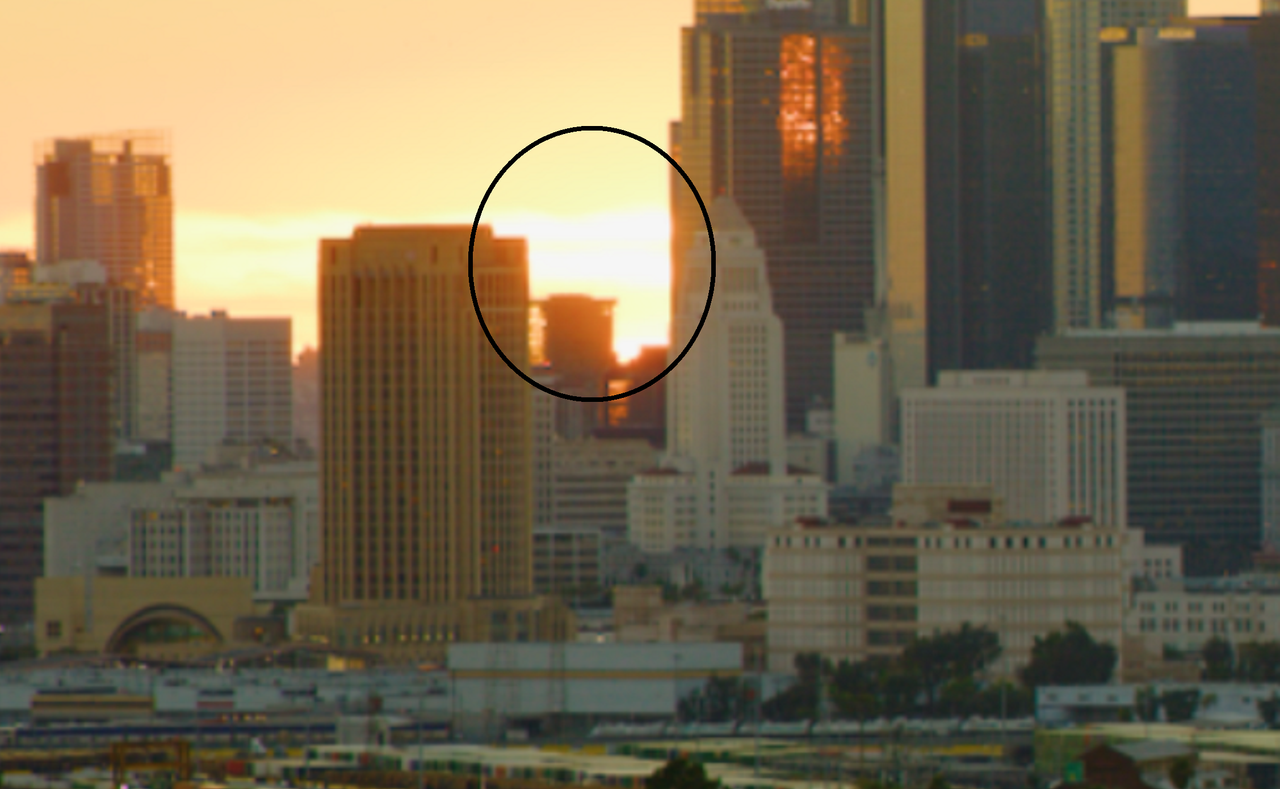
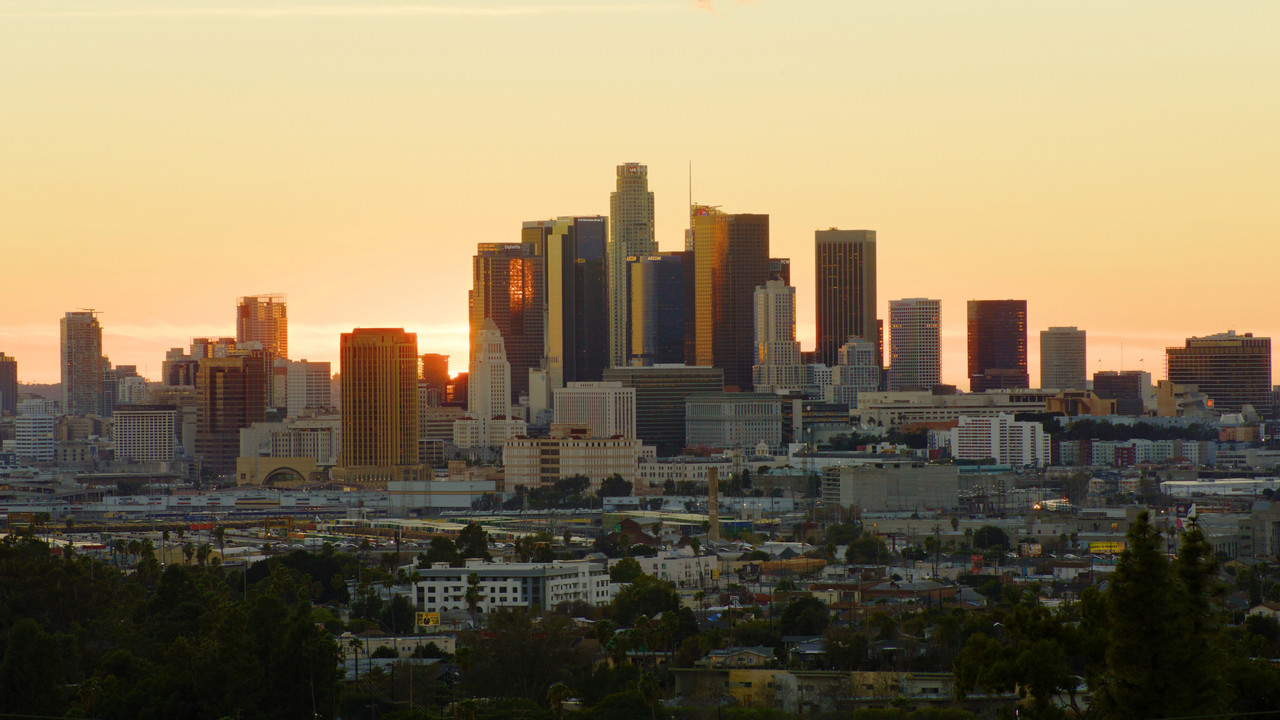
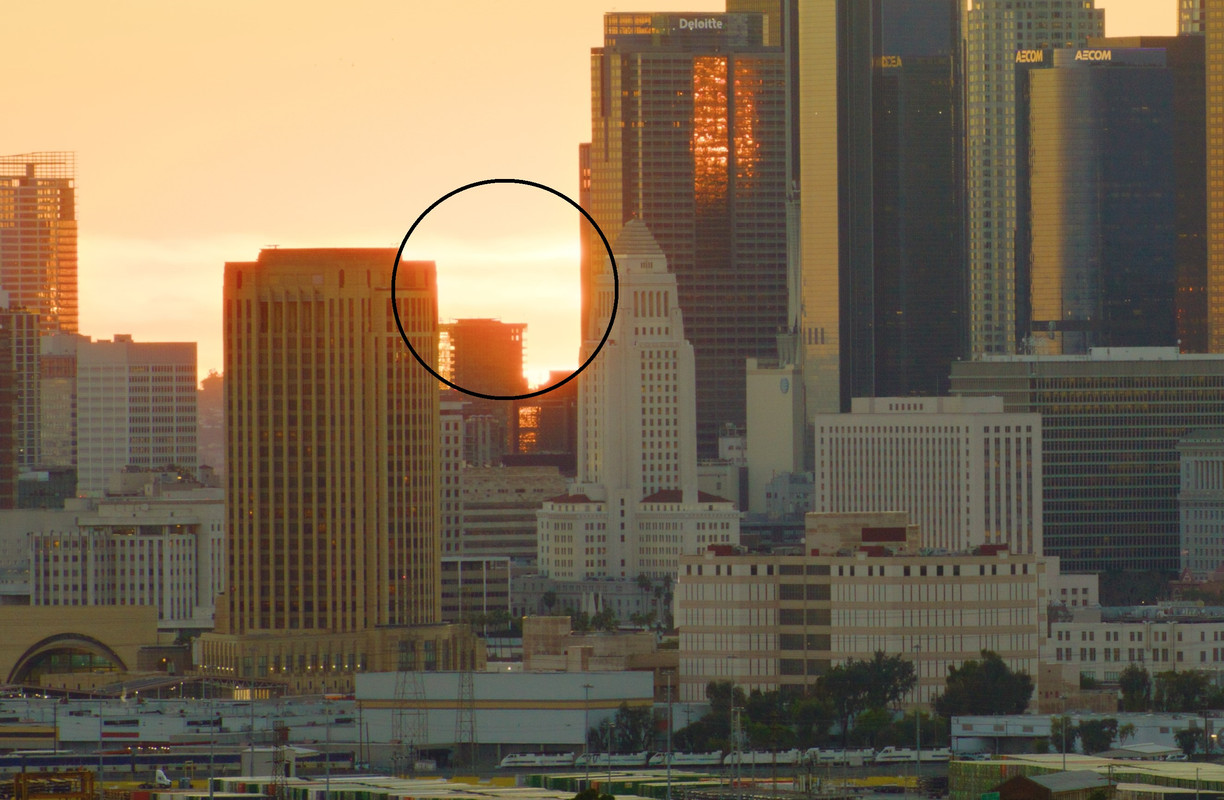
I noticed something Interesting when I tested out the "V-Raptor 8K VV-X SUNSET" clip. In the Original Still included with the .R3D file, the Sunset Area was much better controlled. When I brought it into REDCINE-X BETA Version 62.0.17 and did some correction, The Sunset between the buildings was less controlled. However when I exported a Still from REDCINE-X Beta 62.0.17, The Sunset was as well controlled as was in the Original Still from The Sample RED V-Raptor 8K VV-X SUNSET file. I don't know if this just the Beta Version of REDCINE-X or will that be the behavior of it not showing the new Highlight improvements inside REDCINE-X but only at export?


Original Still included with the "V-Raptor 8K VV-X SUNSET" clip .

D004-D125-0124-I2-001-thumb.jpg


cxrop.jpg


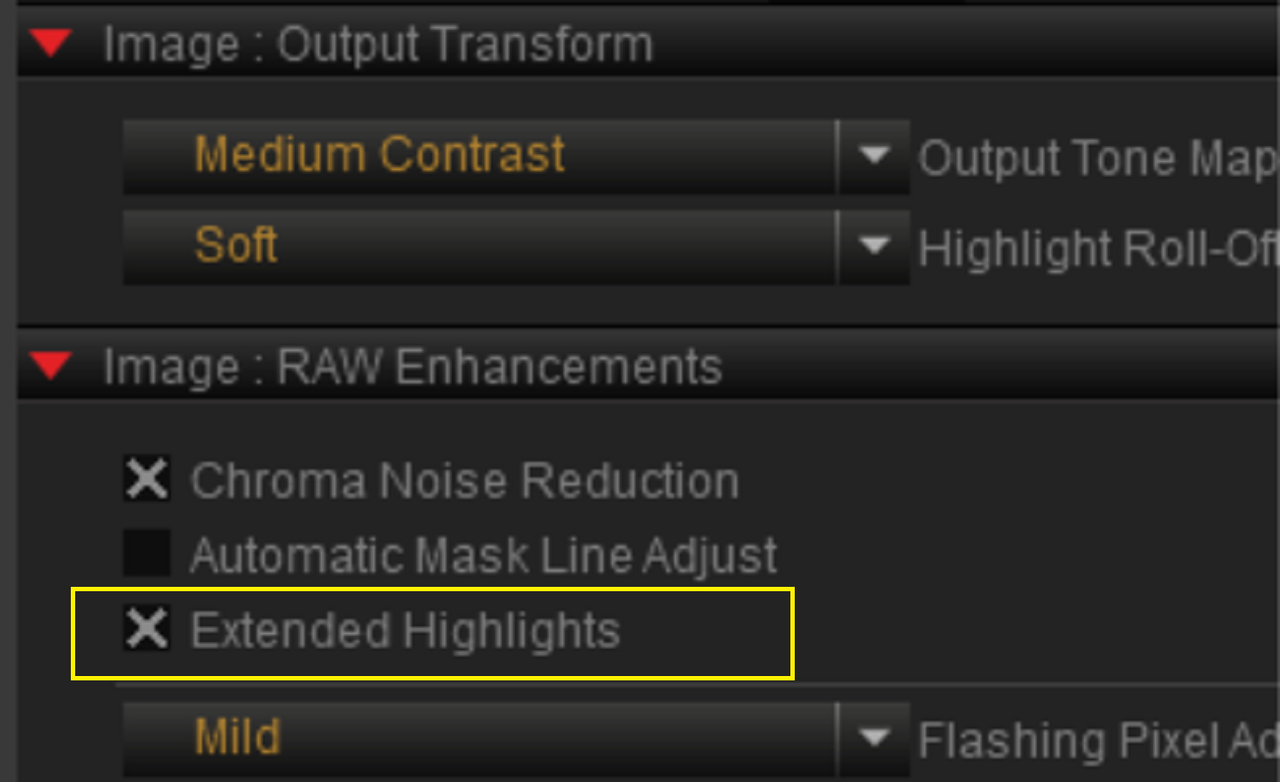
My correction of the "V-Raptor 8K VV-X SUNSET" clip in REDCINE-X with the "EXTENTED HIGHLIGHTS" Checked.

Screenshot-12177.png


Screenshot-12177-crop.png


Screenshot-12176.png


The Exported Corrected "V-Raptor 8K VV-X SUNSET" clip

D004-D125-0124-I2-S000-0000038-ms2cn-1-1-1.jpg


D004-D125-0124-I2-S000-0000038-22.jpg


Original

cxrop.jpg


In REDCINE-X

Screenshot-12177-crop.png


Exported

D004-D125-0124-I2-S000-0000038-22.jpg


EDIT:

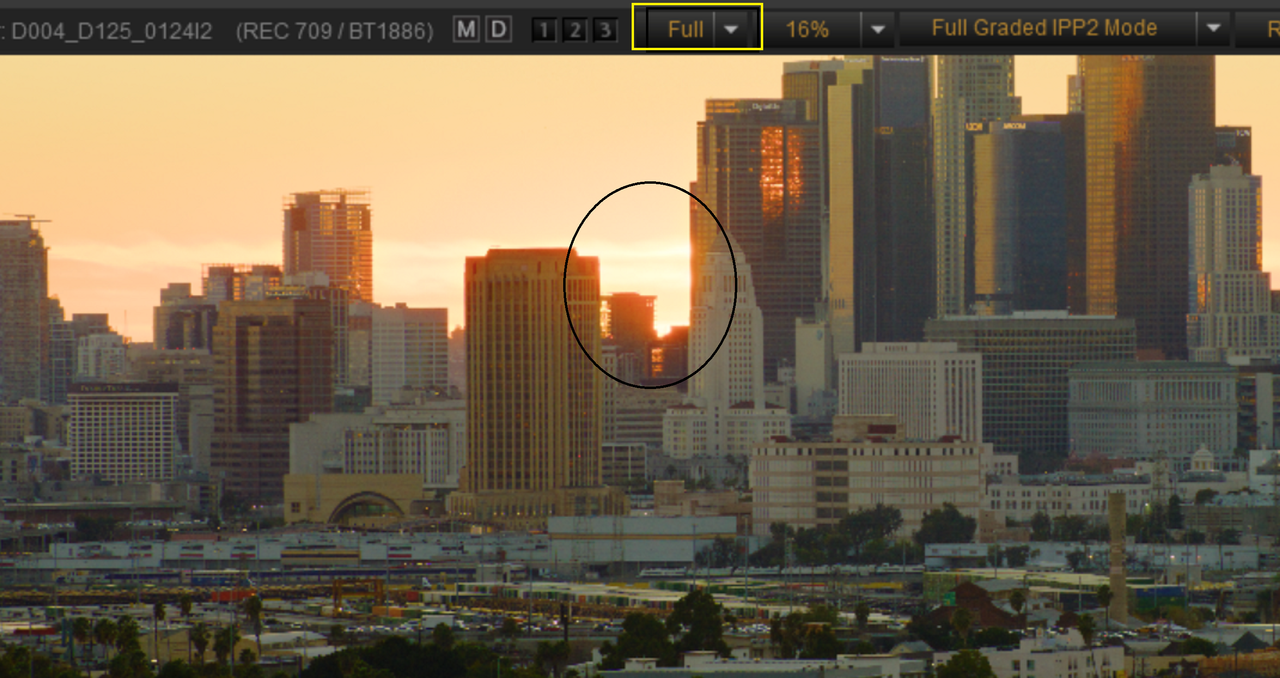
REDCINE-X was set to a LOWER resoltion 1/8 instead of FULL so the less than controlled HIGHLIGHTS were BLOOM from being set to a Lower resolution. MY BAD!!!

Screenshot-12181.png
 
Last edited:
  • Thread starter
  • Moderator
  • #11
Any Timelapse or frame averaging function for animation and other applications?
And what are the slowest frame rates available in the time laps mode. You know what I’m asking and we’re we’re going with these type of questions.
Also wondering if the audio upgrades are to make the camera finally have consistent sync sound.
It would also be nice if there is some better protection for the SDI out. To keep them from burning up. With out having to fallow some on off “monitor first wait no no camera first, what was it again??” Just to save you from having Red replace your video SDI out ports again.
Timelapse is there :) Intervalometer essentially. That I'm tinkering with tomorrow and It's nice to have Extended Highlights + Timelapse for sure. Going way, way back when I was doing more of that style of work it I used the older HDRx for exactly this, however EH is vastly better than HDRx and suitable for motion work out of the tin.

Timelapse info. In the mode you have Interval Time and Frames per Interval. Both appear to have no limits. Slowest shutter I have in this build is currently 1/6th of a second. One of the better things about using a motion picture camera for timelapse for me is the immediate workable file over say a DSLR or Mirrorless camera that will likely need to be converted to use in Grading and NLE software.

I'll have to dig into the audio stuff a bit. I haven't had the issues with that on any of the DSMC3 cameras, but I also constant feed sync on all cameras since DSMC. It's been nearly a decade since I went the Jam Sync once in the morning and once at lunch route. I can confirm the audio bits are what is found in Komodo-X, which is a good thing. Cleaner signal, etc.

SDI, across all the DSMC3 cams, I haven't had SDI burnout. That I'm thankful for, but also makes me curious. I've seen people, particularly on the original Komodo have issues, yet I haven't. But I think that comes down to what I hardline into and I generally use decent on board and wireless units.
 
  • Thread starter
  • Moderator
  • #12
I noticed something Interesting when I tested out the "V-Raptor 8K VV-X SUNSET" clip.

Yep, I think in REDCINE-X PRO you need to be in 1/2 and Full to "see" what's going on.
 
So no HDRx time artefact when using EH ?

Thanks
Patrick

PS: Phil you just inventend a new abrevation : EH !!!!
Is there a link to the the shot? Is it even motion in it? Edit downloaded the city skyline it a fixed camera shot and it only opens in red cine so difficult to tell what's going on. I guess they could do a highlight reconstruction per color chanel by looking at the 2 remaining colors like they do in komodo but do that for two / HDRx tracks then combine the two HDRx tracks with ai motion vectors / warp/merge the two tracks together before blending them. As I see it that would utilise red raw / HDRx output and post processing to its fullest to get as much DR as possible out of the camera. But yes would still be a hack way of doing things.

For some reason original raptor can't do 360 shutter. It can't record one frame right after the previous like the DSMC2 cameras. It needs a little fraction of a frame to redraw the next frame. I guess that is sorted with X and that's what makes HDRx possible.
 
Last edited:
  • Thread starter
  • Moderator
  • #15
So no HDRx time artefact when using EH ?

Thanks
Patrick

PS: Phil you just inventend a new abrevation : EH !!!!
It's actually what it's called in camera and is shown in the REDCODE RAW files in RCX to let you know the shot has the data.
 
  • Thread starter
  • Moderator
  • #16
Is there a link to the the shot? Is it even motion in it?
I'll post samples. I've had the camera for several hours, but I will be testing until Monday various things.

I'm not saying it's "perfect", I'm saying it's better than HDRx ever was.

I'll whip up an explanation of the tech. I've figured a good chunk of it out.
 
I'll post samples. I've had the camera for several hours, but I will be testing until Monday various things.

I'm not saying it's "perfect", I'm saying it's better than HDRx ever was.

I'll whip up an explanation of the tech. I've figured a good chunk of it out.
"Better than HDRx ever was" do you mean this is something different then HDRx?

Only way to to treat HDRx different than the old HDRx that I could think of would be the following:

Shoot regular HDRx tracks. where the bright track has your shutter of choice. Then use the darker shorter exposed track and only use it as reference data to try extend / reconstruct the out of gamut highlights of the brighter track.

but still that's just post processing and could be done just the same with footage from any hdrx capturing camera. So I'm very curious to hear what is unique in that sense I raptor x. The fact that red does not explain what they actually do... Not sure what to think of it.
 
  • Thread starter
  • Moderator
  • #18
"Better than HDRx ever was" do you mean this is something different then HDRx?

Several factors going on here. I know you know how it works, but I'll explain it clearer as there's people out there who have never used the previous cameras.

DSMC and DSMC2 HDRx worked in this manner. I'll user shutter speed as it's easier on the brain at 4am then angle. If exposing 1/48th and having HDRx set to 4 stops you would capture a two "tracks". A and X. The A track is your 1/48th and your X Track would be 1/768th. In post you would use Simple Blend, Magic Motion, or "home brew" mixing/blurring. The weighting schemes resulted in issues on some edges and all that, but could be mitigating most of the time a fair bit.

Side bar. Data rates and frame rates. Previous cameras were able to capture up to around 300MB/s (DSMC2) max and maximum resolution and format size. DSMC, much lower. HDRx came at the cost of halving your max data rate per track and halving your maximum frame rate.

Extended Highlights on V-Raptor X. Keep in mind this camera is brand, brand spanking new to me, but I have figured out most of what RED is doing over the course of today's tests. I suspect this is a 4-ish stop blend, w/ 3+ stops up top, and the rest of the data used to combine/blend. You still are halving your maximum frame rate, however, you are doubling your maximum data rate, that is where things a bit fascinating when you consider the ghost frame stuff and it being effective and high quality. And there is some sort of temporal interpolation of adjacent frame(s) information being used to create the Extended Highlight data. There's also some sort of logic to it that I am investigating. And I can say confidently the global shutter makes this work "better than before" as well. This is all happening in camera to create the data.

I'm still digging into it. With me waving my arms around like a madman in front of a softbox clipping I can get it to make weird things happen at very fast movement, however, that is within the motion blur momentarily and not like the ghosting we've seen with HDRx, so that's where they are doing something I'm working on figuring out. With medium to even medium quick motion, this is working alarmingly well.

To add to this, this is optional and you can toggle it off on REDCODE RAW even if you use it. For many 17+ is enough, but I think the finesse and interesting thing here is knowing where and when to use it, and I do think some who aren't too concerned about their data footprint will just leave it on.

I don't want to sugar coat much or get people's expectations in weird places, but I am shooting some insane tests in very bright conditions. If you know how to use this feature I can say with confidence you can work at fascinatingly lower ISOs. When that clicked for me I started at ISO 250, but I forced the camera down to ISO 12.5 (Exposure Adjust), which I don't think I'd recommend for most, but the fact I am capturing usable and good looking shots that way is sort of madness.

Notes. More on the workflow side. Yes, it's about 2X the data. And currently in REDCINE-X Pro it takes about 3 times to render. My main workstation pushes out 8K VV @ 24fps faster than realtime, so not insane to endure the rendering overall, but currently it's about 3 times slower than "without". With the Extended Highlights disabled and compared to a clip with it off entirely of the same consistent motion content, the render times were the same.

REDCODE RAW without EH was around 346MB/s. With EH was around 715MB/s for the same content and record time.

I think the critical thing is seeing how it works. Just outside even shooting timelapse style or plate-style work today with moderate camera motion, toggling Extended Highlights on outdoors in broad daylight without ND and netting a shot with no issues and 20+ stops is actually wild. And this is like really, really early on. I'm betting there's even more improvements coming once more tinkering can be deployed by engineers.
 
Thanks Phil for all your hard work digging in to this stuff. Really fascinating to read it all. I would be curious, how is the EH handling flickering lights? Does that give any issues with the image?
 
Several factors going on here. I know you know how it works, but I'll explain it clearer as there's people out there who have never used the previous cameras.

DSMC and DSMC2 HDRx worked in this manner. I'll user shutter speed as it's easier on the brain at 4am then angle. If exposing 1/48th and having HDRx set to 4 stops you would capture a two "tracks". A and X. The A track is your 1/48th and your X Track would be 1/768th. In post you would use Simple Blend, Magic Motion, or "home brew" mixing/blurring. The weighting schemes resulted in issues on some edges and all that, but could be mitigating most of the time a fair bit.

Side bar. Data rates and frame rates. Previous cameras were able to capture up to around 300MB/s (DSMC2) max and maximum resolution and format size. DSMC, much lower. HDRx came at the cost of halving your max data rate per track and halving your maximum frame rate.

Extended Highlights on V-Raptor X. Keep in mind this camera is brand, brand spanking new to me, but I have figured out most of what RED is doing over the course of today's tests. I suspect this is a 4-ish stop blend, w/ 3+ stops up top, and the rest of the data used to combine/blend. You still are halving your maximum frame rate, however, you are doubling your maximum data rate, that is where things a bit fascinating when you consider the ghost frame stuff and it being effective and high quality. And there is some sort of temporal interpolation of adjacent frame(s) information being used to create the Extended Highlight data. There's also some sort of logic to it that I am investigating. And I can say confidently the global shutter makes this work "better than before" as well. This is all happening in camera to create the data.

I'm still digging into it. With me waving my arms around like a madman in front of a softbox clipping I can get it to make weird things happen at very fast movement, however, that is within the motion blur momentarily and not like the ghosting we've seen with HDRx, so that's where they are doing something I'm working on figuring out. With medium to even medium quick motion, this is working alarmingly well.

To add to this, this is optional and you can toggle it off on REDCODE RAW even if you use it. For many 17+ is enough, but I think the finesse and interesting thing here is knowing where and when to use it, and I do think some who aren't too concerned about their data footprint will just leave it on.

I don't want to sugar coat much or get people's expectations in weird places, but I am shooting some insane tests in very bright conditions. If you know how to use this feature I can say with confidence you can work at fascinatingly lower ISOs. When that clicked for me I started at ISO 250, but I forced the camera down to ISO 12.5 (Exposure Adjust), which I don't think I'd recommend for most, but the fact I am capturing usable and good looking shots that way is sort of madness.

Notes. More on the workflow side. Yes, it's about 2X the data. And currently in REDCINE-X Pro it takes about 3 times to render. My main workstation pushes out 8K VV @ 24fps faster than realtime, so not insane to endure the rendering overall, but currently it's about 3 times slower than "without". With the Extended Highlights disabled and compared to a clip with it off entirely of the same consistent motion content, the render times were the same.

REDCODE RAW without EH was around 346MB/s. With EH was around 715MB/s for the same content and record time.

I think the critical thing is seeing how it works. Just outside even shooting timelapse style or plate-style work today with moderate camera motion, toggling Extended Highlights on outdoors in broad daylight without ND and netting a shot with no issues and 20+ stops is actually wild. And this is like really, really early on. I'm betting there's even more improvements coming once more tinkering can be deployed by engineers.

Cool. Would be interesting to see how it behaves in long exposure. Time-lapse / camera set to lowest possible frame rate then clap your hands infront of the soft box.

Another question does it have the frame sum and average recording functions like the DSMC2? Thinking if it can do HDRx it likely able to do that as well.

The difference between global shutter and rolling shutter when it comes to HDRx is the redraw time. Basically for rolling shutter, your x track becomes limited to be bigger than the redraw time and for global shutter that limitation is not there. but except for that it works quite the same.


I could not open the X test clips in flame. And in red cine I just found the EH on of type option. Is there any way to develop / render out the two passes?


And the phantom track... What you think about it? Is it not just recording in between frames. Kind of filming 48fps 360 shutter instead of 48fps 180. Then choose to view every second frame? I mean it must be something the regular raptor and all red cameras could do with the right firmware. Possibly not 180 deg on both frames as raptor is limited to almost 180 deg but still shooting the VR back screen bluescreen should be very possible with any of the cameras if using sync and double the frame rate, no?
 
Back
Top