Welcome to our community

Be a part of something great, join today!

  • Hey all, just changed over the backend after 15 years I figured time to give it a bit of an update, its probably gonna be a bit weird for most of you and i am sure there is a few bugs to work out but it should kinda work the same as before... hopefully :)

The Gentleman's Underwater Bubble Blower Thread

I try to set my WB more and more when I'm shooting.
This particular shot I did the in-camera WB on that spot, pointing the camera down to the sand from, say, 3-5 feet distance.
I had my lights on, else it's useless to set the WB... haha...

My take is this works great IF you have an 18% gray chart so that you can tell the camera WHAT neutral gray is....Otherwise setting WB to the sand or anywhere else is pointless. That said, As Paul mentioned---finding a neutral setting in water is a good approach since at every variable of depth; radius you turn in the water or every degree different in any direction you point the camera you are changing those neutral values---SPEAKING only about shooting RAW here----on any other system that is burning in your WB values i'd agree with you to set WB and that particular setting and change it as needed.

If working on a set or closed condition with an assistant, setting WB with an 18% gray slate works great---but not very practical when we are on our own shooting stock.

....So, my feeling is that you are creating a step where you may not need to....and once you are in the middle area...it's pretty darn easy to set WB & Tint since in most cases this is going to be done anyway on each and every clip--at least that's my workflow. *i realize mine is only one of many....but do not see to have any problems with it nor do we shooting 3d and correcting later in various other post programs.
 
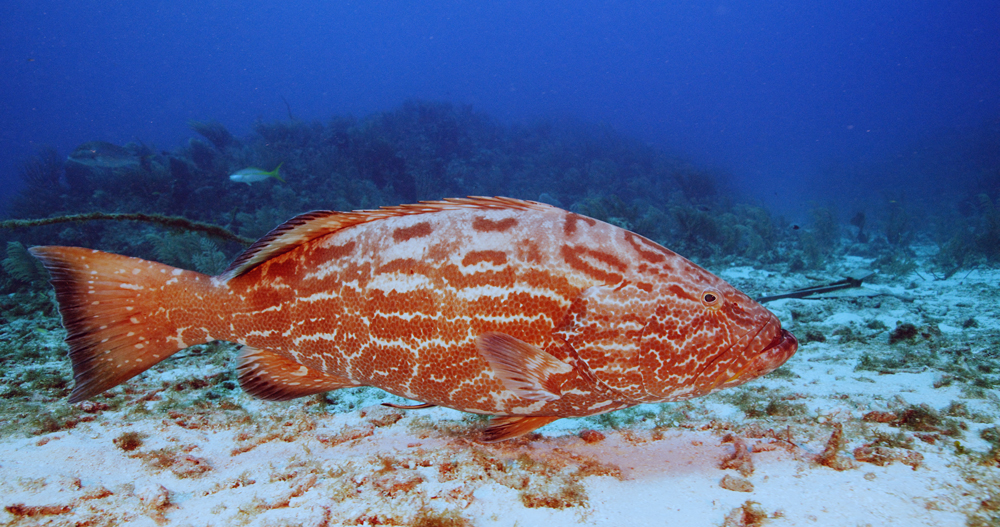
The viz was not super, to Cayman standards, meaning.... 80-100ft ;-)
Granted it was a bit "cloudy" but certainly not "murky"!

She also has a snapshot of the same grouper at the same spot.
Bad picture, just for color purposes.

Shot on a D800.

So, baseline, ... you gurus are clearly able to "make this look good" but it is not how it should look like.
Anyway it is a bezillion times better than what I can "cook" in RCX ;-)))

Hi Michael,
There's obviously many variables including lighting choice, lens, filter, lamp/camera angle, distance to subject, post settings, etc. that differentiate these images, but there's definitely enough data present in your R3D to match the shots in a sequence. In this example I didn't even perform any secondary color correction on the water.

Thanks for posting the file, although it does make me want to go back to Orange Canyon, one of my favorite places on Earth :)

The reason I asked about the water quality that day was because I've noticed that magenta water issues seem to present themselves most often in moderately murky conditions, especially in blue water. Camera angle also seems to play a significant role. The best solution I have found is to get both an in-camera WB in the scene and record the card on screen for use in post. As we all know, messing with cards is a drag, but it sure does save a lot of work later. If I'm rushed or forgetful, I sometimes use a method where I record the card just after a shot or at the minimum a few times per dive, but my tests have clearly shown the ultimate method is to record the shot with the in-camera WB set as closely as possible.

Cheers, Jeff

1492673_10152037919810502_1699432031_o.jpg


Cayman_Grouper_Match2.jpg
 
Jeff, gorgeous post grade of the grouper. Just goes to show, in the hands of a capable guy, this stuff can really shine.
 
Jeff, gorgeous post grade of the grouper. Just goes to show, in the hands of a capable guy, this stuff can really shine.

+1

try these settings as a starting point on this r3d. anyone can do it...

{fairly similar results across redcolors/redgammas, but i stuck with 3.}

5600k
0 tint
1.2 saturation
1 contrast
.95 green

if you want you can play around with curves, lift/gamma/gain, anything else to dial it in just inside rcx. would be nice to have qualifiers/secondaries within rcx someday...

there are many ways to get there, but this easily gets you in range to match to your references (as jeff did), very different of course than what i guesstimated quickly on my green-ish water example based on your metadata, and probably much more 'natural'. the point is you can get pretty far in rcx and push it anywhere you want in editing/coloring software. not all images are so forgiving, it helps that you pounded this dude with light...

this really is a great capture, you can set saturation to anything you like without it falling apart - this is telling. better for color than a lot of images i've gotten topside, actually...

There's obviously many variables including lighting choice, lens, filter, lamp/camera angle, distance to subject, post settings, etc. that differentiate these images, but there's definitely enough data present in your R3D to match the shots in a sequence. In this example I didn't even perform any secondary color correction on the water.

agreed, and that reference image helps alot to eliminate guesswork - it's really not a bad idea to have reference stills from something that performs really well underwater, if at all possible, especially if you're experiencing trouble with your red-colors. although in this case you could have basically set the white balance to around 5600 as mentioned above and pretty much been right there while you were shooting, no post trickery necessary. not a bad idea, either... although i realize these are usually adverse conditions and you guys are doing good to get anything shot some days. that's what's good about r3d's (:
 
I will say this---Rudi is much more seasoned than most out there....and knows the effort it takes....and well Paul? he can go into an entire new level of coloring to bring out red in the green & blue channels as well as mask off areas of bad color and produce what is desired.

Well, while I don’t understand why I’ve been dragged into a contest of skills there was no need for, and while I have managed to survive every time it turns out somebody is better than me at something :-), this statement nevertheless puts a wrong spin on things. Given that Paul has continuously repeated he cannot see what the problem is, and I have done nothing but insist the issue is a serious one, it may then be inferred that this is nothing more than inferior color grading skills at play and nothing more.

Skills have nothing to do with this problem.

First, for the grouper image, Michael made it clear it was the best image he had ever gotten in Grand Cayman, which is true, devoid of 90% of all the issues he’s been facing there. And I should know as I have seen lots of images shot by him before. It is quite easy to make this one look good, even without secondaries. Here’s a simple color balance pass in RCX at it:

GrouperRCXNeutral.jpg


As you can see, it doesn’t look too bad, and even if you zoom into the water about 200%, you can see that although there is a lot macro blocking courtesy of Redcode, and some speckles of red here and there, the water is still blue and can be recovered relatively easy with a little more work.

GrouperCrop.jpg


If this is how my water would look always in RCX, I wouldn’t even complain about there being an issue. So, using this image as an example is truly not representative of whether the magenta issue is really that bad, thus forgive me if I’m not so impressed by the grades presented, it would be very easy to turn the water into a more pleasant turquoise, make the reds veer more towards orange/golden yellow and to run an isolated noise reduction pass on the blue channel. It would still be an inferior image compared to the D800 and many other digital cinema cameras.

I have had this conversation with Jeff Whithehurst before when he has offered his valuable input. But very respectfully, and considering that many people do not truly understand how raw really works, I will repeat that setting WB underwater, or at any point other than during final debayering, is of NO CONSEQUENCE WHATSOEVER. That is, of course, if Redcode is really RAW, and not semi-raw like Canon raw, which bakes in WB and ISO during recording as a way to save space. So for the last time, playing with your WB before or after makes no difference. Even if it may give you an idea of where your values are, which is a fool’s errand at best since WB values underwater are, for the most part, an exercise in futility as no sensor or color science can resolve values of 100 000 Kelvin or -45 tint.

As for secondaries and channel mixing and channel reconstruction, well…what a mixed bag that is. Yes, those are very valuable skills for a colorist, but make no mistake, unless you are trying to create some psychedelic color effects, the only thing those procedures are good for is to try and save shots that seem beyond salvation. So while I can appreciate the possibility of not having to trash an important shot, if the only way to make RED footage look good is by constantly reconstructing channels and isolating water in secondaries, well, we are all in for very painful times. And that is far from what a professional camera should deliver, even if some gifted colorist like Paul can routinely perform life saving surgery on those crappy shots. Furthermore, make no mistake, most of those shots would look OK on a computer monitor but unusable on a big screen.

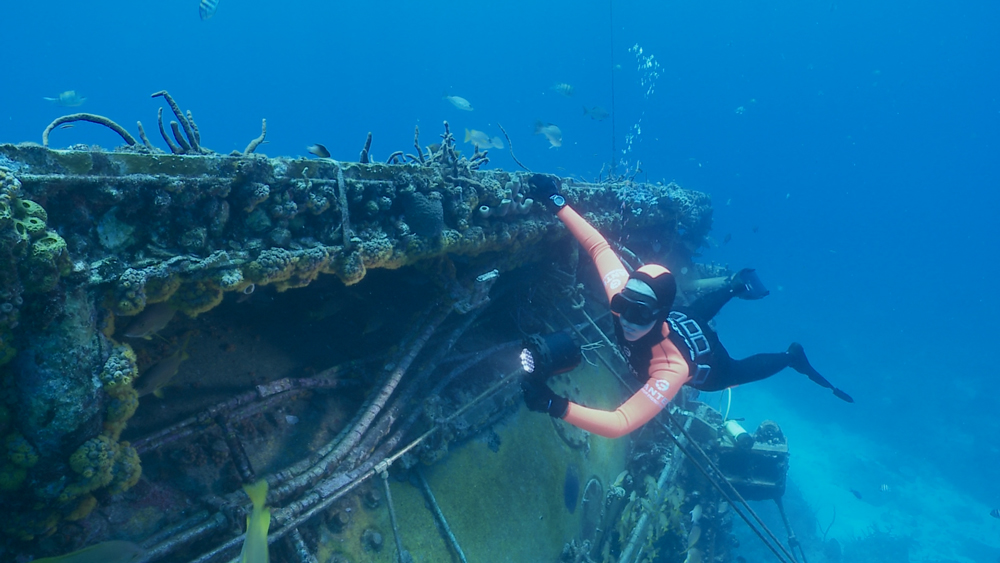
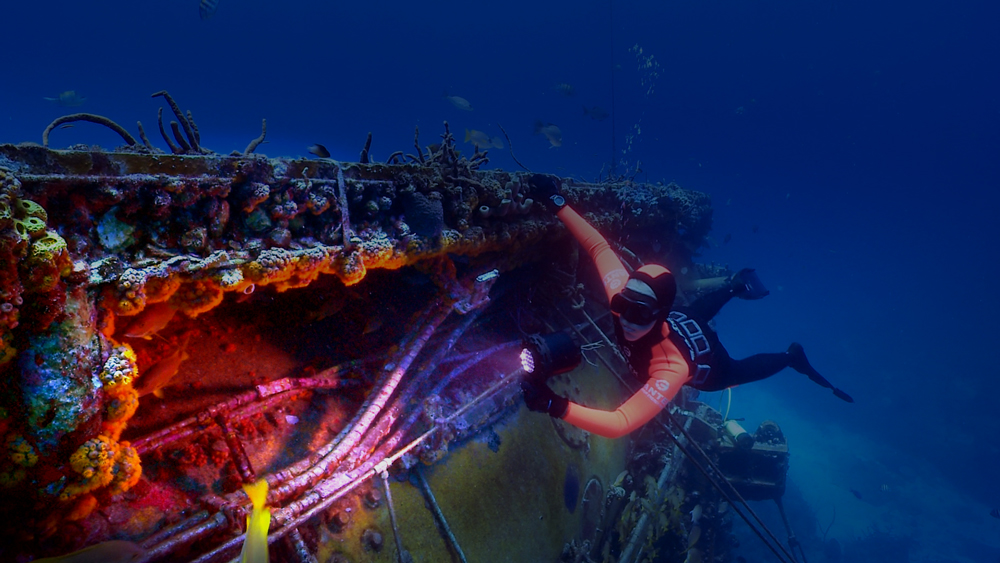
Here below are some examples of the much vaunted Sony EX-1 camcorder and its possibilities. All shots were done in ambient light, with only the help of a red filter, and though I used the camera’s HD SDI feed to record DnxHD 220 mbps, 10 bit, 4:2:2 to an Atomos Samurai, I actually copied my grades and pasted them onto the very low quality onboard 35 mbps, 8 bit, 4:2:0, XDCAM codec to really put the images through the grinder. Take a look below:

Freeport, Bahamas, very murky day (right in the middle of Hurricane Chantal) reef at 12 meters/40 ft. Image recorded on camera on top, graded version on bottom. Notice the separation of warm tones from what was a very subdued, mostly green image.

ReefNeutral.jpg

ReefGraded.jpg


Spiegel Grove wreck, Florida Keys, main deck, 30 meters/100 ft first set, second set main crane over dock hold, 27 meters/90 ft. Notice the saturation of the reds and flexibility of the blues, changing from pale cyan to rich indigo.

WreckNeutral03.jpg

WreckGraded03.jpg


WreckNeutral02.jpg

WreckGraded02.jpg


Aquarius Laboratory, Florida Keys, day for dusk shot, 15 meters/50 ft. Notice the separation of reds, oranges, and purples, as well as the intense deep blue of the water. No banding even at 8 bit.

AquariusNeutral.jpg

AquariusGraded.jpg


Spiegel Grove wreck, Florida Keys, bottom, 43 meters/140 ft. Weren’t we taught there is no red at 140 ft? Well, look again at all the encrustations on the bow of the wreck and the patch of reef, rich, vibrant reds, purples, perfectly separated from the yellow of the fish tails. Oh, and an orange suit that still looks orange. Again, no lights, 140 ft.

WreckNeutral.jpg

WreckGraded.jpg


These are shots that were actually what I would call troubled, they looked like very little could be done for them, and yet, they withstood very saturated grades that complied with the client’s request. Now, I know the 3 chip design of that camera means no interpolation/guessing of colors during RGB coversion, but given the fact that each chip is only 2.2 megapixels, and the MX sensor is 14 megapixels, half of which are green, or 7 megapixels, and 3.5 megapixels each for the blue and red channel, then theoretically the MX should still have the same, if not better, color accuracy as the EXMOR chips on the EX-1, even after debayering. Which is clearly nowhere near the case.

More examples coming.
 
It keeps on amazing me what you guys pull out of, what I consider, crap footage, Jeff and Paul!
And yes, Orange Canyon is very colorful indeed :-)
This was shot in East End at Jack McKinney's.
I had 'the idea' the magenta-issue was on its worst on a scattered day and least on a covered day.
But that could of course also translate to murkyness.

Would you mind posting your RMD Jeff? I would love to learn from it.
And also would love to see what it does with the magenta-noise in the blues on my monitor.

this really is a great capture, you can set saturation to anything you like without it falling apart - this is telling. better for color than a lot of images i've gotten topside, actually...
Wow, Paul.... this is about the best compliment I ever had!
Thanks! :-)

The reference pictures shouldn't be a problem for me as I'm mostly shooting with my wife, who's an amazing uw photographer.
So I can always take a peek on how it was ;-)
Cheers,

Michael
 
hehe, always enjoy your thoughtful posts on here and your blog, rudi. nice flex in our color-contest (:

forgive me if i was a little heavy on the 'i don't see an issue' statement, i'm just trying to make the best of where we are at. it's always better to get something good out of the gate so you can focus on color grades instead of color corrections.

my point about white balance is, from the perspective of color - especially in this case - it's nice for the dp/cameraman to set their intention in the metadata, and in this case it's nice to have any reference for what the range the water-color is supposed to be. and that's most easily spotted while shooting, when there's time for it to be set.

on the note of reconstructive surgery... this is always a practice in subtlety, not psychedelia - as fun as that sounds. content is king as you know, but you also know it would be awesome if we got better results that make color correction less necessary. although my point for any camera, and as much as i love messing with images and colors i promise it's not vested interest talking (i have plenty of things to keep me busy), is that color correction/grading has always been a part of the process - and really should be for technical and creative purposes - but has been getting left out lately or not done properly at all. the camera is not the eye (nor does it need to be), so colorization is in order and makes for nicer images. it's just part of the process.

not being mean, but there is a tiny bit of banding in that shot at the top. not really the camera at fault, at 8-bits in a jpg (or h264 for internet delivery) it's almost impossible to have a subtle gradation anywhere without banding. that poses an online delivery problem at the moment... i'd assume the dnxhd's don't show that.

some really nice work here rudi, great compositions and that ex1 is (obviously) a great little workhorse. thanks for sharing (:
 
I'm with Rudi about the magenta problem with Red. I used to shoot with Sony EX1 and I could easily get very nice colours down to c. 10 meters on sunny days setting camera white balance just on a sandy bottom. I can't get anything like this with Red. OK I can with a lot of post on very shallow dives like no deeper than 3 - 4 meters.
I also agree that since RED records RAW files there's no need to white balance UW. It all can be done later in post.

1.
3-4 meters, sunny day. Both cameras white balanced on sandy bottom. RED set to 9200K and tint -32.
3.jpg


OK with some extensive post the results are similar but there is quite a lot of red noise in dark areas even more visible in next example.
4.jpg


2.
3-4 meters, sunny day. No UW white balance. RED set to 5000K and tint -12.
6.jpg


Red noise in dark areas.
5.jpg


R3D to play with:
http://dive-away.pl/dopobrania/A025_C031_0901AA.0000000F.R3D


3.
Here is real problem. Around 10 meters, sunny day. Both cameras white balanced on sandy bottom. RED set to 22500K and tint -38.
7.jpg


R3D:
http://dive-away.pl/dopobrania/A003_C013_05150R.0000387F.R3D


But there are situations when both cameras give similar good results.

4.
Around 20 meters, sunny day, warm clear waters, lights on. No UW white balance. Both Red and EX1 generate very similar results. RED set to 9400K and tint -10.
1.jpg


5.
Around 10 meters, sunny day, warm clear waters, ambient light. No UW white balance. Both Red and EX1 generate very similar results. RED set to 5000K and tint -10.
2.jpg


Darek Sepiolo
www.dareksepiolo.com
 
Last edited:
Rudi, I haven't called you out in any way. Please check your personal comments towards your fellow REDUsers, thanks.

My solution to reduce color shifts and inaccurate correction begins with two basic steps, 1) record a chart for an accurate reference in post and 2) set WB in camera. I base this solution upon several UW tests and repeatable results.

Regarding step 1 of my solution, you're insisting that "setting WB underwater, or at any point other than during final debayering, is of NO CONSEQUENCE WHATSOEVER". What then do you make of this statement from RED regarding the foundational importance of WB in the REDCine-X color correction process?

In REDCINE-X, white balance also drives all subsequent color science and determines the correct colorimetry of a subject. Getting this right is therefore critical for accurate skin tones, and can improve color saturation dramatically—even though saturation isn’t being adjusted directly.
http://www.red.com/learn/red-101/color-cast-tutorial

Also, since you went further to state that setting WB in camera is a "fools errand" and an "exercise in futility". Can you kindly explain why the red channel value of this color chart target recorded with WB set in camera is twice that of the same target with WB set in post, and every channel has a cleaner signal?

Thanks, Jeff

UW_ColorChart_5_13_70.jpg

UW_ColorChart_5_13_70WB.jpg
 
Last edited:
that's interesting, jeff... can you send/post those r3d snapshots?

you can find my email on my website (link in signature) if you're gonna send them.
 
no problemo...

thanks for sharing these images, derek...

sry i couldn't get back to you immediately, somehow i've gotten myself caught in the middle of like a million different deep discussions on facebook today, i guess everybody's on holiday or something with nothing better to do than argue online. important conversations to have with my friends, of course... but i need a break from the virtual world, i think i'm gonna go offline-ish, including here, for the twelve days of christmas so i can find some peace and do some creating of things. i'll try to have a fun little tutorial for y'all when i return. [anybody want to recommend any particular screen-capturing software, particularly maybe if it captures a dual monitor? i'm on osx maverick]

anyways, back into the deep discussion here.

okay, again these are quick and simple primary grades, absolutely no qualifiers/secondaries, just basics. there's more that could be done, and if it's alright i'll probably use these images you guys are giving me for my tutorial and we'll just take them each all the way through, and hopefully that will represent a cross-section of different conditions, feel free to throw me some more... (:

i don't think this image is so terribly bad, although there is some pretty nasty noise in the red channel. i think a blackshade might have helped... do you guys ever do these at depth/temp or is that even feasible ever? anyways, nothing that couldn't be reduced.

two different processes for different water-colors, one in resolve one in rcx just for fun experimental purposes, there are many ways to get there - as i said, just primary tools, NO secondaries. i misted those annoying little red dots in resolve cause i didn't want to look at them, i need to get the ofx neatvideo plugged into resolve... i ran these through iphoto to save them out as these jpgs and used the NR while i was in there to take the edge off, which really isn't very good... w/e (i've never used iphoto before, i just haven't gotten around to installing photoshop on my fancy new laptop yet)

rcx
attachment.php


resolve
attachment.php


let me know if i'm getting something severely wrong here... other than staying up all night talking to people online.

well, i'm off into the mountains for some fresh snowboarding, apparently they call it work and pay me to be there... sweet.

happy christmas eve, y'all (:
 
Even with the dome port cover on, there is always some kind of stray light inside a housing Paul, whether that be from monitor viewing ports, pwr lights etc, so only way to do a black shade underwater is to dive with the lens cap on. Which I did not too long ago. As a result my face went very magenta.

Had I been quicker on my feet, I could have explained to the client I was actually black shading in new and clever ways :-)

Merry Holidays All.
 
Rudi, I haven't called you out in any way. Please check your personal comments towards your fellow REDUsers, thanks.

My solution to reduce color shifts and inaccurate correction begins with two basic steps, 1) record a chart for an accurate reference in post and 2) set WB in camera. I base this solution upon several UW tests and repeatable results.

Regarding step 1 of my solution, you're insisting that "setting WB underwater, or at any point other than during final debayering, is of NO CONSEQUENCE WHATSOEVER". What then do you make of this statement from RED regarding the foundational importance of WB in the REDCine-X color correction process?

In REDCINE-X, white balance also drives all subsequent color science and determines the correct colorimetry of a subject. Getting this right is therefore critical for accurate skin tones, and can improve color saturation dramatically—even though saturation isn’t being adjusted directly.
http://www.red.com/learn/red-101/color-cast-tutorial

Also, since you went further to state that setting WB in camera is a "fools errand" and an "exercise in futility". Can you kindly explain why the red channel value of this color chart target recorded with WB set in camera is twice that of the same target with WB set in post, and every channel has a cleaner signal?

Thanks, Jeff

UW_ColorChart_5_13_70.jpg

UW_ColorChart_5_13_70WB.jpg

you are wrong, about "setting white balance in camera". It does not have any effect on the final result. White balance in camera can only please your eyes while shooting but it does not affect anything else than metadata. i.e it should and could very much be adjusted in post instead when the raw capture is developed.

Shooting charts to know what the right white balance should be is another thing. as if you do not have anything gray in scene you have nothing to go by when balancing your shots.

The only technical reason for doing a white balance in camera is to see how far off from 5600K you are. So for example if your blue channel is flooded and your red is starved (normal scenario when under water) you can white balance and see how much filter you would need to compensate.... but when diving your filters are normally handled above surface so better then to shoot a chart on your given dept go up an analyse in red cine and see how much compensation is needed to get closer to a perfect filtered daylight balance. As when you capture a balanced image you get the most DR out of all the three color chanels so as I see it the only reason not t filter for best possible balance would be the lack of light as the filters cut the light down. But if diving in clear water and decent light and not to deep you definitely get the most out of the RED sensors if you filter your incoming light to a perfect 5600K.

A lot of times this is easer said than done as the colors shift with depth, overcasts water visibility etc. and changing / adding filters is usually not the top priority when diving... :)
 
Thank you Paul for your efforts. I just don't see it getting anywhere near EX1. Look at the two pictures below and the sandy bootom. Both have close values as a reference for WB but look at the corals... RED messes the colors badly.

As for the question to do WB underwater or not I guess the best solution is to ask RED. Anyone can contact Graeme?

Merry Christmas :)

8.jpg
 
Last edited:
Would any one know if the dyes used in bayer sensor mask are as good or efficient as filtering light as a Prism in a 3 chip camera.

Im thinking also about the wavelengths of light that may generate magenta issues and how effective the dyes may be and how they handle UV or other unwanted wavelengths.
 
Gentlemen,

Likely, my last post until the new year. I have now been involved in conversations with RED about this issue for several months, a long time of almost daily chatter, analysis, suggestions and general back and forth. This is not the e-mail group we have had, this has been more of a private thing between Michael Maes, myself and mostly Graeme, with Jarred and Sean joining in of late. RED is working as best they can on this but we have no solution as of yet, and in an effort to make sure we don't stop until things change, I have gone beyond certain protocols of civility with my stubbornness and put my reputation and more on the line. Because despite next level skills or whatnot, I DO know what underwater images need to look like in order to be conducive to professional results, and right now for the most part, we're not getting that from RED. So I have persisted, insisted, pestered, repeated myself and generally become quite a nuisance. Truly a nuisance, I'm not trying to be cute, I have marveled at the restrain shown by RED. So, when suddenly a shot that is not truly representative gets a nice grade by a couple of talented people and suggestions like setting WB underwater or isolating blues in secondaries are paraded as likely solutions, then I get a little touchy because they are not the solution. Not the real solution. Nowhere near. So I'm sorry if I've offended some with my remarks, but trust me, in terms of how much time and stock I've put into this thing, I can't think of anybody here with the exception of Michael that has put it all on the line as I have.

Jeff, if your examples show the SAME exact settings on RCX, and still you get different readings on your scopes, you have simply discovered that Redcode is not truly RAW after all. I'm not being ironic, this is a possibility and I have checked it out several times, but in my case, every time I've compared settings before and after, I ALWAYS get identical images with identical readings. So, again, as I did before when you first suggested the idea, I must politely refuse that as just not right. Again, apologies if I didn't do it politely enough.

Paul, didn't get a chance to look at Darek's R3Ds, but I can see a ton of chroma noise in the shadows on your examples, one of the telltale signs of our issue. Yes, you could fix things to look far better, but then, we are getting once again into the territory of reconstructive surgery, and like you, I believe the role of color correction is to help images tell a story while being minimally invasive, not at all the path you're traveling.

Bjorn, a self-admitted non UW expert has made a lot of sense as usual, he is quite a brilliant guy. Further on the issue of WB, let us assume for a second that Redcode is not 100% raw after all and it somehow bakes in WB values. So what? All non-raw cameras do exactly that and still they record images with enough color information to take the WB into far off territories. You could set WB underwater with a non-raw camera and it would be somewhat accurate in VERY shallow water with tons of light, but anytime you go below 10 meters/33 ft, you're basically asking the sensor/s to resolve values that are simply impossible to resolve. Have you not seen the RED WB on a grey card and assume temperatures over 100 000 K (not a typo, 5 zeroes there) and tints of -45 and more? I've seen this a lot. And any other camera would do the same. It is just impossible to fully compensate for the color imbalances at depth. Which is why, RED, EX-1, Nikon, whatever I'm shooting, I set my temperature to 7000-8000 K and never touch it again, even during grading. There are other ways to balance the colors in the image that are far more accurate and not global as WB is, and remember, global settings that affect the whole spectrum of the image can be, and often are, very destructive in nature. I think far too many people rely on WB to get them 90% of the way there, but in truth, underwater WB is nothing more than a starting point that must be handled very carefully.

Much more important than becoming a slave to WB is the use of filters, something I do at all times and still it does not much help RED in most situations, simply because this issue prevents the camera from recording properly saturated colors with enough information, so every time the R3Ds are pushed a bit much, the colors start exhibiting severe anomalies. Some of them can be cured with extensive, skillful work, but most simply can't.

Again, for what is worth. Happy end of year to everybody if I manage to stay away from this forum until January as is my plan.
 
you are wrong, about "setting white balance in camera". It does not have any effect on the final result. White balance in camera can only please your eyes while shooting but it does not affect anything else than metadata. i.e it should and could very much be adjusted in post instead when the raw capture is developed.

Björn, Thanks for your input, but with all due respect, (and I have much of that for you) telling me "you are wrong" doesn't explain why my chart indicates that I'm right. In the first image I posted, I did exactly what you suggest, I adjusted the WB in post to an accurate target. Still the channels, especially those that are deficient at depth, are weaker, so setting WB in post doesn't bring back data that was lost.

Further, the statement made earlier that WB affects nothing prior to deBayer directly contradicts the information provided from RED.

So, in common practice, RED UW shooters are shooting with WB set to incorrect values, WB is set in post to inaccurate targets (or not set at all), and as I demonstrated they do so with deficient data. Still, one after another comes on REDUser and complains about how "crappy" RED footage is UW, and time and again I and others demonstrate that correct WB is essential in the post processing color workflow.
 
Jeff, if your examples show the SAME exact settings on RCX, and still you get different readings on your scopes, you have simply discovered that Redcode is not truly RAW after all. I'm not being ironic, this is a possibility and I have checked it out several times, but in my case, every time I've compared settings before and after, I ALWAYS get identical images with identical readings. So, again, as I did before when you first suggested the idea, I must politely refuse that as just not right. Again, apologies if I didn't do it politely enough.

Rudi, thanks for backing down a bit with the negativity, I realize it's a common pitfall in these types of online discussions. I believe we are better served in going forward as true Gentlemen and discuss these important issues without throwing around terms that degrade each others efforts.

I have kept my test as simple as humanly possible, 2 images taken seconds apart at the same depth on the same target. Both are completely untouched other than setting WB in post to the image shot at default values. I've posted these images before, and to date nobody has offered any theory why they are clearly different, other than "WB changes nothing, because I say so forcefully". I'm perfectly comfortable with being wrong, in fact I would welcome it if I'm truly wasting my time with setting WB in the scene. However, my test stands unchallenged with facts, and I don't have much of an issue with inaccurate colors if I use it.

You are correct in stating that the central question is "how RAW is REDRAW", I would love to know. I have sent my results to RED, let's hope the next round of color science has some solutions.

Best, Jeff
 
Jeff,

If you wouldn't mind sending me a couple of R3D snaps of those two shots? If you are convinced that settings are identical and RGB parades look so different, then we should have a look at this issue for sure. If you feel like it, my e-mail: Rudi@IdeasinBlue.com

Thanks,
 
Apologies for quoting Wiki, but it has relevance. Both Jeff and Rudi appear to be correct, on opposite sides of the same coin, as it were;

Color balance and chromatic colors[edit]

Color balancing an image affects not only the neutrals, but other colors as well. An image that is not color balanced is said to have a color cast, as everything in the image appears to have been shifted towards one color or another.[SUP][7][/SUP][SUP][page needed][/SUP] Color balancing may be thought in terms of removing this color cast.
Color balance is also related to color constancy. Algorithms and techniques used to attain color constancy are frequently used for color balancing, as well. Color constancy is, in turn, related to chromatic adaptation. Conceptually, color balancing consists of two steps: first, determining the illuminant under which an image was captured; and second, scaling the components (e.g., R, G, and B) of the image or otherwise transforming the components so they conform to the viewing illuminant.
Viggiano found that white balancing in the camera's native RGB tended to produce less color inconstancy (i.e., less distortion of the colors) than in monitor RGB for over 4000 hypothetical sets of camera sensitivities.[SUP][8][/SUP] This difference typically amounted to a factor of more than two in favor of camera RGB. This means that it is advantageous to get color balance right at the time an image is captured, rather than edit later on a monitor. If one must color balance later, balancing the raw image data will tend to produce less distortion of chromatic colors than balancing in monitor RGB.
 
Back
Top