Welcome to our community

Be a part of something great, join today!

  • Hey all, just changed over the backend after 15 years I figured time to give it a bit of an update, its probably gonna be a bit weird for most of you and i am sure there is a few bugs to work out but it should kinda work the same as before... hopefully :)

REDCINE-X PRO Build 23.2 BETA

This should really help astro time lapse. Once frame summing is back in the build it will be time to play.

Mark, it may be less about reloading the tiff and instead just applying A.D.D. directly in RCX viewer. Once a frame is processed, have a quick way to compare to the normal debayer such as a split screen slider or an on/off button that does not reprocess. Lots of ways to do this.

i am already thinking of how this would work in scratch. They have some settings that are global to all R3Ds and some that are per shot. I would want this per shot so that when I finally render out that only specific shots might use it.

is the unsharp mask part of the debayer or the last stage? Meaning could we reapply it without reprocessing the entire frame?
 
Mark, it may be less about reloading the tiff and instead just applying A.D.D. directly in RCX viewer. Once a frame is processed, have a quick way to compare to the normal debayer such as a split screen slider or an on/off button that does not reprocess. Lots of ways to do this.

Anyway you slice it - it's a heavily CPU processed image - so - you have to do ALL the work before you look at it - so we are saying the same thing - when I say "frame buffer" what I mean the viewer / video IO frame buffer -

Good question re: unsharp mask - I assume it's actually part of the ADD processing and not an image filter performed after the sampling - but it would be great to know if that is the case - because that would change things :)
 
Mind. Blown.

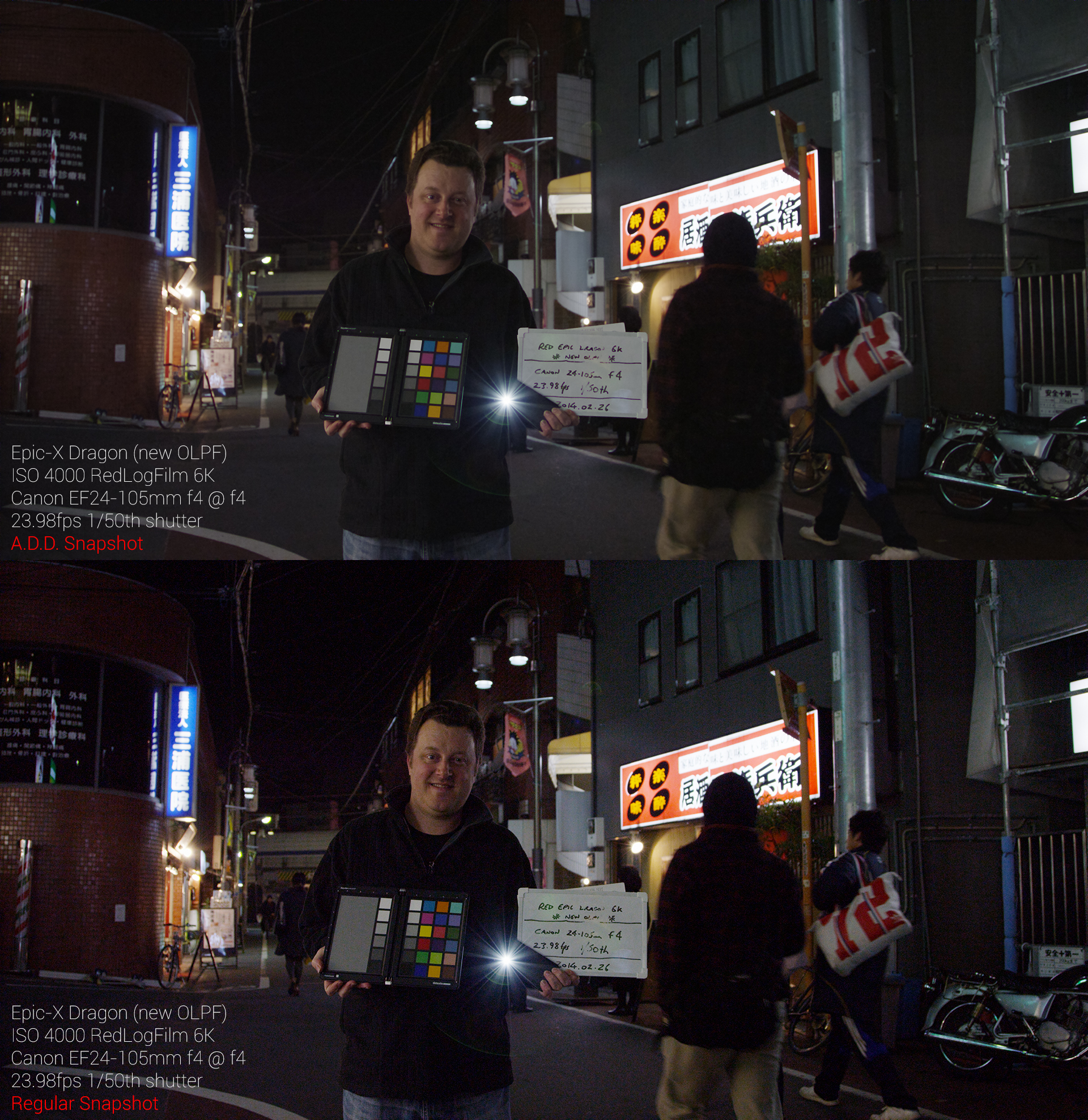
A001_C005_02261I.478.0000478F_ADD_vs_Normal_Snapshot.jpg


That's an astonishing difference. I literally clicked two buttons. Once on the regular snapshot. Once on the ADD snapshot. Default ADD output settings.

This was a torture test, done at ISO4000 at f4 (cheap lens so don't judge sharpness!).

Save the image to see it at 1920 width.

Crazy.... :emote_22_yikes:

Cheers from Tokyo,

Paul :)
 
Thank you for the images Paul. Compelling differences. That's the type of scene I shoot a lot of. Can't wait for my Dragon. Really hope ADD motion arrives soon too.
 
Yes, that are insane results.
Once again, we got a demonstration of the power of REDRAW and the geniuses in RED's labs. Just mind-blowing, again and again....

And for free, you are nuts! :)
 
Mind. Blown.


That's an astonishing difference. I literally clicked two buttons. Once on the regular snapshot. Once on the ADD snapshot. Default ADD output settings.

This was a torture test, done at ISO4000 at f4 (cheap lens so don't judge sharpness!).

Save the image to see it at 1920 width.

Crazy.... :emote_22_yikes:

Cheers from Tokyo,

Paul :)

I actually LOVE the flair coming off the LED mag light!
 
You can't actually "pre visualize" since it's a processed image - but you CAN move that processed image into the frame buffer as soon as it has been created - so you can see it after it is processed. If it's in the frame buffer - it will also go out and supported video IO devices. So you move the sliders - hit ADD - look at it - adjust sliders again - hit ADD - look at it - and then move on to the next shot when you are happy.

I did confirm that the ADD values are not currently written to the RMD for the shot. We need that for sure - since you really want to twerk setting per shot.

Like...
 
Mind. Blown.


That's an astonishing difference. I literally clicked two buttons. Once on the regular snapshot. Once on the ADD snapshot. Default ADD output settings.

This was a torture test, done at ISO4000 at f4 (cheap lens so don't judge sharpness!).

Save the image to see it at 1920 width.

Crazy.... :emote_22_yikes:

Cheers from Tokyo,

Paul :)

Thanks Paul. Glad you like.

We love doing this stuff.

It's difficult to really fully harness the DRAGON sensor.. things like this help.

We are so proud of what our sensor team has created... every month it seems we are digging deeper and deeper and pulling more and more out of it and nobody has even seen DRAGON COLOR yet. Graeme and Rob have their hands full translating arguably the best imaging sensor on the planet.
 
A.D.D. Beta enabled plus CUDA and OpenCL together again at last.

Enjoy :)

https://www.red.com/downloads/4f56854e6261f95a570006af


Added: Advanced Dragon Debayer (A.D.D.) still snapshot exports.
Added: Performance improvements for OpenCL on AMD Cards on the latest Windows drivers.
Note: CUDA Beta Release. OpenCL has been re-enabled.
Fixed: Better handling when attaching malformed external WAV files.
Fixed: Random crash when removing external audio from a clip.
Fixed: Better user notification for out of memory errors when transcoding to QuickTime.
Fixed: DRX not being applied correctly in CUDA on half and lower resolutions.
Fixed: Black thumbnail when poster frame set outside the clips in/out points.
Fixed: Previous and Next clip button functionality in the timeline tab.
Fixed: Metadata fields in right side metadata panel did not update whenever metadata changed.
Fixed: Issue where scrubber could jump when changing playback modes.
Fixed: Issue where sub folder per clip could be honored on a non-custom export preset.
Fixed: Issue where supplemental audio with an R3D Trim could be blank.
Fixed: Issue where AJA cards would only produce a black frame on video out.
Fixed: CUDA stability improvements with better memory utilization.
Fixed: Miscellaneous timeline improvments.
Fixed: Crash issue when loading certain early RED ONE clips.
Fixed: REDline --printMeta no longer prints superfluous information.


When trying to add Post: Look: Effects like Skin and Unsharp Mask to a Dragon clip running Cuda on a Titan GPU with 16gb 1866mhz ram 4770K Asus Impact with Windows 8.1 I get a


=== Efect: Failed to create output image buffer 2.4
Failed to copy pinned host memory to device 4l
 
Okay - I have played a bit with ADD and it's VERY, very impressive - specifically helps with high detail fabrics. Really awesome guys.

After banging on it a bit - I have feature request(s) for the next version -

#1: I REALLY want AJA io4K support. The io4K is awesome and drives every 4K monitor I throw at it from a laptop over TB2 and works perfectly with Adobe CC right out of the box. And it's small. HIGHLY recommend. I haven't tried this version yet as my io4K is at the office - but in the RCX 22 it did not recognize the AJA io4K over TB.

#2: After rendering the ADD frame - please reload the processed frame into the frame buffer.

#3: Write the ADD settings selected into the RMD. Have REDLINE read the ADD settings from RMD if they exist - when processing from REDLINE using RMDs.

Maybe make the "ADD" letters turn green or something like that so that when the render is done so the user knows the processed frame is in the viewer and frame buffer. This way - assuming you add AJA io4K support - you can adjust the unsharp mask etc. - and look at it in 4K on a monitor, adjust the slider a bit - hit the ADD button again, etc. - this would be way faster for finding the best setting for 4K motion renders.

Obviously, for stills work only you can drive RCX on a higher resolution desktop - but lots of folks will want to rock a laptop driving a 4K display (because we can now) - and for those of us that want to use the ADD for a hardcore motion render - we will want to set ADD settings per shot - and assuming we could hit the ADD button, slide the settings - get the processed frame into the frame buffer with the settings in the RMD ... one could step through each shot and find the best ADD settings while looking at a 4K display - then rock a REDLINE render to RedLogFilm for grading.

Anyway - very exciting - please keep pushing it along. The easier it is to use - the more folks will leverage it's power.

Bravo.

Mark, would what you are suggesting allow me to (eventually) enable ADD on footage and then check if I wanted to re frame a shot as a portion of the original? I get that I probably could apply ADD after reframing, but it would be helpful to see how much I could crop and still have a near pristine image without having to check and ADD, check and ADD...

If what you are asking for will allow me to do that, then I'm for it.
 
Last edited:

Attachments

  • small.jpg
    small.jpg
    53.3 KB · Views: 0
Back
Top