Welcome to our community

Be a part of something great, join today!

  • Hey all, just changed over the backend after 15 years I figured time to give it a bit of an update, its probably gonna be a bit weird for most of you and i am sure there is a few bugs to work out but it should kinda work the same as before... hopefully :)

REDCINE-X PRO BUILD 17 Release Build

Great Stuff thank you for the continuing updates and improvements
 
Build 17 on a Dell Precision M6700 and Quadro K4000M, Win 7 Pro 64 SP1, 32 GB RAM, software does not even start, crashes instantly. Build 16 works fine.

This is what happens on my (elderly core2 duo winXP/32 4GB) field laptop, that I use to offload footage (has done this with every RCX build I've tried). I never did figure it out, but installing PS CS6, I can now view R3D files in the field. I would love an RCX fix, if anyone else has ideas on this issue. RC-player doesn't crash, but just shows a white field.

Here is my thread where I was working with a RED support person that might help you:
http://www.reduser.net/forum/showth...-my-old-Windows-XP-laptop&p=994187#post994187
 
View on Second Monitor

View on Second Monitor

Yes, this happens to my dual-screen/dual-GFXcard win7/64 machine every time I update RCX. Instead of showing video full screen on the second monitor, activating 'Video on Second Monitor' pops up a tiny thumbnail size screen under the scopes. Monkeying around in the general/view settings without changing anything, always fixes this, but it always takes something different, EG: opening the view settings and hitting cancel, or hitting ok, or toggling a setting off and then back on and hitting ok. It usually takes me about 5 minutes to find the right trick for each new version.

Hi Aaron !

Thanks for sharing your observations !

I didn't have the problem on the dual monitor setup with win7 64 Ultimate so I thought this is an issue with build 17. Playing around with some checkboxes in the preferences fixed this and now it's showing video full screen on the second monitor as expected.
Thanks for the tip! Much appreciated.

Regards,

Marcus
 
Last edited:
For some reason I can't drag or copy the Force Upgrade folder to my Redmag. It's always worked before. Using OSX 10.6.8.

Can anybody help?
 
Hi,

I see this in the Changlog..
*Fixed: Framerate issue with 59.94 clips when exporting QuickTime.

Anyone know what this problem was/is exactly?
I'm right now in the middle of a large transcode of 59.94 quicktime clips, so it would be good to know!

Matt
 
For some reason I can't drag or copy the Force Upgrade folder to my Redmag. It's always worked before. Using OSX 10.6.8.

Can anybody help?

A little off topic in this thread but...

You have to click on the little RED icon at the top of your screen and remount the REDmag as READ/WRITE.
 
Last edited:
I've had a couple of crashes while rendering with the Rocket. Nothing bad, it's working fine otherwise (I was rendering 150 clips or so) but should I send a log file ?
(Mac OS Lion, 17" MBP from early 2011, 16 GB of RAM, TB Sonnet Rocket, RCX 17)
 
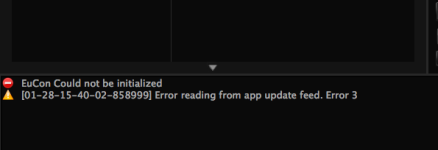
Error messages

Error messages

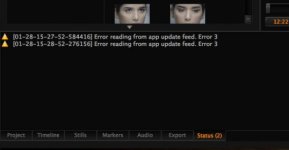
I have this kind of messages...
And the pictures have some verticals lines...
:(
 

Attachments

  • Error.jpg
    Error.jpg
    11.9 KB · Views: 0
  • Pict.jpg
    Pict.jpg
    10.5 KB · Views: 0
  • error2.png
    error2.png
    15.3 KB · Views: 0
I've had a couple of crashes while rendering with the Rocket. Nothing bad, it's working fine otherwise (I was rendering 150 clips or so) but should I send a log file ?
(Mac OS Lion, 17" MBP from early 2011, 16 GB of RAM, TB Sonnet Rocket, RCX 17)

Always good to send us a log file when that happens. Especially if you have the Mac OS X crash log.

Do you remember what it was doing? (playback, export [what format etc.])
 
I have this kind of messages...
And the pictures have some verticals lines...
:(

Did this not happen with the previous release Michael?

If it did, can you send us a link to download this clip? (redcinex at red dot com)
 
Always good to send us a log file when that happens. Especially if you have the Mac OS X crash log.

Do you remember what it was doing? (playback, export [what format etc.])
Hi Rob,
it was exporting to Prores 422HQ in 2K from 5K footage, full debayer using RR. But it only happened twice and I have rendered dozens of clips so far with this build. However, I 'll send a log next time it happens. What should I send, and where ?

BTW, is there a way with RCX to automatically send an email report to a given email address when a crash occurs, or when the render is finished ?
 
RCX keeps crashing when exporting h264s. 4KHD to h264. Re-downloading RCX 16 now. Also, using RR.
 
When I installed 17, it says : "Not available" on HDRx. Image, Curves and Gamma.
In other words; I can´t adjust anything as the tools, settings and curves are not there anymore.
What have I done wrong?

I updated the software through Redcine X 16 when it told me a new version was available
 
Back
Top