Welcome to our community

Be a part of something great, join today!

  • Hey all, just changed over the backend after 15 years I figured time to give it a bit of an update, its probably gonna be a bit weird for most of you and i am sure there is a few bugs to work out but it should kinda work the same as before... hopefully :)

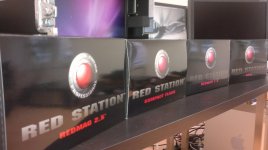
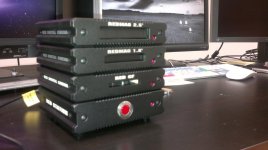
RED STATION 1.8" and 2.5"

Those are the WD 1TB 2.5" drives and they are 12mm thick. They work in the RED Station, as shown by Jarred in another thread. I said they work in my post above, but it looks like it was difficult to understand that and Deanan subsequently pointed out as well that they fit.

The new Seagate 1TB 2.5" Enterprise Class (Constellation.2 series) will be 14.8mm thick. I don't know if they will fit in the RED Station or not.

Doesn't matter if the drives are 5400rpm or 7200rpm... 2.5" mechanical HDD's are going to be a bottleneck if that is what you are offloading to directly. Also rotational speed is not the only factor in HDD performance -- there's platter size, areal density, number of heads, etc.. 2.5" HDD's are typically slower than their 3.5" counterparts due to their platter size, fewer heads, etc.. The SSD mags can unload at about 250MB/s or so they say. The fastest 2.5" HDDs write at about an average 60MB/s. You do the math... You will want a storage system or RAID that can sustain 300MB/s or better if you want to offload the SSD mags at maximum speed. At maximum speed, we should theoretically be able to unload a completely full 256GB SSD mag in about 18 minutes. If you're dumping it to a 500GB WD Black 2.5" 7200rpm HDD that can write at an average 65MB/s, it's going to take about 80 minutes.

Not a dramatic difference, but a Hitachi Travelstar 7K500 averages 85MB/s pretty handily. As soon as SSDs hit the right price point, none of that really matters.
 
Could you use a Red Station Module to edit from or is it strictly for backing up and thats it.

Does the Station BASE connect to your computer with either Firewire 800 and eSata? (Just making sure this can be used with a laptop without an eSata card)

can you use a 2.5" Module all by itself, without the station base?

You guys think a lot of people will use these even if they aren't Red Users? Or does such things like this already exist for bare drives etc?

I do ( edit from the card ) all the time.. but everyone will tell you that it's not good workflow etiquette :)

and yes firewire 800 or eSata, you can use it all by itself without the base. It comes with its own power adapter wall wart, or you can power it from the firewire 800 bus.
 

yes... in action :

1291853227.jpg
 
Well, I just tried the Velociraptor 2.5" in the Redmag 2.5 and it's a no go. :( That means that the new Seagate enterprise drives are a no go as well. :( I was really looking forward to those Seagate Constellation 2 drives. Oh well 1TB laptop drives for storage and SSD's for speed.
 
Hi Sean,

Would you mind posting or PMing the Model No of that drive? I'm working on a database of Go/No-Go drives.

Thanks.
 
ordered
 
Well, I just tried the Velociraptor 2.5" in the Redmag 2.5 and it's a no go. :( That means that the new Seagate enterprise drives are a no go as well. :( I was really looking forward to those Seagate Constellation 2 drives. Oh well 1TB laptop drives for storage and SSD's for speed.

Why is it a "no go"? How are you connected?
 
No go as in it doesn't fit. The model number is WD4500BLHX. I would be willing to bet that any thicker than the WD 1TB 5200 and it won't work. The Redmag 2.5 is Awesome though. I have connected using every connection. That is why this thing is so awesome. Options! When at home eSata, on the road Firewire 800 or USB. Very nice tool.
 
No go as in it doesn't fit. The model number is WD4500BLHX. I would be willing to bet that any thicker than the WD 1TB 5200 and it won't work. The Redmag 2.5 is Awesome though. I have connected using every connection. That is why this thing is so awesome. Options! When at home eSata, on the road Firewire 800 or USB. Very nice tool.

OK, that's kinda what I was thinking but just wanted to make sure that it wasn't an issue of the drive not working. Not sure on the 2.5" RED Station module, as I haven't got one yet, but can you remove the front bezel? Perhaps that would allow for more clearance. Looking at Jarred's picture above of the WD 1TB drive (12mm thick), there's not much room for anything else.
 
Jeff, the Connie 2 is a 12.5mm design.

Time to break out the Dremel. :)
 
There is an internal spring and guide that would most likely cause a problem too. If it was just the bezel I would cut it up but I don't think that would solve the problem. Good news that the Connie is 12.5mm! Also if anyone does have success with getting larger drives in there let us know.
 
Maybe a short Sata-Sata cable or extender board? Not pretty, but might work?
 
Yes but It would be nice if the Redmag 2.5 would accept 15mm drives. There are tons of ways to use 15mm drives just not in the Redmag.
 
I think you guys are somewhat missing the point asking/trying these larger 2.5 drives. You wait 3 months or so and you will have normal size 7200rpm 1TB drives and no worries. Not to mention if you really want to use something odd sized you can just go pick up any of the number of available sata docks/connectors the same way you would with the 2.5 RedMag.
 
What kind of transfer speeds with the 2.5"?

What kind of transfer speeds with the 2.5"?

So what kind of transfer speeds are you getting from using the 1.8" ssd's along with the 2.5" station? Is it being limited to arround 60MB/s?

I'm trying to figure out if I should go with 1x 1.8" station + 2x 2.5" stations, or 1x 1.8" station + a couple of raided sonnett fusion f2 drives, or even 1x 1.8" station + a couple of g-tech drives ...

I do not need anything fancy, just a quick way to offload the ssd mags in real time (5-8GB/s) while on set for my own stock shoots using my laptop (17" MBP) (feature & commercial work would have a real dit)

thoughts?
 
they arrived today... right for christmas... redstation is really badass...
 

Attachments

  • 21122010081.jpg
    21122010081.jpg
    89.6 KB · Views: 0
  • 21122010085.jpg
    21122010085.jpg
    90.6 KB · Views: 0
So what kind of transfer speeds are you getting from using the 1.8" ssd's along with the 2.5" station? Is it being limited to arround 60MB/s?

I'm trying to figure out if I should go with 1x 1.8" station + 2x 2.5" stations, or 1x 1.8" station + a couple of raided sonnett fusion f2 drives, or even 1x 1.8" station + a couple of g-tech drives ...

I do not need anything fancy, just a quick way to offload the ssd mags in real time (5-8GB/s) while on set for my own stock shoots using my laptop (17" MBP) (feature & commercial work would have a real dit)

thoughts?

5-6 GB/s will be hard with a notebook... the connectivity out of the book is limited to 1 lane on macbooks... so you need a esata connectivity to the redstation and then a storage which can take this load... and what I think you will get about 200 to 250 MB/s bandwidth out of the SSD.
so an internal RAID would be needed at least which takes this load then...
or external storage 4 disks raid5 will be enough via SAS...
would be great to use SAS to 4eSATA connectors for connection and mounting on the redstations....
with RC42 stored on it you will be then able to offload the mag 5 times realtime fast... and then think how fast the computer can read your files for chksum verification....
the way to go on ssd was the best thing... RC100 for example or more....

best wishes...
rainer
 
Does anyone have the SSD 1.8 Redmags yet? I sure could use these, but don't see anyone talking about having them.
We waited a long time for the approval (what was it, FCC approval?...I can't remember), then they hit the store and I'm still waiting.
I purchased as soon as the store showed them.
Any idea at all when the backlog will catch up?
I know there was already a backlog for owners who'd been clamoring for the regular drives.
And I'm sure the Epic Ms are requiring several each as they roll out.
I talked to the Bomb squad a couple of times and they can't seem to give me any idea.

Fingers crossed.

lael
#1673
 
sssd module

sssd module

user changeable... easy.

Also.. priority of shipments will goto customers with existing open RED DRIVE/ RED RAM orders ( who have been waiting a very long time )

I just made the deposit for the ssd module. Ihave a redone #4086, when should i recieve the module.? Estimate? I have a red drive since the beginning.
 
Back
Top