Welcome to our community

Be a part of something great, join today!

  • Hey all, just changed over the backend after 15 years I figured time to give it a bit of an update, its probably gonna be a bit weird for most of you and i am sure there is a few bugs to work out but it should kinda work the same as before... hopefully :)

Premiere too slow. Need advice to make it faster.

Lakis Amarantithis

Well-known member
Joined
Jan 24, 2014
Messages
388
Reaction score
0
Points
0
Website
www.3dmovies.com
Using the latest Premiere.
The 6k clip rendered at 4k is 1 min and 24 secs
My rendering times are unacceptable. I'll appreciate any advice.
I can not add more mem.
Is it better to get a new pc?

how much I'll need to spend to have Premiere render close to real time I possible?
thank you all!
 

Attachments

  • reuser.jpg
    reuser.jpg
    94.3 KB · Views: 0
  • Capture.JPG
    Capture.JPG
    96.2 KB · Views: 0
  • r1.JPG
    r1.JPG
    81.5 KB · Views: 0
Thank you, How much should I expected to spent on a Mac that can help me be able to produce hourly / fast? I do 3D mostly with 2 Dragons 6k.. Can you give me an average price?
thanks
 
Many questions as editing systems are largely dependant on the harmonious operation of a combination of components.

What GPU are you using? You do have Mercery Hardware Acceleration enabled?

I can already see that's not the beefiest processor in the world.

Also, what is your media being read from? It's good to have a relatively fast RAID array to read from.
 
Hi Phil, thank you for your reply.
I use the gtx hd 1080, I attached a file from the device manager so you can see the info. I do have Mercury HA enabled. I'll double check.

It looks like I need a new pc. How much average one that will do the job ok? An approximation is fine!
Thank you.
 
Get a Mac ... with fcpx . Done! You’ll thank me later

Why did I know someone was going to say this. :smile: I agree but I wasn't going to be that guy.
Ok- back to finding a solution for Lakis.

Brian Timmons
BRITIM/MEDIA
 
Why did I know someone was going to say this. :smile: I agree but I wasn't gong to be that guy.
Ok- back to finding a solution for Lakis.

Brian Timmons
BRITIM/MEDIA

I third this. My shit flies. But that's just me.
 
Lakis,

I guess I'll be the odd man out here and recommend a PC upgrade (not Mac). If you are looking at pre-built the new HP Z4/6/8 series looks very promising. If you are doing your own custom build, I'd do a recent history search here on the forums as I just read about someone ask for upgrade recommendations a couple weeks back. There was some fairly solid advice in that thread (IMO).
 
I am currently using a 2600k and GTX 1080 just like you. I just spent 5 hours rendering a single 50 minute 8K clip to 4K ProRes 422 HQ. Like you, the CPU was slammed.

So yesterday I just put in an order for a new build, based on this video: https://www.youtube.com/watch?v=PphEQqI1Nck

Let's hope ThreadRipper is everything it's hyped to be.
 
I am currently using a 2600k and GTX 1080 just like you. I just spent 5 hours rendering a single 50 minute 8K clip to 4K ProRes 422 HQ. Like you, the CPU was slammed.

So yesterday I just put in an order for a new build, based on this video: https://www.youtube.com/watch?v=PphEQqI1Nck

Let's hope ThreadRipper is everything it's hyped to be.

In most of the video's I've seen from this guy I disagree with him, this time however he is not talking BS (still don't like the cristmas lights though).
I've built it (specs are in another thread) and everybody at the network I work for, wants to use this system (I don't even get the time to fine-tune it).
Coming from i7-3960x, Threadripper with 2 GPU's is a beast (with Adobe, Davinci, etc.).

The most important thing when you want to buy a new workstation is that it fulfills your current needs (don't buy future proof, because we have a lot of innovation comming in the years to come).
 
I'm looking at the HP Z840 I decided not to go with Mac although I recognize it ,ight be better ;-)

HP Z840 Country Kit
HP Single Unit Packaging
ENERGY STAR Qualified Configuration
HP Remote Graphics Software (RGS) for Z
HP Z840 1125W (1450W/200V) 90 Percent Efficient Chassis
HP USB Optical Mouse
9.5 mm Slim DVD-Writer Optical Disc Drive
Intel® Xeon® E5-2660 v4 Processor (2 GHz, up to 3.2 GHz w/Turbo Boost, 35 MB cache, 2400 MHz, 14 core)
256GB DDR4-2400 (8x32GB) 2 CPU Registered RAM
Intel® Xeon® E5-2660 v4 2nd Processor (2 GHz, up to 3.2 GHz w/Turbo Boost, 35 MB cache, 2400 MHz, 14 core)
HP 3/3/3 Warranty
500 GB 7200 RPM SATA HDD
Windows 7 Professional 64 (available through downgrade rights from Windows 10 Pro)
HP Z Cooler (2 Processors)
Operating System Load to SATA/SAS
HP Z840 Microsoft Windows Workstation
HP USB Keyboard
NVIDIA® QUADRO® P5000 (16 GB GDDR5X, 4 x Displayport 1.4 + DVI-D DL) No cable included Graphics


will this let me edit real time in Premiere and do green screen separation real time? If not what it will take?

The above config is 11.6k

Thank you
 
I'm looking at the HP Z840 I decided not to go with Mac although I recognize it ,ight be better ;-)

HP Z840 Country Kit
HP Single Unit Packaging
ENERGY STAR Qualified Configuration
HP Remote Graphics Software (RGS) for Z
HP Z840 1125W (1450W/200V) 90 Percent Efficient Chassis
HP USB Optical Mouse
9.5 mm Slim DVD-Writer Optical Disc Drive
Intel® Xeon® E5-2660 v4 Processor (2 GHz, up to 3.2 GHz w/Turbo Boost, 35 MB cache, 2400 MHz, 14 core)
256GB DDR4-2400 (8x32GB) 2 CPU Registered RAM
Intel® Xeon® E5-2660 v4 2nd Processor (2 GHz, up to 3.2 GHz w/Turbo Boost, 35 MB cache, 2400 MHz, 14 core)
HP 3/3/3 Warranty
500 GB 7200 RPM SATA HDD
Windows 7 Professional 64 (available through downgrade rights from Windows 10 Pro)
HP Z Cooler (2 Processors)
Operating System Load to SATA/SAS
HP Z840 Microsoft Windows Workstation
HP USB Keyboard
NVIDIA® QUADRO® P5000 (16 GB GDDR5X, 4 x Displayport 1.4 + DVI-D DL) No cable included Graphics


will this let me edit real time in Premiere and do green screen separation real time? If not what it will take?

The above config is 11.6k

Thank you

For that kind of money you can build a system that has a lot more speed.
Just have a look at this thread http://www.reduser.net/forum/showthread.php?160544-Video-card-for-custom-PC-build/page2

Replace the mother board with the gigabyte MZ31-AR0 ~ $600 http://b2b.gigabyte.com/Server-Motherboard/MZ31-AR0-rev-10#ov -$450+$600 = +$ 150
Replace the CPU with AMD EPYC 7401P 24c/48t -$1.000+$1.100 = +$ 100
Replace memory with 8x32GB DDR4-2666 -$1.450+8 x $400 = +$ 1750

For around $ 12.000 you have a system with a lot more possibilities then the Z840. and enough free PCIe-lanes to put even more expansion cards in.
 
For that kind of money you can build a system that has a lot more speed.
Just have a look at this thread http://www.reduser.net/forum/showthread.php?160544-Video-card-for-custom-PC-build/page2

Replace the mother board with the gigabyte MZ31-AR0 ~ $600 http://b2b.gigabyte.com/Server-Motherboard/MZ31-AR0-rev-10#ov -$450+$600 = +$ 150
Replace the CPU with AMD EPYC 7401P 24c/48t -$1.000+$1.100 = +$ 100
Replace memory with 8x32GB DDR4-2666 -$1.450+8 x $400 = +$ 1750

For around $ 12.000 you have a system with a lot more possibilities then the Z840. and enough free PCIe-lanes to put even more expansion cards in.

The annoying layout of that motherboard means you can only use short PCI-E cards for most of the slots since otherwise they'd run into the DIMMs
 
Aaron - how's the threadripper treating you?
 
Hi Lakis,

We run a custom HP Z840 workstation for our main editing and it flies along with 6k files in Premiere. It weighs a ton, cost a small fortune but it never skips a beat. A great investment in workflow and more importantly sanity! HP Turbo drives, 2 processors, 256gb ram etc.

It's run on Windows 7 and if I could run it on Windows XP I would. The only downside to Windows is all the bullshit upgrades to the operating system. Bells and whistles for the masses which can really slow it all down!

Best of luck,

Dan

------------------------------------

www.danielallenmedia.com
 
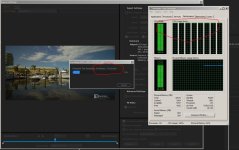
From your photos, you can see your CPU is maxed out. That's the .R3D decoding. Once you get past that, only then will GPU come into play. In my experience, an over clocked i7 is far better than 2x Xenon, and 64Gb Ram is the sweet spot too. Then you can start looking at 2x 1080Ti's and you'll be getting close. The motherboard is the heart of the system though, so choose carefully and avoid MAC!
 
Back
Top