Welcome to our community

Be a part of something great, join today!

  • Hey all, just changed over the backend after 15 years I figured time to give it a bit of an update, its probably gonna be a bit weird for most of you and i am sure there is a few bugs to work out but it should kinda work the same as before... hopefully :)

Phil Holland Weapon Test

Jarred Land

Fire Chief
Staff member
Joined
Dec 27, 2006
Messages
10,644
Reaction score
33
Points
10
Phil has spent the last couple weeks banging on his new Weapon and has put together a nice summary worth sharing. Thanks Phil:

 
Thank you Jarred. It was very interesting this time around taking a really, really close look at Weapon Dragon.


Here's a few stills that are useful to accompany the video:


DAYLIGHT SOURCE - FILM LOOK TEST

MS


CU


RED GAMMA TEST


INCANDESCENT


MATCH TEST


OLPF - HIGHLIGHT ROLL-OFF


OLPF - SMALL APERTURE POINT SOURCE ARTIFACT


ADDITIONAL TESTS

Whelp, here's the other thing that I can officially classify as useful information. Specifically in regards to comparing RED Epic Dragon to RED Weapon.

I spent the first half of my day at Camtec with Christopher Probst going over our Weapon notes and shooting a few tests. We had 3 Weapons and 2 Epic Dragons on hand.

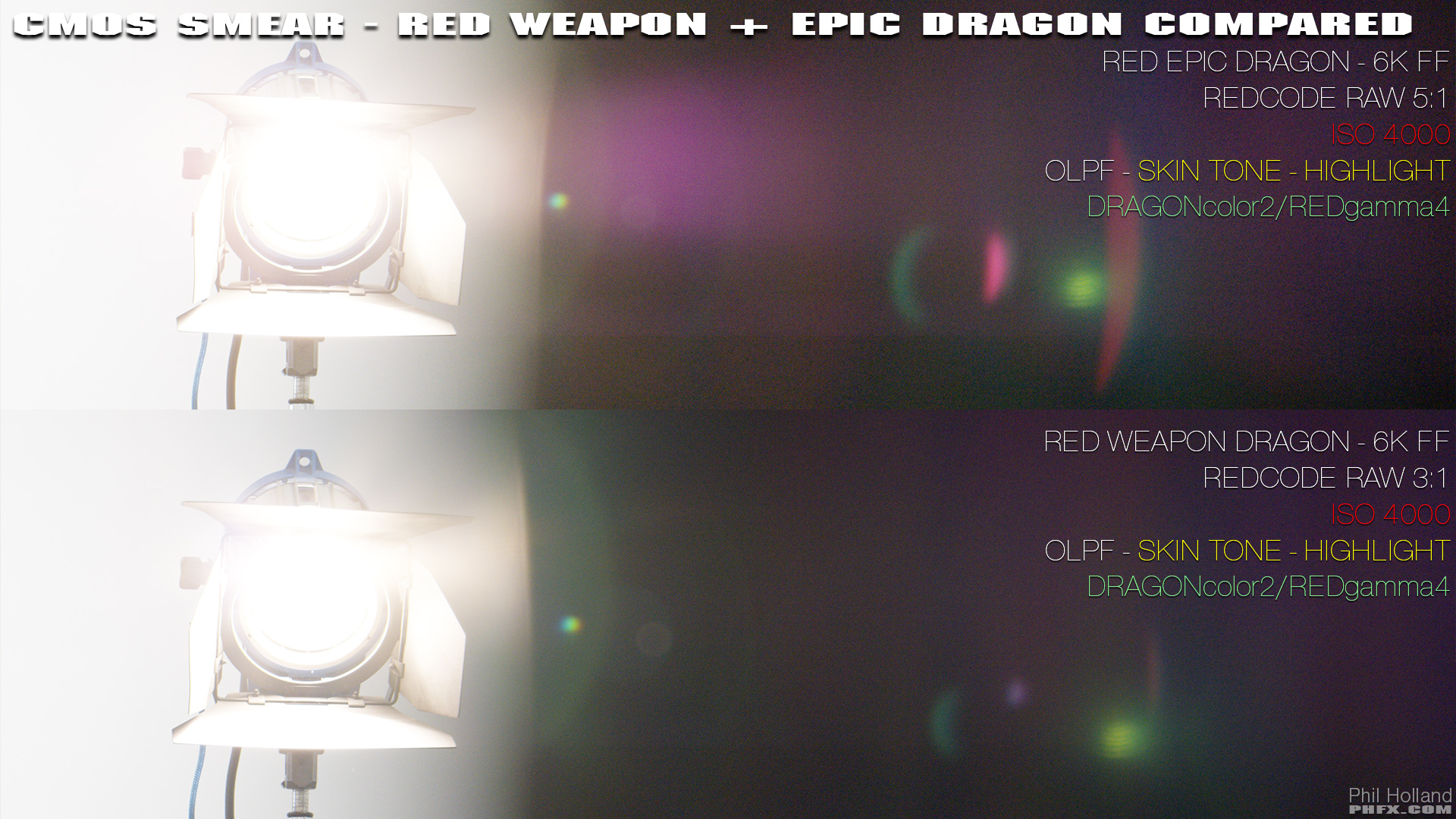
My focus today was on a specific stress test. CMOS Smearing. Like I said earlier RED Weapon has an improved optical path and some other voodoo that has changed things for the better on this front in a few ways. Here's a sample image:

[URL="http://www.artbyphil.com/phfx/cinematography/2015_REDWeaponCameraTest/bigs/phfx_REDWeaponTest2015_CMOSSMEARCompare.jpg"]
[/URL]
A few things to take note of here:
- This is a stress test and I'm doing my best to make an ugly image, the key light in frame is +6 Stops over exposed.
- This example is of the Skin Tone - Highlight OLPF, which does indeed exhibit CMOS Smear easier than the other OLPFs due to it's profile/calibration.
- To show the "extremes" this is ISO 4000, DRAGONcolor2/REDgamma4.
- CMOS Smear is indeed significantly improved on RED Weapon compared to RED Epic Dragon.
- IR Blocking and/or Cutting has also been improved.

I'm seeing less IR contamination in the crushed shadow, which is also lending it's hand to create a slightly cleaner image. Something that is harder to describe is that I was seeing more colorful and solid lens flares on this deep end of the exposure. If you look at the Weapon image you can see more of the greenish flare not getting washed out by IR. And on a more subtle note a bit more contrast seems to be held in the image with more color purity in the highlight clip and roll-off. Which made me want to compare the top end Highlight Roll-Off at the clipping point.

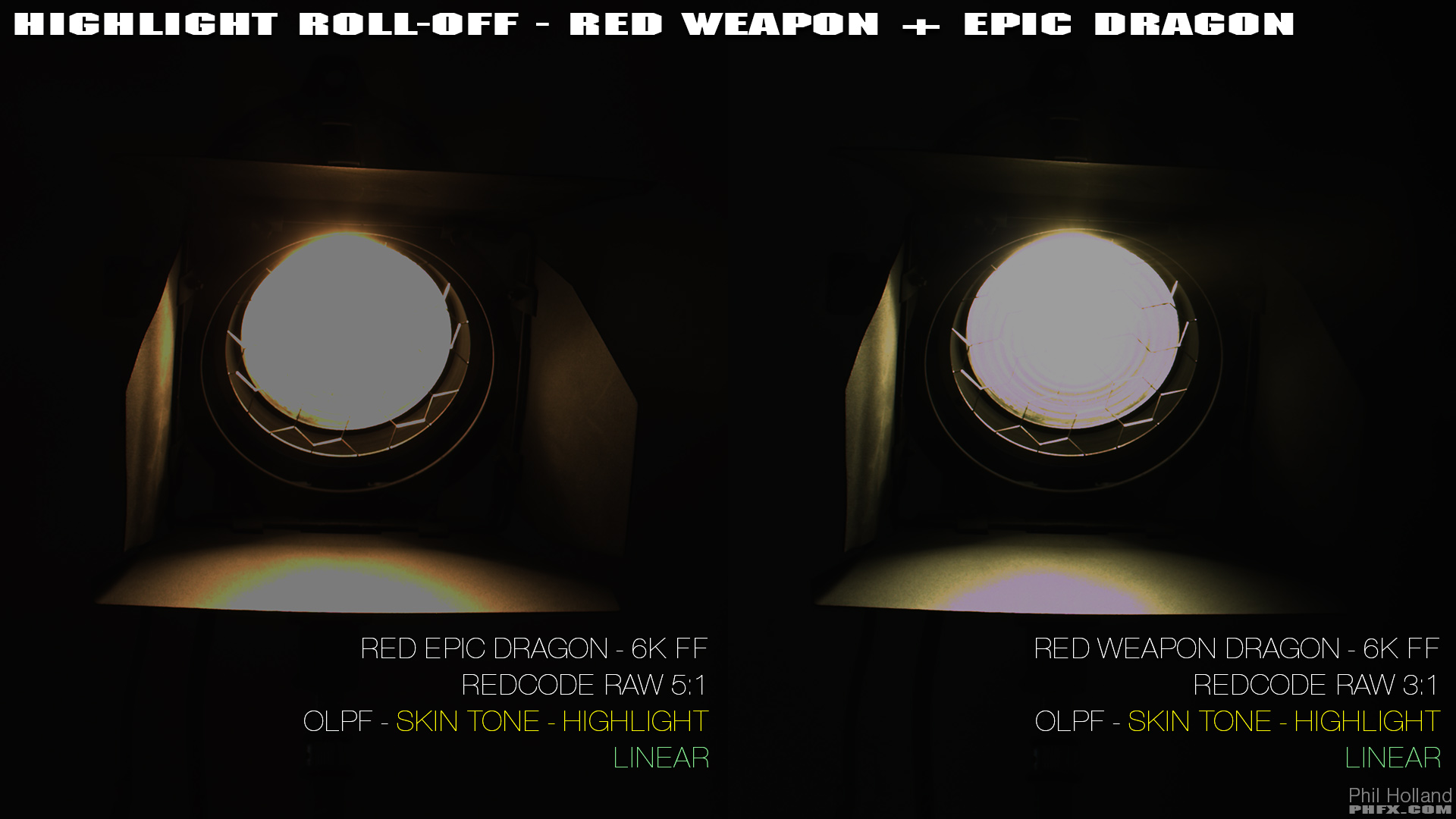
I was seeing something "different feeling" on the Weapon images. Like a smidge more Dynamic Range was in there. So let's inspect the linear light at T8 from both cameras:


There appears to be some tweaking done somewhere. Could be within the camera's signal processing, internal color science, sensor tweaking. Hell, it could be anywhere. But that is indeed more retained highlight information there in the Weapon image. Which, right when I thought I was done with testing, makes me want to test total captured DR again. That takes a long time to do effectively, but if that's the case, it's got me curious enough to inspect it closer. I measured 19 visible stops in the "total range" previously, which nets about 16/17 usable stops. Somebody or somebodies at RED has been tweaking something. The noise floor is visibly lower and now there's more highlight detail right at clip. This is news to me. If I had to guess we might be looking at somewhere between 17-20 stops of "total captured" Dynamic Range because I know exactly what's in Epic Dragon and that's at least a couple stops in the highlights. Thinking of the positive effects of this I imagine this is going to be rad for HDR display shoots and certainly will add a bit more meat to the highlight roll-off. It's the top end of things, so hard to fully define, but it's there.


Back home after a long, long day.

Alright. Let's get some stuff done. I thought I'd kill a few birds with one camera when I shot this stuff earlier today.

2 zip files with nasty, dirty, quick footage from Weapon featuring my ugly mug under a tree as requested.

First:

phfx_REDWeapon6KHDProResSamples.jpg


Contains a zip file with "6K HD REDCODE RAW + ProRes Samples".

There are two folders:
- phfx_6KHDR3DProRes4K422LT_DC2RG4 - 24fps, 6K HD R3D (REDCODE RAW 4:1) + 4K ProRes 422 HQ with DRAGONcolor2 and REDgamma4, 290 frames
- phfx_6KHDR3DProRes4K422LT_DC2RLF - 24fps, 6K HD R3D (REDCODE RAW 4:1) + 4K ProRes 422 HQ with DRAGONcolor2 and REDlogFilm, 290 frames

This was RED Weapon at ISO 800 with the new Standard OLPF. Additionally, because some have asked, I've left the two internal scratch mics on. So you'll have that audio. I am exactly 6 feet away from camera with it set at 0dB.


7GB Download Link:
http://www.artbyphil.com/temp/reduser/phfx_REDWeapon6KHDProResSamples.zip


Second:

phfx_REDWeaponHFR60fps120fpsSamples.jpg


Contains a zip file with "60fps and 120fps HFR 6K HD and 4K HD Samples" and you will witness me flicking a lemon/lime thing.

There are two folders:
- phfx_6KHD_60fps_DC2RG4 - 60fps, 6K HD R3D (REDCODE RAW 6:1) with DRAGONcolor2 and REDgamma4, 288 frames
- phfx_4KHD_120fps_DC2RG4 - 120fps, 4K HD R3D (REDCODE RAW 6:1) with DRAGONcolor2 and REDgamma4, 288 frames

Also shot with the Standard OLPF at ISO 800.


2.2GB Download Link:
http://www.artbyphil.com/temp/reduser/phfx_REDWeaponHFR60fps120fpsSamples.zip


Slight lighting variations occur due to the oddly overcast day in LA, but all exposures are accurate to middle gray for a standard normal exposure. White balanced to chart prior to filming. Wearing a black shirt because that will show something you might be looking for and I wear black often.
 
Last edited:
Extraordinary. Excellent as always, Phil. Looking forward to sharing this with my colleagues.
 
Beyond awesome Phil.
 
Stellar work. Thanks for contributing so much to the community Phil. :)
 
Thanks Phil, great test setup and presentation.

Nice Kodak5219/Vision Emulation too.
 
Thanks.

Are those daylight/tungsten labels reversed?
 
Thanks
 
Still love Skin-Tone Highlight OLPF! Great examples Phil.

Yep. It still produces what I prefer overall. Thanks Jacob.


Thanks Phil, great test setup and presentation.

Nice Kodak5219/Vision Emulation too.

Thank you Les. I actually made a whole lot of LUTs and looks during this process, but didn't want to upload an hour long LUT-extravaganza. I've been a big, big fan of Dragon's color to date. It's the real thing RED got so right with this sensor.


Thanks.

Are those daylight/tungsten labels reversed?

Nope, the labels appear to be correct. Though you freaked me out a whole lot :)

They reference the key light on the talent. Most of this test for me was about color response and skin tones.

If you're curious though, the scene itself exceeds 20 stops of Dynamic Range. The bulbs behind her head are clipping on purpose to see what devils I could find there, but also reveal a bit more about Highlight Roll-Off. You can see that clearer in the REDlogFilm examples.


Thanks for giving back to the community Phil... As always

Thank you Peter. Had you on my mind while filming this as well.


Eating dinner in a second, but I'll expand a bit on some observations I've had during this test in a few.
 
That had me wondering too Akin, but it looks correct if you figure the Daylight source was white balanced in camera, on the model, then tweaked in post. Likewise with the Tungsten source. The skin-tones on the model look the same in both shots (properly balanced), it's just the background, with a combination of Tungsten and natural daylight coming in, that makes it look like the labels are reversed. That the Daylight sourced shot ends up looking warmer overall than the Tungsten sourced shot just adds to the sense of things not appearing as expected.
 
lol, ok it makes sense now. Thanks for clarifying, Phil and Les.
 
Okay. Back after dinner grubs with a few general thoughts and notes.


One thing I'd really like to add after looking so intimately at Weapon Dragon is REDCODE RAW Compression Ratio.

In the world I've been working in we've be trying to achieve the highest quality motion picture images. That means a lot of things. Combined with productions extracting 5K crops from 6K footage or using that extra resolution to stabilize a shot or re-frame, something very clear jumped out at me while doing these tests and the small handful of jobs I've had in the month since receiving my Forged Weapon Dragon.

6K FF REDCODE RAW 3:1. Most of this test footage above was shot at that REDCODE RAW Compression Ratio. Why is this interesting? Well, you are shooting 3:1. Using the native 6K FF isn't anything new, but there's no real REDCODE RAW penalty at 6K resolution now. You can have this rather minimal REDCODE RAW Compression Ratio and just run with it. Which means for productions like Gone Girl, House of Cards, or The Knick you can shoot and crop out 6K, 5.5, 5k, etc. and have 3:1 across the board. It's just a better data transfer rate. It's all the same now for typical at speed recording. This is a very nice thing for those who understand why that's useful.

OLPF chat. Another thing that was increasingly clear for me was the Skin Tone - Highlight OLPF. If you've been here on REDuser you likely saw my first few rounds of tests with the OLPFs and the vast majority of the time I'm rolling with the STH OLPF. After this test and specifically on shoot prior to all this, that's still going to be my main "whip" while rolling. I prefer the color response overall of the STH under all lighting conditions. The new Dragon Standard OLPF is indeed very interesting. Very nice and smooth color. In some ways similar to the Low Light Optimized OLPF, but as you can see from the above image, it does indeed retain those highlights a smidge better. If you are going to shoot in shear low light, use that Low Light Optimized OLPF and you'll get the cleanest possible option out of the Dragon sensor.

Also, HUGE kudos for RED improving the OLPF frame design on Weapon. Now it's just the same tool you use to remove your lens mount and just one turn of the bolt and the OLPF frame comes out. The camera recognizes the pin and boom you are good to get back to shooting. My previous OLPF tests probably took close to 400% longer than what we did here and I'm not exaggerating on that one.

There is also a noticeable improvement to the Optical Path within the camera. This is likely where we are seeing improvement on things like Orb Artifact reduction as well as reduced CMOS Smearing. The whole interior sensor box is different and you can indeed "see" how the 8K OLPF frames will work once it is released.

Fan stuff, because people ask about the fans. I need to do a proper measurement of dB, but the new fans and ventilation system are indeed much quieter. Like so much so, that I don't even care about it anymore.

ProRes stuff, because ProRes. Works more or less like you imagine it would. Weapon does break up the clips into 4GB chunks just like .R3Ds. You set whatever Color Space, Gamma Space, LUT, and/or Look you want in there and that's what's recorded. I was more or less interested to see how it compares "visually". It's somewhere around the 6:1 REDCODE RAW equivalent at 4K from a visual comparison, that's what ProRes 422 HQ is in reality. It maintains/retains the details you'd expect and I didn't see a difference in my transcodes versus the in camera REDCODE RAW, but I will do more testing here for sure.

If you've got other questions hit me up. I'm slapping away at the keyboard tonight.
 
Back
Top