
Navigation
Install the app
How to install the app on iOS
Follow along with the video below to see how to install our site as a web app on your home screen.

Note: this_feature_currently_requires_accessing_site_using_safari
More options
Welcome to our community
Be a part of something great, join today!
You are using an out of date browser. It may not display this or other websites correctly.
You should upgrade or use an alternative browser.
You should upgrade or use an alternative browser.
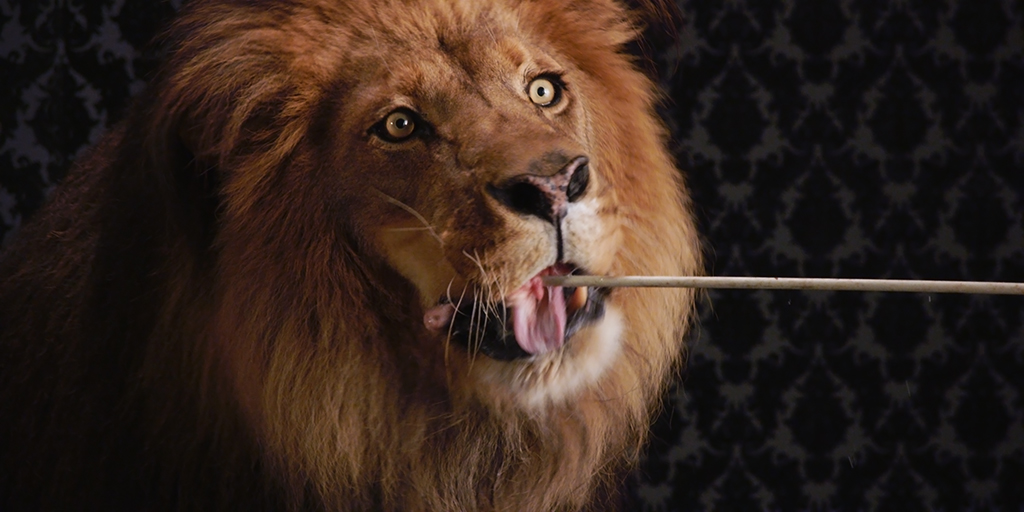
MEET FELIX....
- Thread starter Jarred Land
- Start date


Paul Schneider
Well-known member
- Joined
- Dec 28, 2009
- Messages
- 449
- Reaction score
- 0
- Points
- 0
- Location
- LOS ANGELES
- Website
- www.concreteandclay.com
I dunno if this ok to say, but as incredible this is for a 6-ish k - dollars cam - which I will want, this is also not all bad news for the current RED1 4k owners...
Please delete this post if unapropriate...
The current REDONE MX chip is a Super35 sensor and not a small 2/3" so even though the Scarlet looks to be really great quality-wise there will still be greater comparative flexibility with the older camera with regard to DOF and lens choices.
Tom De Roeck
Member
- Joined
- May 11, 2009
- Messages
- 14
- Reaction score
- 0
- Points
- 0
playing around. all is possible with scarlet. good to know.
btw., jarred: i want to shoot my own werelions here at the black forest. you can ship my epic.
:thumbsup:
Since youre adding stuff anyhow, make the eyes glow!
Andrew Huse
Well-known member
- Joined
- Jan 15, 2010
- Messages
- 371
- Reaction score
- 0
- Points
- 0
- Location
- San Diego, CA
- Website
- www.andrewhuse.com
I can't get the clip to open in RedCineX build 356. It just has a red X through the clip and won't do anything 
Ben Holmes
Well-known member
- Joined
- Apr 16, 2008
- Messages
- 356
- Reaction score
- 0
- Points
- 0
I can't get the clip to open in RedCineX build 356. It just has a red X through the clip and won't do anything
If you're on a Mac, look for the later link to the 32-bit version of RCX. Worked fine for me.
Paul Schneider
Well-known member
- Joined
- Dec 28, 2009
- Messages
- 449
- Reaction score
- 0
- Points
- 0
- Location
- LOS ANGELES
- Website
- www.concreteandclay.com
I'm sure you're aware though that pushing to higher ISO can only be taken on a case by case basis on what is useable or not. It depends obviously on the ambient lighting, the texture and depth of the scene and available information. At higher ISO you expect noise but its whether the amount of noise is either pleasing to see or adds texture to the shot.
Shallow DOF whores are only going to be happy with big sensors there is no way around that and they will moan continously. It will be a far cry from 1\3" video though and in my experience 2/3" has much more of a naturally pleasing fall off. A pity so many people with HDSLR's don't have the ability to smoothly pull focus or seem to be completely incapable of keeping it in focus.
Yes. I am very aware. My comments/concerns can mainly be taken into the context of a fixed lens camera system where you are basically stuck with what you get. 800asa is great, but the marketing throws numbers in the 5000 range, which if even close to true would be even better and would make the viability of being stuck with a single lens that much more palatable.

Darrell Essex
Well-known member
If you are ready to ship by April, you should take Felix to NAB. Let him devour the competition.
Darrell
Darrell
Paul Schneider
Well-known member
- Joined
- Dec 28, 2009
- Messages
- 449
- Reaction score
- 0
- Points
- 0
- Location
- LOS ANGELES
- Website
- www.concreteandclay.com
It will be a far cry from 1\3" video though and in my experience 2/3" has much more of a naturally pleasing fall off.
Personally, I prefer the falloff of s35. I like the flexibility of being able to stop down to increase DOF. Any time I go to something smaller chip wise I'm always wishing I could open up the a bit more...but to each their own.
The detail in the image from this chip is really nice though.

Gunleik Groven
REDuser Sponsor
The current REDONE MX chip is a Super35 sensor and not a small 2/3" so even though the Scarlet looks to be really great quality-wise there will still be greater comparative flexibility with the older camera with regard to DOF and lens choices.
I know, but the way RED has been pushing out Magic, I wasn't sure, until seeing it...
Andrew Huse
Well-known member
- Joined
- Jan 15, 2010
- Messages
- 371
- Reaction score
- 0
- Points
- 0
- Location
- San Diego, CA
- Website
- www.andrewhuse.com
If you're on a Mac, look for the later link to the 32-bit version of RCX. Worked fine for me.
Thanks Ben, got it to work. If anyone couldn't get the .r3d to open, these are the links to 356E you want:
I believe these are the correct links (I filled in the gaps)...
http://red.cachefly.net/redcinex/test/REDCINE-X_build_356E_mac32.zip
http://red.cachefly.net/redcinex/test/REDCINE-X_build_356E_mac64.zip
http://red.cachefly.net/redcinex/test/REDCINE-X_build_356E_win32.zip
http://red.cachefly.net/redcinex/test/REDCINE-X_build_356E_win64.zip
- Thread starter
- Admin
- #252

- Joined
- Dec 27, 2006
- Messages
- 10,644
- Reaction score
- 33
- Points
- 10
heh heh some good stuff...
David Dennis
Well-known member
Could some kind soul point out links to an explanation of what you do when you grade?
I can see it's about color temperature and brightness/contrast, and maybe a few more parameters, but it would be nice to see a bit more detail about the process and how it's supposed to work.
I come from the age of plain old video cameras so this will be new to me when I get my Scarlet Fixed, and I have a hunch I'm not the only one who's trying to absorb the implications of using RAW and how it works.
Thanks!
D
I can see it's about color temperature and brightness/contrast, and maybe a few more parameters, but it would be nice to see a bit more detail about the process and how it's supposed to work.
I come from the age of plain old video cameras so this will be new to me when I get my Scarlet Fixed, and I have a hunch I'm not the only one who's trying to absorb the implications of using RAW and how it works.
Thanks!
D
- Banned
- #254

Hrvoje Simic
Banned
Nice clip. Thanks for sharing.
Scarlet footage rocks.

Scarlet footage rocks.
- Moderator
- #255

Jeff Kilgroe
Well-known member
I can't get the clip to open in RedCineX build 356. It just has a red X through the clip and won't do anything
You need build 356E -- it seems that both 356 and 356E have been posted to this thread.

Stephen Matthews
Well-known member
Could some kind soul point out links to an explanation of what you do when you grade?
I can see it's about color temperature and brightness/contrast, and maybe a few more parameters, but it would be nice to see a bit more detail about the process and how it's supposed to work.
I come from the age of plain old video cameras so this will be new to me when I get my Scarlet Fixed, and I have a hunch I'm not the only one who's trying to absorb the implications of using RAW and how it works.
Thanks!
D
in the clip settings tab you can scroll down to reveal more manipulation tools. I hope this helps if not I'm sure someone else can assist you.
edit: to clarify if you are asking how to grade then that is a whole other answer and i guess someone with more experience should help you with that. But from my experience a large part of it is trial and error and finding what works and what doesn't and starting basic and slowly working up to more aggressive grades.
have fun (that's the most important part)
Ben Holmes
Well-known member
- Joined
- Apr 16, 2008
- Messages
- 356
- Reaction score
- 0
- Points
- 0

Cold and hard. Similar look to a show I'm working on.

Vico Martin
Well-known member
1260 ISO and one up, you really can´t find a couple of lights in Las Vegas?
Amazing news, congrats RED.
Amazing news, congrats RED.
- Moderator
- #259
Jeff Kilgroe
Well-known member
Could some kind soul point out links to an explanation of what you do when you grade?
You should consult the oracle at google.com
"Grading" is the term often applied to the process of creative coloring done to video or film footage. If you have ever processed photos in photoshop to correct or alter colors. Tweaking any RAW info from stills, etc.. then you're well on your way here.
I can see it's about color temperature and brightness/contrast, and maybe a few more parameters, but it would be nice to see a bit more detail about the process and how it's supposed to work.
There's various ways you can approach it and I don't think any one method is more "right" than another. Some basics do help though. First establish your white point and base exposure level. Then you can expand your image with contrast or saturation controls, tweak the curve by pulling control points. I would recommend working with the Redcolor2 and Redgamma2 settings to start. Redlogfilm gives a much flatter gamma curve to start with, some people prefer to start that way. With this particular clip, you don't need to tweak the white balance or exposure much. Work from top to bottom in the color controls, although you may find that you will jump down to the curve control before you start tweaking saturation, color channel gain, etc..
I've played with it off and on since Jarred posted. For some reason, I keep coming back to this one look...
Ben Holmes
Well-known member
- Joined
- Apr 16, 2008
- Messages
- 356
- Reaction score
- 0
- Points
- 0

More neutral, commercial.