Welcome to our community

Be a part of something great, join today!

  • Hey all, just changed over the backend after 15 years I figured time to give it a bit of an update, its probably gonna be a bit weird for most of you and i am sure there is a few bugs to work out but it should kinda work the same as before... hopefully :)

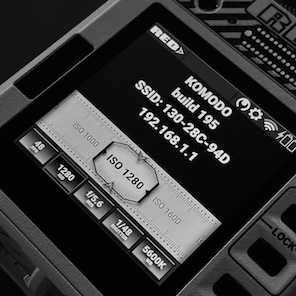
KOMODO....

Like what you did here... good job and appreciate the effort. UI feedback input is welcome right now as I am torn between a few different overall directions. So speak up...

I personally like the UI as it is:
-Skeuomorph "buttons" for the functions you need to access to.
-Classic symbols and fonts for what you only have to read.

In my opinion, if both are treated the same way, it tends to make the UI "safe", it takes all the personality out of this display.

Other companies do that for all their products: sleek design and sleek UI. I don't think RED should.
They work a lot on the design of their cameras, their interface should also reflect this requirement and singularity.

Komodo is not a ultrasonic rangefinder, a robotic drill, or a a stealth warplane. Let it be fun!

PS: I would just like to be able to get a % number next to the batteries, that's all.
 
YES! Please remove the unnecessary skeuomorphism. It makes the cam look so dated.

I agree - I prefer button shading to be flat, single color - not the skeuomorphic iteration we currently see... this could be changed in an update later, no need to focus energies on it now but the aesthetic is something to consider.

PS: I would just like to be able to get a % number next to the batteries, that's all.

I second this. Let's include battery read out: % and/or time remaining (with the option to switch between the two/toggle on/off in a menu somewhere. That is, if it can be fit in the tight space allotted. Thanks Jarred!
 
I prefer Stanly's mockups as well. Current UI with gradients / drop shadows does look dated IMO.
Thanks for keeping us updated Jarred and for the Easter eggs. So happy PDAF is going along well, very exciting.
 
Wow, thanks for the feedback everyone! Happy to see some people that also like their design flat :D

I thought I had missed a post by Jarred when I first saw it!

Mate, that is high praise :D


Like what you did here... good job and appreciate the effort. UI feedback input is welcome right now as I am torn between a few different overall directions. So speak up...

Thanks Jarred, cool to bring these things up with the community! There are a couple of ideas about interaction and ergonomics, not sure how much of that can be applied to KOMODO. Will find some time this week to visualize it.
 
I like that simple design better as well.
May I ask if the UI " Red> " is a menu access button ?

If not, you should get rid of it. There is plenty of Red written everywhere and I'm pretty sure everyone will recognize the Komodo UI anyway.
If it's indeed a menu, let's call it menu.
 
I like that simple design better as well.
May I ask if the UI " Red> " is a menu access button ?

If not, you should get rid of it. There is plenty of Red written everywhere and I'm pretty sure everyone will recognize the Komodo UI anyway.
If it's indeed a menu, let's call it menu.

Removing our logo from anywhere is not an option.
 
+) Agreed : To Reducing brightness of labels compared to data - as it halves the data your eyes scan in a glance.
+) Record Red : [Original : Looks a bit too deep red to make me think it is actively recording] [Stanly : Slightly to Orange and too bright for my taste]
+) Central Area : [Original : 5 lines : a lot of data : Perhaps Split into TC full width the top and two rectangle of data below so that the eye can find Less data in columns, and the space on the right would be better utilised]

What other data do people think is pertinent? What about IPP2 look?

AJ


Just as a personal fantasy I recreated the UI without skeuomorphism (and a couple of tweaks). Not saying that an hour or two of work is a solution to the problem that didn't necessarily exist, but I would prefer usability of this approach. Used one of the older photos of KOMODO as mock-up:

<cut>
 
Last edited:
Also.... maybe having an option to use the space that is currently dedicated for video for other functions when you are externally monitoring video feed. As always, false color, 3D LUT options, focus peaking, etc. would be great.
 
(Apologies for bringing this Question back up):

If FPS, SHUTTER and ANGLE are intrinsically linked - would people find it more logical to have them next to each other?

QS5373BYIqJq8R9-jqeorWnZHXWedf226DKnK_wLFbiZG_kpEbLZFQN2G0AABRRhNH-9BdxdF059uLXCtyneo59qjzXqXDtgYn-ya_hBpunD-eZZdw--X5kNwEMqSE6rx0Hc4asrJx8clA-eJOW6aOX68-qcc5_2v2-46Ev0VTC7MmYBaNZxPrh-xS2YwDt0XMMgM51CpLeqWLSP8OhWXCk_Bbwa63mB4BkTC9S1o8F4sP0W_MJx-Cr1AOCo69MN7lmEaeppZCa-9LVdMPBb5PJjbOAzowkoU33PhZSYeIP0IHDiBWZYRx2iqqYL6fP2xkriwAid__XlDvHT4bvRjITluJ3zalkz0lh_KEhfyzlqINTmCKLTJaniwimdtG1PpM727JL-80G0hOFsy1WVBfNlfTRt1N2xpPqD4Po8x87OkQ4efrEFGGb7GPhhbY6HE-hKOQw0-ZRvoRKwIXsl6e0evIslArQ-FBkwGJxOE5LSNZoUikDATT6oBIHKtAkhPR4MY83tQ5nCYlAArdDYLpQvr6geTC2zSPNtgQ3-1Y3t_a9ccGlkGgsJo4RD1g3ogVFe1Do6VwfvQYvoQQhZi7-8M9FTwr8bBdt0L1OwF8Ds5Xzs-QlPvWwml43MJgz_TeuXc8VNlW1VqKPH2kT7UlBUSq25a6jZZKI7q1_DxjYSWomPLErSAuVXXjZzcSw=w970-h366-no


AJ
 
This top monitor is turning into a really impressive tool. I think the low budget indie film market's going to have a field day with it, especially in close-quarter, run and gun environments. Kudos to Stanley's mockups, liking the simplicity. 'Red >' is definitely the menu button, clear as day. Keep up all the great work!
 
Converting raw to RGB is a prerequisite for a preview of any kind, so there's no way around that.

We DO know from Jarred's posts that the Komodo can output a high quality 4K signal over SDI, though we don't know whether or not it can do that while also recording internal raw (my guess is yes, since the de-Bayer has to happen even when the camera's internal recording is raw, for the preview alone). What's uncertain AFAIK is whether or not the camera can record both an RGB proxy AND raw onto its internal media. That probably will depend on the particular card and its sustained throughput limits.
That's nice you agree. Cause you wrote the same thing, just different wording.
 
I personally like the UI as it is:
-Skeuomorph "buttons" for the functions you need to access to.
-Classic symbols and fonts for what you only have to read.


You pretty much read my damn mind. "Buttons" for what you can push/adjust and "flat" for just info you're reading.
 
Like what you did here... good job and appreciate the effort. UI feedback input is welcome right now as I am torn between a few different overall directions. So speak up...
What might be the other directions...?

Please tell me that this part of the UI is not hanging in the balance!
e7e151c2b15ba19e5100a1638d7eec77d95700a8.jpeg


Well, Since we are talking about a camera that is expected to see a lot of action and probably be exposed to the elements, it would be a great idea to offer two options; a high contrast simple 2D menu and a low-key designer skin with shadows, gradients, etc.
One could be used in the field, out in the elements, and the other in low-light situations and when elegance is key :)

On a side-note, have you considered a shortcut key combination to rotate the entire UI and live view by 90 degrees at a time? That will help a lot if the Komodo is rigged up on a drone or gimbal.
 
+1 for the flat design.

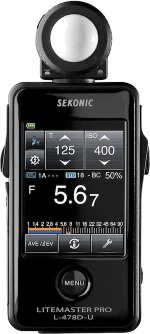
The shaded buttons remind me of the interface on my Sekonic meter... which feels slightly 90s to me in 2020.

The design of the camera itself looks 🔥🔥
 

Attachments

  • T4_L478_401-474_1280x800_main.jpg
    T4_L478_401-474_1280x800_main.jpg
    32 KB · Views: 0
One UI suggestion:

Have a setting where you can activate a giant flashing PAUSE ⏸ symbol covering the screen while the camera is NOT recording. This would eliminate all those times when you think you hit record and at the end of the take you haven't recorded anything.
 
What might be the other directions...?

Please tell me that this part of the UI is not hanging in the balance!
e7e151c2b15ba19e5100a1638d7eec77d95700a8.jpeg


Well, Since we are talking about a camera that is expected to see a lot of action and probably be exposed to the elements, it would be a great idea to offer two options; a high contrast simple 2D menu and a low-key designer skin with shadows, gradients, etc.
One could be used in the field, out in the elements, and the other in low-light situations and when elegance is key :)

On a side-note, have you considered a shortcut key combination to rotate the entire UI and live view by 90 degrees at a time? That will help a lot if the Komodo is rigged up on a drone or gimbal.


That 'ruler' visual design feels hokey and cheap. I get wanting to have unique character, but it's getting in the way of usability. I can only see 3 ISO values on the screen at once? And two are greyed out. Why even repeat the word ISO each time? Sometimes the UI needs to be dead obvious and let me make my action intuitively and quickly.
 
Stanly, I love your idea. However - and I hope that Jarred considers this - there is a case for some kind of skeuomorphism:

https://daringfireball.net/2019/05/vibrant_tapdown_states

To me the fundamental weakness in post-iOS-7 look-and-feel is simply that it’s been drained of joy.

What are the chances will the komodo have a m43 adapter in the future?Apparently the Vazen 40mm covers S35 like the zcam s6

It's technically possible - the mount is wide enough to allow for a M43 adapter. The FFD of Micro 4/3 is slightly less than 20mm. I have tested one Micro 4/3 super wide zoom on a Sony NEX camera, and it covered the sensor just fine. From memory, quality was pretty good, too. I can do a more formal test later. Needless to say, functions were limited. But it worked, dammit.
 
Back
Top