Welcome to our community

Be a part of something great, join today!

  • Hey all, just changed over the backend after 15 years I figured time to give it a bit of an update, its probably gonna be a bit weird for most of you and i am sure there is a few bugs to work out but it should kinda work the same as before... hopefully :)

Kodak 2393 Emulation LUT Test

Jim - The performance hit from these LUTs sounds interesting. I've got the same setup as you except with no rocket and a GTX 285 instead of the Quadro. I usually grade at 720p with a 1/4 debayer and I don't really notice any difference in performance with the LUTs on or off. But I've always assumed there was a small performance hit. It must be more pronounced at higher resolutions.

Any extra noise you are seeing is just that. There is no grain simulation going on. I haven't really noticed the LUTs add more noise, but it seems plausible that they're amplifying and noise that is already present, since these LUTs are altering the density and transforming the colours. Do this with a node and it will very likely do the same thing.

Thanks Juan,

It seems to come and go and most pronounced on 5K footage. Just seems like as soon as I apply the LUT I lose 7FPS.

Yeah, I wouldn't expect it to put any additional strain on the system, maybe I'm just imagining it. I'll do some further testing.

Thanks for the comment on noise. I'm guessing it's just the amount of pushing that is drawing it out. I'll post some stills next time I come across it.

In general do you try to avoid noise or do you embrace it as a grain-like characteristic?
 
The luts should hardly be any performance hit at all, as they only remap colors. In flame I can load them as overlay to different screens and then playback large files with no render. So basically they do not add anything to you render times. In theory they should be possible to add into the cameras next to redgamma3 and such.

Thanks Björn,

Your knowledge and generosity on this forum is fantastic! I'll do some further testing.
 
Hey everyone. Thank you Juan, Bjorn and everyone else for all your wonderful information regarding LUT's. I've been using the Fuji Film LUT and loving the results.

I had a quick question though?

What is the difference between

Fuji Film3510_log2hd_ then at the end of the LUT name it has

ConstLclip
ConstLMap
CUSPClip

Is there a difference between these different file names? Whats the best one to use or is it based on certain projects?

Thanks again for all the great information everyone.
 
Resolve question... where is the best place to apply LUT's? On a Track Node? Apply via the Look Up Table tab in project Settings? And if so, do you apply as an output LUT?

Thanks,
CB
 
Rob - ConstLclip, ConstLMap, CUSPClip refer to how the LUT treats colours that are out of gamut. For a detailed explanation read page 9 of this document. I generally just use ContLclip.

Shots look good! What camera did you shoot with?


Christopher - I was just about to respond to you in the other thread... The method you are using is correct. Set it as the output LUT so it gets rendered out with the footage. And like you said doing it this way makes it a lot easier to change the LUT project wide with a few clicks.
 
There's a checkbox in the LUT tab that allows you to choose if LUTs affect the scopes. By default it's ticked and the scopes represent your image post LUT.
 
We recently wrapped a month long shoot on Scarlet and used the Kodak LUTs in Resolve on majority of the shots. Here are some frames:


These were reference stills that I gave to our DP (who had never worked with Resolve) and I taught him how to apply basic grades. We added some film grain to the finished product and were quite pleased with skin tones and highlights.

Juan, thanks so much for sharing your technique. It's really incredible what can be pulled from the 4K log images these cameras capture.
 
I started another thread about file hosting sites so i could post ProRes HQ files for some of my tests. If anyone here has some space and wouldn't mind hosting these files, I'd be happy to share. What I'm experimenting with is using these LUTs in combo with the Cinegrain 4K scans I just received to achieve a somewhat textured look. Not going for the exact look of film, just looking to give some of my RED footage a bit of texture, so it's subtle. Showing these tests on Vimeo or Youtube would be useless because it would wipe out some of the texture. So, if you have the bandwidth, let me know and I'll start posting these. I'm also not doing heavy color correction. For these tests, my goal is to provide a basic look, so in Resolve 9 I'm getting the R3D metadata where I want it, I have the Kodak LUT on the output, and I'm making small tweaks to gain and black levels as well as saturation and that's about it.

Anyway, I have a couple files ready to go if there is space out there.
 
Alright, so i've been reading everyone rave about these luts, and been seeing some really great grades come out of them, but when I apply these to my footage it's completely hit or miss. Too purple, too green, too desaturated. All these things Can be graded out easily and only appear in a scene by scene basis, but the problem I run into with every single shot and any of these luts is that the highlights get severely "clipped" even before hitting 100 IRE. I have a scene where two guys in labcoats are walking outside for instance, and without the luts applied I can brighten the scene until the labcoats just break 100 ire and then I use a curve to bring back lost detail, making the brightness of the scene appear correct. With the luts however, the labcoats begin to "clip" (I say clip in quotations because they don't clip on the waveform, but clip visually) at about 90. It seems the lut is compressing the highlights somehow, based on the waveform activity, meaning I cant make the scene as bright as it needs to be, and I cant curve the detail back in.


Am I doing something wrong? Is this just how the luts are? If so, how am I supposed to hit 100 IRE with my highlights without losing all my detail? Same Story for my blacks, cant get them to hit 0 without completely crushing everything.
 
2393 Fuji Lut (Photo by Will Keir):
WillECUup_1.3.4.jpg

WillECU_1.3.1.jpg
 
Alright, so i've been reading everyone rave about these luts, and been seeing some really great grades come out of them, but when I apply these to my footage it's completely hit or miss. Too purple, too green, too desaturated. All these things Can be graded out easily and only appear in a scene by scene basis, but the problem I run into with every single shot and any of these luts is that the highlights get severely "clipped" even before hitting 100 IRE. I have a scene where two guys in labcoats are walking outside for instance, and without the luts applied I can brighten the scene until the labcoats just break 100 ire and then I use a curve to bring back lost detail, making the brightness of the scene appear correct. With the luts however, the labcoats begin to "clip" (I say clip in quotations because they don't clip on the waveform, but clip visually) at about 90. It seems the lut is compressing the highlights somehow, based on the waveform activity, meaning I cant make the scene as bright as it needs to be, and I cant curve the detail back in.


Am I doing something wrong? Is this just how the luts are? If so, how am I supposed to hit 100 IRE with my highlights without losing all my detail? Same Story for my blacks, cant get them to hit 0 without completely crushing everything.
Nick, you are using Redcolor 3 and Redlogfilm correct?

Also, make sure you have all RED metadata locked in, especially ISO, white balance and tint. You want a nice solid starting point before passing it through this LUT. I have been finding that in general, I am bringing the black levels up a tad as the LUTs seem to crush them a bit. As long as you have a good starting point, the LUTs seem to behave.
 
Which flame do you have? Look in 3DLUT imports / luster something / logtolin and you should have them there as 3DL's

Hey Bjorn,
I have a 2013 Flame and two Flares with a San and 4 burns in road cases. I haven't braved the Anniversary version yet.
I often work freelance in studios around LA so today I'm on a 2011x1 box. Next week I'll be back on my system and have a look.
Thanks!
Sam
 
does anyone know what I would have to do to get these .cube files to work with Lut buddy inside of premiere?
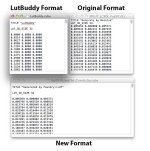
I've found that LutBuddy is very picky as to the file format. Hopefully they fix this issue at some point.


If you export a cube file from LutBuddy, and open it with a text editor, you can see the format that it expects (basically just extra spacing between the titles at the top). It also doesn't seem to like LUTs with a sample size of 33 (it prefers size 32 or 64).


I took the LUTs into nuke and exported them out as size 32 .cube files, edited them with a text editor to match LutBuddy's formatting, and now they're readable in both LutBuddy and Resolve.


You can download the new conversion here (if anyone's interested in re-hosting these, go ahead):
https://dl.dropbox.com/u/26939196/lustre_conversion.zip

attachment.php
 

Attachments

  • lutBuddy.jpg
    lutBuddy.jpg
    67.9 KB · Views: 0
Back
Top