Welcome to our community

Be a part of something great, join today!

  • Hey all, just changed over the backend after 15 years I figured time to give it a bit of an update, its probably gonna be a bit weird for most of you and i am sure there is a few bugs to work out but it should kinda work the same as before... hopefully :)

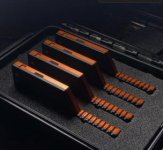
Kippertie Long Take 2TB Mini Mags *RED APPROVED*

Great to have an example of how to go about making a product the proper way and not be an idiot about it. Really makes it clear exactly what was going on in that "other" situation.

Great idea to add the USB-C port! So sick to not need a reader if you are on the go. I'm sure you will sell a ton of these.

The ironic thing is that, as far as I know, JinniMag were the first to put built-in USBc ports directly in their mags. So you’re (understandably) shitting on them, but then giving kudos to someone else for implementing their idea. LOL!

Anyway, will these work with DSMC1? I love the idea of being able to roll at max FPS/lowest compression and not have to worry about cutting a take short... also digging the price! Good job, John!
 
Not sure in my work I would ever need 2TB Media but at the $1,800 USD cost for the USB C model the Red 960GB Mini mag at $2,350 is looking like poor value and the 480Gb at $1,450 USD is only $350 cheaper and quarter the capacity ! Qudos to Red for approving the Longtake that directly competes with their own media. The USB C connection is also cool removing the requirement for a Reader with possibly slightly higher download speeds?

I would like to see some pictures of the Longtake SSD mounted on a camera to visualise how far it protrudes? The extra length may make the SSD more susceptible to being pulled out during recording if the camera is being man handled???

I am not sure if I would fill a 2TB drive on a shoot day before backing it up. I have stayed with the 480GB Mini mags so that the recordings on the camera SSDs are turned over and multiple back ups are made before production moves along too far but at the price point the Longtakes look very tempting.

The data Recovery deal with Ontrack.com looks like a nice bonus.
 
This is an other fantastic product from Kippertie, very happy for this, bravo John!

... I would like to see some pictures of the Longtake SSD mounted on a camera to visualise how far it protrudes? The extra length may make the SSD more susceptible to being pulled out during recording if the camera is being man handled???


https://www.instagram.com/p/B39cwpHJzRa/
attachment.php


https://www.instagram.com/p/B3_3LWOpVuX/
attachment.php


https://www.instagram.com/p/B39cGxyphA8/
attachment.php
 

Attachments

  • Screen Shot 2019-10-24 at 2.53.28 PM.jpg
    Screen Shot 2019-10-24 at 2.53.28 PM.jpg
    17.4 KB · Views: 0
  • Screen Shot 2019-10-24 at 2.55.39 PM.jpg
    Screen Shot 2019-10-24 at 2.55.39 PM.jpg
    19.6 KB · Views: 0
  • Screen Shot 2019-10-24 at 2.58.27 PM.jpg
    Screen Shot 2019-10-24 at 2.58.27 PM.jpg
    14.4 KB · Views: 0
Not sure in my work I would ever need 2TB Media but at the $1,800 USD cost for the USB C model the Red 960GB Mini mag at $2,350 is looking like poor value and the 480Gb at $1,450 USD is only $350 cheaper and quarter the capacity ! Qudos to Red for approving the Longtake that directly competes with their own media. The USB C connection is also cool removing the requirement for a Reader with possibly slightly higher download speeds?

I would like to see some pictures of the Longtake SSD mounted on a camera to visualise how far it protrudes? The extra length may make the SSD more susceptible to being pulled out during recording if the camera is being man handled???

I am not sure if I would fill a 2TB drive on a shoot day before backing it up. I have stayed with the 480GB Mini mags so that the recordings on the camera SSDs are turned over and multiple back ups are made before production moves along too far but at the price point the Longtakes look very tempting.

The data Recovery deal with Ontrack.com looks like a nice bonus.

Agreed. 1TB versions would be amazing too.
 
These 2tb sticks have come at a fortuitous time for me!! I was going to buy 960gb red drives and these look more interesting...

Thinking laterally about how such big media can change things...This is perhaps going to change my onset data strategy for all my short(ish) jobs!

At the moment I have someone do 2 separate backups per day but now I think I will count the kippertie SSD as one of the back ups! ... with the 2nd back up on a usbC SSD done at breakneck speed... Anyone else think this is a good way forward? Obviously for long jobs it won’t work..
 
Had to sleep on it, but I ordered. I have 3X shoots coming up where this is a bit more friendly for my long form work.

I'm trusting you with my footage John. We're practically married now :)
 
Still haven’t heard if these are these DSMC1 compatible (and if not, why not)?

Per the FAQ on our product site, unfortunately not DSMC1 compatible due to limitations in the camera. I don't have more detail than that.
 
Had to sleep on it, but I ordered. I have 3X shoots coming up where this is a bit more friendly for my long form work.

I'm trusting you with my footage John. We're practically married now :)

Phil, what are your thoughts on these statements listed on the website:
“Always use 'secure format' before shooting.”
“Offload media incrementally whenever possible.”

I thought secure format was only for specific circumstances - like after a firmware update. I thought it wasn’t good to do it every time. Do these mags get fragmented more easily than ones from RED?

As for offloading incrementally, I don’t know anyone that works that way. What is the benefit? Seems like a hassle.

 
Phil, what are your thoughts on these statements listed on the website:
“Always use 'secure format' before shooting.”
“Offload media incrementally whenever possible.”

I thought secure format was only for specific circumstances - like after a firmware update. I thought it wasn’t good to do it every time. Do these mags get fragmented more easily than ones from RED?

As for offloading incrementally, I don’t know anyone that works that way. What is the benefit? Seems like a hassle.

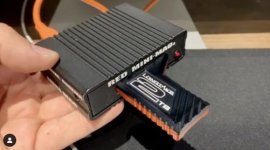
If you follow Red’s published troubleshooting, you’ll see that a secure format is essentially the prime recommendation. I believe the only reason they don’t flat out force a secure format is the quantity of accidental format incidents which are prevented against.

All mags will tend to fragment at the same rate. The larger the mag the less it’ll happen for a given quantity of recording. Also, fragmentation and garbage collection routines are responsible for intermittent slowdowns causing write errors. Longtake is around 50% faster than a minimag, so any slowdowns are less likely to be impactful.

Our recommendation to offload incrementally is only based on that logically being the safest option. Chance of a random hardware failure increases in line with the number of mags used, so overall we feel Longtake presents a very safe option. Recommending overly cautious best practices is only a reflection of our desire to safeguard your material to the highest degree, not any reflection on the performance of the hardware.
 
What John said,

But I'll tell you right now, I'll be filling these suckers up fully when they arrive. I rarely do "incremental downloads" due to the nature of occasionally not being able to physically get to the camera.

Secure Format, I certainly understand in terms of fragmentation, but I believe the RED firmware internally checks the mag and will even recommend running a secure format.

Actually a relevant question. John, is there any specific version of Camera Firmware we need to be on to work with these mags?

Thanks!
 
No specific firmware needed. We’ve filled the mags to bursting in testing hundreds of times over. On minimags and Longtake alike there is the last <0.2% of space where speed falls off. It seems as though the camera avoids that intentionally, but we can see it on the test bench for both. Certainly no need to avoid filling them right up.

The only bug I’m aware of is related to running R3D recording as a single take for over 255 R3D segments. The camera can’t play it back, but the take is absolutely fine. It looks like a simple overflow bug in the firmware to me, but aims have to defer to the coding gods on whether that’ll receive a fix. Again, only an in-camera playback problem, and doesn’t affect segmented files in other formats.
 
If I find myself trying to playback a 2 hour take in camera, I'll be crying either way.

Would be good to add that to the FAQ though for sure.
 
Back
Top