Welcome to our community

Be a part of something great, join today!

  • Hey all, just changed over the backend after 15 years I figured time to give it a bit of an update, its probably gonna be a bit weird for most of you and i am sure there is a few bugs to work out but it should kinda work the same as before... hopefully :)

iPad Mission Control COLOR MONITORING question

Eric Haase

Well-known member
Joined
Apr 1, 2009
Messages
1,041
Reaction score
0
Points
36
Location
Los Angeles
Website
www.ericjhaase.com
I've mentioned this issue before and it has been discussed a bit: On the Red One, when you view the monitor on set with metadata settings in the camera, you see a certain image. It generally has good contrast and is pleasing. When you load this clip into RCX on a Rocket system and view using the SAME metadata settings, the monitor output does not match what you saw on set. You have to pull the shadows down and make some tweaks to achieve the same contrast. This has been acknowledged by RED- can't find the thread because I think search is limited but here is the original request for wireless color settings on Epic: http://reduser.net/forum/showthread.php?41904-Epic-feature-request-wireless-LUTs-RMDs&highlight=


Now the new iPad mission control app will let you dial in settings on the fly and have them live updated on the camera. I haven't seen the full feature set but it looks like there are curve controls on there. It would be great to be dialing in a look as you go so you can fine tune lighting, color, and looks during the shooting process. My question is:

Will what I see on the monitor finally be the same as what I see in RCX on a Rocket system with output to a calibrated HDSDI monitor with the same settings?

It would seem a real waste to dial in a look on the iPad app on set, and then still have to go into RCX and realize the look you dialed in isn't accurate and needs another tweak just to make it look like you already made it look! A few of us have been asking for accurate monitoring output from the camera for a long time and are really hoping this will happen with Epic!
 
Eric, do you have a calibration tool that works with iPad? Is one part of Mission Control?
 
No. In my post I was just referring to viewing on calibrated monitors so people can not say that the footage looks inconsistent because of monitor setup. Both monitors are the same and set up the same way.
 
I can understand your frustrations. Luckily, for now... it's workable - the difference isn't so severe. But it would be nice for the DP to set a look on set that can go all the way through with precision. Honestly though, I think it would be best to use that just like a one light anyways. Your time on set is typically very limited, and you'll really want to spend more time with a colorist in a studio environment. So I think it's close enough even as is for that process, the small details and finishing touches need to be taken care of in the finishing process. Of course, total accuracy wouldn't hurt anybody.

Unfortunately I missed NAB, does anyone have details about Mission Control for Ipad? I've only heard the name, that it exists.
 
It's an app (currently IPad based - may see android, Mac, pc, or other ports) that allows you to control settings on red DSMC cameras. Similar to redmote... Although not sure of Feature overlap.

Hoping for the ability to save or export metadata settings through email.

I don't think it has monitoring capability but would love to be proved wrong.

Also would love to be able to send r3d snapshots from it if that is possible.
 
...
I don't think it has monitoring capability but would love to be proved wrong.
...

My understanding is that they are discussing it but are somewhat concerned about latency issues because of Wi-Fi. I am not an expert nor a RED confidant so this is just my interpretation from listening to the back-and-forth at NAB.
 
I am really not concerned with monitoring on an iPad with the app. The point I am making in the thread is that the monitor output of the camera looks one way with metadata applied and looks completely different with the same metadata applied in rcx through a rocket. So, basically it's nearly pointless to be adjusting the curve on an iPad app looking at the monitor output that the camera is showing in realtime because it's going to need a different curve in rcx to achieve the same look.

WHY NOT MAKE THE MONITOR OUT MATCH COMING FROM CAMERA AND COMING FROM RCX WITH THE SAME METADATA?

I've never understood why the discrepancy in these 2 things. It is clearly a choice.
 
I've never understood why the discrepancy in these 2 things. It is clearly a choice.

Yes, it will match with Epic as the internal camera processing is designed to round trip with RMDs.
 
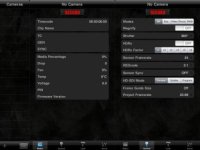
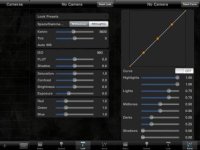
Some images from the first alpha version.
Lots more to come like look presets, more status, metadata input, etc.

MissionControl1.jpg
MissionControl2.jpg
 
The camera has built-in WiFi.

It is my understanding that the EPIC does not have built in WiFi, but a proprietary wireless connection for REDMote only, and that traditional WiFi would be part of an add-on module.

If this is incorrect, can someone from RED clarify how this will work and what will differentiate REDMote from Mission Control when setting up a Wireless Network on set.

Thank you,
 
Is it possible that redmote commands travel in the same band, using the same "modem" as wifi but relies on it's own set of protocols so that technically it is not a "wifi" device?

Hence the camera having wifi capability, but the redmote having its own set of protocols? I could be jokey here and call it 802.11R (horrible joke, I know).
 
NO, as Brook said the camera has a built in Wi-Fi, this is how the Redmote communicates to the camera... ;)

This is interesting... at NAB a RED employee in the booth, discussing the iPad app, specifically said the REDmote used a communication method other than Wi-Fi and that they were looking at a Wi-Fi module for adding this capability and how using Wi-Fi for the iPad app would be effected by latency. Perhaps he was confused? Or is there a difference between Epic and Scarlet and I confused the two?

I certainly think Ketch and Brook would know what they are talking about but maybe RED can clear this up?
 
This is interesting... at NAB a RED employee in the booth, discussing the iPad app, specifically said the REDmote used a communication method other than Wi-Fi and that they were looking at a Wi-Fi module for adding this capability and how using Wi-Fi for the iPad app would be effected by latency. Perhaps he was confused? Or is there a difference between Epic and Scarlet and I confused the two?

I certainly think Ketch and Brook would know what they are talking about but maybe RED can clear this up?

I also spoke to someone at the booth regarding the iPad app, and he mentioned it would work over WiFi, but it was being "buggy" (my word, not his) at the show due to all the WiFi signals present, so he had it hardwired in through what may have been ethernet, didn't get a good look. BUT, my point is, it should work through WiFi, with no mention of latency, as it is primarily metadata settings (though there do seem to be some camera controls enabled possibly?), there shouldn't be much lag to speak of.
 
Last edited:
Back
Top