Welcome to our community

Be a part of something great, join today!

  • Hey all, just changed over the backend after 15 years I figured time to give it a bit of an update, its probably gonna be a bit weird for most of you and i am sure there is a few bugs to work out but it should kinda work the same as before... hopefully :)

Group Buy -Osee 15.6" Production Field Monitor

So after spending some time trying to hook up my Sony fs7 over sdi I almost gave up. HDMI worked fine, SDI not on both cameras. Last resort, tried a new SDI cable, should have done that sooner. Worked like a charm. Waveform popped up as well. Classic user error.
Cant wait to take it to set. The only thing that seems flimsy is the suitcase handle as others have pointed out.
Not tried it with our Dragon yet
 
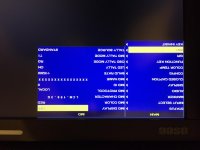
If anyone figures out how to turn off the model number display in red at the bottom of the screen let me know.

In the menu, go under IMD, then turn IMD display to OFF.

EDIT: Sorry for the upside down image for reference... not sure why it did that.
 

Attachments

  • OSEE IMD.jpg
    OSEE IMD.jpg
    84 KB · Views: 0
Hmm when I change the to off and exit the menu, it pops back on. I can't seem to get it to stay in off mode. Any ideas what I'm doing wrong?
Edit: fixed it, forgot to press enter after doing the change.....
 
Is there a way to get one of the function keys to bring up the waveform / vector up etc?
I've tried the options available in the menu but can't seem to find one for waveform function.

Also does anyone know if the BlackMagic UltraStudio Mini Monitor will send a 10bit signal to our monitors if connected via Thunderbolt ---> BlackMagic ---> HDSDI ---> Osee Monitor?

Thanks,
Phil
 
Last edited:
Ok so I can't set a shortcut function key for Waveform without having a SDI feed attached?
 
Last edited:
Hi All,

So i've got my Osee monitor setup with my iMac.
Viewing through FCPX at some clips, connecting through BlackMagic's Mini Monitor with SDI so I can view at 10bit.
Just wondered if someone could walk me through the Osee monitor's "color temp" submenu.

I just want to view back my footage exactly how I shot it. What should the colour temp be set at and what should colour space be set at so it represents the way I shot my footage?
I'm guessing the colour space should be off. But I could be wrong. As when I select off the colours are saturated and contrast becomes quite high. I'm not viewing the footage in any log setting, just as I shot it with RedDragonColor & RedGamma4.

Please advise!

Thanks,

Phil


P.S. Below is the monitor rigged up on a wall mount. Will upload on set photos with the field kit on the next job.

2016-01-15-14.25.05.jpg
 
Last edited:
Anyone?
 
I would just tweak to your liking. In terms of an actual calibration, I have found that iMac's are decently accurate...so you can match it as close to that. I have never used any actual color calibration tools, but have had many compliments on my grading looks, and I always grade off my MBPr and iMac, so give that a shot. It will get you in the ballpark.
 
Hi,

Have any of you guys got a refund on the shipping costs. At least a part refund as promised ? Shipping costs were $380 for me , still waiting for some refund from OSEE.
 
Hi,

Have any of you guys got a refund on the shipping costs. At least a part refund as promised ? Shipping costs were $380 for me , still waiting for some refund from OSEE.

I've pinged them. Will let you know.
 
The osee CS is pretty awesome. And the people who work there care about the users. They have always been great at getting back to me about questions/concerns. I was one of the guys who got one early, before they had the v-mount figured out. They have been great at helping. Send em an email or call em up
 
Back
Top