Welcome to our community

Be a part of something great, join today!

  • Hey all, just changed over the backend after 15 years I figured time to give it a bit of an update, its probably gonna be a bit weird for most of you and i am sure there is a few bugs to work out but it should kinda work the same as before... hopefully :)

fine tuning camera shutter

Steve Weiser

Member
Joined
Feb 18, 2014
Messages
20
Reaction score
0
Points
0
Location
London
Hi there

Shooting with a dragon, I was just wondering about when you have almost got your shutter synced ( say with an old crt screen or a pulsing light when shooting off speed ) - so that there is just the slightest flicker that you need to get rid of ... is there a physical way to scroll up or down in small increments to fine tune, so that the flicker completely goes? A bit like rolling up or down on a menu wheel set to "extended clear scan" on other cameras !
To just keep typing in numbers on the touch screen and hope that its getting you in the right direction could take forever...... and drive me nuts!!!
It may be that there is something like this in a menu that I have completely overlooked .

Please... can anyone help ?
many thanks
 
In your country, 1/50th and 1/100th of a second. Was just there filming.
 
Last edited:
if you shoot a T.V set your shutter to 1/60th to match the scanrate (in EU you might want to try 1/50th but i'm not sure..)

EDIT: oops - Phil beat me to it.
 
I shoot a lot of screens. Often the refresh is a tiny bit away from its nominal value on electronics that don't sync to mains power.

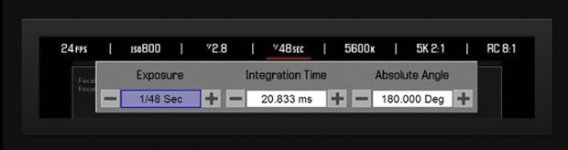
if you press and hold the shutter value you can bring up an advanced menu that lets you adjust in tiny increments.

Side note: Also little known is that you can dial in much shorter values than the 1/8000 maximum in the list. I forget exactly the number but it's >1/100000
 
Thanks chaps for the reply

As you said John the refresh can often be a tiny bit away from its normal value ...... I think what I was hoping for, was a way to just press and hold an "up" or "down" function of the shutter mode whilst watching the screen until the image syncs rather than typing in a new number each time

Thanks for the side note tip


many thanks
 
FWIW I recently shot some led display that were pulsing like crazy and using the shutter speed's horizontal slider of my OS X app I was able to find the nasty frequency in a breeze... No shutter slider in foolcontrol iOS for now tho but will add it in a furure revision (only menu + numerical values in speed / angle)
 
You can map "Integration Time: Decrease" and "Integration Time: Increase" to keys of your choice. I don't have the camera here, so i don't know how fine the steps are, but maybe thats what you are looking for. You can also edit that list of available shutter-speeds (create a custom list).

BTW, there is a good article on that topic: http://www.red.com/learn/red-101/flicker-free-video-tutorial
 
if you press and hold the shutter value you can bring up an advanced menu that lets you adjust in tiny increments.

Is that one of these switches? Exposure? Integration Time? Absolute Angle?

If not where is that switch to press and hold?
 

Attachments

  • Screen shot 2015-08-21 at 7.54.28 PM.jpg
    Screen shot 2015-08-21 at 7.54.28 PM.jpg
    12.4 KB · Views: 0
I just ran into this issue for a corporate video involving LCD Screens and a projection system. I went looking for something equivalent to a, "Clear Scan," and there was nothing in the menus. Has anyone found anything close to this. Besides the normal EU an US Hz rate for monitors, even the "flicker-free" tool from RED couldn't solve. I pulled out an old chart and could't dial in exactly what i needed to "phase out" the flicker. Anybody have an answer that's close to an ECS(electronic Clear Scan) setting? Even the old P2(HVX-200) had a 1/10 decimal dial in setting. Just curious. Love the system...just wondering if it's something i need to try and solve outside of, "In-Camera" techniques. Thanks in advance.
-Eamon
 
You can try to fail it in with shutter angle instead, so you could set the shutter to 1/50th and then changed the angle to 172.8 for starters. If 172.8 does not get rid of the problem you can move the the degrees around to find the frequency. The shutter will stay at 1/50th within reason.

check thins like as well

http://www.red.com/learn/red-101/shutter-angle-tutorial
 
Back
Top