
greg filipkowski
Well-known member
What iso shoot at?800? depth of field 1.4 or 6.0 or 12, what will help the key, will depth of field make it harder?

Follow along with the video below to see how to install our site as a web app on your home screen.

Note: this_feature_currently_requires_accessing_site_using_safari


 ))))
))))
 Perfect. makes it even easier.. One touch keys are the best. using tungsten light !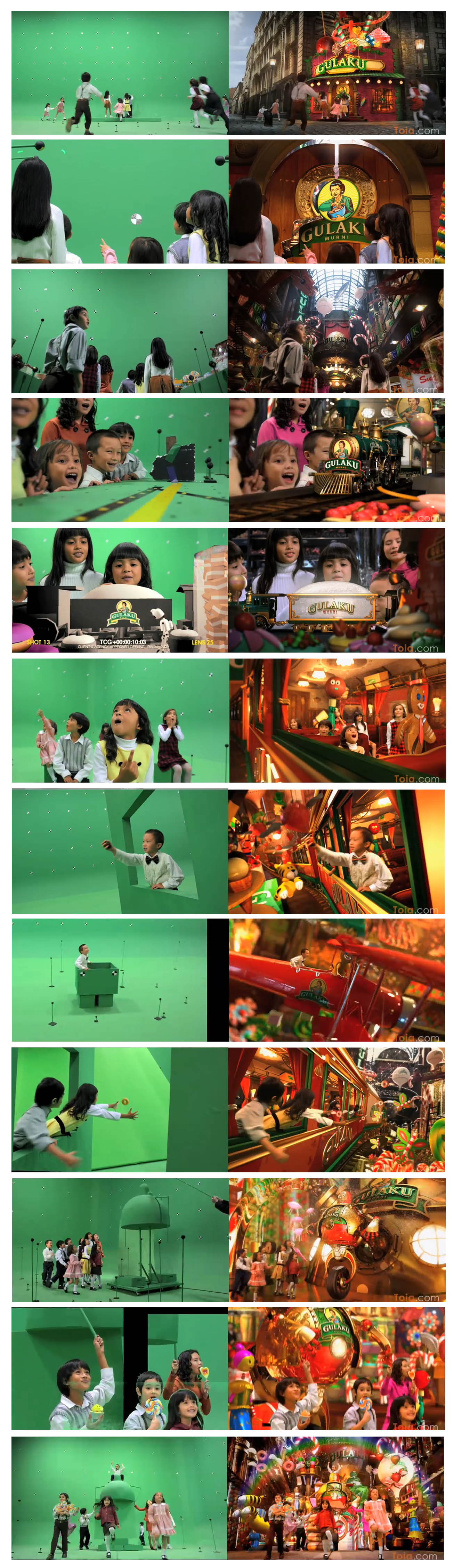


I completely stuffed a green shot up last month... and with modern keying tools these days, you would never have known.
But always best to shoot it a clean as possible.
We even got great keys from the old M chip REDONE..

HI completely stuffed a green shot up last month... and with modern keying tools these days, you would never have known.
But always best to shoot it a clean as possible.
We even got great keys from the old M chip REDONE..
This doesn't actually do any good. The only thing that matters is the 'angular size' of the screen to the sensor. If you move your greenscreen back a mile you're going to need light 1,000,000x more light to get it to the same luminance as a small screen 2' behind the subject but the same size in frame.keep your subject as far away from the screen as is practical...
...and use black cloth to cover up any portions of the screen (or flooring) that are not in the shot (or not necessary to pulling the key, like an in camera garbage matte)
This doesn't actually do any good. The only thing that matters is the 'angular size' of the screen to the sensor. If you move your greenscreen back a mile you're going to need light 1,000,000x more light to get it to the same luminance as a small screen 2' behind the subject but the same size in frame.
The reason people thinks this works is because people usually have too large of green screens (e.g. turning on an entire stage for a small static shot) and moving them away from your giant green screen just makes the green-screen "Smaller".
Cool?I completely stuffed a green shot up last month... and with modern keying tools these days, you would never have known.
I'm not sure we're talking about the same ideas... The main thing I was thinking of is spill control - i.e. don't have them leaning against the screen or under the same lights that are lighting the screen if at all possible... Also, it's usually just a small thing but the larger distance would blur the background even more, hopefully taking care of wrinkles, dirt, etc. obviously depending on the shot. I'm not talking about lugging in a ginormous screen for a headshot and sticking it across a field... If the screen's wrinkly and you can't iron it or lay it out in the sun or put some hairdryers on it or if it's dirty and you can't clean it, and you have the screen size, lighting requirements, and f-stop - try to get the screen defocused by moving farther away (and/or adjusting the f-stop). We're talking in terms of feet here... not miles

Also use a backlight to give separation from the green background unless your going for a flat look.
This is fine for a static shot and good advice for minimising spill. However, for a moving/zooming shot you need tracking markers, and they need to be sharp to be easily trackable. But yes, there ideally needs to be enough space between background green and subject to minimise spill.
This looks like a tedious job... And so colourful... I'm blind now. Hope you got tons go money for that. GS & Kids & CGI = hardcore.
Someone has to do it.
Hans