Welcome to our community

Be a part of something great, join today!

  • Hey all, just changed over the backend after 15 years I figured time to give it a bit of an update, its probably gonna be a bit weird for most of you and i am sure there is a few bugs to work out but it should kinda work the same as before... hopefully :)

Filming greenscreen question

Whenever I shoot greenscreen I like to shoot at 2.8 to 3.5, that way I get a sharp subject and the greenscreen is out of focus. It helps pull nice keys. 1.4 I get a little nervous. If you have a lens that is sharp wide open then maybe give it a try, but I personally don't see the advantage. exposing at 800 iso will work great.
 
You want to make sure your greenscreen is lit evenly (within a half stop exposure wise all the way across). You can add a depth map in post to simulate shallow depth of field so you can close down on the lens in production. Make sure your subject is well exposed or you will end up with noise and have a tough time pulling a decent key. Also use a backlight to give separation from the green background unless your going for a flat look.

As for ASA, that depends on your lighting conditions (tungsten or daylight), and how much lighting you have/need. For greenscreen I would say shoot closer to 320 for optimal performance and least amount of noise possible given the situation. If you know how to expose and light then shoot at 800ASA and don't worry.

Also, unless you know for the composited shot you need a shallow depth of field, dont shoot for shallow depth of field. This will ruin your shot. You should shoot with deep depth, and in post you can always add a depth cue to the footage to get your shallow depth of field back. Otherwise close down your lens and don't blur the background or your subject.
 
I completely stuffed a green shot up last month... and with modern keying tools these days, you would never have known. :) Perfect.

But always best to shoot it a clean as possible. :) makes it even easier.. One touch keys are the best.

We even got great keys from the old M chip REDONE.. :) using tungsten light !

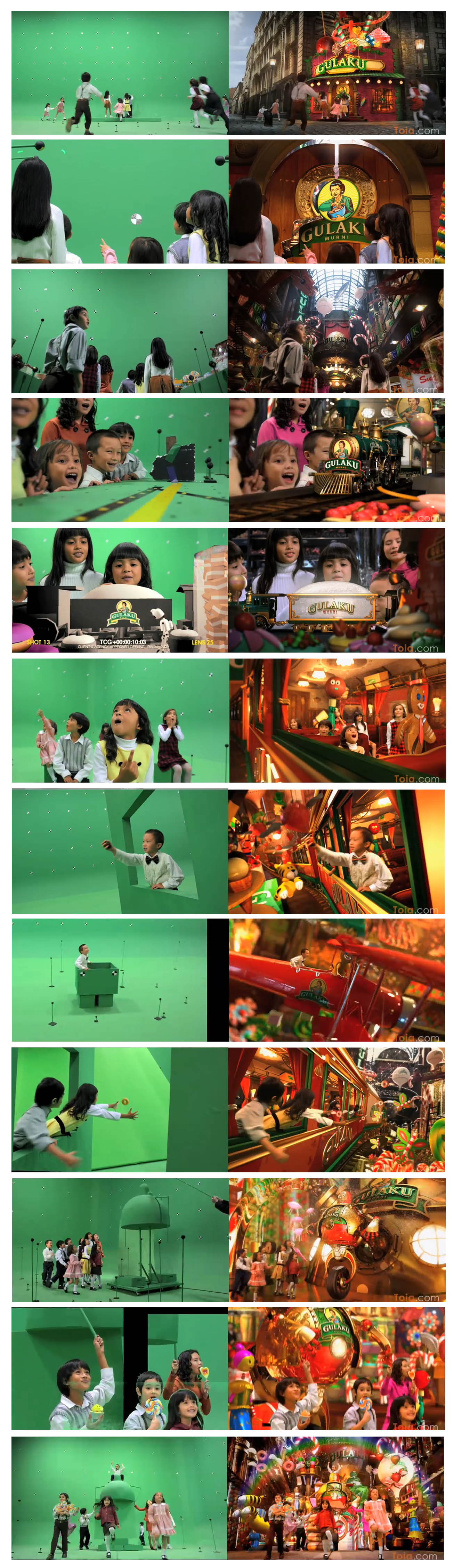
Gulaku.jpg
 
I've been shooting green screen and blue screen material nearly every two weeks since getting my Scarlet X last December. I agree with everything above.

What I would suggest if you are in a tough situation is to light your screen as close to 5000k as possible (or filter). If you are dealing with tricky fabric that is slightly shear, favor deeper depth of field. I've lit them between ISO 320-800 at this point with outstanding results.
 
If you are shooting free screen you have a ton of control over your lighting so assume you have less sensitivity and compress your dynamic range. Shoot daylight temp if possible. Also a good sharp lens with minimal chromatic aberration is really helpful. My last shoot was with a Cooke classic and it was razor sharp with no CA made a big difference. Obviously shoot with as little compression as possible and make sure your free screen is adequately exposed.
 
Thanks!

Thanks!

Thanks for the tips. Just about to do a green screen shoot this week - the first with the Scarlet and this is quite helpful! Cheers!
 
It's nice to have an out of focus screen and a sharp, clean subject. Lenses tend to be sharpest anywhere from 2.8 - 5.6, so I'd use that range depending on what lighting you have available and the size of your shot, screen/subject distance. Controlling spill is highly recommended - keep your subject as far away from the screen as is practical and use black cloth to cover up any portions of the screen (or flooring) that are not in the shot (or not necessary to pulling the key, like an in camera garbage matte) - this will improve your key and your color corrections/spill suppressions for a better final image. Try to have a large, high resolution monitor to keep an eye on everything. You may even want to use something like http://veescope.com/ (created by a reduser, if i'm not mistaken) to help light and expose your screen evenly. You can also use the look controls like contrast and saturation to see how even your screen is (make sure to set these back for proper exposure monitoring!) I'd recommend the 320-800 ISO range, tending towards 320 just to be safe. You may want to think about shooting higher shutter speeds than normal if you are comfortable with adding motion blur in post (reelsmart/twixtor/etc - optical flow) - this can give you a cleaner key, and can help the final composite fit together. As always, test this - it needs to make sense for your workflow and you need to be aware of the caveats in the technology as well as the excess post-time. It will not always be the best way to go, if in doubt shoot normally.

All that being said, you will almost always have practical limitations of time, budget, and available resources - among other things. The only trick is to spend time with the currently standard software and deeply understand it's capabilities and shortcomings. What we have on hand is VERY powerful, but it has limitations. Always keep in mind the extra amount of time a poorly-captured scene is going to take, and see if it makes sense to spend a little more time on set getting it right. Fix it in post = $$$. Sometimes, fixing it on set = even more $$$, so always be aware and thoughtful of that balance. As creativity on set is more important than technicalities, you need to know when something is passable and when you need to put your foot down and make sure you get what you need for vfx. If the quality of the shot is going to be limited unless you halt production, it's probably a good idea to do so. It's always better to say 'no' than find yourself at a reshoot (hint: you probably won't find yourself at the reshoot).
 
I completely stuffed a green shot up last month... and with modern keying tools these days, you would never have known. :) Perfect.

But always best to shoot it a clean as possible. :) makes it even easier.. One touch keys are the best.

We even got great keys from the old M chip REDONE.. :) using tungsten light !

Great shots!

As you had to have all those tracking markers in sharp focus and got great keys, this should put to rest the idea that you need an out of focus background.

Did you have much movement of the Scarlet, and how did Scarlet's rolling shutter affect the tracking?

BTW - do you have the video of those shots on your web site or available on Vimeo/YouTube?
 
Last edited:
I completely stuffed a green shot up last month... and with modern keying tools these days, you would never have known. :) Perfect.

But always best to shoot it a clean as possible. :) makes it even easier.. One touch keys are the best.

We even got great keys from the old M chip REDONE.. :) using tungsten light !

Gulaku.jpg
H
Hey Mark,

I can see a little of green spill on the kids skins in few places, how did you handle that?

Thanks!
 
keep your subject as far away from the screen as is practical...
This doesn't actually do any good. The only thing that matters is the 'angular size' of the screen to the sensor. If you move your greenscreen back a mile you're going to need light 1,000,000x more light to get it to the same luminance as a small screen 2' behind the subject but the same size in frame.

The reason people thinks this works is because people usually have too large of green screens (e.g. turning on an entire stage for a small static shot) and moving them away from your giant green screen just makes the green-screen "Smaller".

...and use black cloth to cover up any portions of the screen (or flooring) that are not in the shot (or not necessary to pulling the key, like an in camera garbage matte)

Yes, definitely black out/don't light anything that isn't behind the subject.


Another thing to keep in mind is lighting. Most "bad keys" are great keys of bad lighting. You get a lot of "Free" lighting when you are on set. Green Spill isn't the same as White Spill. Skin absorbs all manner of different spectrums of light differently so for instance you're shooting a character that's supposed to be on white... shoot them on a white cyc stage and just put a small strip of green up behind them. The closer you get the lighting the better your results. Just shooting something on green won't let a compositor match lighting. You really need to shoot it correctly.
 
On the subject of backing the green screen panel way, I realise that if just back it away and them use a bigger panel then there is no diference, but wouldn`t it help to back it away and use longer focal lengths with the same size green screen panel?
 
This doesn't actually do any good. The only thing that matters is the 'angular size' of the screen to the sensor. If you move your greenscreen back a mile you're going to need light 1,000,000x more light to get it to the same luminance as a small screen 2' behind the subject but the same size in frame.

The reason people thinks this works is because people usually have too large of green screens (e.g. turning on an entire stage for a small static shot) and moving them away from your giant green screen just makes the green-screen "Smaller".

I'm not sure we're talking about the same ideas... The main thing I was thinking of is spill control - i.e. don't have them leaning against the screen or under the same lights that are lighting the screen if at all possible. Thinking more about on a stage rather than portable scenario. Also, it's usually just a small thing but the larger distance would blur the background even more, hopefully taking care of wrinkles, dirt, etc. obviously depending on the shot. I'm not talking about lugging in a ginormous screen for a headshot and sticking it across a field, I'm just saying - if you're on stage move them away from the source of spill, as is practical for the focal length of your shot and your lighting package/time requirements/etc/etc. The closer you are, the less likely you are to get a huge gradation of lighting - so don't move to the point where it messes up your lighting - but I'm assuming best case scenario you've lit the thing evenly. More screen equals more bounce light equals more spill - there's an easily found balance of where to be in there. Basically, just move your subject away from the screen a little bit to avoid excess green light from the screen. If the screen's wrinkly and you can't iron it or lay it out in the sun or put some hairdryers on it or if it's dirty and you can't clean it, and you have the screen size, lighting requirements, and f-stop - try to get the screen defocused by moving farther away (and/or adjusting the f-stop). We're talking in terms of feet here... not miles :) Cool?
 
I completely stuffed a green shot up last month... and with modern keying tools these days, you would never have known. :) Perfect.

This looks like a tedious job... And so colourful... I'm blind now. Hope you got tons go money for that. GS & Kids & CGI = hardcore.

Someone has to do it.

Hans
 
I'm not sure we're talking about the same ideas... The main thing I was thinking of is spill control - i.e. don't have them leaning against the screen or under the same lights that are lighting the screen if at all possible... Also, it's usually just a small thing but the larger distance would blur the background even more, hopefully taking care of wrinkles, dirt, etc. obviously depending on the shot. I'm not talking about lugging in a ginormous screen for a headshot and sticking it across a field... If the screen's wrinkly and you can't iron it or lay it out in the sun or put some hairdryers on it or if it's dirty and you can't clean it, and you have the screen size, lighting requirements, and f-stop - try to get the screen defocused by moving farther away (and/or adjusting the f-stop). We're talking in terms of feet here... not miles :) Cool?

This is fine for a static shot and good advice for minimising spill. However, for a moving/zooming shot you need tracking markers, and they need to be sharp to be easily trackable. But yes, there ideally needs to be enough space between background green and subject to minimise spill.
 
Also use a backlight to give separation from the green background unless your going for a flat look.

Not sure if you meant magenta backlight or just backlight but I think its better to stay away from that since its a good chance you end up with both green and magenta spill to work with. Also it is better to just backlight if the background have an motivated light.

Cheers!
 
This is fine for a static shot and good advice for minimising spill. However, for a moving/zooming shot you need tracking markers, and they need to be sharp to be easily trackable. But yes, there ideally needs to be enough space between background green and subject to minimise spill.

right - thanks for mentioning that... it is okay for them to be a little soft, but they need to be distinguishable and hopefully stay as consistent as possible throughout the shot - tracking markers is a whole nother subject altogether, really...
 
This looks like a tedious job... And so colourful... I'm blind now. Hope you got tons go money for that. GS & Kids & CGI = hardcore.

Someone has to do it.

Hans

You need to have your thinking cap on, that for sure... The blindness will go away in couple of days... :)
 
Back
Top