Welcome to our community

Be a part of something great, join today!

  • Hey all, just changed over the backend after 15 years I figured time to give it a bit of an update, its probably gonna be a bit weird for most of you and i am sure there is a few bugs to work out but it should kinda work the same as before... hopefully :)

DSMC Release v7.0.0

Another thing I noticed, when switching between IPP2 and Legacy pipelines, on the 7" Redtouch LCD, the blacks seem to be lifted when going IPP2 (even on the interface and outside of the picture area). Even with the more contrasty IPP2 Profile. The blacks are not black, they are lifted.

Am I the only one seeing this, and is this normal behaviour ?

Thanks !

Have you tried looking at some of your legacy footage in RCX 50? This is something I’ve noticed about IPP2 in general, but allows for the varying gradients in shadows to be controlled much better in post. RED Gamma 4 had a pretty heavy curve to please “producers and onlookers” without an on-set grade. I believe that concept has shifted to keeping things organic.
 
Yey ! :thumbsup:
Glad it's finally here ! :)

I installed it on my Epic-W, and so far it seems pretty stable and I haven't seen any issues or bugs.

One of the things I wanted in this firmware is the UDF format for the RedMags, which allows recording on a single continuous Prores file instead of many 4 GB chunks. From what I've been testing so far it seems to be working well.
But there was one thing I wanted to try, and which I just tried : letting the camera shut down while recording (from a drained battery for example). The bad news is, the last prores file (the one I was recording when the camera shut down) is corrupted and can't be read on my computer, nor on the camera (the camera just freezes when I try playing the last clip back).
I of course always do my best to avoid doing this, but I know it can happen from time to time if you're recording very long takes and aren't using Red batteries (I use Bebob ones).
So, a few questions regarding this :
- is there a way to recover the corrupted file if that ever happens ? (I don't think Red-undead was made for that purpose, or would that work ? I can see the file, but can't play it back in any app)
- Would it please be possible to add an optional "low battery warning" message ? Like something that displays a clear warning when you reach a certain (ideally user-definable) voltage ? I mean, even on batteries that aren't able to display percentage on Reds, the camera is still able to display the voltage. From what I've seen the camera tends to shut down pretty quickly after it gets bellow 12V. So it should be possible to just display a warning at that point (it doesn't have to be full screen, just something clearly visible on one side of the frame or so)... Would you please consider adding that feature, I'm pretty sure a lot of people would like that too ;)

Thanks !

Just a general question about UDF in regards to losing power... was the R3D clip in good shape while playing back via computer aside from the ProRes corruption?

As for tools to fix your ProRes file, these may do the trick:
https://www.digitalrebellion.com/promaintenance/
http://aeroquartet.com/movierepair/prores422#
http://grauonline.de/cms2/?page_id=5
 
Last edited:
WOW !!! I haven't loaded any of the beta versions, but I loaded this into my magnum today and was holly crap there is a ton of cools stuff in this. The 4k prores update is like an entire camera upgrade, and that mixed with the redwide stuff is just impressive. Update was seamless and I didn't have any problems from the last production version. Small shoot today I ran the r3d with the 4k prores, no problems, the prores was really nice to do a quick daily review.
 
It is just there during when you are not recording, correct?

Yes, I don't see it when I'm recording, I just find the notification a bit distracting when you're framing/composing a shot. I wish there was a way to turn it off
 
Just a general question about UDF in regards to losing power... was the R3D clip in good shape while playing back via computer aside from the ProRes corruption?

As for tools to fix your ProRes file, these may do the trick:
https://www.digitalrebellion.com/promaintenance/
http://aeroquartet.com/movierepair/prores422#
http://grauonline.de/cms2/?page_id=5

Thank you Anthony for the links ! I tested the last link and it seems to be able to repair the file indeed, so good to know we're not stuck with a corrupted file if that ever happens on a shoot :)

The tests I did so far on this matter were Prores only (I usually avoid shooting prores and shoot R3D 90% of the time, but some clients want Prores for workflow/cost/speed reasons, do I need to be able to offer that option too). So I can't say if the R3D would've been corrupted too or not. My guess is, the last R3D chunk might've been corrupted, the rest not... But it's only a guess.

Anyway, I hope someone at Red read my message about adding a "low battery" warning for non-Red batteries which only display voltage. This would really be useful anyway. It's good to know you're able to recover footage if it's corrupted, but it's even better to just avoid having corrupted footage in the first place ;)
 
Have you tried looking at some of your legacy footage in RCX 50? This is something I’ve noticed about IPP2 in general, but allows for the varying gradients in shadows to be controlled much better in post. RED Gamma 4 had a pretty heavy curve to please “producers and onlookers” without an on-set grade. I believe that concept has shifted to keeping things organic.

This was a "Prores only" test (so I can't check in Redcine), but what I saw on the screen was translated into the Prores file : the black were lifted quite a lot. Nothing you can't correct in post, but I don't think that's a normal thing. I've played around with IPP2 in RCX and Resolve quite a lot during the last few months (while still being on a non IPP2 firmware in camera until a couple of days ago), and I never noticed this kind of things before. IPP2 is indeed lower contrast than Legacy, but the blacks were still black, and the whites were still white. Which is not the case here.
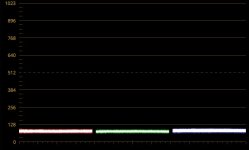
I attached a pic of the waveform I get when importing a black shot (with cap on) into Resolve. IPP2 "High Contrast" and highest Rolloff. Shouldn't the black be at 0 here ?

And again, when I switch between IPP2 and legacy in camera, on the 7" screen, the black get lifted quite a lot in IPP2. Not just in the framed image, but also on the black bars on the side and in the menus. That definitely doesn't seem right. I'm wondering if others are seeing this too... ?
 

Attachments

  • Red IPP2 Black.jpg
    Red IPP2 Black.jpg
    40.9 KB · Views: 0
Am also seeing the lifted blacks in the 7" RED monitor menu's when using IPP2 Nils.
 
Nils,

I am getting exactly the same result as you. I did a test shooting with my lens cap on with one clip set to Legacy and the second clip set to IPP2. When I bring the two Pro res files into Resolve the Legacy clip shows black on zero but the IPP2 clip has the black level starting at 64 on the 1023 scale. This is going to make for washed out Proxies.

Oddly the black level is lifted globally on my 7" LCD and on my new gorgeous DSMC2 EVF and that wonderful OLED black disappears when switched to IPP2 and the EVF blacks go grey even outside the picture area?

Worth opening a ticket as this really limits the use of Proxies with the "burn in" as the point of the "burn in" is to express the intent for the look of the project.
 
Thank you Anthony for the links ! I tested the last link and it seems to be able to repair the file indeed, so good to know we're not stuck with a corrupted file if that ever happens on a shoot :)

The tests I did so far on this matter were Prores only (I usually avoid shooting prores and shoot R3D 90% of the time, but some clients want Prores for workflow/cost/speed reasons, do I need to be able to offer that option too). So I can't say if the R3D would've been corrupted too or not. My guess is, the last R3D chunk might've been corrupted, the rest not... But it's only a guess.

Anyway, I hope someone at Red read my message about adding a "low battery" warning for non-Red batteries which only display voltage. This would really be useful anyway. It's good to know you're able to recover footage if it's corrupted, but it's even better to just avoid having corrupted footage in the first place ;)

It’s been so long that I had forgotten if the new card format still split R3Ds into 4GB chunks or not. I vaguely remember that they still are, for content security reasons. Which kind of makes my question have no sense to it. For a second there I thought they made R3Ds one file as well.
 
Nils,

I am getting exactly the same result as you. I did a test shooting with my lens cap on with one clip set to Legacy and the second clip set to IPP2. When I bring the two Pro res files into Resolve the Legacy clip shows black on zero but the IPP2 clip has the black level starting at 64 on the 1023 scale. This is going to make for washed out Proxies.

Oddly the black level is lifted globally on my 7" LCD and on my new gorgeous DSMC2 EVF and that wonderful OLED black disappears when switched to IPP2 and the EVF blacks go grey even outside the picture area?

Worth opening a ticket as this really limits the use of Proxies with the "burn in" as the point of the "burn in" is to express the intent for the look of the project.

This is a challenge because on one hand I can understand that tidy proxies that can be dropped in to a timeline and edited by a client with a near final look burned in is fairly savvy, but on the other hand I appreciate the fact that IPP2 proxies are not clipping the black level to allow colorists some room to breathe in post. This kind of brings me back a little ways, but what we’re the standards for a one light color in film telecine? I have a feeling the blacks are lifted just a tad there as well to keep all the color information contained for future use.

You could always crush the bottom end with the curve plot, and that would probably burn in. Can’t say I’d like IPP2 to be changed otherwise (for my tastes and for future proofing). Is there an IPP2 output setting that mimics what you’re looking for before you move to change the curves?
 
Am I the only one who doesn't like the new IPP2? I see a green cast. I prefer the "IPP2 Preview Med contrast" much more than the new one.
 
Am I the only one who doesn't like the new IPP2? I see a green cast. I prefer the "IPP2 Preview Med contrast" much more than the new one.

Erm. Got an .R3D snapshot I/we can look at? You shouldn't be seeing a big color shift from the LUTs to the current transforms unless settings are different.
 
I can understand that tidy proxies that can be dropped in to a timeline and edited by a client with a near final look burned in is fairly savvy, but on the other hand I appreciate the fact that IPP2 proxies are not clipping the black level to allow colorists some room to breathe in post...... I have a feeling the blacks are lifted just a tad there as well to keep all the color information contained for future use.

You could always crush the bottom end with the curve plot, and that would probably burn in. Can’t say I’d like IPP2 to be changed otherwise (for my tastes and for future proofing). Is there an IPP2 output setting that mimics what you’re looking for before you move to change the curves?

Anthony,

In my workflow generally the proxies are never colour corrected. The proxies use is finished once the edit is locked and then we move to the R3D files. "Protecting" the blacks on the proxies is a mostly pointless exercise. If you were planning on finishing with the pro res files I suspect you would never bake in the look anyway.

I have started a support ticket with Red so will be interested if its considered a bug or a feature. As you correctly point out a possible "fix" is adjusting the curves to sit black back on to zero.

Even if a code value of 64 is the technically correct placement for black its the wrong place for a burnt in Proxy. I need my proxies to look good not washed out.
 
After updating tp 7.0 I have this blue line on the right side of my screen. Sometimes it comes and goes then it stays constantly. It shows up on my footage as well.
 

Attachments

  • IMG_6184.jpg
    IMG_6184.jpg
    86.6 KB · Views: 0
Last edited:
The beep record seems to not work - I first noticed it not working in last build. Not sure if there is a volume control for the option?


Same issue here.

Also, is there a way to bake the IPP2 Lut into the ProRes Proxy?
 
Back
Top