Welcome to our community

Be a part of something great, join today!

  • Hey all, just changed over the backend after 15 years I figured time to give it a bit of an update, its probably gonna be a bit weird for most of you and i am sure there is a few bugs to work out but it should kinda work the same as before... hopefully :)

Dragon new OLPF w/ super saturated Reds

Would these excesses in red colour saturation and blue elements becoming apparent have anything to do with the Dragon sensor actually being able to "see" more into what would otherwise be a burn-out when the exposure is set dark enough ( please forgive the laymans's terms. ) The acrylic lenses on tail lights are far from optical perfection, with prismatic shapes to reflect following headlight beams directly back to origin regardless of direction within a range of angles.

Prisms separate pure light into its separate colours so chances of prismatic separation of te pinpoint source within the lamp itself into other colours are probably good. They may also return strong environmental light sources from directly behind the camera back at the camera in whatever colour they emit.

Whilst the Dragon sensor might have issues, my personal preference would be to also eliminate as a cause, localised areas of colour contamination within the now visible areas of red colour previously burned out ad maybe some previously invisible chromatic aberrations produced by lenses in the lighting conditions.
 
Last edited:
Gosh.... I thought the Dragon's slightly more over emphasis of red was a way of making it
look more like Kodak Film.

Maybe this is a good thing.
 
I noticed this first on my Scarlet and also on my Epic. I have noticed a few times on other stuff I have seen. Figured it was a digital thing not a Red thing.
 
This does not look like film, I'll shoot a test today between our work. It does not look good in any way. It could require re-calibration of analog gain on the sensor.

But still no other Digital camera does this to reds. A log image is equally saturated throughout the color gamut on other systems. Alexa /F65/55 have no such issue.
 
This does not look like film, I'll shoot a test today between our work. It does not look good in any way. It could require re-calibration of analog gain on the sensor.

But still no other Digital camera does this to reds. A log image is equally saturated throughout the color gamut on other systems. Alexa /F65/55 have no such issue.

I think it's better to show a r3d, then discuss. Discussing picture qualities of pictures we have not seen is just a fuss.

Now, I add to that fuss, I shot some dawn footage on the street with our dragon and yes I noticed a very ill looking red, overstaturation thing on tail lights and stoplights. So maybe thats one of the things for the new color science, who knows.

But, again upload a r3d.
 
Not to try to step on anyones toes, but yall remember the volcano shoot that Mike did, right? That was pre new OLPF, and surely a few tweaks back but I would think if people were going to talk about the red channel that the images from that shoot would feature a lot of that channel...

PS pls post the r3d file, I am sure everyone would be more then happy to take a look and discuss it! would make for a much more fruitful discussion as well!
 
Massive red spike, Guys I can't post r3ds of a commercial job. We all know that. When I have a chance to set up a test I will post that.
 
Mike,

So say that I use RedColor3 instead of RedLogfilm. If I raise saturation to a desired level for the rest if the image the red is generally double the value. So if I raise saturation to 1.2 Red tailights appear as if I had set saturation to 1.8.

Also, if you change from RedlogFilm to Redcolor3 you'll notice how all the colors become less saturated, except Red.
 
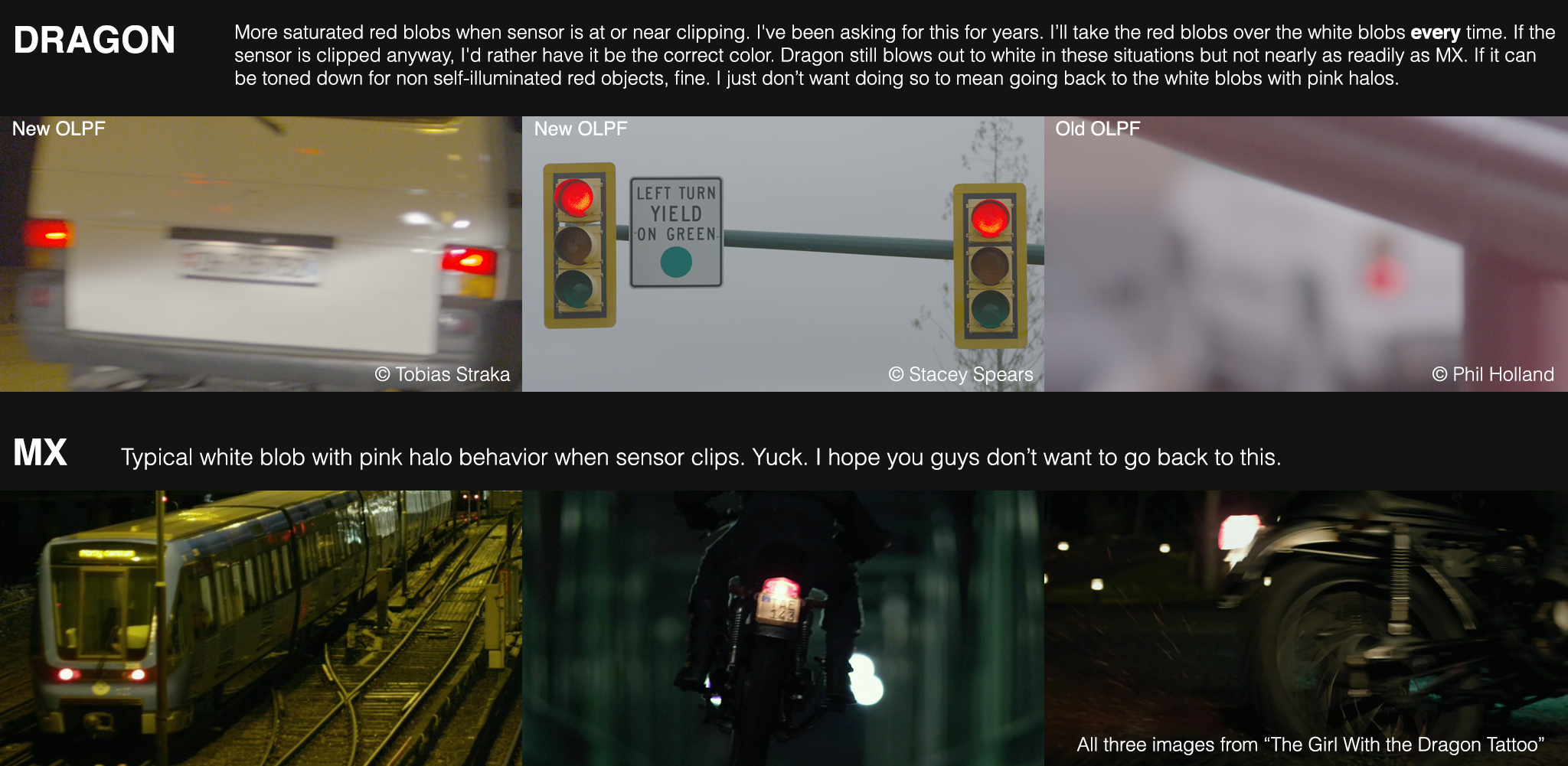
Check out the tail lights on the van in this shot by Tobias Straka (posted in another thread)

A001_C026_030755.0000237.jpg

R3D: http://www.swissfilmmakers.com/hosted/dragon/A001_C026_030755.0000237F.R3D

Seems that Red Color 3 is giving some very saturated reds indeed. Interestingly RedColor2 seems not to have the issue?
 
Here are a couple of quick and dirty stop light R3Ds using the new OLPF. Three R3Ds per zip with the stop light at green, yellow, and red shot at two different exposures. Threw in a DSC card as well at the last minute w/ an ADD still given the exposure. Canon 70-200mm lens with Canon Motion Mount. Shot at 6k HD, 5:1 compression. Specifics are in the metadata.

Lights - f/5.6, 2.5 Stops MM, 200mm
www.spearsandmunsil.com/sspears70/red/03-09-14/lights_v1.zip

Lights - f/8.0, 3.4 stops MM, 200mm
www.spearsandmunsil.com/sspears70/red/03-09-14/lights_v2.zip

Chart - f/8.0, 1.6 stops MM, 70mm
www.spearsandmunsil.com/sspears70/red/03-09-14/dsc.zip
 
Alex have you raised this with Red support?
 
I would guesstimate that the analogue levels are correctly balanced in the recorded R3D - but that RC3s saturation algorithm is trying to correct for the MX sensors lack of saturation in the red channel ... meaning that we need RC4.

AJ
 
I agree.

I noticed this with Dragon, too (old OLPF, though).

Shooting car tail lights and traffic red lights was still a major problem. Clipped, ugly reds. Same thing as with the old sensor (MX).

Can RED fix this?

Also, Marc - the reds are clipped. If you take them down 5% as you suggest, they'll still be clipped (in an ugly way).
Other than this problem, clipping is really nice on the Dragon. Major improvement.

The thing I've complained about the most on this forum is how MX treated clipped red light sources like tail/brake lights, red traffic lights, neon, etc. It tended to be a white blob with a pink halo instead of a red blob, as you would expect from most film stocks.

Now, Dragon has gotten WAY better at handling these instances so I'm not sure what you mean by, "Same thing as with the old sensor (MX)."

Dragon renders saturated, red blobs when the sensor clips more often than MX ever did, unless MX was looking at a light from an angle, which cut down considerably on the light's intensity.

At any rate, I understand the concern over having red objects that aren't light sources being over-saturated and, hopefully, RED can address the issue without undoing the progress they've done on the saturation of red light sources. I'm right there with you.

However, if fixing it to you guys means going back to the white blobs, you can count me out.

If RED can maintain a slightly less (than it is now) red saturation of clipped red channels on red light sources but bring the red response of everything else more in line with the other two channels, this is a best-case scenario for all concerned IMO.

Otherwise, without seeing an example of just what it is you'd like it to look like, I don't know if I can get on board with your complaint.

The tail lights in Tobias' example are easily brought down by Hue vs. Saturation in Resolve with negligible impact on the rest of the image.


Click the image for a larger version.

 
Last edited:
So yes red lights shine, and should not be overexposed. Possibly shoot with a HDRx pass for such situations until the new color science is out we are a bit in the beta zone so this should not be to shocking for anyone, should it?
 
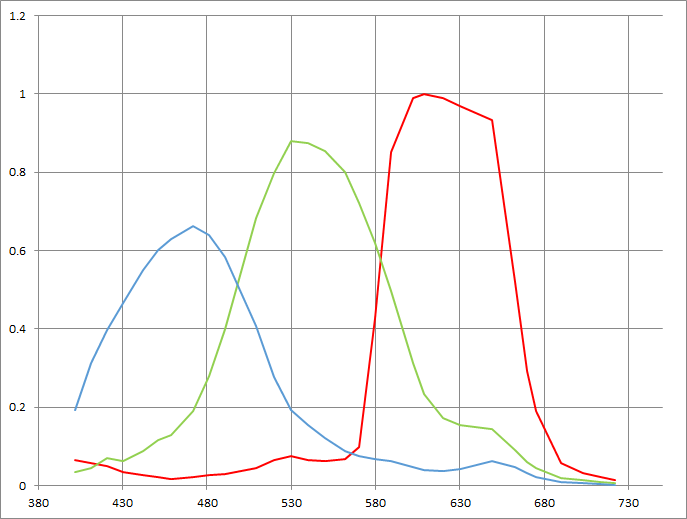
Might have something to do with this:

L_E19.tmp.png


It looks like there isn't a very symetrical transition between blues and reds like there is between green/blue then again I would be curious how cross-talk problems are affected by Dragon's sensor. I would love to see a DXO Epic MX test for comparison.

DXO Labs said:
The color response of the sensor shows an unusually high sensitivity on the red channel (see graph below). This certainly contributes to the overall sensitivity of the sensor.
Also, in daylight illumination, red and green are saturating for approximately the same exposure. This yields a very low amplification of the red channel, with respect to the green that will be needed for white-balancing (In D50 illuminant, the red white balance scale is only 11% above the green one).

But this doesn't seem like something that the debayer can't handle.
 
I spoke with Jarred today and then eventually with Graeme.

The problem is Redgamma3 / Redcolor3... For now use RedColor2. Until it is fixed.

Resolve and Colorfront can't use the new OLPF footage yet.. I usually just use camera RGB /rec709 on everything anyway. I get the best results. I wouldn't have seen this problem if I wasn't forced to use rcX.
 
Back
Top