Welcome to our community

Be a part of something great, join today!

  • Hey all, just changed over the backend after 15 years I figured time to give it a bit of an update, its probably gonna be a bit weird for most of you and i am sure there is a few bugs to work out but it should kinda work the same as before... hopefully :)

Dragon new OLPF w/ super saturated Reds

Alex Carr

Well-known member
Joined
Aug 4, 2007
Messages
951
Reaction score
0
Points
0
Location
planet Earth in the Milky Way Galaxy
So Red is way more saturated than any color. I noticed this on Jarred's camera about 10 days ago, Now we have two for our shoot this weekend. I saw the Red saturation then, big problem. I see it now in every shot, and in every shot it will need to be desaturated, tracked, and blurred to hide the problem.

When looking at a RedLogFilm look, the Reds are at about 200% Saturation where the rest of the colors are around 100%. It gets worse when its a bright highlight like stoplights, taillights, or worse a FireTruck. The Firetruck looked terrible, its covered in the exact hue of Red that is super saturated.

Is there a current tool to fix this? Or a update in the SDK and Red firmware coming soon? I see it on all video outputs also. RedLogFilm or RedColor3.

The camera looks fine otherwise, sensor is more neutral, and closer to 5000k. But this is a problem that needs to be addressed.
 
you can adjust the image during processing in redcine-x or anywhere else afterwards...
 
Alex, how bad is this? Can we please see some images?
So Red is way more saturated than any color. I noticed this on Jarred's camera about 10 days ago, Now we have two for our shoot this weekend. I saw the Red saturation then, big problem. I see it now in every shot, and in every shot it will need to be desaturated, tracked, and blurred to hide the problem.

When looking at a RedLogFilm look, the Reds are at about 200% Saturation where the rest of the colors are around 100%. It gets worse when its a bright highlight like stoplights, taillights, or worse a FireTruck. The Firetruck looked terrible, its covered in the exact hue of Red that is super saturated.

Is there a current tool to fix this? Or a update in the SDK and Red firmware coming soon? I see it on all video outputs also. RedLogFilm or RedColor3.

The camera looks fine otherwise, sensor is more neutral, and closer to 5000k. But this is a problem that needs to be addressed.
 
I'm sorry none of these tests retain information even partially relevant to my discovery. Don't show me a chart or skin tones. Show me a StopLight, or Tail lights. Or a Firetruck. If you want to see, take your dragon with new OLPF out to your car and shoot your tail lights, just try to tell me that level of saturation is normal. It will need Qualifiers, tracking, removal and $$ Sorry, but other cameras don't need this. When I find a problem with a Camera system I claim it truthfully with a factual background, without assumption or speculation whatsoever.

Here are some basics, Log image should have very little saturation. Why does Red Dragon with new OLPF have FULLY saturated Reds in a LOG image? Its clearly a problem. We will need to spend $$ to fix this issue in post. I'm sure that I can't be the only one to see this.

As an example, say that you had a MedCU shot of a woman with bright Red lipstick. In DI you wanted to qualify the cherry Red Lipstick and Saturate it. Well, at this point.. I don't need to saturate that Cherry red in every shot that I shoot. This effect is 'baked within' any image shot with Dragon w/ new OLPF. 3 different cameras all show the same. Jarred's was the first camera where I noticed it. You can can see it on Video Output.

For now I recommend not shooting anything bright and Red. Tail lights, stop lights, FireTrucks,
 
Josh, Can't you see how saturated the Reds are of the thing left of the chart? Way too saturated. Compared to greens and other colors there's something not quite right about the new filter.
 
As an example, say that you had a MedCU shot of a woman with bright Red lipstick. In DI you wanted to qualify the cherry Red Lipstick and Saturate it. Well, at this point.. I don't need to saturate that Cherry red in every shot that I shoot.
This is fixable in several ways. One would be using a hue vs. saturation curve in Resolve and just knocking back the red a couple of points; another would be pulling a very well-qualified key and knocking it down (no blur or window necessary). I do this all the time with flames and explosions (and tail lights!), and it works extremely well. You would be amazed how much detail is still there, even with Log or Rec709 material that's clearly clipped by about a stop.

My advice is to shoot some tests, take the material to a decent colorist, apply the LUT of your choice, and see how it comes up on a calibrated display and figure out when you're really in trouble, vs. having the ability to fix it later on.

Note that blue used to be the big problem in film, since it's the top-most emulsion layer (the yellow filter layer). We'd do the same thing in post when the blues jumped off the monitor: just qualify a key and pull back on the blues 5%. Not a big deal. People rarely even asked me to do it, and never noticed it when it was done... but I ​noticed it.
 
I'm sorry none of these tests retain information even partially relevant to my discovery. Don't show me a chart or skin tones. Show me a StopLight, or Tail lights. Or a Firetruck. If you want to see, take your dragon with new OLPF out to your car and shoot your tail lights, just try to tell me that level of saturation is normal. It will need Qualifiers, tracking, removal and $$ Sorry, but other cameras don't need this. When I find a problem with a Camera system I claim it truthfully with a factual background, without assumption or speculation whatsoever.

Here are some basics, Log image should have very little saturation. Why does Red Dragon with new OLPF have FULLY saturated Reds in a LOG image? Its clearly a problem. We will need to spend $$ to fix this issue in post. I'm sure that I can't be the only one to see this.

As an example, say that you had a MedCU shot of a woman with bright Red lipstick. In DI you wanted to qualify the cherry Red Lipstick and Saturate it. Well, at this point.. I don't need to saturate that Cherry red in every shot that I shoot. This effect is 'baked within' any image shot with Dragon w/ new OLPF. 3 different cameras all show the same. Jarred's was the first camera where I noticed it. You can can see it on Video Output.

For now I recommend not shooting anything bright and Red. Tail lights, stop lights, FireTrucks,

I agree.

I noticed this with Dragon, too (old OLPF, though).

Shooting car tail lights and traffic red lights was still a major problem. Clipped, ugly reds. Same thing as with the old sensor (MX).

Can RED fix this?

Also, Marc - the reds are clipped. If you take them down 5% as you suggest, they'll still be clipped (in an ugly way).
Other than this problem, clipping is really nice on the Dragon. Major improvement.
 
Medavoym... Dunno if I misunderstand, but what Alex is talking about is not the clipping you refer to, THAT should probably be a lot better with the new olpf (I cannot test that as I still have the old).
And already is a lot on Dragon in general than... well most...

Alex, would be great to see an example.
 
So Red is way more saturated than any color. I noticed this on Jarred's camera about 10 days ago, Now we have two for our shoot this weekend. I saw the Red saturation then, big problem. I see it now in every shot, and in every shot it will need to be desaturated, tracked, and blurred to hide the problem.

When looking at a RedLogFilm look, the Reds are at about 200% Saturation where the rest of the colors are around 100%. It gets worse when its a bright highlight like stoplights, taillights, or worse a FireTruck. The Firetruck looked terrible, its covered in the exact hue of Red that is super saturated.

Is there a current tool to fix this? Or a update in the SDK and Red firmware coming soon? I see it on all video outputs also. RedLogFilm or RedColor3.

The camera looks fine otherwise, sensor is more neutral, and closer to 5000k. But this is a problem that needs to be addressed.

I need to see R3D examples...
 
Also, Marc - the reds are clipped. If you take them down 5% as you suggest, they'll still be clipped (in an ugly way).
I'd have to see it. I've done tons of film projects before where you'd swear the red highlights were clipped, but we were able to bring back more than 50% of the (apparently lost) detail.

What happens if you drop the exposure another half-stop or so to protect the highlights? Or, put some ND filter paper in the car taillights? Again, this same exact thing happens with film, so as far as I'm concerned, this problem has always existed and we just fixed it digitally, or people accepted the mild film shoulder roll-off that happened in a film print.
 
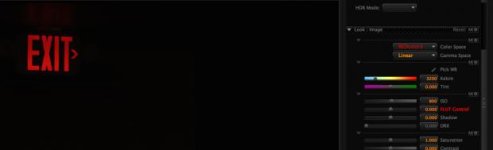
I had this problem in spades...with all of my cameras. Here's a sample file showing a red exit sign:

https://www.dropbox.com/s/ar56ea8ln30r6yl/A007_C001_03074X.0000745F.RMD
https://www.dropbox.com/s/bvdd667w53q7r8f/A007_C001_03074X.0000745F.R3D

The see the problem, and the solution, look at it in RC3/RG3 (the red looks some horrible blueish red) and then in 709/709, where it goes to all red. Better yet, look at it in Linear gamma and cycle through the color models. It is *crazy* how differently the green and blue channels are represented in this thing we all know is supposed to be red.

What this teaches me is that it's all about the color matrix (or the LUT) and thankfully the raw image gives one enough data to tweak the LUT to suit *your* interpretation of red. It drove me nuts with other cameras that baked in very wrong guesses too far upstream for me to correct them. The bottom line is that you don't have to fix this problem in post, you can fix it in pre, if you have a DIT with the right LUT.
 
@ Michael, THAT was a strange example...

Looking at it linearily it is obviously neither clipped or oversaturated...

What is the issue with this?

If anything, the shot is pretty underexposed...
 

Attachments

  • Screen Shot 2014-03-09 at 10.34.21 am.jpg
    Screen Shot 2014-03-09 at 10.34.21 am.jpg
    8.3 KB · Views: 0
@ Michael, THAT was a strange example...

Looking at it linearily it is obviously neither clipped or oversaturated...

What is the issue with this?

If anything, the shot is pretty underexposed...

Yes, it is underexposed (which linear gamma makes abundantly clear). But the point is that the sign, which appears to the eye to be super-saturated red, gets an unhealthy boost of blue in RC3/RG3 as the color temperature drops below 4800. REC 709 boosts the blue much less at 3200K. Which color matrix and/or gamma curves are correct is anybody's guess, but in this case I see the need to make the sign look red, not blueish red, and so must either fix it with a qualifier in post or a LUT.
 
Seriously, Ive seen three cameras including Jarred's all with this problem. Go see for yourself, take your camera outside and shoot a test.
1/2 of the instances. New olpf dragon footage can only be seen by RC-X right now, also making it hard to fix in resolve. I have to compress to another format to grade normally in Resolve. I'm sure I can do a better job with a raw file. But still I shouldnt have to fix footage with a common red saturation problem, its not just clipped reds, its a lot of shades of cherry reds. The cheapest solution is shoot with a different camera.
 
I do not have new OLPF yet, but have not seen this on the footy I have checked. A raw file with an example would be very helpful to try to figure what is going on...
 
Back
Top