Welcome to our community

Be a part of something great, join today!

  • Hey all, just changed over the backend after 15 years I figured time to give it a bit of an update, its probably gonna be a bit weird for most of you and i am sure there is a few bugs to work out but it should kinda work the same as before... hopefully :)

DRAGON: Improve it...

One man's FUD is another man's treasure Mark ;)
I would like to have a button that lets some redusers grow some skin haha ;)
A "confidence" button maybe ?
 
+1

And what ever happened to Flip? Impossible?

4. Option to set dumb lens focal length and have that show up in metadata. When I switch from a 19mm to a 50mm I just want to be able to quickly set that manually so it shows up in metadata.
 

The magenta banding on high key single sources next to dark is indeed much more prominent on Dragon vs Epic MX. My stance is it's not advised to shoot into kinos / windows / or sources that have abrupt edges, regardless of exposure next to the source. There isn't much to do about it since I showed examples and was told it's normal for all CMOS sensors, however, this does not present itself on Epic MX to the same degree. Epic MX is white and faint, Dragon is magenta and bright. I'd love to be proven wrong but thread on the issue is now locked and I'd rather wait until the next firmware revision, which will be image / color based to test it against MX again. However, I don't really take issue with the red noise on Dragon, the blue channel blotchy noise which was on Epic is gone, which is a huge improvement. So it's a wait and see thing, I'm sure they're working on something.

I think on the whole though, the Dragon upgrade, what you get for what your paying for is an incredible value in terms of frame rates and resolutions.

But yeah, the Flip and Flop of the screen is something we all need.
 
Option to set dumb lens focal length and have that show up in metadata. When I switch from a 19mm to a 50mm I just want to be able to quickly set that manually so it shows up in metadata.
I think everything you listed is on the list of things being addressed or should improve in time. The ability to set focal length, aperture, and perhaps some other details in the metadata on the camera would be hugely beneficial at times.

Ability to capture a single frame while firing a strobe.
Yeah. You know, there's that "stills / motion" mode switch on the side handle... would be often if it had a true purpose.

Monitor flip and flop would be awesome.

Yep.
 
I think everything you listed is on the list of things being addressed or should improve in time. The ability to set focal length, aperture, and perhaps some other details in the metadata on the camera would be hugely beneficial at times.


Yeah. You know, there's that "stills / motion" mode switch on the side handle... would be often if it had a true purpose.


Yep.

what does that switch for? its not working like usual photo camera
can i shoot r3d. images? no


also it would be awesome to upload LUTs like on F65 and Amira
 
You can, in fact shoot stills with the epic. It's easy with a gpio trigger (like the Aaton handle I modified) set the epic in timelapse mode with gpio trigger and every time you trigger you will be grabbing one frame. It's a great way to cut down on media usage if you just want some stills :)

Battistella
 
Cameras ship with the new OLPF and Calibration. However, if you desire the older tech Red will allow you to have it. Speak to your Bomb Squad Rep during the order or upgrade process if that's something you're after.

Not requesting the older tech, I'm just confused, based on the example I thought the magenta was associated with the older OLPF. If my camera was recently shipped with the new one why does every hotspot I film over 90 IRE do this?

https://www.mediafire.com/?wbsvq1wchztd9vc
 
Not requesting the older tech, I'm just confused, based on the example I thought the magenta was associated with the older OLPF. If my camera was recently shipped with the new one why does every hotspot I film over 90 IRE do this?

https://www.mediafire.com/?wbsvq1wchztd9vc

In the same boat, I have a lot of footage that isn't usable because of this. Unfortunately, this is considered normal performance on Dragon. However, Epic MX and Scarlet MX are clear of the magenta CMOS flare. The noise issue is really just a matter of using more light if you need it, this I feel is much more important because it restricts a lot of shot types.

Here's a link to the thread where it was discussed :

http://www.reduser.net/forum/showth...egenta-lines&p=1381819&viewfull=1#post1381819
 
Hey Ryan,

you ou should gather up some r3ds and file a support ticket. It's the best way to figure out whether there might be a problem.

Battistella
 
Full compatibility with SMPTE spec time code. Today, I could not walk in the door and confidently jam a Dragon at any frame rate <25fps

The good news is that Zaxcom and Red are hashing this out now and I expect it to be fixed in the next release build.


Hi Doug,

Actually, Zaxcom may have a stopgap fix on Moday...

Thank you very much

Fury
 
A strong teflon coated double magnet (one for mounting on the tripod, the other mounted on base of or side of camera (to give a portrait orientation.) This of course assuming the magnets would not interfere with the workings of the camera in any way.

I simply mount another tripod plate to the side of the camera (via the VF Stealth, it goes where the side grip module would normally go) unclick from tripod, rotate 90 degrees, click back in the tripod, Done.
 
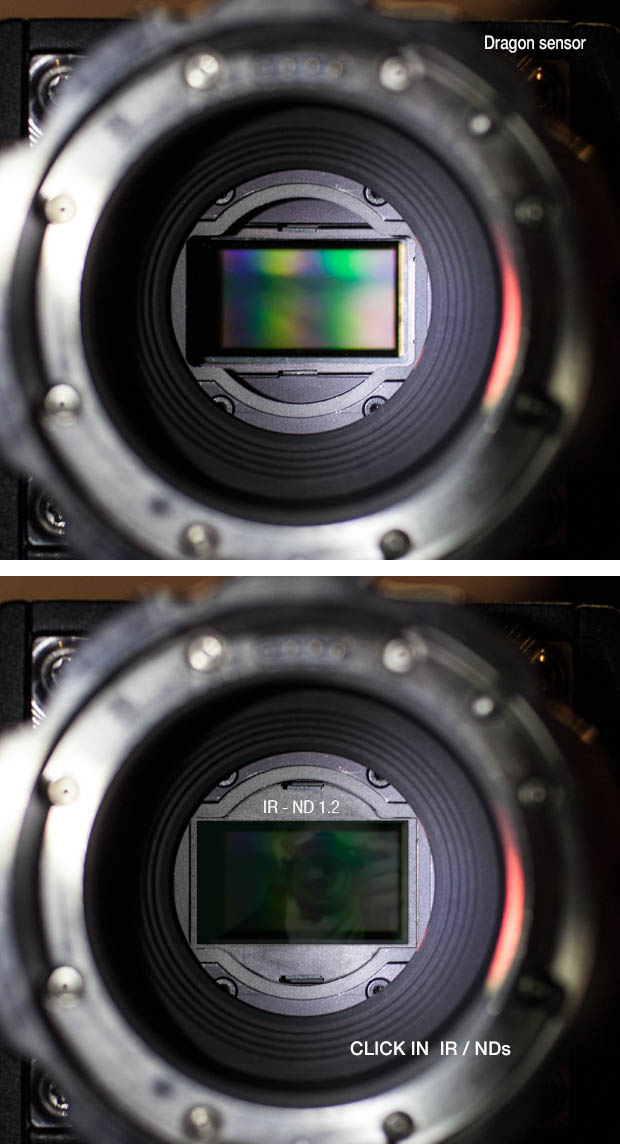
in built or drop in IRND's..

Thats all... :) I'm otherwise happy over all.

dragon%20click%20in%20ND.jpg
 
Wishlist:

1) Raw view as in R1
2) The edge strengthening of Focus setting is either on or off. This option were even better if one could adjust the edge strengthening with a real value parameter from 0 to 1, where 0 is off and 1 is the current "Focus" = on setting.
3) The dial ring of Redmote seems to have 16 different positions. Accordingly, if it is used for AF the focus changes in 16 steps. Found it useful, if one could adjust the step size to 32, 64, 128, 256, 512 with the Redmote buttons 4, 5, 6, 7, and 8, respectively, on the upper right corner of Redmote.
 
Back
Top