Welcome to our community

Be a part of something great, join today!

  • Hey all, just changed over the backend after 15 years I figured time to give it a bit of an update, its probably gonna be a bit weird for most of you and i am sure there is a few bugs to work out but it should kinda work the same as before... hopefully :)

Dragon Has More Noise Than MX???

Jessie, I took a look and...

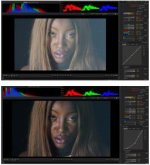
- At iso 6400 your histogram starts to look good. So I would say this material is exposed for noise / I would say at least 3 stops under.
- When I balance the colors I get a light temperature of about 2900K which means tungsten, tungsten together with over or under expo will start to deteriorate quicker as the olpf and sensor of the camera is set to hold best for 5600K.
- Also when the colors are balanced the blue lensflare gets pushed so that brings up a lot of noise.

But all in all I find it possible to rescue especially if you toss both DEB and ADD on it and if it's going to a HD finnish. then the I would say the noise is nothing but nice texture :)
I took a screen dump of the shot with the exposure brought up and then another one with a curve pushing down the blacks. it does not look pretty or anything but just to show where the the histogram would have landed with 3 times the amount of light... as you see there is still no peaking in the shot. Dragon can be a bit deceiving I think, basically do not look at the screen look at your goal posts and stoplights, for a shoot like this the exposure would be the best right below where the stoplights turns off then it might look very bright on the screen but you would have the cleanest picture possible, as it is now you have 3 stops less.

Edit: Better link to screen dumps here saw that the attachment got a bit small :)
https://www.flickr.com/photos/108703124@N02/15538067895/
 

Attachments

  • PastedGraphic-6.jpg
    PastedGraphic-6.jpg
    13.2 KB · Views: 0
- When I balance the colors I get a light temperature of about 2900K which means tungsten, tungsten together with over or under expo will start to deteriorate quicker as the olpf and sensor of the camera is set to hold best for 5600K.

Well, according to my own testing, to get the cleanest images from Dragon (OLPF v2) you have to set it at 4100-4200 kelvin. That's where I find the blue and red channels similar in terms of noise, and it's less noticiable.
 
Thanks all for the info and comments! It's been a huge help!

Cheers :)
 
Sounds like you maybe haven't let the cam warm up to calibration temperature.

But if you could share an R3D snap, that would help us look into it.

ha .. you're kidding..

i know its true.. when did we become slaves to our cameras ..

what i'd like is to shoot instantly,

on a positive note, Dave Coffins DCRAW can now decode redcode files thanks to the opensource JASPER image library via it standard jpeg2000 decoder..

it can't load epic yet though, as epic j2k has some of the metadata removed it seeems (probably gets put back in during decode..

.. so looks like the red one is future proofed as an archive format anyway.. ;)
 
I've found that running the camera with quiet record adaptive or adaptive. Record some footage and the sensor heats up faster. Then format the card when it's up to temp.
 
well if you hate black shading i know of a camera you don't need to do it on...only 40k and up depending which model :)

but to get raw on it your talking big bucks...


ha .. you're kidding..

i know its true.. when did we become slaves to our cameras ..

what i'd like is to shoot instantly,

on a positive note, Dave Coffins DCRAW can now decode redcode files thanks to the opensource JASPER image library via it standard jpeg2000 decoder..

it can't load epic yet though, as epic j2k has some of the metadata removed it seeems (probably gets put back in during decode..

.. so looks like the red one is future proofed as an archive format anyway.. ;)
 
Originally Posted by Gunleik Groven Sounds like you maybe haven't let the cam warm up to calibration temperature.


But if you could share an R3D snap, that would help us look into it.
What does this mean? I don't believe I've done any such process yet with my Dragon. Have I been doing something wrong?

I'm still confused about this.
 
I think what Gunliek means. And I can not speak for him, is that perhaps the camera was not brought up to operating temperature before recording images.

when you read a recipe, and it says "preheat oven to 200degrees" before you put the cookies in to bake them. Well, same concept. Get the camera sensor up to temperature before recording.

It's not that you can't record images before the sensor is warm, you might get less than perfect results.

Battistella
 
Dan, not yet. It likely will happen eventually, but for now DEB is only RCX, so you'd have to round-trip/render/transcode out of RCX...
 
I think what Gunliek means. And I can not speak for him, is that perhaps the camera was not brought up to operating temperature before recording images.

when you read a recipe, and it says "preheat oven to 200degrees" before you put the cookies in to bake them. Well, same concept. Get the camera sensor up to temperature before recording.

It's not that you can't record images before the sensor is warm, you might get less than perfect results.

Battistella

Indeed, some of the real noisy stuff I've seen on Dragon (or managed to provoke myself) has been blackshade and/or operating-temperature related
 
Last edited:
Dan, not yet. It likely will happen eventually, but for now DEB is only RCX, so you'd have to round-trip/render/transcode out of RCX...

It's in Resolve as well.
 
I am also finding my dragon quite noisy. Even when exposing to a centered histogram at 800+ ISO and no lit up goal posts. Sometimes it so bad it makes me think the camera is f*ed. I shot something recently with the dragon and C300 and the stupid C300 had no grain. so I am having a hard time wrapping my head around this. Is the dragon really this bad in low light? Shouldn't grain just be black. Why is it boosting the low light areas?

And yes I have made sure the camera is black shaded and at the right operating temp and exposure and blaaa blaaa blaaaa

would love to get this sorted out asap.

Its hard to keep having to tell clients "No no we can remove that grain in post!"
My red one was usually good at 800ISO in any type of lighting.

Could it be something wrong with the camera or is there something I am not doing right?
 
Yeah, I've been exposing the Dragon with the SkinTone Highlight OLPF at 250 - 500 iso....I won't go any higher for my taste. I'm very much looking forward to the LLO OLPF. I really hope to see DEB in Premiere soon. Its a real pain in the ass to have to use RCX to get rid of the red blotchy noise that I've been running into.
 
Its a real pain in the ass to have to use RCX to get rid of the red blotchy noise that I've been running into.
There are lots of good tools with which you can get rid of digital noise. I wouldn't necessarily say that what's in RedCineX-Pro for free is the best choice available.
 
People need to watch their compression ratios. A lot of people want to go to 6k so they're turning up comrpession as a result. "red blotchy noise" sounds like compression aggrevated noise. Try shooting a comparison between 3:1 and whatever compression ratio you're normally shooting as a test and see how much of your noisiness is because you're wanting to shoot 6k and cranking your compression up to like 10:1 to keep file sizes the same as 5k.
 
Back
Top